
Introduzione
The CyberpowerPC Spectre 01 is a wired adjustable stereo gaming headset designed for comfort and high-quality audio. This manual provides essential information for setting up, operating, maintaining, and troubleshooting your headset to ensure an optimal gaming and audio experience across various platforms.
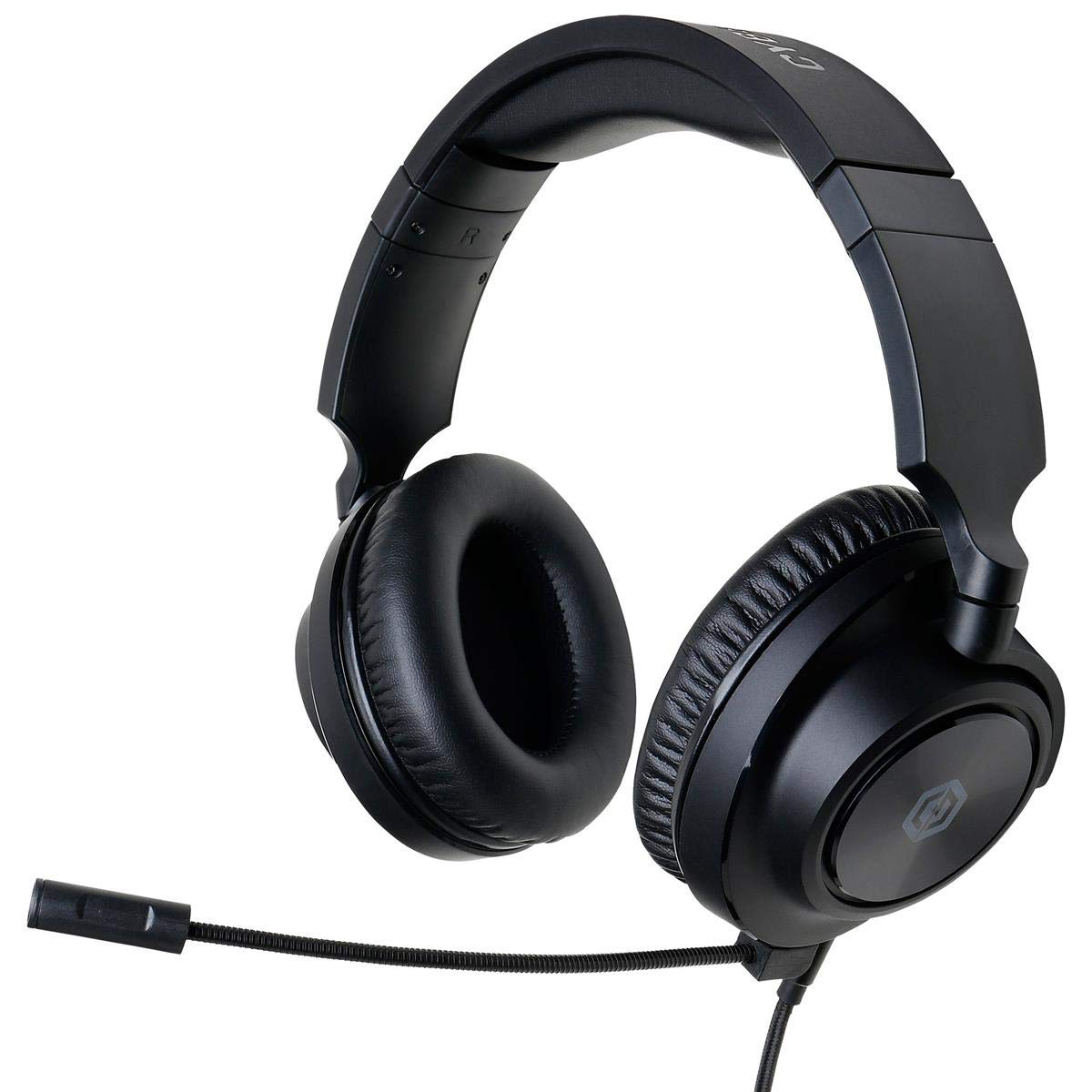
Figure 1: CyberpowerPC Spectre 01 Gaming Headset
Contenuto della confezione
Verifica che tutti gli articoli siano presenti nel tuo pacco:
- Spectre Gaming Headset
- Cavo audio
- Microfono staccabile
- PC Splitter (Y-cable)
- Guida rapida
Impostare
1. Collegamento del microfono
Locate the microphone input port on the left earcup. Align the microphone's connector with the port and gently push until it clicks into place. Ensure it is securely attached for proper function.
2. Collegamento dell'auricolare
The Spectre 01 headset uses a standard 3.5mm jack for audio and microphone connectivity.
- For devices with a single 3.5mm combo jack (e.g., most laptops, PS4, Xbox One, Switch, mobile phones): Plug the headset's 3.5mm audio cable directly into the device's audio port.
- For devices with separate audio and microphone jacks (e.g., most desktop PCs): Use the included PC splitter. Connect the headset's 3.5mm cable to the female end of the splitter. Then, plug the green-tipped male connector of the splitter into your computer's audio output jack (usually green), and the pink-tipped male connector into your computer's microphone input jack (usually pink).
3. Regolazione per il comfort
The headset features an adjustable headband and flexible earcups. Extend or retract the headband to fit your head size. The earcups can pivot and tilt to conform to your ear shape, reducing pressure during extended use.

Figure 2: Headset Adjustments for Optimal Fit
Istruzioni per l'uso
1. Controlli audio
The headset features inline audio controls on the cable. Use the volume wheel to adjust the listening volume. A microphone mute switch is also present, allowing you to quickly toggle your microphone on or off.
2. Utilizzo del microfono
Position the flexible boom microphone close to your mouth for clear voice capture. Ensure the microphone is not muted via the inline control or your device's settings.
3. Compatibilità della piattaforma
The Spectre 01 headset is compatible with a wide range of devices:
- Per PC/Mac: Connect using the 3.5mm jack, utilizing the PC splitter for separate audio/mic ports if necessary.
- PlayStation 4 (PS4): Plug directly into the controller's 3.5mm port. Adjust audio settings in the PS4 system menu.
- Xbox Uno: Plug directly into the controller's 3.5mm port. An Xbox One Stereo Headset Adapter (sold separately) may be required for older controllers without a 3.5mm jack.
- Nintendo Switch: Plug directly into the console's 3.5mm port.
- Dispositivi mobili: Plug directly into the 3.5mm audio jack of your smartphone or tablet.

Figure 3: Earcup Flexibility for Enhanced Comfort
Manutenzione
To ensure the longevity and performance of your CyberpowerPC Spectre 01 headset, follow these maintenance guidelines:
- Pulizia: Utilizzare un panno morbido e asciutto per pulire i padiglioni auricolari e l'archetto. Per lo sporco ostinato, utilizzare un panno leggermenteamp È possibile utilizzare un panno, ma evitare un'eccessiva umidità. Non utilizzare prodotti chimici aggressivi o detergenti abrasivi.
- Magazzinaggio: Store the headset in a clean, dry place away from extreme temperatures and direct sunlight. Avoid coiling the cable tightly to prevent damage.
- Gestione: Always grasp the plug when disconnecting the cable, rather than pulling on the cable itself. Avoid dropping the headset or subjecting it to strong impacts.
Risoluzione dei problemi
If you encounter issues with your Spectre 01 headset, refer to the following common solutions:
- Nessun suono o volume basso:
- Assicurarsi che il jack da 3.5 mm sia completamente inserito nel dispositivo.
- Check the inline volume control on the headset cable and increase the volume.
- Verifica le impostazioni di uscita audio e i livelli del volume del tuo dispositivo.
- If using the PC splitter, ensure both green and pink connectors are correctly plugged into the corresponding ports on your PC.
- Provare l'auricolare con un altro dispositivo per escludere un problema specifico del dispositivo.
- Microfono non funzionante:
- Assicurarsi che il microfono sia fissato saldamente all'auricolare.
- Check the inline microphone mute switch on the cable and ensure it is in the 'unmuted' position.
- Verify your device's microphone input settings and ensure the Spectre 01 is selected as the default input device.
- If using the PC splitter, ensure the pink connector is correctly plugged into your PC's microphone input.
- Prova il microfono con un altro dispositivo o applicazione.
- Distorsione del suono o rumore statico:
- Assicurarsi che tutti i collegamenti siano saldi e privi di detriti.
- Try connecting the headset to a different audio port or device to check if the issue persists.
- Reduce the volume on both the headset and the device to see if distortion lessens.
Specifiche
| Marca | CyberpowerPC |
| Numero di modello | CPS01H200 |
| Nome del modello | Spettro |
| Colore | Nero |
| Posizionamento dell'orecchio | Sopra l'orecchio |
| Fattore di forma | Sopra l'orecchio |
| Impedenza | 32 Ohm |
| Gamma di frequenza | Da 20 Hz a 20 KHz |
| Dimensioni del conducente | Neodimio da 50 mm |
| Tecnologia di connettività | Cablato |
| Presa per cuffie | 3.5 mm Jack |
| Caratteristiche del cavo | Staccabile |
| Materiale | Finta pelle, plastica |
| Caratteristiche aggiuntive | Lightweight, Microphone Included, Inline Audio Controls |
Informazioni sulla garanzia
The CyberpowerPC Spectre 01 Gaming Headset is covered by a Garanzia limitata di 1 anni from the date of purchase. This warranty covers defects in materials and workmanship under normal use. It does not cover damage caused by accident, misuse, abuse, neglect, unauthorized modification, or improper installation. Please retain your proof of purchase for warranty claims.
Supporto
For further assistance, technical support, or warranty inquiries, please visit the official CyberpowerPC website or contact their customer service department. Refer to the contact information provided in your Quick Start Guide or on the CyberpowerPC websito.