
1. Introduzione
The Pyle PREA86BTH is a versatile Bluetooth Hybrid Stereo Home Pre-Amplifier designed to enhance your home audio and entertainment system. This unit converts weak electrical signals into a robust output signal suitable for further processing or direct connection to a power amplifier and speakers. It features multiple input options, Bluetooth connectivity, and a dual 10-band graphic equalizer for precise audio control.
2. Istruzioni di sicurezza
Please read these instructions carefully before operating the unit. Retain this manual for future reference.
- Fonte di energia: Connect the unit only to an AC 120V/60Hz or AC 240V/50Hz power supply as indicated on the unit. Ensure the voltage selector switch on the rear panel is set correctly for your region.
- Ventilazione: Non ostruire le aperture di ventilazione. Garantire un adeguato flusso d'aria attorno all'unità per evitare il surriscaldamento.
- Acqua e umidità: Non esporre l'unità a pioggia, umidità o umidità eccessiva. Non posizionare oggetti contenenti liquidi, come vasi, sull'unità.
- Calore: Tenere l'unità lontana da fonti di calore quali termosifoni, bocchette di ventilazione, stufe o altri apparecchi che producono calore.
- Pulizia: Pulire solo con un panno asciutto. Scollegare il cavo di alimentazione prima della pulizia.
- Manutenzione: Non tentare di riparare l'unità da soli. Per qualsiasi intervento di assistenza, rivolgersi a personale qualificato.
- Posizionamento: Posizionare l'unità su una superficie stabile e piana. Evitare di esporla alla luce diretta del sole o in prossimità di forti campi magnetici.
3. Contenuto della confezione
Verificare che tutti gli articoli siano presenti nella scatola:
- Pyle PREA86BTH Hybrid Stereo Pre-Amppiù vivace
- Telecomando
- Antenna FM
- Rack Mount Handles (2)

Image: Contents of the Pyle PREA86BTH package, showing the amplifier unit, remote control, FM antenna, and two rack mount handles.
4. Caratteristiche del prodotto
- pre-ibridoAmplifier for home entertainment and karaoke systems.
- Integrated Bluetooth for wireless music streaming (Bluetooth 5.0).
- Multiple audio inputs: USB reader, AUX 3.5mm, 2 Microphone inputs, Optical/Coaxial Digital, HDMI, AC-3, and DVD inputs.
- FM Radio tuner with auto-search scan.
- Front panel controls with digital LED display.
- Rotary controls for Microphone Volume, Treble, Bass, Echo, Delay, Input Selection, and Master Volume.
- Dual 10-band graphic equalizer for left and right channels.
- Presa per cuffie per l'ascolto privato.
- Universal rack mount design.
5. Controlli del pannello frontale
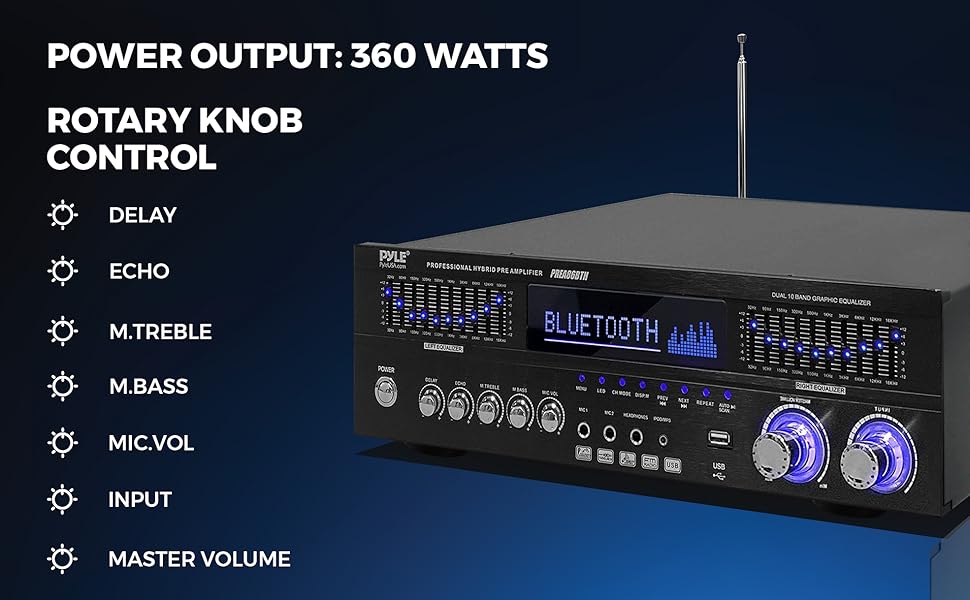
Immagine: dettagliata view of the Pyle PREA86BTH front panel, highlighting the power button, equalizer sliders, digital display, input selectors, and rotary controls for various audio adjustments.
- Pulsante di accensione: Accende o spegne l'unità.
- Display LED digitale: Shows current input, frequency, and other status information.
- Selettore di ingresso: Cycles through available audio inputs (Bluetooth, USB, AUX, Optical, Coaxial, HDMI, AC-3, DVD, FM).
- Ingressi microfono (MIC1, MIC2): 1/4" jacks for connecting microphones.
- Jack per cuffie: Jack da 1/4" per il collegamento delle cuffie.
- Porta USB: Per collegare unità flash USB per la riproduzione di audio MP3.
- Controlli del microfono: Rotary knobs for MIC VOL (volume), ECHO, and DELAY.
- Controlli di tono: Rotary knobs for M.TREBLE (microphone treble) and M.BASS (microphone bass).
- Volume principale: Large rotary knob to adjust the overall output volume.
- Equalizzatore grafico: Dual 10-band sliders for precise frequency adjustment of the left and right audio channels.
- FM Radio Controls: Buttons for auto-scan, next/previous station, and repeat functions.
6. Collegamenti del pannello posteriore
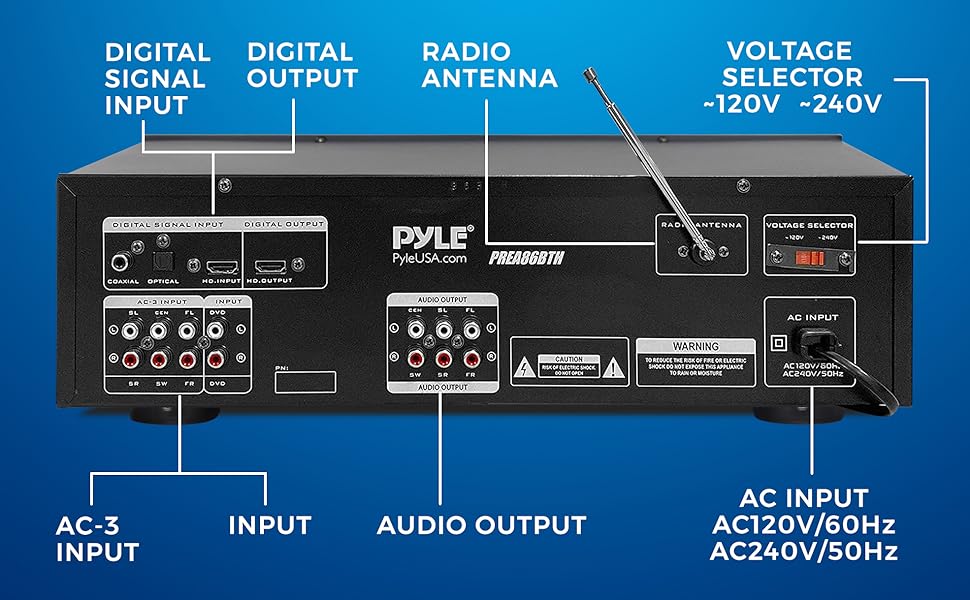
Image: Rear panel connections of the Pyle PREA86BTH, including digital signal inputs (Coaxial, Optical, HDMI), AC-3 inputs, RCA audio inputs/outputs, FM antenna connector, and AC power input with voltage selettore.
- Ingressi segnale digitale: COAXIAL, OPTICAL, HDMI (HD.INPUT). Connect digital audio sources.
- AC-3 Inputs: Multi-channel audio inputs for compatible devices.
- Ingresso DVD: RCA stereo audio input for DVD players or other analog sources.
- Ingresso audio (AUX): RCA stereo audio input for general analog sources.
- Uscita audio: RCA stereo audio output to connect to a power amplifier o dispositivo di registrazione.
- Antenna FM: Connettore per l'antenna FM inclusa.
- Voltage Selettore: Switch between 120V and 240V AC power. Ensure this is set correctly for your region before connecting power.
- Ingresso CA: Collegamento del cavo di alimentazione.
7. Impostazione
Follow these steps to set up your Pyle PREA86BTH pre-amplificatore:
- Posizionamento: Place the pre-amplifier on a stable, flat surface or install it into a standard audio rack using the provided handles. Ensure adequate ventilation.
- Connect Speakers/Amplificatore: Connect the RCA Audio Output from the PREA86BTH to the input of your power amplifier or active speakers. This unit is a pre-amplifier and requires a separate power amplifier to drive passive speakers.
- Collegare le sorgenti audio:
- For digital sources (TV, Blu-ray player), use the Optical, Coaxial, or HDMI inputs.
- For analog sources (CD player, turntable with pre-amp, DVD player), use the AUX or DVD RCA inputs.
- For USB playback, insert a USB flash drive into the front panel USB port.
- Collegare l'antenna FM: Attach the included FM antenna to the FM ANTENNA connector on the rear panel for radio reception. Extend the antenna for better reception.
- Collegamento elettrico: Before connecting the power cord, ensure the VOLTAGE SELECTOR switch on the rear panel is set to the correct voltage for your region (120V or 240V). Then, connect the power cord to the AC INPUT on the rear panel and plug it into a wall outlet.
8. Istruzioni per l'uso
8.1 Accensione/spegnimento
Premere il tasto ENERGIA button on the front panel to turn the unit ON or OFF.
8.2 Selezione dell'ingresso
Premere il tasto INGRESSO button on the front panel or remote control to cycle through the available audio sources (Bluetooth, USB, AUX, Optical, Coaxial, HDMI, AC-3, DVD, FM).
8.3 Controllo del volume
Regolare il VOLUME PRINCIPALE rotary knob on the front panel to control the overall output volume. For microphone volume, use the VOL MICROFONO manopola.
8.4 Associazione Bluetooth
- Select 'Bluetooth' as the input source using the INGRESSO button. The LED display will show 'BLUETOOTH' and indicate pairing mode.
- Sul tuo dispositivo mobile (smartphone, tablet, laptop), attiva il Bluetooth e cerca i dispositivi disponibili.
- Select 'PYLEUSA' from the list of devices.
- Once paired, the unit will confirm the connection, and you can stream audio wirelessly.

Image: A smartphone displaying a music player interface, with the Pyle PREA86BTH amplifier in the background, illustrating Bluetooth connectivity.
8.5 Riproduzione USB
- Inserire una chiavetta USB contenente audio MP3 files into the front panel USB porta.
- Select 'USB' as the input source. The unit will automatically begin playing audio files.
- Use the playback controls (Play/Pause, Next, Previous, Repeat) on the front panel or remote control.

Image: A hand inserting a USB flash drive into the front panel USB port of the Pyle PREA86BTH amplifier, demonstrating the USB playback feature.
8.6 Funzionamento della radio FM
- Selezionare 'FM' come sorgente di ingresso.
- Press the 'AUTO SCAN' button to automatically search and store available FM radio stations.
- Use the 'NEXT' and 'PREV' buttons to navigate through stored stations.
8.7 Utilizzo del microfono
- Collegare i microfoni al MIC1 or MIC2 ingressi sul pannello frontale.
- Regolare il VOL MICROFONO manopola per controllare il volume del microfono.
- Utilizzare il ECO E RITARDO manopole per aggiungere effetti all'audio del microfono.
- Regolare M.TREBLE E M.BASSO for microphone tone control.
8.8 Regolazione dell'equalizzatore
Utilizzare il DUAL 10 BAND GRAPHIC EQUALIZER sliders on the front panel to fine-tune the frequency response of your audio. Adjust the sliders for the Left and Right channels independently to achieve your desired sound profile.
9. Risoluzione Dei Problemi
If you encounter issues with your Pyle PREA86BTH, refer to the following common problems and solutions:
- Nessun potere:
- Verificare che il cavo di alimentazione sia collegato saldamente all'unità e alla presa a muro.
- Assicurare il VOLTAGE SELECTOR switch on the rear panel is set correctly (120V or 240V).
- Verificare che la presa a muro funzioni.
- Nessuna uscita audio:
- Ensure the pre-amplifier is connected to a power amplifier or active speakers. This unit does not directly power passive speakers.
- Check all audio cable connections (RCA, Optical, Coaxial, HDMI) between the pre-amplifier and your audio sources/power amppiù vivace.
- Verify the correct input source is selected on the pre-amppiù vivace.
- Increase the MASTER VOLUME on the pre-amplifier and the volume on your power amplificatore/altoparlanti attivi.
- If using headphones, ensure they are properly plugged in and the main output is not muted.
- Problemi di connessione Bluetooth:
- Ensure 'Bluetooth' input is selected on the pre-amppiù vivace.
- Make sure your device's Bluetooth is enabled and within range (typically up to 40+ feet).
- Prova a disaccoppiare e riassociare il dispositivo.
- Ensure no other devices are currently connected to the pre-amplificatore tramite Bluetooth.
- Riproduzione USB non funzionante:
- Ensure 'USB' input is selected.
- Verify the USB drive contains compatible MP3 audio files.
- Prova un'altra unità USB.
- Scarsa ricezione radio FM:
- Extend and reposition the FM antenna for better signal reception.
- Perform an 'AUTO SCAN' to find available stations.
- Il telecomando non risponde:
- Assicurarsi che non vi siano ostacoli tra il telecomando e il sensore IR dell'unità.
- Sostituire le batterie del telecomando.
10. Specifiche
| Caratteristica | Specificazione |
|---|---|
| Numero di modello | PREA86BTH |
| Dimensioni del prodotto | 16.93 x 7.87 x 4.72 pollici |
| Peso dell'articolo | 8.68 libbre |
| Produttore | Pilo |
| ASIN | B08JMBTN36 |
| Data prima disponibilità | 21 settembre 2020 |
11. Garanzia e supporto
I prodotti Pyle sono progettati per garantire affidabilità e prestazioni. Per informazioni sulla garanzia o assistenza tecnica, consultare la documentazione inclusa con l'acquisto o visitare il sito ufficiale Pyle. websito. Conservare la prova d'acquisto per eventuali reclami in garanzia.
For further assistance, you may contact Pyle customer service directly.