
Introduzione
The Fostex 6301DT is a compact and versatile 4-inch powered studio monitor, designed for broadcast, production facilities, mobile setups, project studios, and home recording environments. Building upon the legacy of the 6301-series, this model incorporates a D-class power amplifier and a new driver unit, featuring an energy-saving auto stand-by function. The 6301DT integrates Dante network audio capabilities, allowing playback of any two channels of Dante network audio signals, alongside traditional 1/4-inch TS analog inputs. Its ultra-rugged die-cast aluminum enclosure ensures durability for professional use.
Informazioni sulla sicurezza
- Fonte di energia: Collegare l'unità solo all'alimentazione specificatatage. Ensure the power cord is securely connected.
- Ventilazione: Non ostruire le aperture di ventilazione. Garantire un adeguato flusso d'aria attorno all'unità per evitare il surriscaldamento.
- Umidità: Non esporre l'unità a pioggia, umidità o umidità eccessiva. Evitare di posizionare oggetti contenenti liquidi sull'unità.
- Oggetti estranei: Non inserire oggetti nelle aperture dell'unità.
- Manutenzione: Per qualsiasi intervento di assistenza, rivolgersi a personale qualificato. Non tentare di aprire o riparare l'unità da soli.
- Posizionamento: Place the monitor on a stable surface. Avoid locations with excessive vibration, dust, or direct sunlight.
Contenuto della confezione
Verificare che tutti gli articoli siano presenti nel pacco:
- Fostex 6301DT Active Monitor Speaker
- Cavo di alimentazione IEC
Prodotto finitoview
Pannello frontale

Figura 1: Controlli del pannello frontale
- Pulsante di accensione: Press to turn the unit ON or OFF. An LED indicator shows the power status.
- Manopola del volume: Adjusts the output level of the monitor.
Pannello posteriore
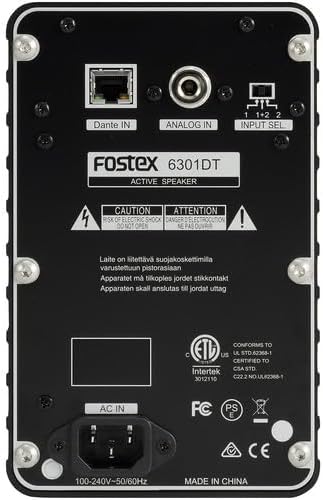
Figura 2: Collegamenti del pannello posteriore
- Dante IN (RJ45): Connects to a Dante network for digital audio input.
- Analog IN (1/4" TS): Connects to an analog audio source using a 1/4-inch TS cable.
- Interruttore di selezione dell'ingresso: Selects the audio input channel for monitoring (1, 2, or 1+2 mixed).
- INGRESSO CA: Connects the supplied IEC power cord.
Impostare
Posizionamento
Place the Fostex 6301DT on a stable, flat surface. For optimal sound reproduction, position the monitor at ear level and equidistant from your listening position. An optional EB-6301 mounting bracket (not included) allows for easy surface-mounting at various angles.

Figura 3: Esample Configurazione dell'applicazione
Collegamento di potenza
- Ensure the monitor's power button is in the OFF position.
- Connect the supplied IEC power cord to the AC IN port on the rear panel of the monitor.
- Collegare l'altra estremità del cavo di alimentazione a una presa di corrente CA adatta.
Connessioni audio
The 6301DT supports both analog and Dante network audio inputs.
- Ingresso analogico: Connect your analog audio source (e.g., mixer, audio interface) to the 1/4" TS Analog IN port on the rear panel using a 1/4-inch TS cable.
- Dante Network Input: Connect an RJ45 Ethernet cable from your Dante network switch or device to the Dante IN port on the rear panel.
Operativo
Accensione/spegnimento
Press the Power button on the front panel to turn the monitor ON. The power indicator LED will illuminate. Press the button again to turn the monitor OFF.
Regolazione del volume
Rotate the Volume knob on the front panel clockwise to increase the output level and counter-clockwise to decrease it. Start with a low volume setting and gradually increase it to a comfortable listening level.
Selezione dell'input
Use the Input Select switch on the rear panel to choose the desired audio source:
- Analogico: Selects the 1/4" TS analog input.
- Dante Channel 1: Monitors the first Dante audio channel.
- Dante Channel 2: Monitors the second Dante audio channel.
- Dante Channel 1+2 (Mixed): Monitors a mix of both Dante channels.
Configurazione di rete Dante
For Dante network operation, you will need to use Audinate's Dante Controller software on a computer connected to the same Dante network. This software allows you to route audio signals to the Fostex 6301DT and configure its network settings. The 6301DT supports sampling frequencies of 44.1 kHz, 48 kHz, 88.2 kHz, and 96 kHz.
Manutenzione
- Pulizia: Use a soft, dry cloth to clean the exterior of the monitor. Do not use abrasive cleaners, waxes, or solvents.
- Magazzinaggio: Se si conserva l'unità per un periodo prolungato, scollegarla dall'alimentazione e conservarla in un luogo fresco e asciutto, lontano dalla luce solare diretta e da temperature estreme.
- Ventilazione: Ensure that the ventilation openings are kept clear of dust and debris.
Risoluzione dei problemi
| Problema | Possibile causa | Soluzione |
|---|---|---|
| Nessuna uscita audio |
|
|
| Suono distorto |
|
|
| Problemi di connessione Dante |
|
|
Specifiche

Figura 4: Dimensioni del prodotto
| Caratteristica | Specificazione |
|---|---|
| Numero di modello | AMS-6301DT |
| Tipo di altoparlante | Monitor da studio alimentato |
| Dimensioni dell'altoparlante | 4 pollici |
| Diametro del woofer | 4 pollici |
| AmpTipo lificatore | Class-D |
| Potenza massima in uscita | 20 Watt |
| Modalità di uscita audio | Stereo |
| Numero di canali audio | 2.0 |
| Tecnologia di connettività | RJ45 (Dante), 1/4" TS (Analog) |
| Protocollo di connettività | Dante |
| Supportato SampFrequenze di ling | Frequenza 44.1/48/88.2/96 kHz |
| Signal-to-Noise Ratio | 85 dB |
| Fonte di alimentazione | Elettrico con cavo |
| Materiale di recinzione | Alluminio pressofuso |
| Colore | Nero |
| Dimensioni dell'articolo (P x L x A) | 4.7" x 7.5" x 4.7" |
| Peso dell'articolo | 5.1 libbre |
| Caratteristiche aggiuntive | Auto stand-by function, Recessed front-panel controls |
Garanzia e supporto
Informazioni sulla garanzia
The Fostex 6301DT is covered by a Garanzia limitata del produttore di 1 anniSi prega di conservare la prova d'acquisto per eventuali reclami in garanzia.
Assistenza clienti
For technical assistance, troubleshooting, or warranty service, please contact American Music and Sound, the manufacturer, or your authorized Fostex dealer. Refer to the Fostex official websito per le informazioni di contatto dell'assistenza più aggiornate.