
1. Introduzione
Thank you for choosing the FREESTYLE FH0955 LED Bluetooth Headphones. This manual provides essential information for the proper setup, operation, and maintenance of your new headphones. Please read it carefully before use to ensure optimal performance and longevity of the product.
2. Prodotto finitoview
The FREESTYLE FH0955 headphones offer a wireless audio experience with integrated features designed for convenience and style. Key features include Bluetooth 5.0 + EDR connectivity, a built-in microSD card slot for direct music playback, a foldable headband for portability, and subtle LED backlighting on the earcups.

Immagine 2.1: anteriore view of the FREESTYLE FH0955 LED Bluetooth Headphones, showcasing the over-ear design and LED lighting.

Immagine 2.2: Prospettiva lateralefile of the FREESTYLE FH0955 LED Bluetooth Headphones, highlighting the earcup and headband design.

Image 2.3: A person wearing the FREESTYLE FH0955 LED Bluetooth Headphones, demonstrating typical usage.
3. Impostazione
3.1. Carica delle cuffie
Before first use, fully charge the headphones. The FH0955LB model is equipped with a 400 mAh Lithium-ion battery.
- Connect the supplied MicroUSB charging cable to the charging port on the headphones.
- Connect the other end of the cable to a USB power source (e.g., computer USB port, USB wall adapter, or power bank).
- L'indicatore LED si illuminerà durante la ricarica e si spegnerà o cambierà colore una volta completata la ricarica.
- A full charge typically takes approximately 2 hours and provides up to 10 hours of continuous music playback.
3.2. Accoppiamento Bluetooth
Per connettere le cuffie in modalità wireless a un dispositivo:
- Assicurarsi che le cuffie siano cariche e spente.
- Tenere premuto il pulsante di accensione sulle cuffie finché l'indicatore LED non lampeggia, indicando la modalità di associazione.
- Sul tuo dispositivo (smartphone, tablet, computer), attiva il Bluetooth e cerca i dispositivi disponibili.
- Select "FH0955" or a similar name from the list of found devices.
- Una volta effettuato il collegamento, l'indicatore LED smetterà di lampeggiare e rimarrà fisso oppure si spegnerà, a seconda del modello.
- The Bluetooth 5.0 + EDR technology allows for a stable connection up to 10 meters.
3.3. Riproduzione della scheda MicroSD
The headphones feature an integrated microSD card slot for direct music playback without a connected device.
- Inserire una scheda microSD (precaricata con audio files) nell'apposito slot presente sulle cuffie.
- The headphones should automatically switch to microSD playback mode. If not, use the Mode button (if available) to switch.
- Use the playback controls on the headphones to manage your music.
3.4. Connessione cablata (jack audio da 3.5 mm)
For devices without Bluetooth or when the battery is depleted, you can use the included 3.5mm audio cable.
- Collegare un'estremità del cavo audio da 3.5 mm al jack audio delle cuffie.
- Collegare l'altra estremità all'uscita audio da 3.5 mm del dispositivo.
- The headphones will operate in passive mode, and Bluetooth functionality will be disabled.
4. Istruzioni per l'uso
4.1. Accensione/spegnimento
- Accensione: Tenere premuto il pulsante di accensione per circa 3 secondi finché l'indicatore LED non si accende.
- Spegni: Tenere premuto il pulsante di accensione per circa 3-5 secondi finché l'indicatore LED non si spegne.
4.2. Riproduzione di musica
- Riproduci/Pausa: Premi una volta il pulsante Riproduci/Pausa.
- Traccia successiva: Press the "Next" button (often Volume Up, long press).
- Traccia precedente: Press the "Previous" button (often Volume Down, long press).
- Aumenta volume: Premere brevemente il pulsante Volume su.
- Volume basso: Premere brevemente il pulsante Volume giù.
4.3. Gestione delle chiamate
With the built-in microphone, you can manage phone calls when connected via Bluetooth.
- Rispondi/Termina chiamata: Premere una volta il pulsante Riproduci/Pausa durante una chiamata in arrivo.
- Rifiuta chiamata: Durante una chiamata in arrivo, tenere premuto il pulsante Riproduci/Pausa per circa 2 secondi.
- Ricomponi l'ultimo numero: Premi due volte il pulsante Riproduci/Pausa.
4.4. Retroilluminazione a LED
The headphones feature subtle LED backlighting. Refer to the specific controls on your device for toggling or changing LED modes, if available. This feature is primarily aesthetic.
5. Manutenzione
5.1. Pulizia
- Per pulire la superficie delle cuffie, utilizzare un panno morbido e asciutto.
- Non utilizzare detergenti abrasivi, alcol o solventi chimici, poiché potrebbero danneggiare la finitura.
- Mantenere la porta di ricarica e il jack audio liberi da polvere e detriti.
5.2. Conservazione
- Conservare le cuffie in un luogo fresco e asciutto, lontano dalla luce solare diretta e da temperature estreme.
- Quando non viene utilizzata per lunghi periodi, caricare la batteria almeno una volta ogni tre mesi per mantenerla in buone condizioni.
- Utilize the foldable headband feature for compact storage and transport.
6. Risoluzione Dei Problemi
| Problema | Possibile causa | Soluzione |
|---|---|---|
| Le cuffie non si accendono. | Batteria scarica. | Caricare completamente le cuffie. |
| Impossibile effettuare l'associazione tramite Bluetooth. | Cuffie non in modalità di associazione; Bluetooth del dispositivo disattivato; troppo lontano dal dispositivo. | Ensure headphones are in pairing mode. Turn device Bluetooth off/on. Move closer to device (within 10m). |
| Nessun suono. | Volume troppo basso; sorgente audio errata; cuffie non collegate. | Increase volume on headphones and device. Check Bluetooth connection or 3.5mm cable. Ensure correct mode (Bluetooth/MicroSD). |
| La scheda MicroSD non funziona. | Scheda non inserita correttamente; non supportata file formato; scheda danneggiata. | Reinsert card. Ensure audio files are in a supported format (e.g., MP3). Try a different microSD card. |
7. Specifiche
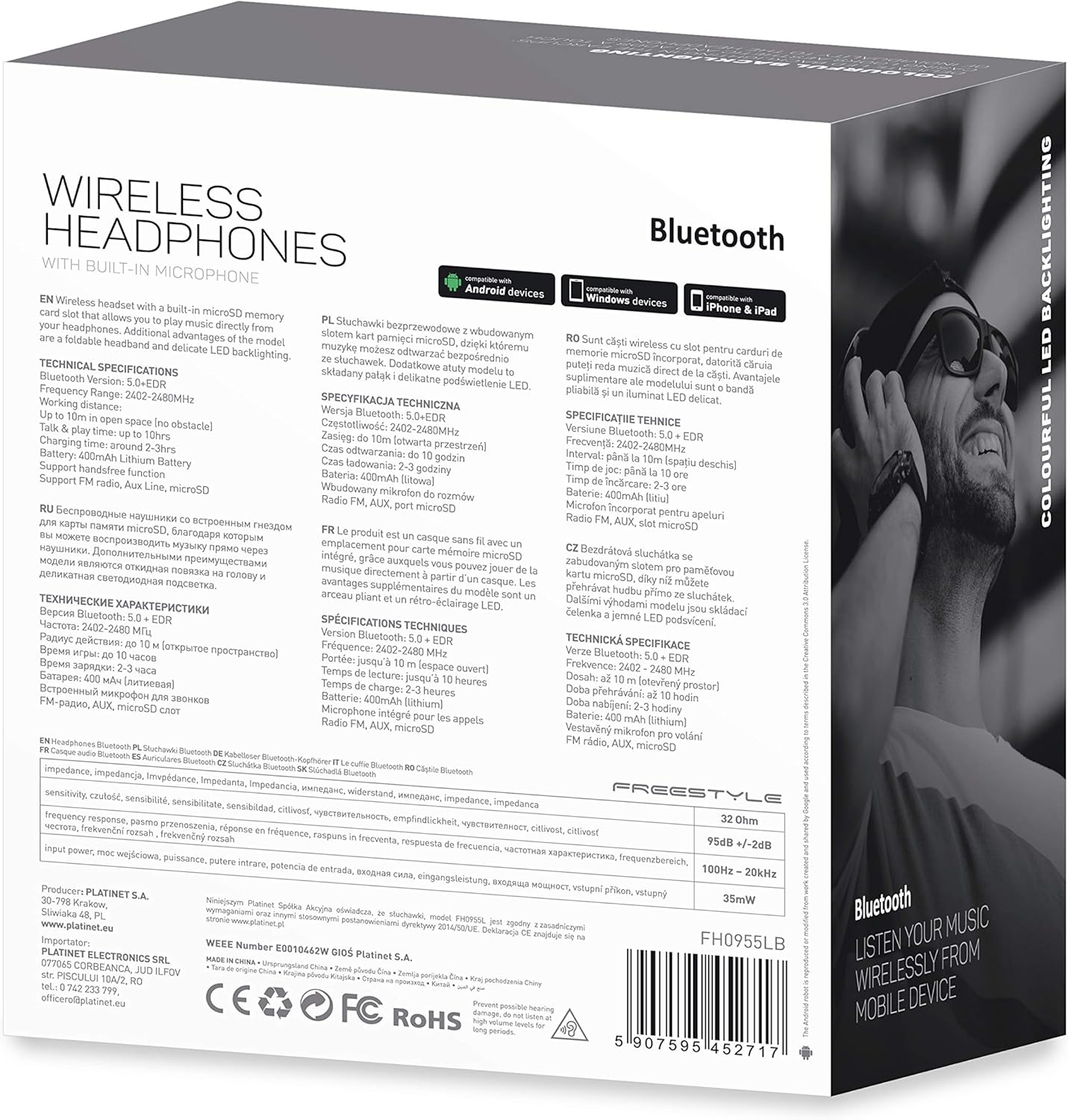
Immagine 7.1: Dettagliata view of the product packaging, showing technical specifications and compliance information.
| Caratteristica | Specificazione |
|---|---|
| Numero di modello | FH0955LB |
| Marca | Stile libero |
| Tecnologia di connettività | Wireless (Bluetooth 5.0 + EDR) |
| wireless Range | Fino a 10 metri |
| Presa audio | 3.5 millimetri |
| Fattore di forma | Over-Ear (Circum-Auricolari) |
| Caratteristiche speciali | Noise Cancellation, LED Backlighting, MicroSD Card Slot |
| Tipo di batteria | Integrated Lithium-ion (400 mAh) |
| Tempo di riproduzione | Fino a 10 ore |
| Tempo di ricarica | Circa 2 ore |
| Porta di ricarica | MicroUSB |
| Colore | Nero |
| Materiale | Leather (earpads/headband) |
| Livello di resistenza all'acqua | Resistente all'acqua |
| Componenti inclusi | 1 paio di cuffie |
| Produttore | Platino |
8. Garanzia e supporto
I dettagli specifici della garanzia sono in genere forniti con la documentazione di acquisto o sul documento ufficiale del produttore websito. Conservare la prova d'acquisto per eventuali reclami in garanzia.
For technical support or inquiries, please refer to the contact information provided by your retailer or the manufacturer, Platinet.
9. Informazioni sulla sicurezza
- Non esporre le cuffie a temperature estreme, umidità o liquidi.
- Evitare l'ascolto a livelli di volume elevati per periodi prolungati per evitare danni all'udito.
- Non tentare di smontare o modificare le cuffie, poiché ciò potrebbe invalidare la garanzia e causare danni.
- Tenere fuori dalla portata dei bambini.
- Dispose of the product responsibly according to local electronic waste regulations.