
1. Introduzione
This manual provides detailed instructions for the setup, operation, maintenance, and troubleshooting of your HISTTON Industrial Mini PC, model P12-B-i7-10510U. Please read this manual thoroughly before using the device to ensure proper functionality and longevity.
2. Prodotto finitoview
2.1 Caratteristiche principali
- Processore: Intel Core i7-10510U (10th Generation)
- Memoria: 16 GB di RAM DDR4
- Magazzinaggio: SSD da 128 GB + HDD da 1 TB
- Sistema operativo: Windows 10 Pro preinstallato
- Connettività: HDMI, VGA, Multiple USB ports (USB 2.0, USB 3.0), GPIO, LPT, RS232 COM ports, Dual Gigabit Ethernet (NIC), WiFi, Bluetooth
- Raffreddamento: Fanless aluminum alloy design for silent operation and efficient heat dissipation
- Supporto display: Dual monitor output via HDMI and VGA
2.2 Contenuto della confezione
Verificare che tutti gli articoli siano presenti nel pacco:
- HISTTON Industrial Mini PC Unit
- Adattatore di alimentazione
- Antenne Wi-Fi
- Staffa di montaggio (se inclusa)
- Screws and cables for internal storage (if applicable)
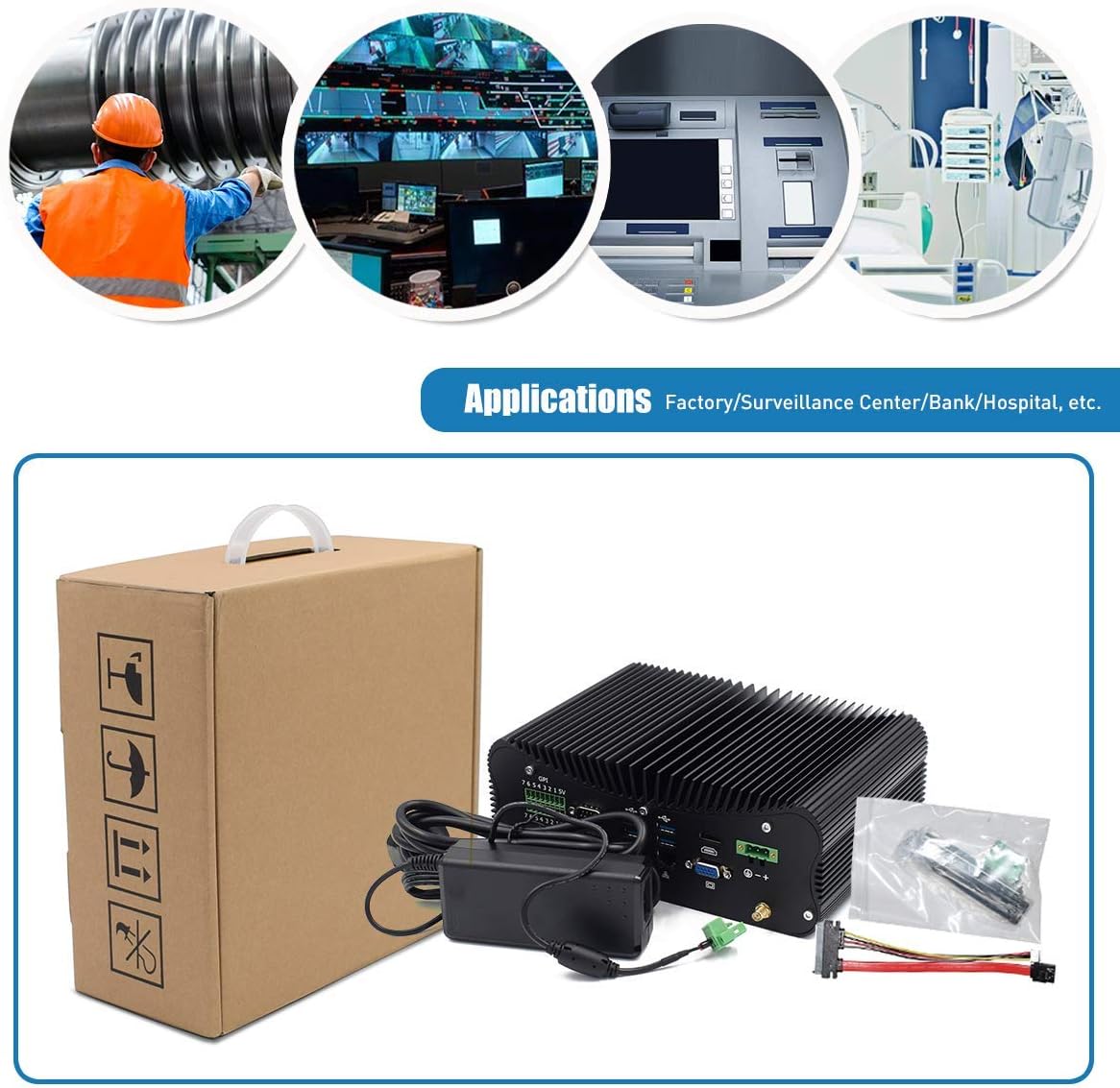
Figura 2.2.1: Contents of the HISTTON Industrial Mini PC package, showing the main unit, power supply, and various accessories.
2.3 Disposizione delle porte
Prendi familiarità con le porte disponibili sul tuo Mini PC:

Figura 2.3.1: Rear panel ports of the Mini PC, including GPIO, COM ports, USB 3.0, Ethernet, HDMI, VGA, and DC power input.
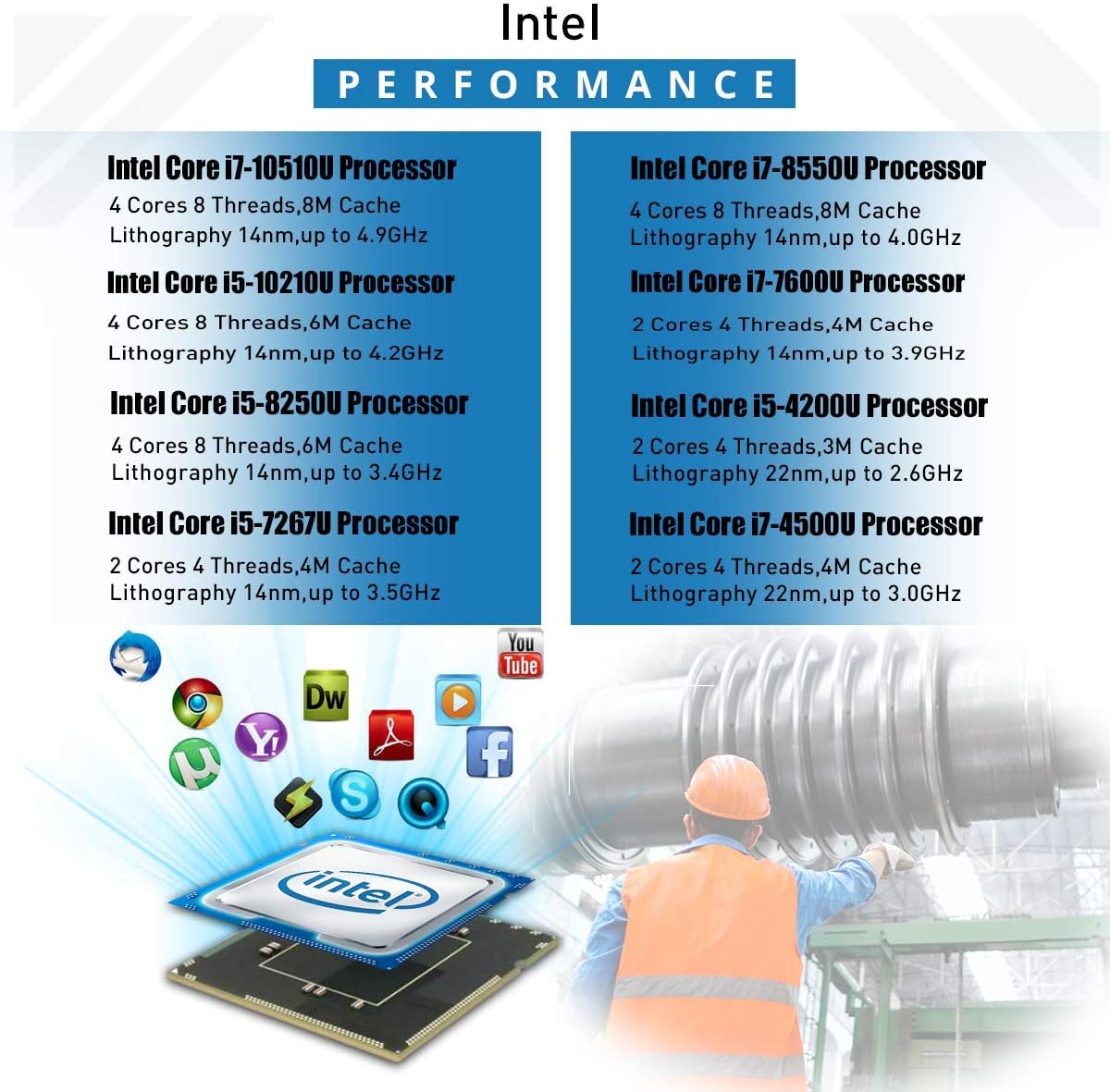
Figura 2.3.2: Comprehensive port diagram with labels, highlighting USB 2.0, USB 3.0, HDMI, VGA, GPIO, COM ports, LAN, and the power switch.
3. Impostazione
3.1 Configurazione iniziale
- Connetti le periferiche: Connect your monitor(s) to the HDMI and/or VGA ports. Connect a USB keyboard and mouse to the available USB ports.
- Connetti rete: For wired internet, connect an Ethernet cable to one of the LAN ports. For wireless internet, screw the provided WiFi antennas onto the connectors on the rear panel.
- Connetti alimentazione: Collegare l'adattatore di alimentazione alla porta di ingresso dell'alimentazione CC del Mini PC, quindi collegare l'adattatore a una presa di corrente.
- Accensione: Press the power button located on the front/side panel of the Mini PC.
3.2 Sistema Operativo
Your HISTTON Industrial Mini PC comes with Windows 10 Pro pre-installed. Upon first boot, you may need to complete the initial Windows setup process, including language selection, user account creation, and network configuration.
4. Istruzioni per l'uso
4.1 Gestione dell'alimentazione
- Accensione: Premere una volta il pulsante di accensione.
- Spegni: Use the Windows shutdown procedure (Start > Power > Shut down) or press and hold the power button for 5 seconds for a forced shutdown (not recommended for regular use).
- Ricomincia: Use the Windows restart procedure (Start > Power > Restart).
4.2 Collegamento dei display
The Mini PC supports dual display output. Connect your primary monitor to either the HDMI or VGA port, and your secondary monitor to the other available display port. You can configure display settings within Windows (Right-click on desktop > Display settings).

Figura 4.2.1: Example of a dual monitor setup using the Mini PC's HDMI and VGA outputs.
4.3 Using Serial (COM) Ports
The Mini PC features multiple RS232 COM ports (COM5, COM6, etc.) for connecting industrial devices, point-of-sale systems, or other serial peripherals. Ensure proper driver installation for your specific serial devices.
4.4 GPIO and LPT Ports
The General Purpose Input/Output (GPIO) and LPT (Parallel) ports are available for specialized industrial applications requiring direct hardware control. Consult your application's documentation for specific usage instructions.
5. Manutenzione
5.1 Pulizia
To maintain optimal performance, regularly clean the exterior of the Mini PC with a soft, dry cloth. Avoid using liquid cleaners directly on the device. The fanless design minimizes dust accumulation internally, but ensure the heat sink fins are free from obstructions.
5.2 Espansione di memoria e archiviazione
The Mini PC allows for internal storage and memory upgrades. To access the internal components, carefully remove the bottom cover. The device supports 2.5-inch HDD/SSD, mSATA SSD, M.2 SSD, and DDR4 RAM modules.

Figura 5.2.1: Internal layout of the Mini PC, indicating locations for 2.5-inch HDD, mSATA SSD, M.2 SSD, and DDR4 RAM slots.
5.3 Fanless Cooling System
The Mini PC utilizes an all-aluminum body and a fanless design for passive cooling. This design ensures silent operation and reduces maintenance needs by eliminating moving parts prone to wear and dust accumulation.

Figura 5.3.1: Illustration of the fanless cooling mechanism, where the aluminum alloy body acts as a heatsink for efficient heat transfer.
6. Risoluzione Dei Problemi
6.1 Problemi comuni e soluzioni
- Nessun potere: Assicurarsi che l'adattatore di alimentazione sia collegato saldamente sia al Mini PC sia a una presa di corrente funzionante. Testare la presa con un altro dispositivo.
- Nessuna visualizzazione: Verify that the monitor is powered on and correctly connected to the Mini PC's HDMI or VGA port. Try a different cable or monitor if possible. Ensure the correct input source is selected on your monitor.
- Nessuna connessione di rete: For wired connections, check the Ethernet cable and router. For WiFi, ensure antennas are attached, WiFi is enabled in Windows, and you are connected to the correct network.
- Sistema non reattivo: If the system freezes, press and hold the power button for 5 seconds to force a shutdown, then restart.
6.2 Resetting CMOS
If you encounter boot issues or incorrect BIOS settings, you may need to reset the CMOS. Locate the CMOS button hole (refer to Figure 2.3.2) and use a thin, non-conductive object to press the button for a few seconds while the PC is powered off.
7. Specifiche
7.1 Specifiche tecniche
| Componente | Specificazione |
|---|---|
| Processore | Intel Core i7-10510U (1.8 GHz, 4 Cores, 8 Threads, 8M Cache, up to 4.9 GHz) |
| Memoria RAM | 16 GB DDR4 |
| Magazzinaggio | SSD da 128 GB + HDD da 1 TB |
| Sistema operativo | Windows 10 Pro |
| Grafica | Grafica Intel UHD (dedicata) |
| Risoluzione massima dello schermo | 3840 x 2160 pixel |
| Connettività wireless | Wi-Fi, Bluetooth |
| Porti | HDMI, VGA, USB 3.0, USB 2.0, RS232 COM, GPIO, LPT, Dual Gigabit Ethernet |
| Dimensioni (LxWxH) | 9.45 x 6.3 x 3.39 pollici |
| Peso dell'articolo | 5.06 libbre |

Figura 7.1.1: Intel processor performance overview, including the i7-10510U.
8. Garanzia e supporto
For warranty information and technical support, please refer to the documentation provided with your purchase or contact HISTTON customer service through their official channels. Keep your proof of purchase for warranty claims.