
Introduzione
This manual provides essential information for the safe and efficient operation of your MEDION P64145 All-in-One Audio System. Please read it thoroughly before using the device and keep it for future reference.
Informazioni importanti sulla sicurezza
Seguire sempre le precauzioni di sicurezza di base quando si utilizza questo prodotto per ridurre il rischio di incendi, scosse elettriche e lesioni personali. Conservare questo manuale a portata di mano per riferimenti futuri.
- Non esporre il dispositivo a pioggia o umidità.
- Non ostruire le aperture di ventilazione.
- Utilizzare solo gli accessori specificati dal produttore.
- Affidare tutti gli interventi di assistenza a personale qualificato.
Contenuto della confezione
Assicurarsi che tutti gli articoli siano presenti e in buone condizioni al momento del disimballaggio:
- MEDION Life MD44125 P64145 AiO Audio System
- Telecomando (batteria inclusa)
- Cavo di alimentazione
- Manuale d'uso
Impostare
1. Disimballaggio e posizionamento
Carefully remove the audio system from its packaging. Place the unit on a stable, flat surface away from direct sunlight, heat sources, and excessive dust or moisture. Ensure adequate ventilation around the unit.
2. Connecting the Power and Antenna
Connect the provided power cord to the AC IN socket on the rear of the audio system, then plug the other end into a wall outlet. Extend the telescopic antenna on the rear of the unit for optimal FM and DAB+ radio reception. Adjust its position for the best signal quality.
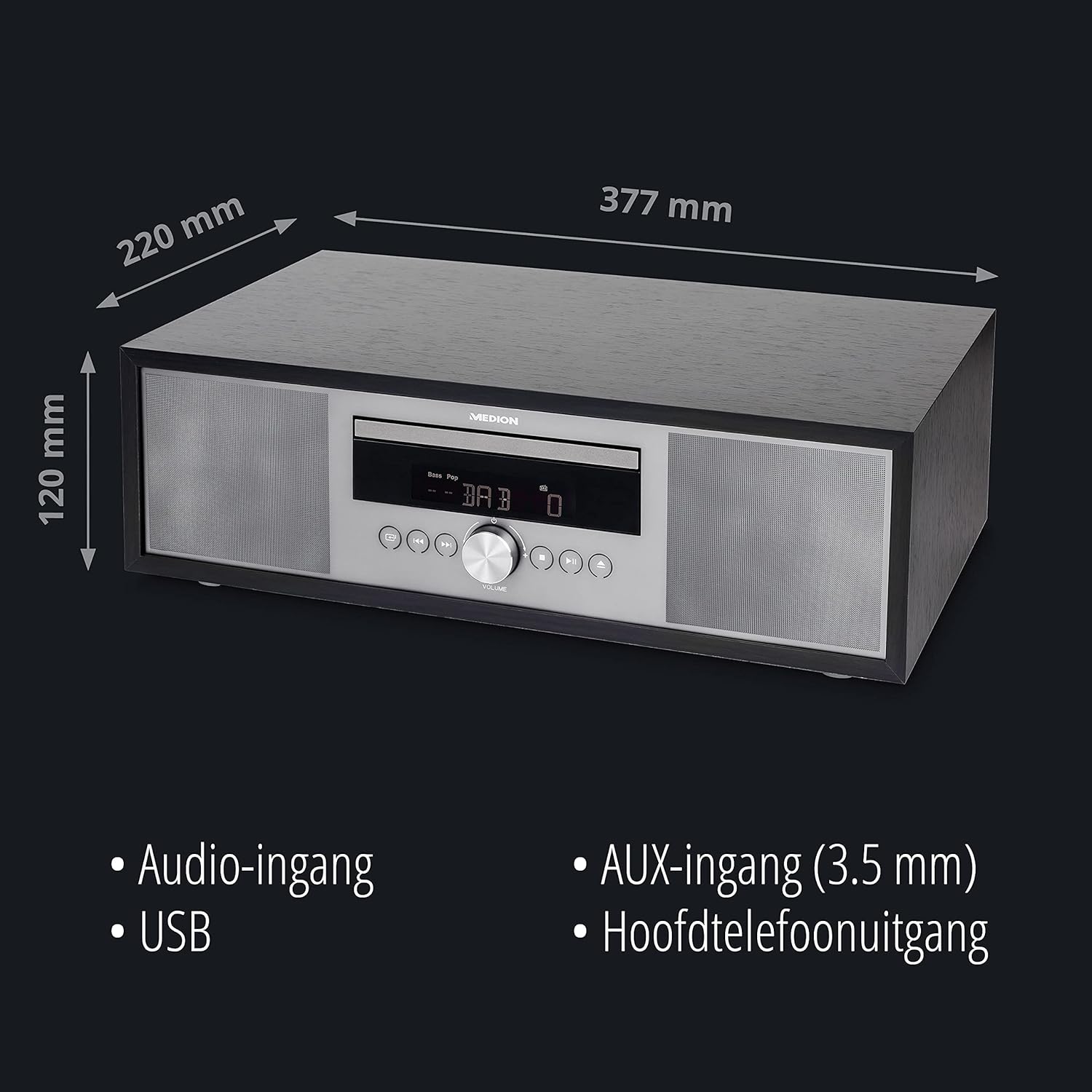
Immagine: Posteriore view of the MEDION P64145 audio system with the power cord connected and the telescopic antenna extended. This image demonstrates how to properly connect power and set up the antenna for improved radio signal reception.
3. Installazione della batteria del telecomando
Open the battery compartment on the remote control and insert the provided battery, observing the correct polarity.
Istruzioni per l'uso
1. Accensione/spegnimento
Premere il tasto ENERGIA pulsante sull'unità o sul telecomando per accendere o spegnere il sistema.
2. Selezione della sorgente
Premere il tasto FONTE button repeatedly to cycle through available input sources: DAB+, FM, CD, USB, Bluetooth, AUX-in.
3. Funzionamento della radio DAB+
- Selezionare la modalità DAB+.
- Il sistema eseguirà automaticamente la scansione delle stazioni DAB+ disponibili.
- Utilizzare il SINTONIA +/- pulsanti o manopola rotante per navigare tra le stazioni.
- Premere OK per selezionare una stazione.
- To save a station, press and hold a preset number button (1-30).
Video: This video demonstrates selecting DAB+ radio, adjusting volume, and other functions on a similar MEDION micro audio system. It illustrates the user interface and controls for various audio modes.
4. Funzionamento della radio FM
- Seleziona la modalità FM.
- Utilizzare il SINTONIA +/- buttons to manually tune or press and hold to auto-scan for the next available station.
- To save a station, press and hold a preset number button (1-30).
5. Riproduzione CD
- Seleziona la modalità CD.
- Insert a CD (audio CD or MP3 CD) into the CD slot.
- The system will automatically begin playback.
- Utilizzo RIPRODUCI/PAUSA, FERMARE, SALTA +/- pulsanti per il controllo.

Immagine: Davanti view of the audio system highlighting the integrated CD player. This image shows where to insert CDs for playback.
6. Riproduzione USB
- Inserire un'unità flash USB contenente MP3 files nella porta USB.
- Seleziona la modalità USB.
- Use the navigation buttons to browse and select tracks.
7. Trasmissione Bluetooth
- Select Bluetooth mode. The display will show "Pairing".
- On your smartphone or tablet, enable Bluetooth and search for "MEDION P64145".
- Seleziona il dispositivo da associare. Una volta connesso, puoi riprodurre l'audio in streaming in modalità wireless.

Immagine: A smartphone displaying a music app connected via Bluetooth to the MEDION audio system. This image demonstrates wireless music streaming capability.
8. Collegamento AUX-in
Connect an external audio device (e.g., MP3 player) to the AUX-in port using a 3.5mm audio cable. Select AUX-in mode to play audio from the connected device.
9. Sveglia e timer di spegnimento
The system features an alarm function (wake via radio, alarm sound, CD, or USB) and a sleep timer. Refer to the detailed instructions in the full user manual for setting these features.
10. Impostazioni audio
Regola il suono profile using the equalizer settings. The system offers five selectable sound settings (Pop, Rock, Jazz, Classic, Flat) to optimize your listening experience.

Immagine: Icons representing different sound equalizer presets (Pop, Rock, Jazz, Classic, Flat) available on the audio system. This image highlights the customizable sound options.
Manutenzione
- Pulizia: Use a soft, dry cloth to clean the unit. Do not use liquid cleaners or aerosol sprays.
- Cura del CD: Maneggiare i CD tenendoli per i bordi. Mantenerli puliti e privi di graffi.
- Magazzinaggio: If not in use for an extended period, unplug the unit and store it in a cool, dry place.
Risoluzione dei problemi
| Problema | Possibile causa | Soluzione |
|---|---|---|
| Nessun potere | Power cord not connected properly; Power outlet not working. | Controllare il collegamento del cavo di alimentazione; provare una presa diversa. |
| Nessun suono | Volume too low; Mute function active; Incorrect source selected. | Increase volume; Deactivate mute; Select correct source. |
| Scarsa ricezione radio | Antenna non estesa o posizionata correttamente; interferenza. | Extend and adjust antenna; Move unit away from other electronic devices. |
| Problemi di associazione Bluetooth | Dispositivo non in modalità di associazione; Bluetooth disattivato sul dispositivo esterno. | Ensure system is in Bluetooth pairing mode; Enable Bluetooth on external device and retry pairing. |
Specifiche
- Modello: MEDION P64145 (MD44125)
- Potenza di uscita audio: 15 Watt
- Sintonizzatore radio: DAB+, PLL-FM Stereo (30 presets each)
- Lettore CD: Supports Audio CD, MP3-CD
- Connettività: Bluetooth, USB, ingresso AUX
- Caratteristiche speciali: Alarm function, Sleep timer, Color display
- Dimensioni (circa): Dimensioni: 41.8 x 27.3 x 15.5 cm
- Peso (circa): 3.95 kg

Immagine: The MEDION P64145 audio system with its dimensions indicated. This image provides a visual representation of the product's size.
Garanzia e supporto
For warranty information, technical support, or service inquiries, please refer to the warranty card included in your package or visit the official MEDION websito. Conservare la prova d'acquisto per eventuali reclami in garanzia.