
ASTRO A9916-PPHB
Manuale utente dell'orologio digitale da uomo Astro
Model: A9916-PPHB | Brand: ASTRO
Introduzione
Welcome to the user manual for your new Astro Men's Digital Watch, model A9916-PPHB. This guide provides comprehensive instructions on how to set up, operate, and maintain your watch to ensure optimal performance and longevity. Please read this manual carefully before using your watch.
Prodotto finitoview e funzioni dei pulsanti
Your Astro digital watch features a clear display and intuitive button controls for various functions.
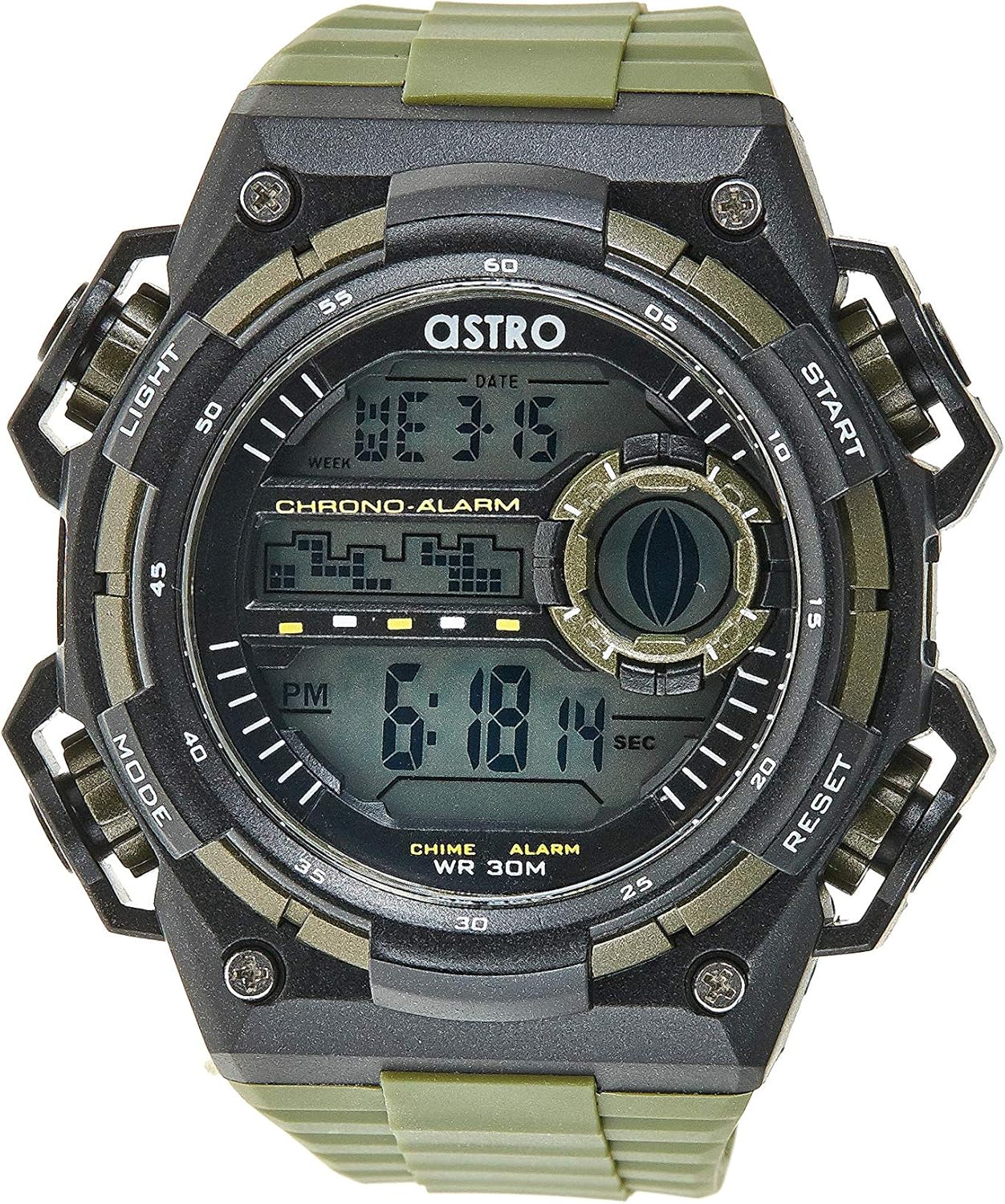
Figura 1: Fronte View della Guardia. This image displays the watch face, highlighting the digital display and the four primary control buttons: LIGHT (top left), MODE (bottom left), START (top right), and RESET (bottom right). The display shows the time, day of the week, and date, along with indicators for chronograph and alarm functions.

Figura 2: lato View della Guardia. This image provides a profile view of the watch, clearly showing the placement and design of the "LIGHT" and "MODE" buttons on the left side of the watch case. These buttons are essential for navigating through the watch's functions and activating the backlight.

Figura 3: Indietro View della Guardia. This image shows the reverse side of the watch, featuring the stainless steel case back secured by four screws. The durable olive green plastic strap, with its buckle closure, is also visible, indicating the watch's robust construction.
Funzioni dei pulsanti:
- Pulsante LUCE (in alto a sinistra): Attiva la retroilluminazione per viewvisualizzazione del display in condizioni di scarsa illuminazione.
- Pulsante MODE (in basso a sinistra): Cycles through different modes: Time Display, Alarm Setting, Chronograph (Stopwatch), and Date Setting.
- Pulsante START (in alto a destra): Used to start/stop the chronograph, adjust values during setting, or activate the alarm.
- Pulsante RESET (in basso a destra): Used to reset the chronograph, confirm settings, or switch between 12/24-hour format.
Installazione e configurazione iniziale
1. Disimballaggio e ispezione
Upon receiving your watch, carefully unbox it and inspect for any visible damage. Ensure all components, including the watch and any accompanying documentation (like the guarantee card), are present.

Figure 4: Watch Packaging and Guarantee Card. This image shows the watch's protective tin packaging and the included guarantee card, which is important for warranty claims.
2. Impostazione dell'ora e della data
- Dalla modalità di visualizzazione normale dell'ora, premere il tasto MODALITÀ tre volte il pulsante per accedere alla modalità di impostazione dell'ora. Le cifre dei secondi inizieranno a lampeggiare.
- Premere il tasto RESET pulsante per scorrere le impostazioni: Secondi → Ora → Minuti → Mese → Data → Giorno della settimana.
- Mentre una cifra lampeggia, premere il tasto INIZIO per aumentare il valore. Tenere premuto il pulsante INIZIO pulsante per far avanzare rapidamente le cifre.
- Una volta regolate tutte le impostazioni, premere il tasto MODALITÀ per uscire dalla modalità di impostazione e tornare alla visualizzazione normale dell'ora.
3. Selezione del formato 12/24 ore
Nella modalità di visualizzazione dell'ora normale, premere il tasto RESET pulsante per passare dal formato 12 ore (con indicatore 'AM'/'PM') a quello 24 ore.
Istruzioni per l'uso
1. Funzione di allarme
- Dalla visualizzazione normale dell'ora, premere il tasto MODALITÀ button once to enter the Alarm mode. The alarm time will be displayed.
- Premere il tasto RESET button to select the hour or minute to set. The selected digit will flash.
- Premere il tasto INIZIO pulsante per regolare la cifra lampeggiante.
- Per attivare/disattivare l'allarme, premere il tasto INIZIO pulsante mentre è attiva la modalità Sveglia (senza che nessuna cifra lampeggi). Un'icona di allarme apparirà/scomparirà sul display.
- Premere il tasto MODALITÀ pulsante per tornare alla visualizzazione normale dell'ora.
2. Ciaourly carillon
Per attivare o disattivare l'hourly chime (which beeps at the top of every hour):
- In modalità Sveglia, premere il tasto RESET pulsante per attivare/disattivare l'hourly chime on/off. A chime icon will appear/disappear on the display.
3. Cronografo (cronometro)
- Dalla visualizzazione normale dell'ora, premere il tasto MODALITÀ button twice to enter the Chronograph mode. The display will show "00:00:00".
- Premere il tasto INIZIO pulsante per iniziare il cronometraggio.
- Premere il tasto INIZIO nuovamente il pulsante per mettere in pausa il cronometraggio.
- Premere il tasto RESET pulsante in pausa per reimpostare il cronografo su "00:00:00".
- Premere il tasto MODALITÀ pulsante per tornare alla visualizzazione normale dell'ora.
4. Funzione di retroilluminazione
Premere il tasto LEGGERO button (top left) at any time to illuminate the display for a few seconds, making it visible in dark environments.
Manutenzione e cura
1. Pulizia dell'orologio
To keep your watch looking its best, wipe it regularly with a soft, dry cloth. For stubborn dirt, a slightly damp È possibile utilizzare un panno e asciugare immediatamente. Evitare l'uso di prodotti chimici aggressivi o materiali abrasivi.
2. Water Resistance (WR 30M)
Your Astro watch is water resistant up to 30 meters (3 ATM). This means it is suitable for daily use and can withstand splashes or brief immersion in water, such as during hand washing or light rain. It is NOT suitable for showering, swimming, diving, or any water sports. Do not operate buttons when the watch is wet.
3. Sostituzione della batteria
Quando il display diventa fioco o le funzioni diventano irregolari, potrebbe essere necessario sostituire la batteria. La sostituzione della batteria dovrebbe idealmente essere eseguita da un orologiaio qualificato per garantire la corretta tenuta e l'integrità dell'impermeabilità.
Risoluzione dei problemi
| Problema | Possibile causa | Soluzione |
|---|---|---|
| Il display è vuoto o poco luminoso. | Batteria scarica. | Sostituire la batteria. |
| L'ora non è corretta. | Ora non impostata correttamente o pressione accidentale del pulsante. | Refer to "Setting the Time and Date" section to reset the time. |
| I pulsanti non rispondono. | Watch may be in a frozen state or battery is extremely low. | Try pressing all buttons simultaneously for a few seconds to reset. If problem persists, replace battery. |
| L'allarme non suona. | L'allarme non è attivato. | Ensure the alarm icon is displayed on the screen. Refer to "Alarm Function" section. |
Specifiche
- Numero modello: A9916-PPHB
- Tipo di visualizzazione: Digitale
- Materiale del cinturino: Plastica
- Materiale della cassa: Plastic / Stainless Steel Back
- Resistenza all'acqua: 30 metri (3 ATM)
- Funzioni: Time (12/24-hour), Date, Day, Alarm, Hourly Chime, Chronograph, Backlight
- Produttore: Astro
Garanzia e supporto
Your Astro A9916-PPHB watch comes with a manufacturer's guarantee. Please refer to the included guarantee card (Figure 4) for specific terms and conditions of your warranty. Keep your purchase receipt and guarantee card in a safe place as proof of purchase.
For technical support, warranty claims, or any inquiries not covered in this manual, please contact your retailer or the official Astro customer service channel as indicated on your guarantee card or product packaging.
Ask a question about this manual
Ask about setup, troubleshooting, compatibility, parts, safety, or missing instructions. Manuals+ will review the question and use this page’s manual context to help answer it.