
AMPIRE LDS-NBT-CP
AMPIRE LDS-NBT-CP Smartphone Interface User Manual
For BMW NBT Multimedia Systems with CarPlay and Android Auto
1. Introduzione
Questo manuale fornisce istruzioni dettagliate per l'installazione, il funzionamento e la manutenzione del AMPIRE LDS-NBT-CP Smartphone Interface. This device integrates your smartphone's functionalities, such as Apple CarPlay and Android Auto, directly into your BMW's NBT multimedia system, enhancing your in-car experience with navigation, communication, and entertainment features.
2. Prodotto finitoview
IL AMPIRE LDS-NBT-CP is a plug-and-play smartphone interface designed for seamless integration with your vehicle's factory multimedia system. It displays content on the original factory monitor and routes audio through the vehicle's AUX input.

Immagine 2.1: anteriore view del AMPIRE LDS-NBT-CP Smartphone Interface unit, showing various ports and indicators.
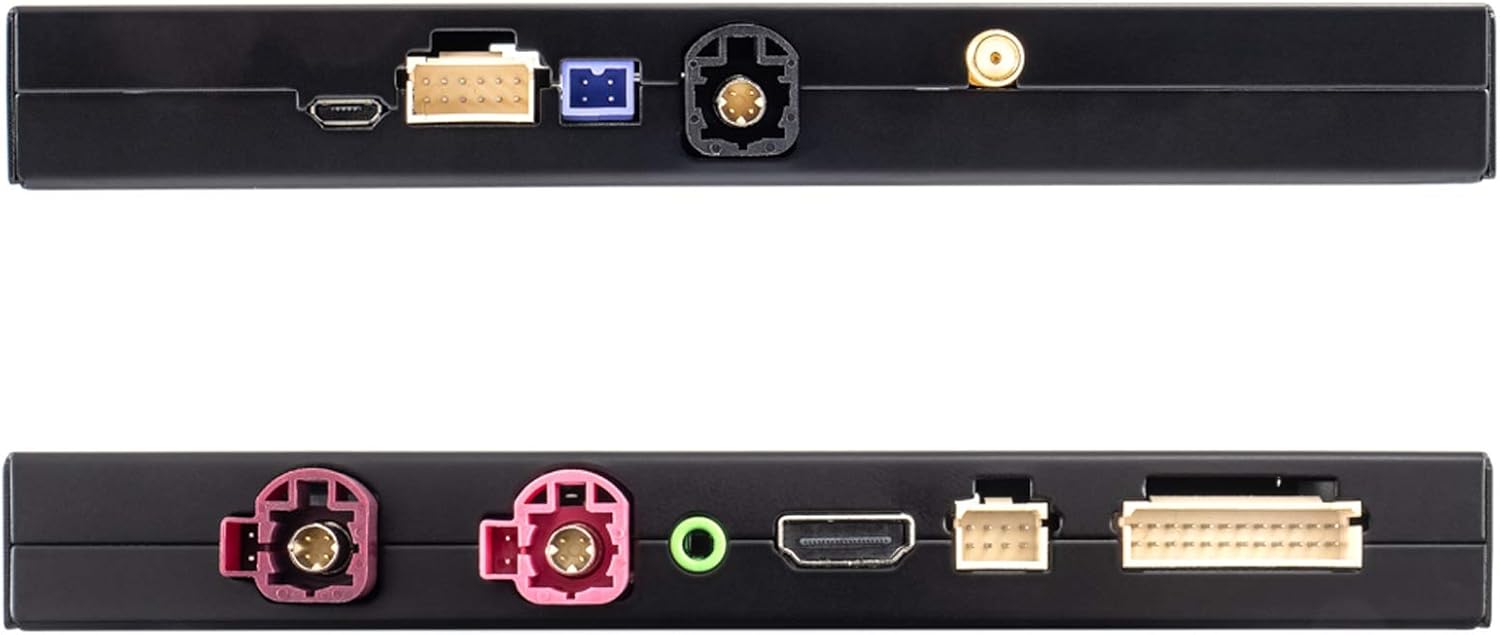
Immagine 2.2: Parte superiore e inferiore views of the interface, highlighting connection ports for USB, WiFi, and other inputs/outputs.
3. Caratteristiche principali
- Full Smartphone Integration: Seamlessly integrates Apple CarPlay and Android Auto into your vehicle's factory system.
- Navigazione: Utilize navigation applications like Google Maps and Waze directly on your car's display.
- Riproduzione multimediale: Access music streaming services such as Spotify and Amazon Prime Music.
- Display ad alta risoluzione: Supports up to 1080p HD resolution for video and images.
- Connettività wireless: Features wireless functions via 5.8G WLAN or Bluetooth. CarPlay can also be connected via cable.
- Ingressi telecamera: Includes inputs for front and rear view cameras (composite video).
- Elaborazione audio: Integrated audio DSP with EQ for enhanced sound quality.
- Aggiornamenti software: Supports software updates via the USB input.
- Controllare: Operates using the vehicle's existing buttons and control systems.
- Controllo vocale: Siri voice control is available in CarPlay mode via the included microphone.
- Mirrorlink: Android users can utilize the Mirrorlink function to mirror their smartphone display.
4. Compatibilità
This interface is compatible with BMW vehicles equipped with the NBT multimedia system. Please verify your vehicle's model and manufacturing date against the list below:
- BMW Serie 1: F20/21 (03/2013 - 03/2015)
- BMW Serie 2: F22 (11/2013 - 03/2015)
- BMW Serie 3: F30/31 (11/2012 - 07/2015), F34 (03/2013 - 07/2015), F80 (03/2014 - 07/2015)
- BMW Serie 4: F32 (07/2013 - 07/2015), F33 (11/2013 - 07/2015), F36 (03/2014 - 07/2015)
- BMW Serie 5: F07 (07/2012 onwards), F10/11/18 (09/2012 onwards)
- BMW Serie 6: F06/12/13 (03/2013 onwards)
- BMW Serie 7: F01/02/03 (07/2012 - 06/2015)
- La BMW X3 è la versione più piccola della BMW XXNUMX. F25 (04/2013 - 03/2016)
- La BMW X4 è la versione più piccola della BMW XXNUMX. F26 (04/2014 - 03/2016)
- La BMW X5 è la versione più piccola della BMW XXNUMX. F15 (08/2014 - 07/2016), F85 (12/2014 - 07/2016)
- La BMW X6 è la versione più piccola della BMW XXNUMX. F16 (08/2014 - 07/2016), F86 (12/2014 - 07/2016)
The interface is designed to work with smartphones for audio and video applications in the car.
5. Contenuto della confezione
Dopo aver aperto la confezione, assicurarsi che tutti i seguenti componenti siano presenti e integri:

Immagine 5.1: Passoview of all items included in the package, including the interface unit, various cables, and accessories.
- AMPIRE LDS-NBT-CP Smartphone Interface Unit
- Wiring Harness Set (Power, Video, USB, etc.)
- External Microphone for Voice Control
- Antenna WiFi
- Cavo audio AUX

Image 5.2: Close-up of the main wiring harness, showing various connectors for integration into the vehicle's system.
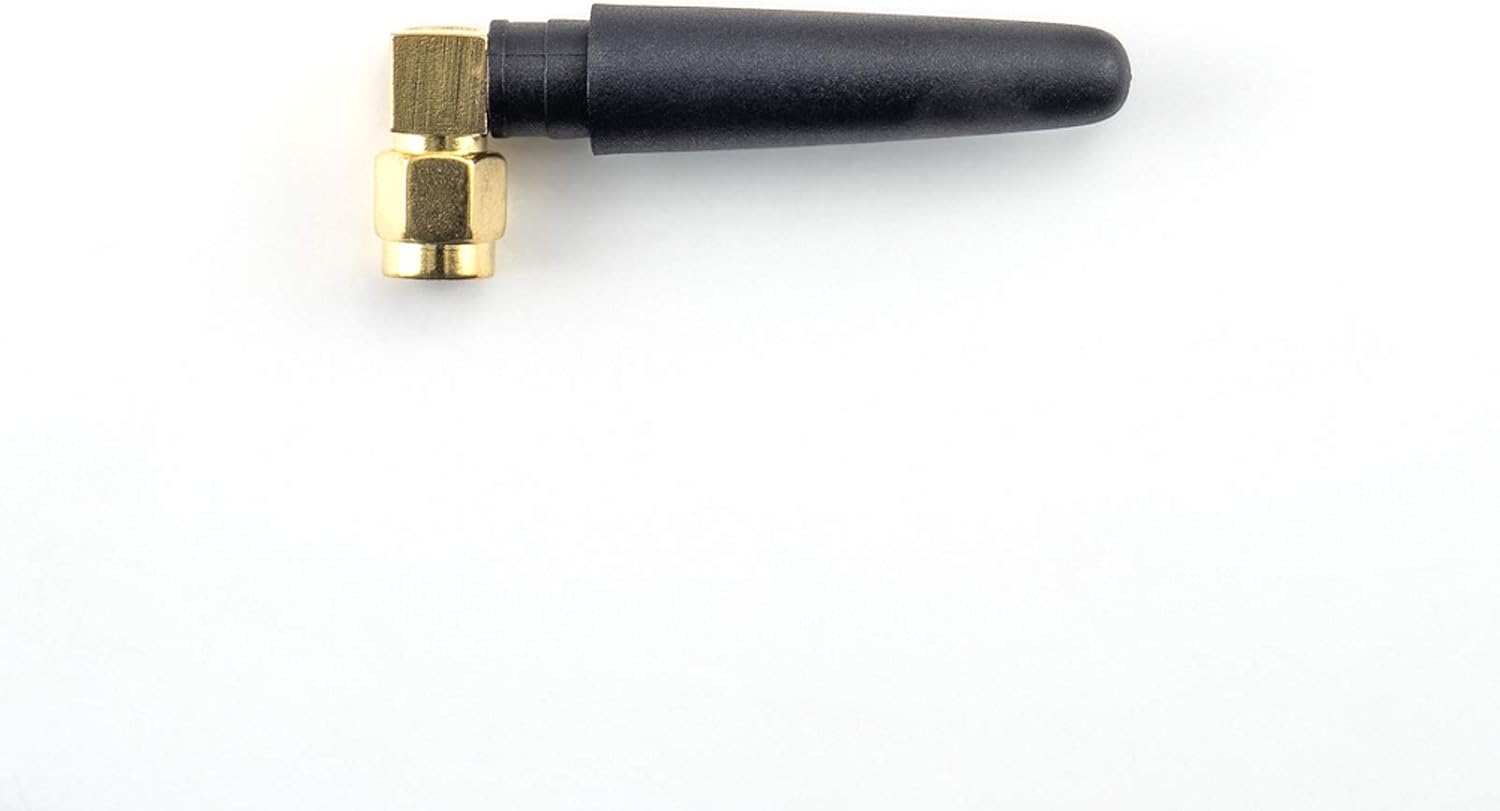
Image 5.3: The compact WiFi antenna, essential for wireless connectivity features.

Image 5.4: The external microphone, used for Siri voice commands and hands-free calling.

Image 5.5: The AUX audio cable, used to route sound from the interface to the vehicle's sound system.
6. Configurazione e installazione
IL AMPIRE LDS-NBT-CP Smartphone Interface is designed for integration into your vehicle's existing wiring and multimedia system. Due to the complexity of automotive electronics, professional installation by a qualified technician is highly recommended to ensure correct functionality and to avoid damage to your vehicle or the interface.
6.1. General Installation Steps (Consult a professional for detailed instructions):
- Smontaggio del veicolo: Carefully remove necessary trim panels and the head unit to access the vehicle's wiring.
- Connessione dell'interfaccia: Connect the main wiring harness from the interface to the vehicle's head unit and power supply. This is typically a plug-and-play process, but specific connections must be identified.
- Connessione display: Connect the video input/output cables between the interface and the vehicle's display.
- Connessione audio: Connect the AUX audio cable from the interface to the vehicle's AUX input. Ensure the vehicle's audio source is set to AUX for sound output from the interface.
- Connessioni periferiche:
- Connect the external microphone for voice control. Position it optimally for clear audio capture.
- Attach the WiFi antenna for wireless connectivity.
- If installing front or rear cameras, connect them to the designated camera inputs on the interface.
- Connect any USB devices (e.g., for wired CarPlay or software updates) to the USB port.
- Prova: Before reassembling the vehicle, perform thorough testing of all functions, including CarPlay, Android Auto, audio, and camera inputs.
- Rimontaggio: Once all functions are verified, carefully reassemble the vehicle's trim panels.
Refer to your vehicle's specific service manual or consult a professional installer for precise wiring diagrams and disassembly procedures.
7. Istruzioni per l'uso
Una volta installato, il AMPIRE LDS-NBT-CP interface allows you to access smartphone functionalities through your BMW's NBT system.
7.1. Activating the Interface
The interface is typically activated by pressing and holding a specific button on your vehicle's iDrive controller or steering wheel. Consult your installer or vehicle documentation for the exact activation method.
7.2. Collegamento dello smartphone
- CarPlay/Android Auto wireless:
- Assicurati che il Bluetooth e il Wi-Fi del tuo smartphone siano abilitati.
- On the interface screen, navigate to the CarPlay or Android Auto option.
- Pair your smartphone with the interface via Bluetooth. Follow the on-screen prompts.
- Once paired, the system will automatically connect via Wi-Fi for wireless CarPlay/Android Auto.
- CarPlay cablato:
- Connect your iPhone to the interface's USB port using a certified USB cable.
- CarPlay should automatically launch on the vehicle's display.
7.3. Utilizzo di CarPlay e Android Auto
Once connected, you can control CarPlay or Android Auto using your vehicle's factory controls (iDrive controller, steering wheel buttons). The interface mirrors your smartphone's display, allowing access to:
- Navigazione: Use Apple Maps, Google Maps, Waze, etc.
- Telefonate: Effettua e ricevi chiamate in vivavoce.
- Messaggistica: Invia e ricevi messaggi tramite comandi vocali.
- Musica: Play music from your favorite apps.
- Assistenti vocali: Use Siri (for CarPlay) or Google Assistant (for Android Auto) via the external microphone.
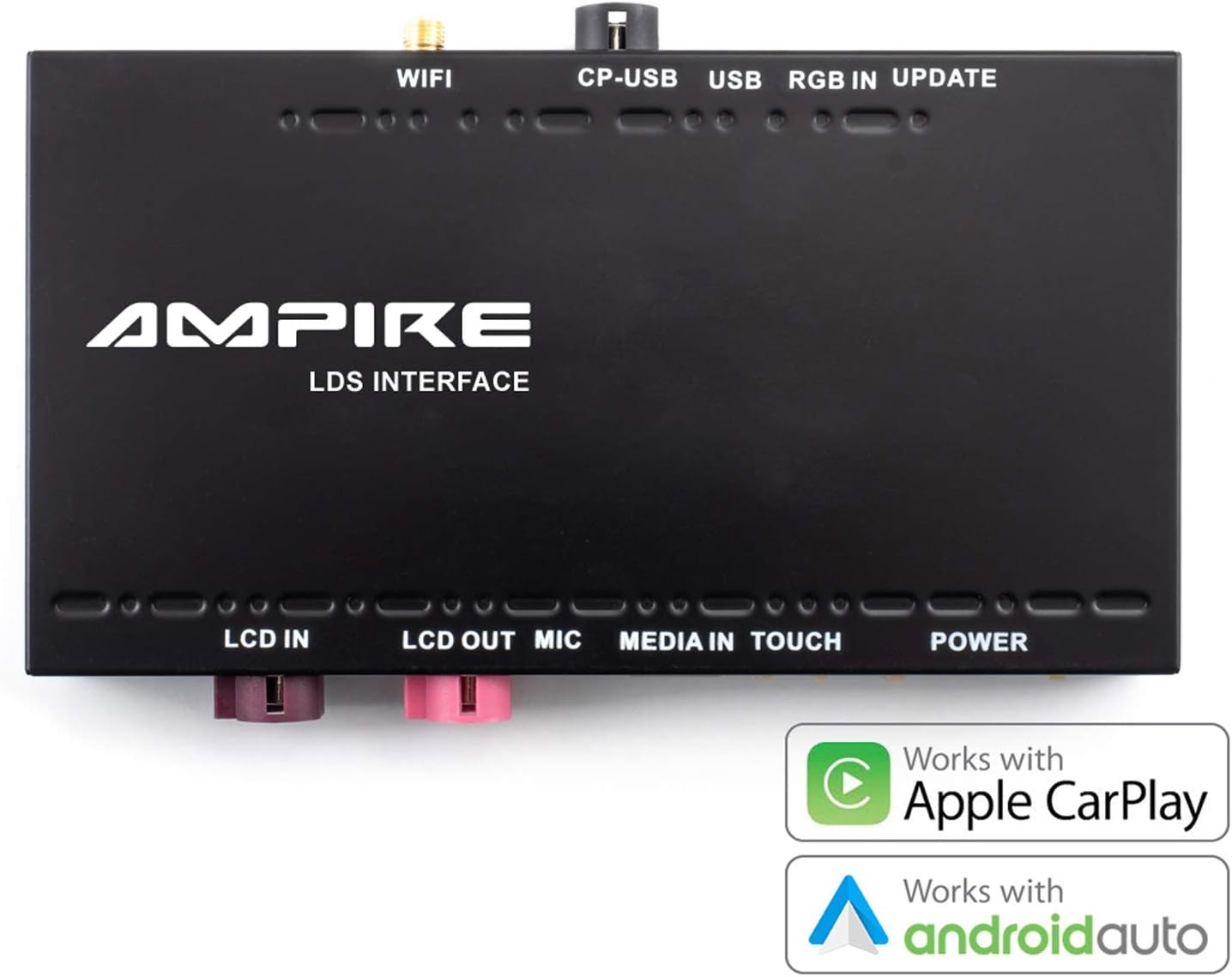
Image 7.1: The interface unit, emphasizing its compatibility with both Apple CarPlay and Android Auto.
7.4. Mirrorlink (Android Only)
For Android users, the Mirrorlink function allows you to mirror your smartphone's entire display onto the car's screen. This provides access to apps not natively supported by Android Auto. Refer to your smartphone's settings for Mirrorlink activation.
8. Manutenzione
IL AMPIRE LDS-NBT-CP Smartphone Interface is designed for reliable operation with minimal maintenance. Follow these guidelines to ensure its longevity:
- Pulizia: Keep the interface unit and connections free from dust and debris. Use a soft, dry cloth for cleaning. Do not use liquid cleaners directly on the unit.
- Aggiornamenti software: Controllare periodicamente le istruzioni del produttore website for available software updates. Updates can improve performance, add features, or resolve issues. Use the USB input for software updates as instructed by the manufacturer.
- Condizioni ambientali: Ensure the unit is installed in a location protected from extreme temperatures, direct sunlight, and moisture.
- Integrità del cavo: Regularly inspect all connected cables for any signs of wear or damage. Replace damaged cables immediately to prevent malfunctions.
9. Risoluzione Dei Problemi
Se riscontri problemi con il tuo AMPIRE LDS-NBT-CP interface, refer to the following common troubleshooting steps:
- Nessuna visualizzazione/schermo nero:
- Ensure the interface is powered on and correctly connected to the vehicle's display.
- Verify that the vehicle's display input is switched to the correct source (if applicable).
- Controllare tutti i cavi video per verificare che i collegamenti siano saldi.
- Nessun audio:
- Confirm the vehicle's audio source is set to AUX.
- Check the AUX audio cable connection between the interface and the vehicle.
- Ensure the volume on both your smartphone and the vehicle's system is turned up.
- CarPlay/Android Auto non si connette:
- For wireless connection, ensure Bluetooth and Wi-Fi are enabled on your smartphone and paired correctly.
- For wired CarPlay, try a different USB cable or USB port if available.
- Restart your smartphone and the vehicle's multimedia system.
- Assicurati che il sistema operativo del tuo smartphone sia aggiornato.
- Controllo vocale non funzionante:
- Check if the external microphone is securely connected and positioned correctly.
- Ensure microphone permissions are granted on your smartphone for CarPlay/Android Auto.
- Connettività intermittente:
- Verificare la presenza di fonti di interferenza (ad esempio, altri dispositivi wireless).
- Assicurarsi che l'antenna WiFi sia fissata saldamente.
If these steps do not resolve the issue, contact AMPIRE customer support or your professional installer for further assistance.
10. Specifiche
| Caratteristica | Dettaglio |
|---|---|
| Marca | AMPIRA |
| Numero di modello | LDS-NBT-CP |
| Dispositivi compatibili | Smartphone |
| Uso specifico del prodotto | Audio e video per auto |
| Tipo di connettore | USB, Wi-Fi, AUX type A |
| Numero di porte | 3 (Note: This refers to primary user-accessible ports like USB, AUX. The device has more internal connections.) |
| Uscita audio | Speakers (via vehicle's AUX input) |
| Batterie richieste | NO |
| Peso dell'articolo | 1.14 kg |
| Colore | Nero |
| Prima data disponibile | 3 dicembre 2021 |
11. Garanzia e supporto
IL AMPIRE LDS-NBT-CP Smartphone Interface is built for durability and a long lifespan. For specific warranty details, please refer to the documentation provided with your purchase or contact AMPIRE customer support directly. For technical assistance or installation inquiries, it is recommended to consult with your professional installer or the AMPIRE support team.
Produttore: AMPIRA
Ask a question about this manual
Ask about setup, troubleshooting, compatibility, parts, safety, or missing instructions. Manuals+ will review the question and use this page’s manual context to help answer it.