
Introduzione
This manual provides essential instructions for the proper use and maintenance of your Vikefon Type C Charging and Data Cable. This 1-meter cable is designed for efficient charging and high-speed data transfer between your Type C enabled devices and compatible power sources or computers.

Image: The Vikefon Type C Charging and Data Cable, featuring a standard USB-A connector on one end and a reversible USB-C connector on the other.
Caratteristiche del prodotto
- USB Connector Quality: Ensures reliable charging and high-speed data transmission.
- Potenza in uscita: Supports up to 5V, 3 Amp per una ricarica rapida.
- Compatibilità universale: Fully compatible with all Type C mobile devices for fast charging and syncing.
- Reversible USB Type-C Connector: Allows for quick and easy connections in any orientation.
- Design durevole: Features intricate nylon braiding for enhanced durability and longevity, outlasting standard cables.
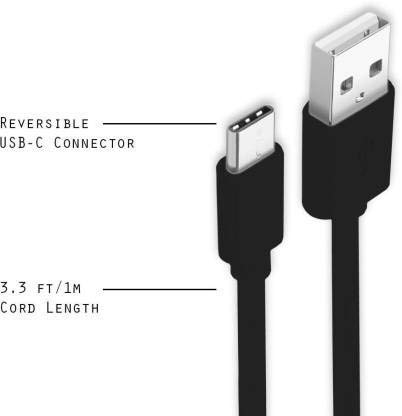
Image: A diagram illustrating the reversible nature of the USB-C connector and the cable's 1-meter (3.3 ft) cord length.
Impostare
- Identificare i connettori: The cable has a standard USB-A connector on one end and a smaller, oval-shaped USB Type-C connector on the other.
- Collegamento alla fonte di alimentazione/computer: Insert the USB-A end of the cable into a compatible USB port on a wall adapter, power bank, car charger, or computer.
- Connetti al dispositivo: Insert the USB Type-C end into the charging/data port of your smartphone, tablet, or other Type C enabled device. The USB Type-C connector is reversible, so it can be inserted in either orientation.
- Verifica connessione: Ensure both ends are securely connected. Your device should indicate that it is charging or connected for data transfer.
Istruzioni per l'uso
Caricare il tuo dispositivo
- Connect the USB-A end of the cable to a compatible USB power adapter (e.g., wall charger, car charger, power bank).
- Connect the USB Type-C end to your device's charging port.
- Ensure the power adapter is plugged into a live power outlet. Your device should begin charging.
Trasferimento dei dati
- Collegare l'estremità USB-A del cavo a una porta USB del computer.
- Connect the USB Type-C end to your device.
- On your device, you may receive a prompt asking to allow data access or to select a USB connection mode (e.g., "File Transfer," "MTP"). Select the appropriate option to enable data transfer.
- Your device should appear as a removable drive or media device on your computer, allowing you to transfer files.
Manutenzione
- Gestione corretta: Always grasp the connector head when plugging or unplugging the cable. Avoid pulling directly on the cable itself to prevent damage to the internal wires.
- Evitare di piegarsi: Do not excessively bend or crimp the cable, especially near the connectors, as this can cause internal wire breakage.
- Magazzinaggio: Store the cable in a clean, dry place away from extreme temperatures and direct sunlight. Avoid tangling the cable.
- Pulizia: If necessary, gently wipe the cable and connectors with a dry, soft cloth. Do not use liquids or abrasive cleaners.

Immagine: un primo piano view highlighting the durable metal heads of the Vikefon Type C cable connectors, designed for anti-oxidation and corrosion resistance.
Risoluzione dei problemi
- Dispositivo non in carica:
- Assicurarsi che entrambe le estremità del cavo siano collegate saldamente.
- Verificare che l'adattatore di alimentazione funzioni correttamente e sia collegato a una presa di corrente funzionante.
- Prova a utilizzare un adattatore di alimentazione o una porta USB diversi.
- Controlla che la porta di ricarica del tuo dispositivo non presenti detriti o danni.
- Ricarica lenta:
- Ensure you are using a power adapter that supports fast charging (e.g., 3A output).
- Chiudi tutte le applicazioni in background non necessarie sul tuo dispositivo.
- Nessun trasferimento dati:
- Confirm the cable is properly connected to both your device and computer.
- On your device, check the notification panel for USB options and select "File Transfer" or "MTP."
- Prova a connetterti a un'altra porta USB del tuo computer.
- Riavvia sia il dispositivo che il computer.
Specifiche
| Caratteristica | Dettaglio |
|---|---|
| Marca | Vikefon |
| Nome del modello | Tipo C |
| Numero di modello | Tipo C 0129 |
| Tipo di connettore | USB tipo C (maschio-maschio) |
| Tipo di cavo | USB |
| Dispositivi compatibili | Laptop, PC, Smartphone (e.g., Xiaomi Redmi 8A, Poco M2, Poco M2 Pro, Samsung, Motorola, Lenovo, Lava, Sony, HTC, LG, Karbonn, Maxx) |
| Caratteristiche speciali | Charging Wire, Durable, High Data Transfer Rate, High Quality, Long Length |
| Velocità di trasferimento dati | Up to 0.48 Gigabits Per Second (480 Mbps) |
| Tecnologia di connettività | USB |
| Specifica Met | ISO |
| Colore | Nero |
| Forma dell'oggetto | Girare |
| Outer Material Type | Rubber (with Nylon Braiding) |
| Lunghezza del cavo | 1 metri |
Garanzia e supporto
Specific warranty details for the Vikefon Type C Charging and Data Cable are not provided in this manual. For information regarding warranty coverage, returns, or technical support, please refer to the product packaging or contact the manufacturer directly through their official channels.