
1. Introduzione
The DALY Smart Battery Management System (BMS) is designed to optimize the performance and extend the lifespan of 24V L-ion 7S lithium battery packs. This intelligent system provides comprehensive protection against overcurrent, overcharge, overdischarge, short circuits, and temperature fluctuations. Equipped with a Bluetooth module, it allows users to monitor battery status and modify parameters conveniently via a mobile application or PC software.

Figure 1: DALY Smart BMS 24V L-ion 7S 60A with integrated wiring.
2. Informazioni sulla sicurezza
Always prioritize safety when working with battery management systems and lithium batteries. Failure to follow safety guidelines can result in serious injury, fire, or damage to property.
- Ensure all connections are correct and secure before applying power. Incorrect wiring can cause irreversible damage to the BMS and battery pack.
- Do not insert the BMS to connect the cable while the battery pack is live. Always disconnect the battery pack before connecting or disconnecting the BMS.
- Use appropriate personal protective equipment (PPE), such as insulated gloves and safety glasses, when handling battery components.
- Evitare di cortocircuitare i terminali della batteria o i collegamenti del BMS.
- Keep the BMS and battery pack away from water, moisture, and extreme temperatures. The BMS features waterproof and dustproof properties, but direct exposure should be avoided.
- Utilizzare solo il volume specificatotage and current ratings for the BMS. Exceeding these limits can lead to damage or failure.
- If any unusual behavior, smoke, or excessive heat is observed, immediately disconnect power and consult a qualified technician.
3. Contenuto della confezione
Verificare che tutti gli articoli siano presenti nel pacco:
- DALY 3.7V Li-ion BMS (1 unit)
- Bluetooth Module (1 unit)
- NTC Sensor (1 unit)
- Sampling Cable (1 unit)
- UART Cable (1 unit)
- Manuale di istruzioni (1 unità)

Figure 2: Typical package contents for the DALY Smart BMS.
4. Specifiche
The DALY Smart BMS 24V L-ion 7S 60A features the following technical specifications:
- Dimensioni del prodotto: 5.04 x 2.6 x 0.71 pollici
- Peso dell'articolo: 13.4 once (0.84 libbre)
- Ingresso volumetage: 3.7 Volts (per cell)
- Interfaccia di comunicazione: UART, Bluetooth
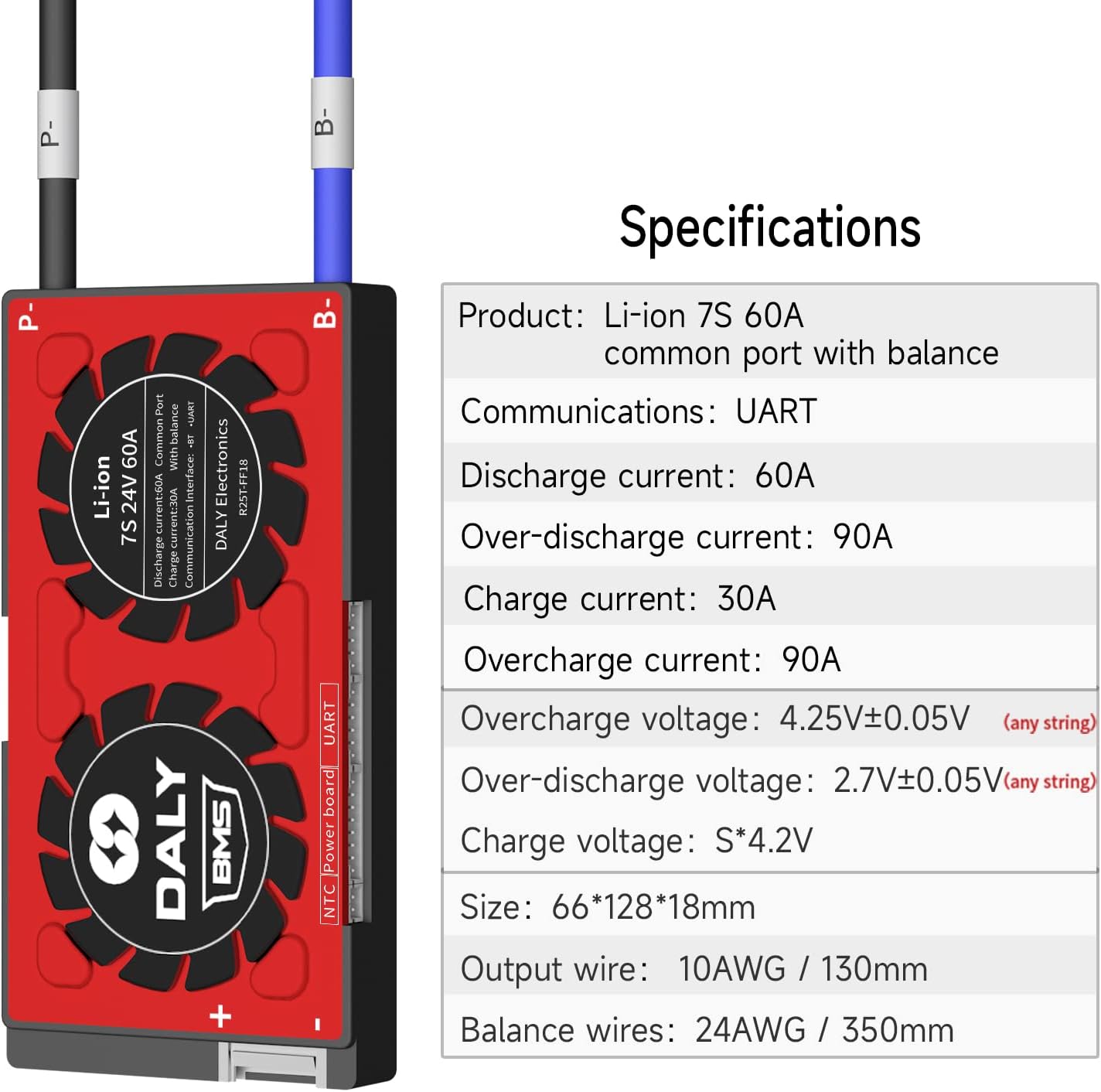
Figure 3: Detailed specifications table for the DALY Smart BMS.
Detailed Parameters (Li-ion 7S Smart BMS)
| Descrizione | Specification (60A Model) | Unità |
|---|---|---|
| Continue discharge current | 60 | A |
| Over discharge current detect | 90 | A |
| Main Circuit Conduct Inner resistance | <20 | mΩ |
| Volume di caricatage (ioni di litio) | S*4.2 | V |
| Corrente di carica | 30 | A |
| Over Charge current detect delay | 80±10 | A |
| Over charge detect voltage | 4.25±0.05 | V |
| Ritardo di protezione da sovraccarico | 1 | S |
| Rilascio di carica eccessiva voltage | 4.15±0.05 | V |
| Balance detect Voltage | 3.8 | V |
| Rilascio saldo voltage | 3.8 | V |
| Bilancia corrente | 30±5 | mA |
| Over discharge detect | 2.7±0.05 | V |
| Over discharge detect delay | 1 | S |
| Rilascio di scarica eccessiva voltage | 2.8±0.05 | V |
| Over charge current protection | Scarico | |
| Short Circuit protection condition | Cortocircuito del carico esterno | |
| Short circuit detect delay | 200-500 | uS |
| Sganciatore di protezione da cortocircuito | Scarico | |
| Temp Protect (Charge) | -40~65 | °C |
| Temp Protect (Discharge) | -40~70 | °C |
| Autoconsumo | 35 | mA |
| Sleeping current (over-discharge) | 800 | uA |
| Intervallo di temperatura di lavoro | -20~60 | °C |
| Storing Temp range | -40~85 | °C |
5. Configurazione e installazione
Proper installation is critical for the safe and effective operation of your DALY Smart BMS. Please follow these steps carefully.
5.1 Wiring the Battery Pack
Before connecting the BMS, ensure your battery pack is properly assembled and the balance wires are prepared. Tools needed include a soldering machine (suggested 662°F/350°C), scissors, double-sided tape, tin wire, and a multimeter.
- Preparare il pacco batteria: Ensure the battery cells are arranged correctly and sampling points are identified.
- Secure the BMS: Use double-sided tape to fix the BMS to the battery pack in a stable position.
- Collegare i cavi di bilanciamento: IMPORTANT: You must disconnect balance wires and the BMS connection port before welding black and red balance wires on the battery pack.
- Posizionamento dei fili: Place each balance wire in its correct position on the battery pack. The black wire (B0) connects to the negative terminal of the battery. Subsequent red wires (B1, B2, etc.) connect to the positive terminals of each cell in series, following the sequence.
- Cut and Strip Wires: Once all wires are in place, cut them to the appropriate length and strip the ends for soldering.
- Connessioni a saldare: Carefully solder each balance wire to its corresponding sampling point on the battery pack.

Figure 4: Detailed wiring diagram for connecting the DALY Smart BMS to a battery pack.
5.2 Visual Wiring Guide
Video 1: A detailed guide on wiring and soldering the DALY BMS balance wires to a battery pack. This video demonstrates the correct sequence and technique for secure connections.
5.3 Initial Activation and Software Setup
- Attiva BMS: The BMS requires activation by charging the battery for the first time.
- Connetti il modulo Bluetooth: Plug the Bluetooth module into the designated port on the BMS.
- Install App/Software: Download the DALY BMS app (for mobile) or PC software. Links and detailed tutorials can be found on the official DALY webposto (www.dalybms.com).
- Password iniziale: The initial password for the Smart Board APP to change parameters is 123456.
6. Istruzioni per l'uso
The DALY Smart BMS allows for real-time monitoring and parameter adjustment.
6.1 Monitoraggio dello stato della batteria
Use the Bluetooth app or PC software to check the battery status. This includes:
- Singola cella voltages
- Volume totale della confezionetage
- Corrente di carica/scarica
- Temperatura
- Stato di carica (SOC)
- Protection status (e.g., overcharge, overdischarge, short circuit)

Figure 5: Illustration of the DALY Smart BMS connected to a mobile device via Bluetooth, showing the app interface for monitoring.
6.2 Modifying Parameters
The Smart BMS allows for modification of various parameters to suit your specific battery configuration and usage requirements. Refer to the detailed software/app tutorials on the DALY website for specific instructions on parameter adjustment.
Note: Incorrect parameter settings can damage your battery pack. Only adjust parameters if you fully understand their function and impact.
7. Manutenzione
To ensure the longevity and optimal performance of your DALY Smart BMS and battery pack, consider the following maintenance tips:
- Ispezione regolare: Ispezionare periodicamente il BMS e tutti i cablaggi per verificare la presenza di eventuali segni di danni, corrosione o collegamenti allentati.
- Mantenere pulito: Ensure the BMS is free from dust and debris. Its waterproof and dustproof design helps, but regular cleaning with a dry, soft cloth is recommended.
- Controllo della temperatura: Operate the battery pack and BMS within their specified temperature ranges to prevent overheating or freezing, which can degrade performance and lifespan.
- Aggiornamenti software: Check the DALY website or app for any available firmware or software updates to ensure your BMS is running with the latest features and bug fixes.
8. Risoluzione Dei Problemi
If you encounter issues with your DALY Smart BMS, consider the following:
- Nessuna alimentazione/Nessuna comunicazione:
- Controllare tutti i collegamenti elettrici per verificarne il corretto posizionamento e la continuità.
- Ensure the battery pack is charged sufficiently to activate the BMS.
- Verify the Bluetooth module or UART cable is correctly connected.
- Protezione attivata:
- The BMS will trigger protection (e.g., overcurrent, overvoltage, sottovoltage, temperature) if conditions exceed safe limits. Check the app/software for specific fault alarms.
- Address the underlying cause (e.g., reduce load, check charger, allow cooling).
- Letture imprecise:
- Ensure balance wires are securely connected and not damaged.
- Recalibrate the BMS if an option is available in the software (consult DALY support documentation).
For persistent issues or complex problems, please contact DALY customer service for assistance.
9. Applicazioni
The DALY Smart BMS is suitable for a wide range of applications requiring reliable battery management for lithium-ion battery packs, including:
- Two-wheelers (e.g., electric scooters, bikes)
- AGV Forklifts
- Monopattini elettrici
- Photovoltaic Energy Storage Systems
- RV Energy Storage
- Sistemi di accumulo di energia domestica

Figure 6: Visual representation of various applications for DALY BMS products.
10. Garanzia e supporto
DALY BMS products are manufactured with high-quality components and undergo rigorous testing to ensure reliability and performance.
- Garanzia di qualità: The product is ISO/FCC/RoHS/PSE/CE APPROVED, ensuring compliance with international quality and safety standards.
- Supporto tecnico: DALY offers 24-hour one-on-one customer service and lifetime technical support. If you require assistance, please contact the seller or manufacturer directly.
- Garanzia: For specific warranty terms and conditions, please refer to the documentation provided with your purchase or contact DALY customer service.