
1. Introduzione
The Samsonite Mysight Laptop Backpack with Wheels 17.3" is designed for the modern professional, offering a lightweight, high-tech solution for carrying your essentials. It features intelligent organization and is constructed with eco-friendly recycled PET material. This manual provides detailed instructions for the proper use, care, and maintenance of your backpack.

Figura 1: Fronte view of the Samsonite Mysight Laptop Backpack with Wheels.
2. Caratteristiche principali
- Design versatile: Functions as both a traditional backpack and a wheeled briefcase.
- Capacità spaziosa: Offers 25.5 liters of storage, suitable for 1-2 day trips.
- Materiale ecologico: Exterior crafted from recycled PET material.
- Porta USB integrata: Convenient external charging access (power bank not included).
- Smart Sleeve: Allows attachment to the handle of larger luggage for easy transport.
- Comfort imbottito: Features comfortable padded handles and shoulder straps.
- Interno organizzato: Includes internal business organization, dedicated laptop and tablet compartments, and a power bank pocket.
- Detachable Pen Pouch: A removable pouch with Velcro fastening for writing instruments.
- Easy Pass Cable Management: System for routing cables through compartments.

Figura 2: Fronte view mostrareasing the backpack's compartments.

Figura 3: lato view of the backpack.
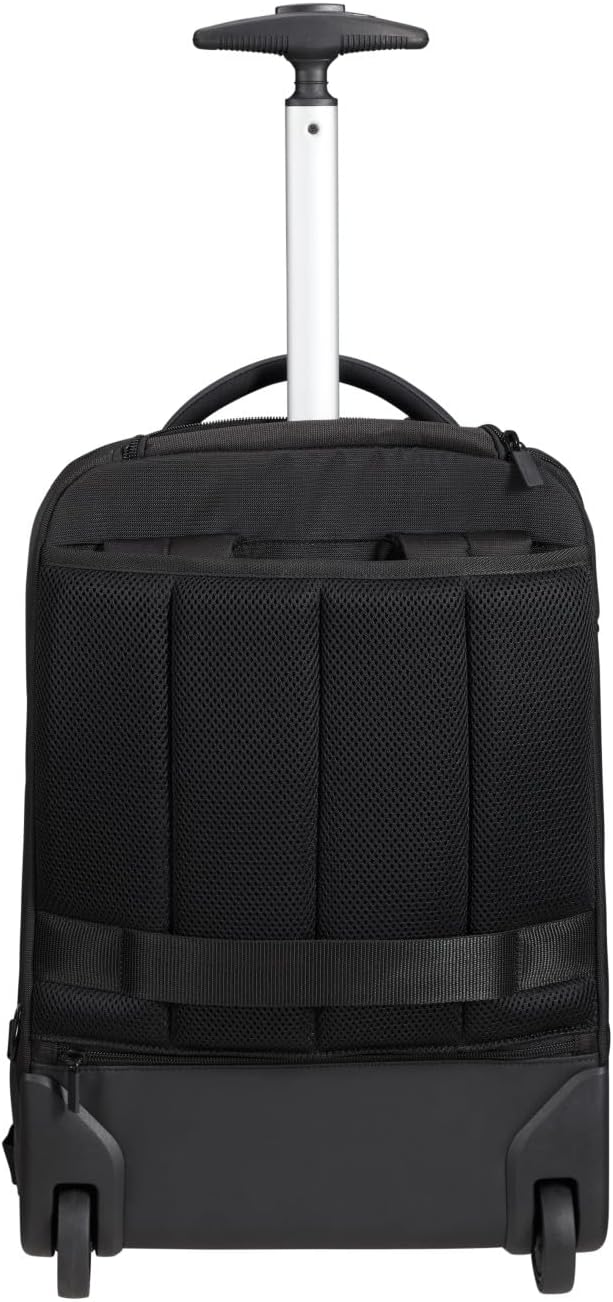
Figura 4: Indietro view of the backpack with shoulder straps.
3. Impostazione e configurazione
3.1. Converting to Wheeled Mode
- Locate the shoulder straps on the back of the backpack.
- Unhook the bottom buckles of the shoulder straps.
- Tuck the shoulder straps into the designated compartment behind the back panel.
- Unzip the top compartment where the trolley handle is stored.
- Press the button on the handle and extend it to your desired height.

Figure 5: Extended trolley handle for wheeled mode.

Figure 6: Backpack in wheeled configuration.
3.2. Converting to Backpack Mode
- Retract the trolley handle completely and secure it in its compartment. Zip the compartment closed.
- Pull out the hidden shoulder straps from their storage compartment.
- Attach the bottom buckles of the shoulder straps to the corresponding loops at the base of the backpack.
- Adjust the straps for a comfortable fit.
3.3. Using the Smart Sleeve
The integrated Smart Sleeve allows you to securely attach your backpack to the handle of a larger suitcase, making travel through airports or busy areas more convenient.
- Locate the horizontal strap on the back of the backpack.
- Slide the Smart Sleeve over the extended handle of your larger luggage.
- Ensure the backpack is stable and securely attached before moving.

Figure 7: Backpack attached to a suitcase via Smart Sleeve.
4. Funzionamento
4.1. Organizzazione dei contenuti
- Scomparto principale: Utilize the spacious main compartment for clothing or larger items.
- Laptop and Tablet Compartments: Secure your laptop (up to 17.3 inches) and tablet in their dedicated padded sleeves to protect them from impacts.
- Powerbank Pocket: Store your power bank in the designated pocket for easy access to the USB charging port.
- Detachable Pen Pouch: Use the removable pen pouch to keep your writing tools organized and easily accessible.
- Portabottiglie: The side pocket is ideal for carrying a water bottle or umbrella.

Figure 8: Main interior compartment.

Figure 9: Laptop and tablet compartments.
4.2. Using the Integrated USB Port
The backpack features an external USB port for convenient charging of your devices on the go.
- Place your charged power bank (not included) into the dedicated power bank pocket inside the backpack.
- Connect your power bank to the internal USB cable.
- Connect your device's charging cable to the external USB port on the side of the backpack.
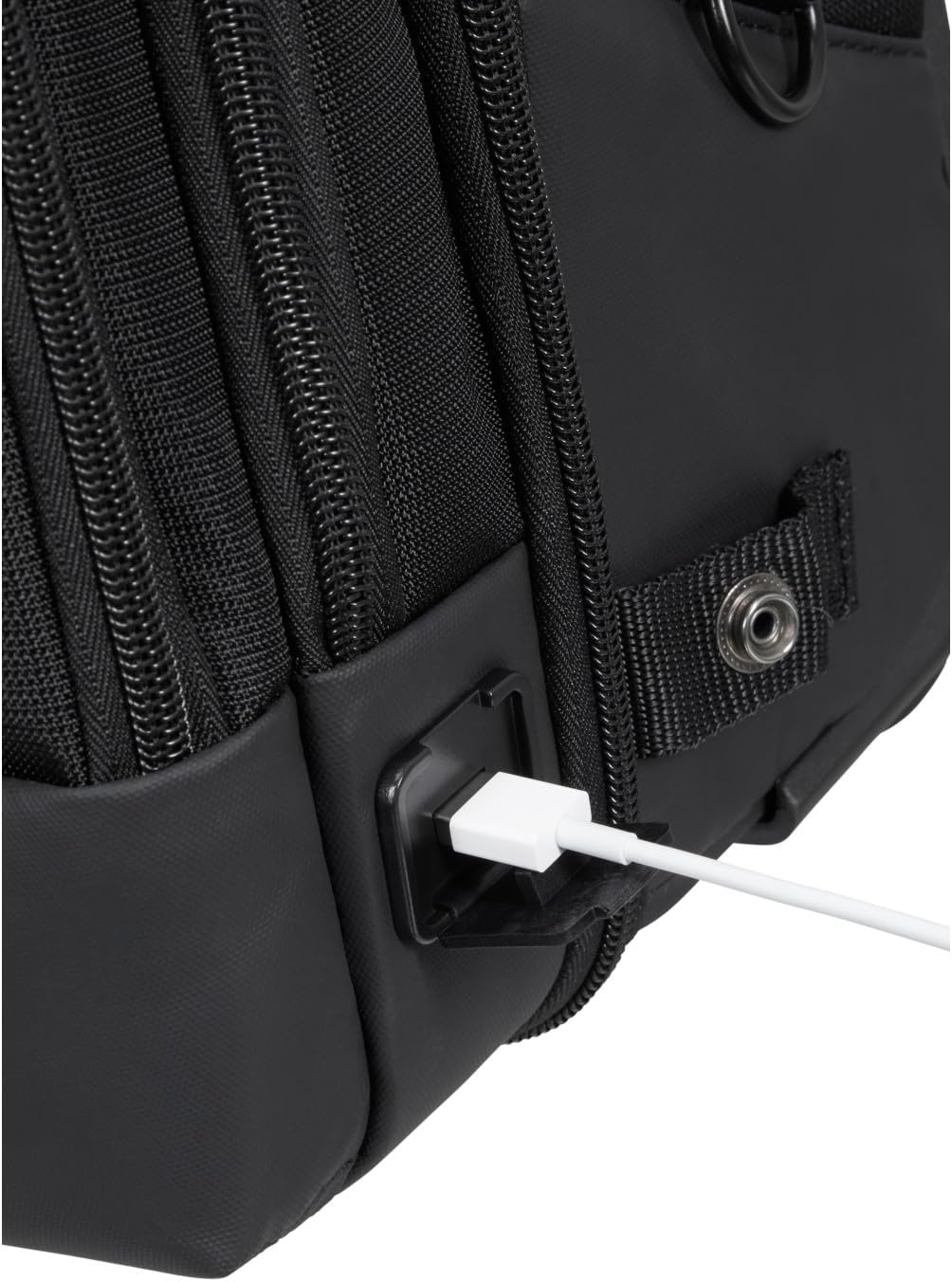
Figure 10: External USB charging port.
5. Manutenzione
- Pulizia: Per la pulizia generale, pulire l'esterno con un pannoamp panno e sapone neutro. Non lavare in lavatrice o asciugare in asciugatrice.
- Magazzinaggio: Quando non lo si utilizza, conservare lo zaino in un luogo fresco e asciutto, lontano dalla luce solare diretta.
- Cerniere: Periodically check zippers for smooth operation. If stiff, apply a small amount of zipper lubricant.
- Ruote: Per garantire un rotolamento fluido, tenere le ruote libere da detriti.
6. Risoluzione Dei Problemi
- Trolley Handle Stuck: Ensure the release button is fully depressed and there is no obstruction in the handle mechanism.
- Shoulder Straps Not Retracting/Extending: Check for any fabric caught in the storage compartment or mechanism.
- Porta USB non in carica: Verify that your power bank is charged and correctly connected to the internal cable, and that your device's cable is properly inserted into the external port.
7. Specifiche
| Caratteristica | Dettaglio |
|---|---|
| Numero di modello | 135073/1041 |
| Dimensioni (A x L x P) | 18.9 x 12.8 x 7.28 pollici (48 x 32.5 x 18.5 cm) |
| Peso | 5.28 libbre (2.4 kg) |
| Capacità | 25.5 litri |
| Compatibilità del computer portatile | Fino a 17.3 pollici |
| Materiale | PET riciclato |
8. Garanzia e supporto
For warranty information and customer support regarding your Samsonite Mysight Laptop Backpack, please refer to the official Samsonite website or contact their customer service directly. Warranty terms and conditions may vary by region and product.
Per ulteriore assistenza, visitare il sito Samsonite Store on Amazon.