
1. Prodotto finitoview
The Optoma X400LVe is a professional XGA projector designed for classrooms, meeting rooms, and training spaces. It delivers bright, clear images with 4,000 ANSI lumens and a 25,000:1 contrast ratio. Key features include flexible installation options, an integrated speaker, and a long lamp vita.
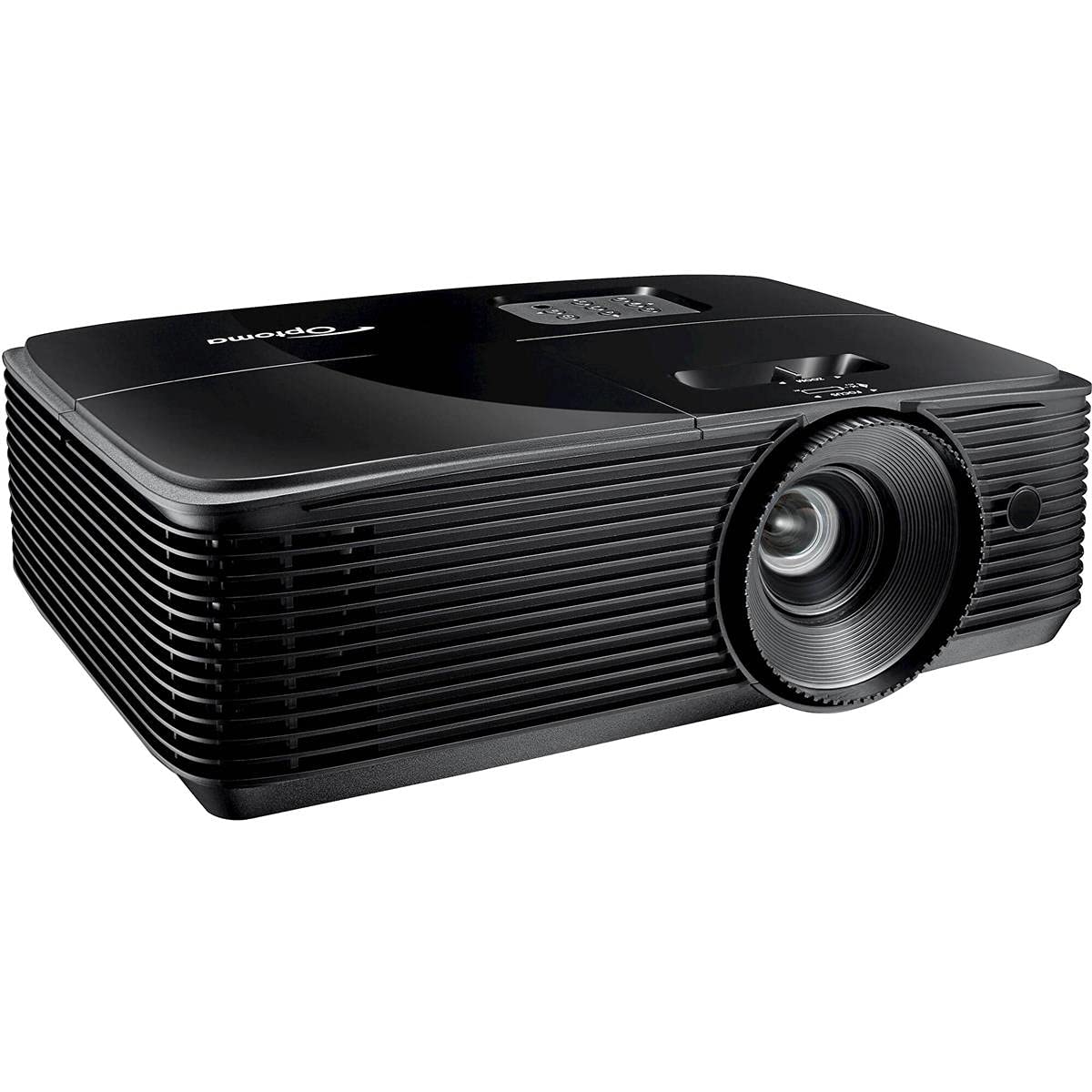
Figura 1: Fronte view of the Optoma X400LVe Projector.
Caratteristiche principali:
- Alta luminosità: 4,000 ANSI lumens for clear images in well-lit environments.
- Risoluzione XGA: Native 1024 x 768 resolution for sharp text and graphics.
- Alto rapporto di contrasto: 25,000:1 for vibrant colors and deep blacks.
- Connettività flessibile: HDMI v1.4a, VGA, Composite, Audio-in/out, USB-A, RS232.
- Lungo Lamp Vita: Up to 15,000 hours in Eco+ mode.
- Altoparlante integrato: 10-watt speaker for audio without external equipment.
- Configurazione semplice: Vertical keystone correction (±40°) and 1.1x zoom for flexible placement.
2. Configurazione e installazione
2.1 Disimballaggio del proiettore
Carefully remove the projector and all accessories from the packaging. Ensure all components listed in the packing list are present.
2.2 Posizionamento del proiettore
The Optoma X400LVe can be placed on a tabletop, mounted on the ceiling (front or rear projection), or used for front or rear projection. Consider the projection distance and screen size for optimal viewing.
- Distanza di proiezione: 3.9 feet to 46.9 feet.
- Dimensioni dello schermo di proiezione: 27.7 pollici a 304.4 pollici.

Figure 2: Optoma X400LVe dimensions and connectivity ports.
2.3 Collegamento dei dispositivi
Connect your source devices (laptops, media players, gaming consoles) to the projector using the appropriate ports. The projector offers a variety of input options:
- HDMI v1.4a: Per video e audio digitali.
- VGA (Input & Output): Per video analogico.
- Video composito: Per video in definizione standard.
- Ingresso audio (3.5 mm): Per ingresso audio esterno.
- Uscita audio (3.5 mm): Per il collegamento ad altoparlanti esterni.
- USB-A (5V / 1.0 Amp): For powering devices like streaming sticks.
- RS232: Per il controllo del proiettore tramite computer o sistema di controllo.

Figura 3: Pannello posteriore con porte di connettività.
2.4 Collegamento di alimentazione
Connect the power cord to the projector's AC input and then to a power outlet (AC input 100-240V, 50-60Hz).
3. Funzionamento del proiettore
3.1 Accensione/Spegnimento
- Accensione: Press the power button on the projector's control panel or the remote control.
- Spegni: Press the power button twice. The projector will enter cooling mode before shutting down completely.

Figure 4: Projector control panel and lens adjustments.
3.2 Regolazione dell'immagine
- Messa a fuoco: Ruotare l'anello di messa a fuoco sull'obiettivo finché l'immagine non risulta nitida.
- Ingrandisci: Adjust the zoom ring on the lens to change the image size.
- Correzione trapezoidale: Use the 'Keystone+' and 'Keystone-' buttons on the remote control or the projector's control panel to correct vertical image distortion (±40°).
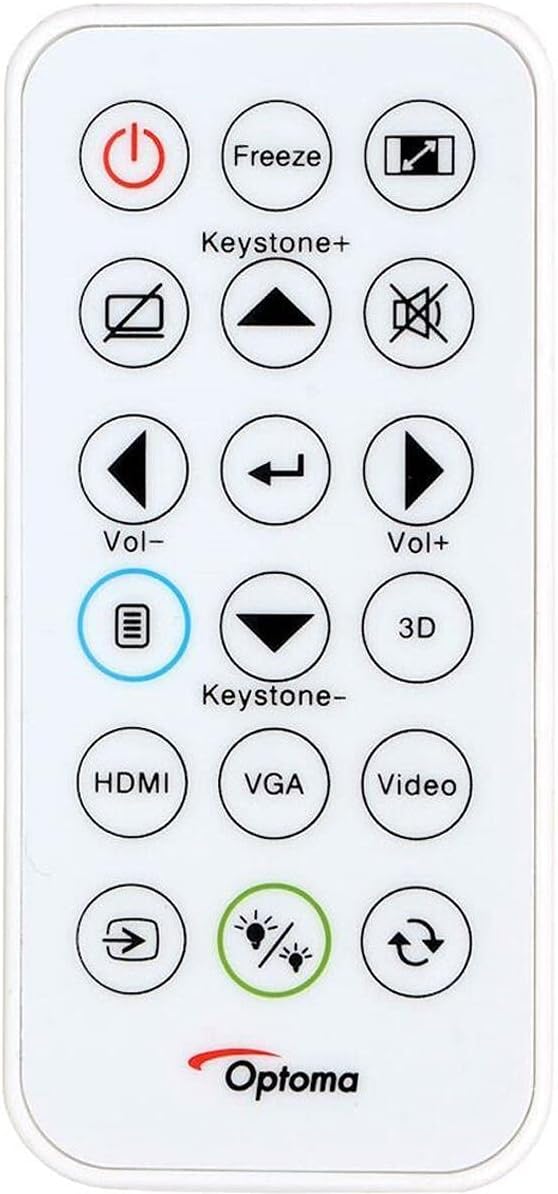
Figure 5: Remote control for the Optoma X400LVe Projector.
3.3 Selezione della sorgente di input
Press the 'Source' button on the remote control or projector to cycle through available input sources (HDMI, VGA, Composite). Dedicated input buttons may also be available on the remote.
3.4 Controllo audio
Adjust the volume using the 'Vol+' and 'Vol-' buttons on the remote control. The integrated 10-watt speaker provides sufficient audio for most environments.
4. Manutenzione
4.1 Lamp Vita
Il proiettore lamp has an estimated life of up to 15,000 hours in Eco+ mode. Actual lamp life may vary depending on usage and environmental conditions. Replace the lamp when its brightness significantly diminishes or if the lamp la spia luminosa si accende.

Figure 6: Eco+ mode for extended lamp vita.
4.2 Pulizia
- Lente: Use a soft, lint-free cloth and lens cleaning solution. Avoid abrasive materials.
- Casing: Pulisci il proiettore casing con un morbido, damp stoffa. Non utilizzare prodotti chimici aggressivi.
- Prese d'aria: Regularly clean the air vents to ensure proper airflow and prevent overheating.
5. Risoluzione Dei Problemi
5.1 Nessuna immagine visualizzata
- Assicurarsi che il proiettore sia acceso e che lamp è acceso.
- Verificare che la sorgente di input sia selezionata correttamente e che il dispositivo sorgente sia attivo.
- Controllare tutti i collegamenti dei cavi tra il proiettore e il dispositivo sorgente.
- Adjust focus and zoom settings.
5.2 L'immagine è distorta o sfocata
- Regolare la ghiera di messa a fuoco sull'obiettivo.
- Use keystone correction to fix trapezoidal distortion.
- Ensure the projector is placed on a stable, flat surface or securely mounted.
5.3 Surriscaldamento del proiettore
- Assicurarsi che le prese d'aria siano libere e non ostruite.
- Utilizzare il proiettore in un'area ben ventilata.
- If operating above 5,000 feet, manually switch to high-altitude mode (refer to the on-screen display menu).
5.4 Nessun audio
- Controllare il livello del volume sul proiettore e sul dispositivo sorgente.
- Ensure audio cables are correctly connected (if using analog audio-in).
- If using HDMI, verify the source device is sending audio through HDMI.
6. Specifiche tecniche
| Caratteristica | Specificazione |
|---|---|
| Marca | Optoma |
| Nome del modello | X400LVe |
| Tecnologia di visualizzazione | DLP |
| Risoluzione nativa | XGA (1024×768) |
| Risoluzione massima | UX GA (1600 x 1200) |
| Luminosità | 4000 ANSI Lumen |
| Rapporto di contrasto | 25,000:1 |
| Proporzioni | 4:3 (Native), 16:9 Compatible |
| Tipo di sorgente luminosa | 203 W ltamp |
| Vita della fonte di luce | 15,000/12,000/10,000/6,000 hours (Eco+/Dynamic/Eco/Bright) |
| Rapporto di lancio | 1.94 – 2.15:1 |
| Ingrandire | 1.1x Manuale |
| Correzione Keystone | ±40° Vertical |
| Altoparlante integrato | 10W |
| Connettività | HDMI v1.4a, VGA (in/out), Composite, Audio-in/out, USB-A (5V/1A), RS232 |
| Livello di rumore | 27 dB |
| Dimensioni (L x A x P) | Dimensioni: 12.4″ x 3.9″ x 9.6″ |
| Peso | 6.7 libbre |
| Alimentazione elettrica | AC input 100-240V, 50-60Hz |
| Funzionalità di sicurezza | Barra di sicurezza, blocco Kensington, protezione con password, blocco tastiera |
7. Garanzia e supporto
7.1 Informazioni sulla garanzia
The Optoma X400LVe projector comes with a Garanzia limitata di 1 anno su parti e manodoperaIl proiettore lamp is covered by a separate 90-day lamp garanziaSi prega di conservare la prova d'acquisto per eventuali reclami in garanzia.
7.2 Assistenza clienti
For technical assistance, troubleshooting, or warranty inquiries, please contact Optoma customer support. Visit the official Optoma websito per informazioni di contatto e risorse aggiuntive.