
1. Prodotto finitoview
The eufy Security Keypad T8960 is an integral component of your eufy home security system, designed to provide convenient arming and disarming capabilities. It operates wirelessly and requires a eufy Security HomeBase for full functionality.
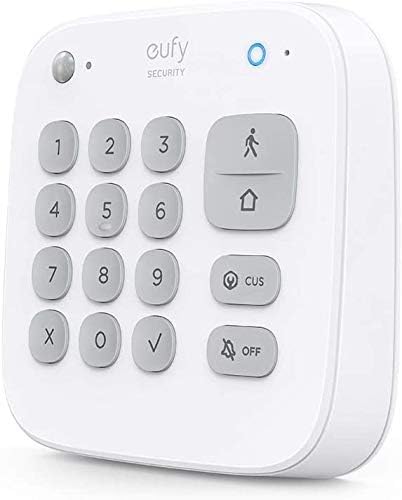
Immagine: Frontale view of the eufy Security Keypad T8960, showing the numeric keypad and mode buttons.
Contenuto della confezione:
- Tastiera di sicurezza eufy
- Manuale d'uso
- Biglietto di benvenuto
Note: A eufy Security HomeBase is required for the keypad to function and is not included with this product.

Image: Diagram illustrating the wireless connection between the eufy Security Keypad and a eufy Security HomeBase.
2. Configurazione e installazione
Opzioni di montaggio:
The eufy Security Keypad can be installed using either screws or the provided self-adhesive strips.
Fasi di installazione:
- Scegli una posizione: Select a convenient location near an entry point, ensuring it is within range of your eufy Security HomeBase.
- Preparare la superficie: Assicurarsi che la superficie di montaggio sia pulita e asciutta.
- Fissare la piastra di montaggio: If using adhesive, peel the backing from the adhesive strips on the mounting plate and firmly press it onto the desired surface. If using screws, mark the drill points, drill pilot holes, and secure the mounting plate with screws.
- Attach Keypad: Align the keypad with the mounting plate and slide it into place until it clicks securely.

Image: Two-part image showing the back of the keypad with adhesive strips being peeled, and then the keypad being mounted onto a wall.
Pairing with HomeBase:
Refer to the eufy Security App for detailed instructions on pairing the keypad with your HomeBase. The app will guide you through the process of adding new devices to your security system.
3. Istruzioni per l'uso
Inserimento e disinserimento:
To arm or disarm your security system, enter your designated password on the keypad. The system will respond instantly to your command.

Image: A person interacting with the eufy Security Keypad mounted on a wall, demonstrating quick arming or disarming.
Modalità di sicurezza:
The keypad supports preset modes such as 'Home' and 'Away'. When switching between these modes, a 30-second delay is provided to allow occupants to exit or enter the premises without triggering an immediate alarm.

Image: A person exiting a door, with a graphic overlay indicating a 30-second countdown for the security system to arm.
Custom Security Modes:
You can create and customize security modes through the eufy Security App. This allows you to define which sensors are active or inactive, and how the keypad functions within each custom mode, tailoring the system to your specific needs.

Image: A smartphone screen displaying the eufy Security App interface, showing options to create and edit custom security modes.
4. Manutenzione
Durata della batteria:
The keypad features a built-in Lithium Ion battery designed to provide up to 180 days of power on a single charge, ensuring continuous operation. When the battery level is low, the keypad will indicate this, and you should recharge it using the provided charging method (typically a micro-USB cable, not explicitly listed but standard for such devices).

Image: The eufy Security Keypad mounted on a wall, with text emphasizing its 180-day battery life.
Pulizia:
To clean the keypad, use a soft, dry cloth. Avoid using abrasive cleaners or solvents, as these can damage the device's surface.
5. Risoluzione Dei Problemi
If you encounter issues with your eufy Security Keypad, consider the following:
- Tastiera non reattiva: Ensure the keypad's battery is charged. Connect it to a power source and allow it to charge for a few hours.
- Problemi di connessione: Verify that your eufy Security HomeBase is powered on and connected to the internet. Ensure the keypad is within the operational range of the HomeBase.
- Codice di accesso errato: Double-check the passcode entered. If forgotten, reset it via the eufy Security App.
- Problemi di controllo delle app: Ensure your smartphone has an active internet connection and the eufy Security App is updated to the latest version.
For persistent issues, consult the eufy Security App's help section or the official eufy Security support websito per ulteriore assistenza.
6. Specifiche
| Marca | Sicurezza eufy |
| Numero di modello | T8960 |
| Colore | Bianco |
| Fonte di alimentazione | Alimentato a batteria |
| Tipo di batteria | 1 ione di litio (incluso) |
| Tipo di installazione | Screw-In, Self-Adhesive |
| Tipo di montaggio | Montaggio in superficie |
| Metodo di controllo | Applicazione |
| Peso dell'articolo | 1.38 libbre |
| Dimensioni del pacco | 7.36 x 6.69 x 3.15 pollici |
| Codice UPC | 194644064754 |
7. Garanzia e supporto
For information regarding product warranty, please refer to the documentation included with your purchase or visit the official eufy Security website. Support resources, including FAQs and contact options, are also available on the eufy Security websito.
Supporto online: www.eufylife.com/support