
1. Introduzione e oltreview
The CallToU Wireless Door/Window Sensor Chime (Model CC01-DS04) is a versatile security and alert system designed to notify you when a door or window is opened. It consists of a receiver unit and a magnetic sensor. When the magnetic sensor detects an opening, it wirelessly transmits a signal to the receiver, which then sounds an alarm or chime.
This system is suitable for various applications, including:
- Sicurezza domestica: Detects unauthorized entry through doors or windows.
- Sicurezza dei bambini: Alerts you if children open restricted doors or windows.
- Monitoraggio degli animali domestici: Notifies you if pets open doors or gates.
- Avviso al cliente: Functions as a welcome chime for retail stores or offices.

Figure 1: CallToU Wireless Door/Window Sensor Chime system overview.
2. Contenuto della confezione
Si prega di controllare il pacco per assicurarsi che siano presenti tutti gli articoli:
- 1 x unità di ricezione
- 1 x Magnetic Sensor (Transmitter)
- 1 x Manuale di istruzioni
- Mounting Accessories (Double-sided tape, screws)
- 1 x 12V 23A Alkaline Battery (pre-installed in transmitter)
3. Caratteristiche del prodotto
- Volume regolabile: 5 levels of volume adjustment, ranging from 0dB (silent) to 110dB.
- Melodie multiple: 55 selectable chime melodies.
- Indicatore LED: Visual alert with LED flashing.
- Gamma estesa: Up to 200 meters (650 feet) in open areas, and up to 80 meters (260 feet) indoors.
- Batteria a lunga durata: Magnetic sensor battery lasts for approximately 13,000 triggers (about 8 months with 50 uses per day).
- Installazione semplice: Wireless design with no complex wiring required.
- Sistema espandibile: One receiver can pair with up to 30 transmitter sensors.

Figure 2: Receiver features including 55 melodies and 5 volume levels.
4. Istruzioni per l'installazione
4.1 Componenti Oltreview
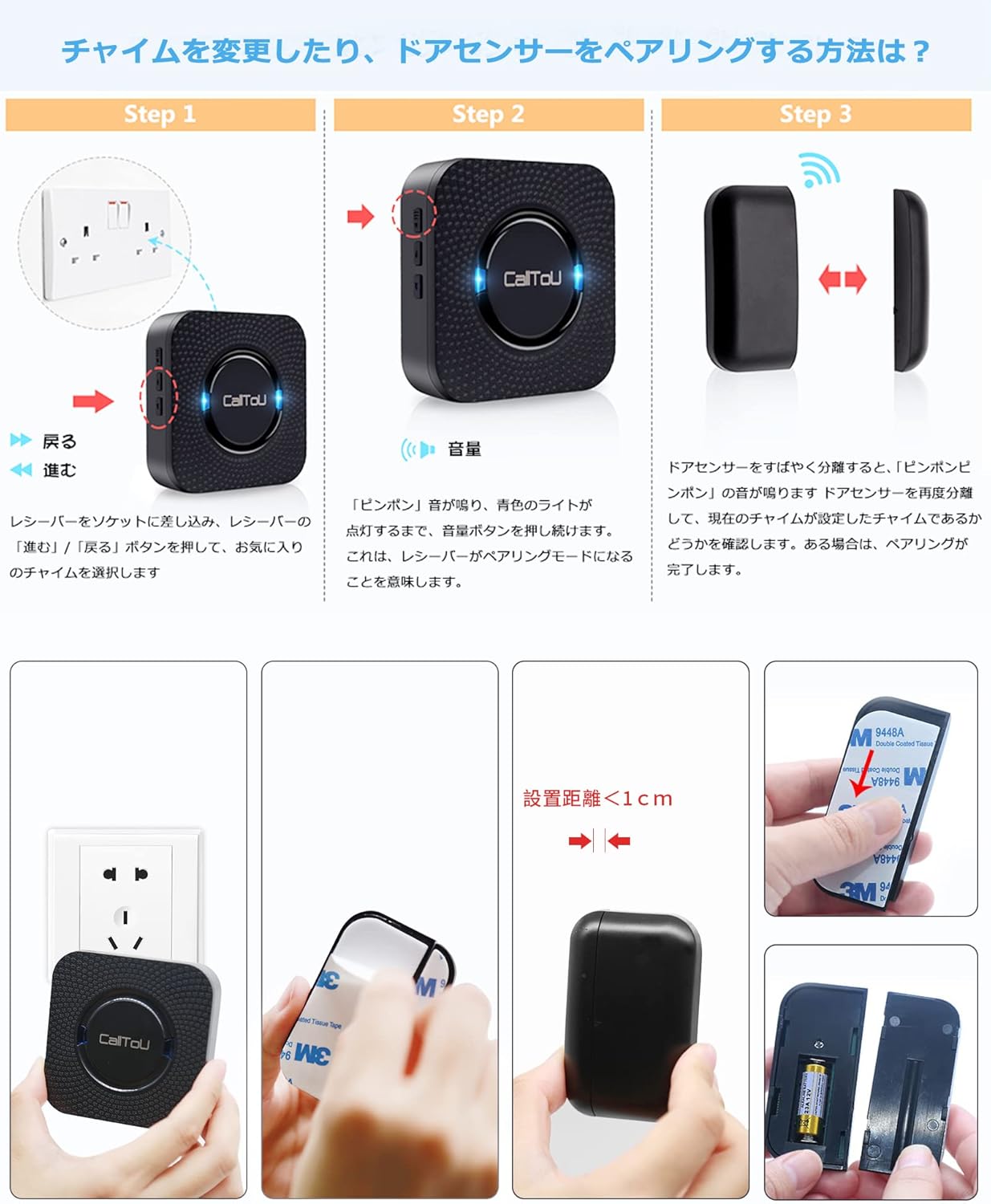
Figura 3: dettagliata view of receiver and magnetic sensor components.
4.2 Configurazione iniziale e associazione
- Accendere il ricevitore: Plug the receiver unit into a standard electrical outlet. The receiver will power on and be ready for pairing.
- Seleziona Melodia: Press the 'Up' or 'Down' buttons on the side of the receiver to cycle through the 55 available melodies. Select your preferred chime sound.
- Entra in modalità di associazione: Press and hold the volume button on the side of the receiver for approximately 5 seconds until you hear a "ding-dong" sound and the blue LED light flashes. This indicates the receiver is in pairing mode.
- Activate Magnetic Sensor: Separate the two parts of the magnetic sensor by more than 1.5 cm (0.6 inches). The receiver will emit the selected chime sound and its LED will flash, indicating successful pairing.
- Montare il sensore: Use the provided double-sided tape or screws to attach the magnetic sensor to your desired door or window frame. Ensure the two parts of the sensor are aligned and within 1.5 cm (0.6 inches) of each other when the door/window is closed.

Figure 4: Plug the receiver into an outlet.

Figure 5: Select your desired melody.

Figure 6: Enter pairing mode by holding the volume button.
Video 1: Demonstrates the door sensor setup method, including powering on, selecting a melody, entering pairing mode, and activating the magnetic sensor for successful pairing.

Figure 7: Proper installation of the magnetic sensor on a door or window.

Figure 8: Visual guide for the setup and pairing process.
5. Istruzioni per l'uso
- Attivazione dell'allarme: When the magnetic sensor's two parts separate (e.g., a door or window opens), the sensor will send a signal to the paired receiver.
- Avviso al destinatario: The receiver will sound the selected melody and its LED light will flash, alerting you to the opening.
- Regolazione del volume: Press the volume button on the receiver to adjust the sound level through 5 different settings.
- Selezione della melodia: Use the 'Up' and 'Down' buttons on the receiver to change the chime melody.

Figura 9: Esamples of how the door sensor chime can be used in different scenarios.
6. Manutenzione
6.1 Battery Replacement (Magnetic Sensor)
The magnetic sensor is powered by a 12V 23A alkaline battery. When the battery is low, the sensor's indicator light may flash or the transmission range may decrease. Replace the battery as follows:
- Carefully pry open the magnetic sensor casing using a small screwdriver.
- Rimuovere la vecchia batteria da 12V 23A.
- Inserire una nuova batteria alcalina da 12 V 23 A, assicurandosi della corretta polarità.
- Chiudere il sensore casing in modo sicuro.
Video 2: Detailed instructions on how to replace the battery in the door sensor.

Figure 10: Visual guide for magnetic sensor battery replacement.
6.2 Pulizia
Pulire le unità con un panno morbido e asciutto. Non utilizzare detergenti abrasivi o solventi.
7. Risoluzione Dei Problemi
| Problema | Possibile causa | Soluzione |
|---|---|---|
| Il ricevitore non emette un segnale acustico quando il sensore viene attivato. | 1. Sensor and receiver are not paired. 2. Sensor battery is low or dead. 3. Sensor and receiver are out of range. 4. Obstructions between sensor and receiver. | 1. Re-pair the sensor and receiver (refer to Section 4.2). 2. Replace the sensor battery (refer to Section 6.1). 3. Move the receiver closer to the sensor. 4. Reduce obstructions or reposition units. |
| Il suono del campanello è troppo basso o troppo alto. | L'impostazione del volume non è corretta. | Regolare il volume utilizzando il pulsante del volume sul ricevitore. |
| Falsi allarmi. | Magnetic sensor parts are too far apart or misaligned. | Ensure the magnetic sensor parts are within 1.5 cm (0.6 inches) when the door/window is closed and are properly aligned. |
8. Specifiche
- Marca: Chiamata all'utente
- Modello: CC01-DS04
- Colore: Nero
- Dimensioni del ricevitore: 8.17 x 8.17 x 3 cm (circa 3.22 x 3.22 x 1.18 pollici)
- Magnetic Sensor Dimensions: 9.5 x 9 x 9 cm (overall product dimension, specific sensor dimensions not provided but implied to be smaller)
- Fonte di energia: Receiver: AC Plug-in; Transmitter: 1 x 12V 23A Alkaline Battery (included)
- Portata wireless: Up to 200 meters (650 feet) outdoors (line of sight), up to 80 meters (260 feet) indoors
- Livelli del volume: 5 (0-110 dB)
- Melodie: 55 selezionabili
- Tecnologia dei sensori: Sensore di contatto (magnetico)
- Codice UPC: 779584902443

Figura 11: Dimensioni del prodotto.
9. Garanzia e supporto
This CallToU product comes with a Garanzia di qualità di 1 anni. If you encounter any issues or have questions regarding the product during use, please contact CallToU customer support through Amazon's order details page. We are committed to providing prompt assistance and replacements if necessary.
For further assistance, please refer to the contact information provided with your purchase or visit the official CallToU brand store on Amazon.


