
1. Prodotto finitoview
The KAIDI KD-763 is a wired gaming headset designed for use with the PlayStation 4 (PS4) console and other compatible devices with a 3.5mm audio jack. It features over-ear cups for immersive sound, a rotary microphone for clear communication, and an inline volume control for convenient audio adjustments. The headset also includes an LED lighting effect, typically powered via a USB connection.
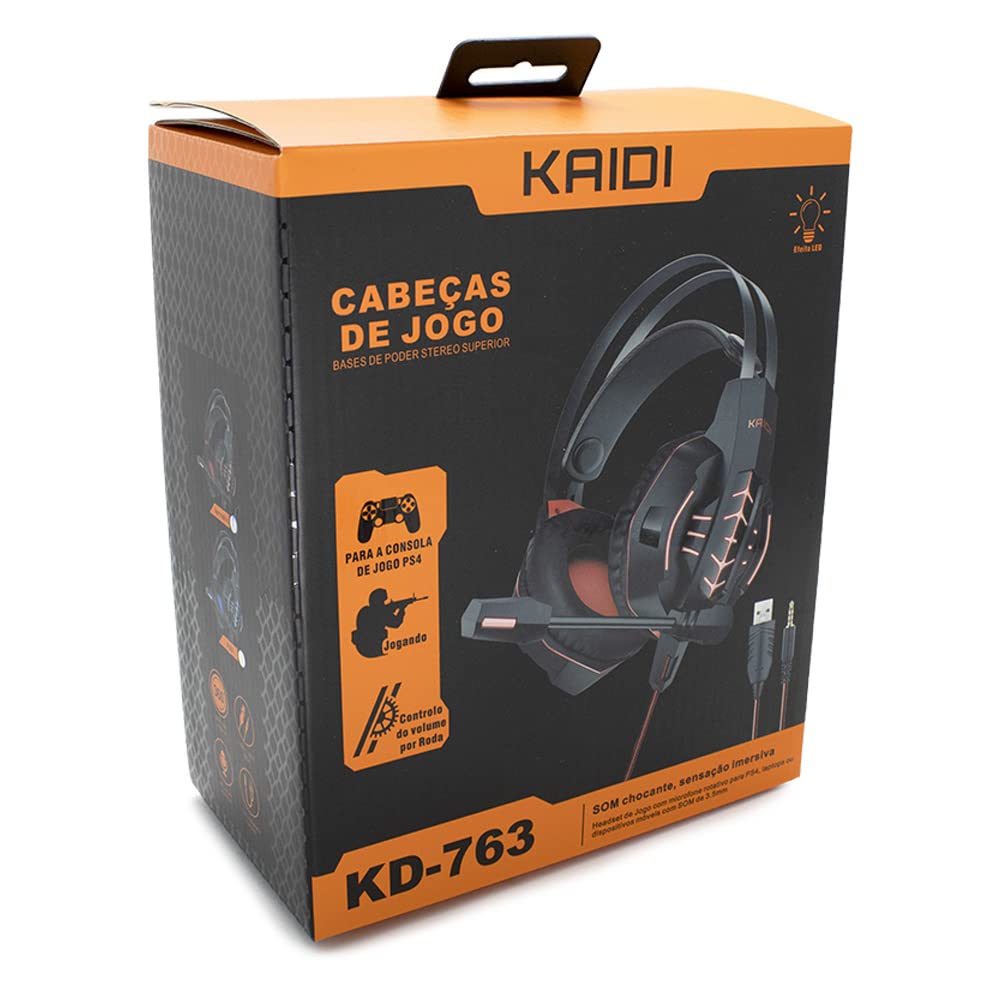
Figura 1.1: The KAIDI KD-763 PS4 Gaming Headset packaging, showing the headset, its features, and compatibility with PS4.
2. Informazioni sulla sicurezza
- Evitare l'ascolto prolungato ad alto volume per prevenire danni all'udito.
- Non esporre l'auricolare a temperature estreme, umidità o luce solare diretta.
- Tenere le cuffie lontano dall'acqua e da altri liquidi.
- Non tentare di smontare o modificare le cuffie. Ciò potrebbe invalidare la garanzia e causare danni.
- Pulire le cuffie esclusivamente con un panno morbido e asciutto.
- Tenere fuori dalla portata dei bambini.
3. Contenuto della confezione
Si prega di controllare il contenuto della confezione all'apertura. Se qualche articolo risulta mancante o danneggiato, contattare il rivenditore.
- KAIDI KD-763 Gaming Headset
- Manuale dell'utente (questo documento)
4. Guida all'installazione
- Connect to PS4 Controller: Locate the 3.5mm audio jack on your PS4 controller. Insert the 3.5mm connector from the KD-763 headset firmly into this port.
- Powering LED Lights (Optional): If your headset features LED lighting, connect the USB connector from the headset to an available USB port on your PS4 console or a compatible USB power adapter. The LED lights will illuminate once connected.
- Regola la vestibilità dell'auricolare: Extend or retract the headband to ensure the earcups sit comfortably and securely over your ears. The over-ear design should fully enclose your ears for optimal sound isolation.
- Posizione del microfono: Adjust the flexible rotary microphone boom to a position near your mouth for clear voice pickup. Ensure it is not obstructing your vision.
- Configure PS4 Audio Settings:
- Vai a Impostazioni > Dispositivi > Dispositivi audio on your PS4.
- Impostato Dispositivo di input to "Headset (Controller)".
- Impostato Dispositivo di uscita to "Headset (Controller)".
- Impostato Uscita per cuffie to "All Audio" for full game and chat sound.
- Regolare Controllo del volume (cuffie) a un livello confortevole.
5. Istruzioni per l'uso
5.1. Controllo del volume
The KD-763 headset features an inline volume control wheel located on the cable. Rotate the wheel upwards to increase the volume and downwards to decrease it. Adjust to a comfortable listening level.
5.2. Utilizzo del microfono
The microphone is designed to capture your voice clearly. Ensure it is positioned correctly near your mouth. If your PS4 audio settings are configured correctly, your voice will be transmitted to other players in online games or chat parties.
To mute the microphone, check if there is a physical mute switch on the inline control. If not, you can mute the microphone through your PS4's quick menu (hold the PS button on your controller).
6. Manutenzione
- Pulizia: Utilizzare un panno morbido, asciutto e privo di lanugine per pulire i padiglioni auricolari e l'archetto. Non utilizzare detergenti liquidi o materiali abrasivi.
- Magazzinaggio: When not in use, store the headset in a clean, dry place, away from direct sunlight and extreme temperatures. Avoid tangling the cable.
- Cura del cavo: Do not pull on the cable to disconnect the headset. Always grasp the plug. Avoid bending or twisting the cable excessively.
7. Risoluzione Dei Problemi
- Nessun suono o volume basso:
- Assicurati che il jack da 3.5 mm sia completamente inserito nel controller PS4.
- Check the inline volume control wheel on the headset cable and turn it up.
- Verify PS4 audio settings (Impostazioni > Dispositivi > Dispositivi audio) are correctly configured for the headset.
- Prova l'auricolare con un altro dispositivo (ad esempio uno smartphone) per escludere un problema con l'auricolare.
- Il microfono non funziona:
- Assicurarsi che il braccio del microfono sia posizionato correttamente.
- Check PS4 audio settings (Impostazioni > Dispositivi > Dispositivi audio) to ensure Dispositivo di input is set to "Headset (Controller)".
- Confirm the microphone is not muted via an inline switch or the PS4 quick menu.
- Test the microphone with another application or device if possible.
- Le luci LED non funzionano:
- Ensure the USB connector is firmly plugged into a powered USB port.
- Prova un'altra porta USB.
8. Specifiche
| Marca: | KAIDI |
| Modello: | Modello KD-763 |
| Tipo di cuffia: | Over-ear (Circumaurais) |
| Impedenza: | 32 Ohm |
| Sensibilità: | 110 dB |
| Connettività: | Cablato (jack audio da 3.5 mm + USB per LED) |
| Dispositivi compatibili: | Gaming Consoles (e.g., PS4), devices with 3.5mm audio jack |
| Uso specifico: | Gioco d'azzardo |
| Tipo di controllo: | Inline Volume Control Wheel |
| Microfono: | Rotary/Swivel |
| Effetto LED: | Yes (USB powered) |
9. Garanzia e supporto
KAIDI products are designed and manufactured to the highest quality standards. For information regarding warranty coverage, terms, and conditions, please refer to the warranty card included with your purchase or visit the official KAIDI websito.
For technical support, troubleshooting assistance, or to inquire about replacement parts, please contact KAIDI customer service through their official channels. Contact information can typically be found on the product packaging or the official KAIDI websito.