
1. Introduzione
This instruction manual provides essential information for the safe and effective use of your Sans HEPA 13 Air Purifier. Please read this manual thoroughly before operating the device and retain it for future reference. Your Sans Air Purifier is designed to improve indoor air quality by filtering out various airborne particles and odors, contributing to a healthier living environment.
2. Informazioni importanti sulla sicurezza
- Always unplug the air purifier before cleaning, performing maintenance, or when not in use.
- Do not operate the device with a damaged cord or plug. If the cord or plug is damaged, contact customer support.
- Keep the air purifier away from water or wet surfaces. Do not immerse the device in water or other liquids.
- Assicurare una ventilazione adeguata attorno al dispositivo. Non ostruire le prese d'aria o le uscite.
- Non inserire alcun oggetto nelle prese d'aria.
- Questo apparecchio non è destinato all'uso da parte di persone (bambini compresi) con ridotte capacità fisiche, sensoriali o mentali, o prive di esperienza e conoscenza, a meno che non siano supervisionate o abbiano ricevuto istruzioni riguardanti l'uso dell'apparecchio da una persona responsabile della loro sicurezza.
- I bambini devono essere sorvegliati per assicurarsi che non giochino con l'apparecchio.
3. Prodotto finitoview
The Sans HEPA 13 Air Purifier is engineered to deliver clean air efficiently and quietly. It features a multi-stage filtration system and smart technology for optimal performance.
Caratteristiche principali:
- Copertura: Cleans air in spaces up to 1560 sq. ft. per hour.
- Multi-Stage Filtrazione: Includes a pre-filter, medical-grade HEPA 13 filter, activated carbon filter, and internal UV-C light.
- Rimozione delle particelle: Removes over 99.9% of particles down to 0.1 microns, including pollutants, allergens, dust, dander, harmful chemicals, gases, and odors.
- Tecnologia intelligente: Equipped with precise sensors to measure air quality (AQI) and automatically adjust fan settings.
- Air Quality Display: Easy-to-read display provides real-time insight into your space's air quality.
- Whisper Quiet Sleep Mode: Operates silently and turns off display lights for undisturbed sleep.

Figure 3.1: Sans HEPA 13 Air Purifier with packaging.
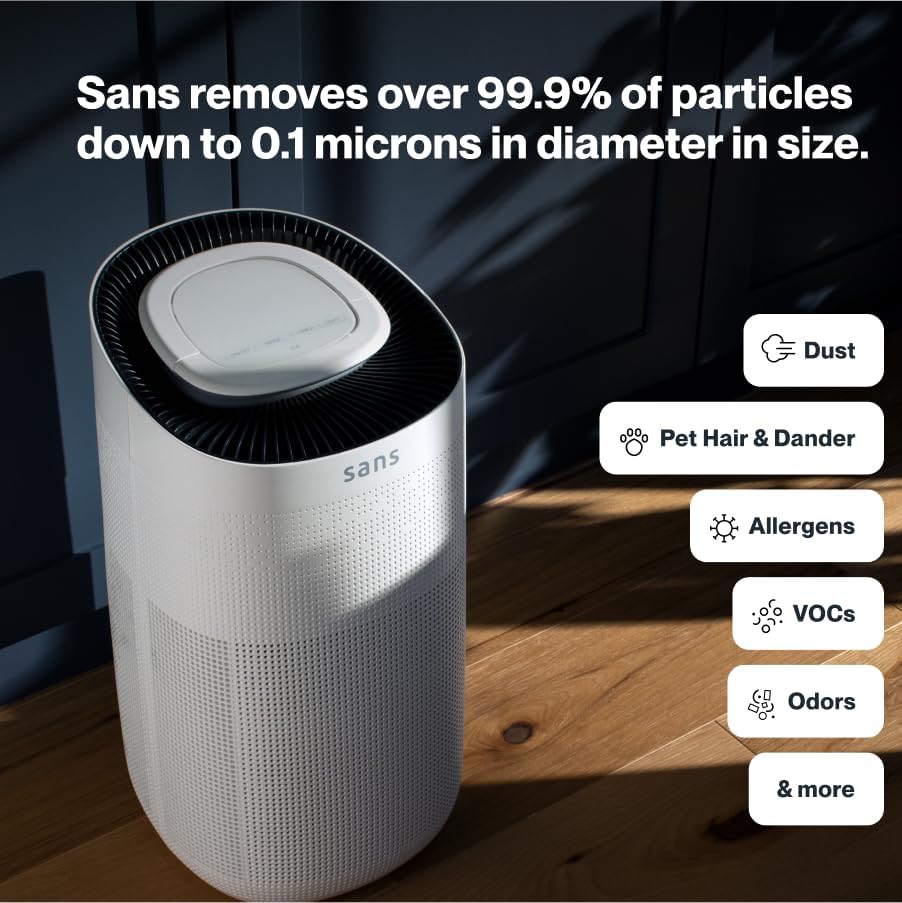
Figure 3.2: Illustration of the air purifier's effectiveness against various airborne particles.
Sistema di filtraggio:
The Sans Air Purifier utilizes a comprehensive four-stage processo di filtrazione:
- Pre filtro: Captures larger particles such as dust, pet hair, and dander.
- Filtro HEPA-13: A medical-grade filter that traps smoke, ash, PM2.5, and PM10 particles.
- Filtro a carbone attivo: Neutralizes chemicals, odors, and gases.
- Internal UV-C Light: Acts as a final layer of defense against airborne pathogens.
4. Impostazione
- Disimballare: Estrarre con cautela il purificatore d'aria dalla confezione.
- Installazione del filtro: Ensure all filters are correctly installed and any protective packaging is removed. Refer to Section 6: Maintenance for detailed filter replacement instructions.
- Posizionamento: Place the air purifier on a flat, stable surface, ensuring adequate space (at least 6 inches) around all sides for optimal airflow. Avoid placing it directly against walls or furniture.
- Collegamento elettrico: Collegare il cavo di alimentazione a una presa elettrica standard.

Figure 4.1: Proper placement of the air purifier in a living space.
5. Istruzioni per l'uso
The control panel on top of the air purifier allows for easy operation and monitoring.

Figure 5.1: Control panel with SmartPure Display and buttons.
Funzioni del pannello di controllo:
- Pulsante di accensione (⏻): Premere per accendere o spegnere l'unità.
- Pulsante Modalità (⏚): Cycles through fan speeds (Low, Medium, High) and Auto Mode.
- Sensor Mode (⌕): Displays PM2.5 or VOC levels.
- Pulsante Timer (◷): Sets the operating time (e.g., 2H, 4H, 8H).
- Pulsante luce (💡): Turns the ambient light On or Off.
- Modalità risparmio: Activates quiet operation and turns off display lights for minimal disturbance.
Indicatore della qualità dell'aria:
The ambient light ring and digital display provide real-time air quality feedback:
- Luce blu: Indicates clean air.
- Red/Purple Light: Indicates dirty air, and the unit will increase fan speed in Auto Mode to clean the air.
- Display digitale: Shows the Air Quality Index (AQI) or specific pollutant levels (PM2.5, VOC). Lower numbers indicate cleaner air.
Video 5.1: Demonstration of Sans Air Purifier features and operation, including fan speed and air quality indicator.
6. Manutenzione
Regular maintenance ensures optimal performance and longevity of your Sans Air Purifier.
Sostituzione del filtro:
The Sans filter is designed for approximately three months of continuous use (24/7). A light on the control panel will illuminate to indicate when the filter needs to be changed.
- Spegni: Scollegare il purificatore d'aria dalla presa di corrente.
- Filtro di accesso: Press down on the release button on the back of the machine to open the filter compartment cover.
- Rimuovi il vecchio filtro: Gently pull out the used filter.
- Inserisci nuovo filtro: Place the new Sans filter into the compartment, ensuring it is seated correctly.
- Chiudi scomparto: Reattach the filter compartment cover until it clicks securely into place.
- Reimposta indicatore filtro: After replacing the filter, press and hold the filter reset button (usually indicated by a filter icon) on the control panel for 3-5 seconds until the indicator light turns off.
Video 6.1: Step-by-step guide on how to change the Sans Air Purifier filter.
Pulizia dell'esterno:
Pulire l'esterno del purificatore d'aria con un panno morbido e asciutto. Non utilizzare detergenti abrasivi o solventi.
7. Risoluzione Dei Problemi
If you encounter any issues with your Sans Air Purifier, refer to the following common problems and solutions:
| Problema | Possibile causa | Soluzione |
|---|---|---|
| L'unità non si accende. | Cavo di alimentazione non collegato correttamente; nessuna corrente dalla presa. | Controllare il collegamento del cavo di alimentazione; provare una presa diversa. |
| Il flusso d'aria è debole o rumoroso. | Filter is dirty or blocked; air inlets/outlets are obstructed. | Replace the filter (see Section 6); ensure no obstructions around the unit. |
| Air quality reading (AQI) is consistently high. | High levels of pollutants in the environment; sensor is dirty. | Ensure the unit is running in Auto or High mode; clean the air quality sensor (refer to manufacturer's guide for sensor location). |
| L'indicatore di sostituzione del filtro rimane acceso dopo aver sostituito il filtro. | Indicatore del filtro non reimpostato. | Press and hold the filter reset button for 3-5 seconds. |
If the problem persists after attempting these solutions, please contact Sans customer support.
8. Specifiche
- Marca: Senza
- Modello: HEPA 13 Air Purifier
- Colore: Bianco
- Dimensioni del prodotto: 10"P x 11.5"L x 20"A (10 x 11.5 x 20 pollici)
- Peso: 14 libbre
- Copertura dell'area del pavimento: 1560 Square Feet (per hour)
- Certificazioni: Certificato CARB, certificato ETL, certificato FCC
- Primo disponibile: 5 gennaio 2021
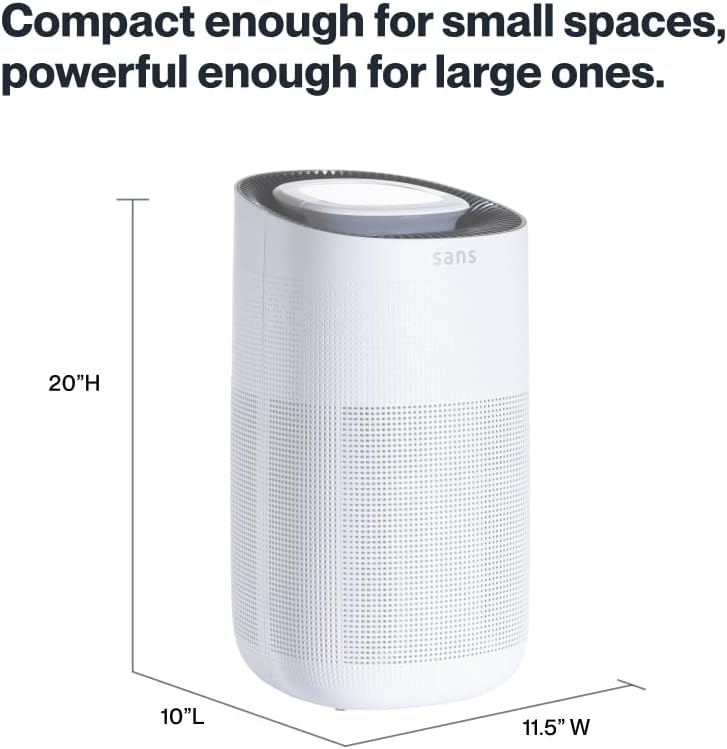
Figure 8.1: Sans Air Purifier dimensions.
9. Garanzia e supporto
For warranty information, product support, or to purchase replacement filters, please visit the official Sans Home Wellness website or contact their customer service directly. Details regarding available protection plans can also be found through authorized retailers.