
Introduzione
This manual provides essential information for the proper installation, operation, and maintenance of your Zebronics Zeb-D370S DVD Player. Please read this manual thoroughly before using the device to ensure safe and efficient operation. Keep this manual for future reference.
Informazioni importanti sulla sicurezza
- Non esporre il dispositivo alla pioggia o all'umidità per evitare incendi o scosse elettriche.
- Non aprire il casing. Affidare tutti gli interventi di manutenzione a personale qualificato.
- Assicurare una ventilazione adeguata attorno all'unità. Non ostruire le aperture di ventilazione.
- Use only the power adapter supplied with the unit or specified by the manufacturer.
- Evitare di posizionare l'unità su superfici instabili.
- Scollegare il cavo di alimentazione durante i temporali o quando non si utilizza l'apparecchio per lunghi periodi.
Contenuto della confezione
Verificare che tutti gli articoli siano presenti nel pacco:
- Zebronics Zeb-D370S DVD Player Unit
- Telecomando
- cavo AV
- Cavo di alimentazione
- Manuale di istruzioni
Prodotto finitoview
The Zebronics Zeb-D370S is a versatile DVD player featuring a built-in stereo speaker and amplifier, HDMI, USB, and SD card support, and dual karaoke microphone inputs. It supports multiple formats and offers 5.1 channel, coaxial, and optical audio outputs.
Controlli e porte del pannello frontale
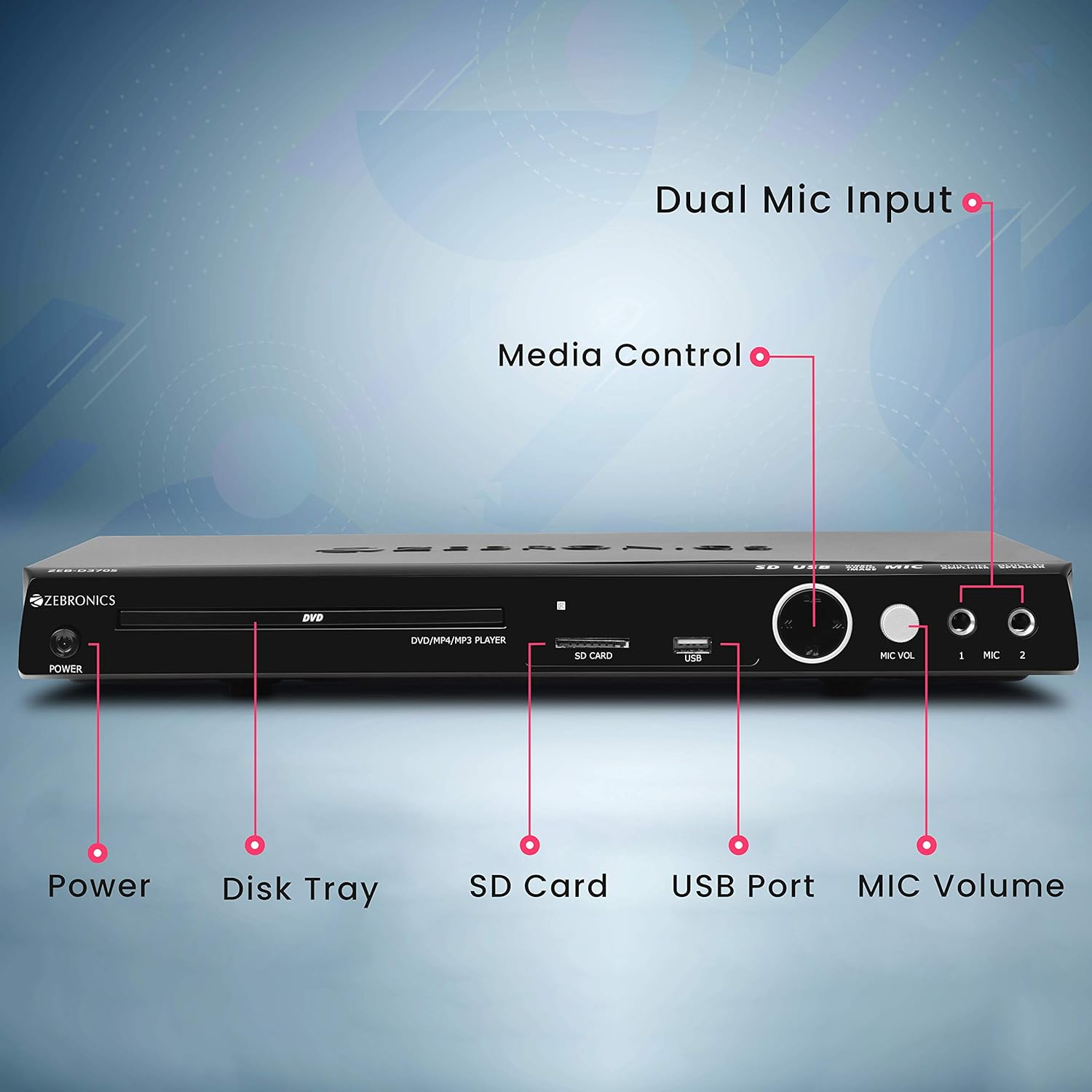
Front panel of the Zebronics Zeb-D370S DVD Player, showing the Power button, Disk Tray, SD Card slot, USB Port, MIC Volume control, and two Microphone inputs (MIC 1, MIC 2).
- Pulsante di accensione: Accende o spegne l'unità.
- Disk Tray: For inserting DVDs, CDs, VCDs, and SVCDs.
- Slot per scheda SD: Per la riproduzione di contenuti multimediali files da una scheda SD.
- Porta USB: Per la riproduzione di contenuti multimediali files da un'unità USB.
- Volume MIC: Regola il volume dei microfoni collegati.
- MIC 1 & MIC 2: Inputs for connecting microphones for karaoke.
- Pulsanti di controllo multimediale: Play/Pause, Stop, Skip, etc.
Collegamenti del pannello posteriore

Rear panel of the Zebronics Zeb-D370S DVD Player, detailing the Coaxial Output, Optical Output, 5.1 Channel Output, HDMI port, Composite video output, Component video output, S-Video output, and Ext-Audio Output.
- Uscita HDMI: For high-definition video and audio connection to a TV or display.
- Uscita video composito: Uscita video a definizione standard.
- Uscita video componente: Higher quality analog video output (YPbPr).
- Uscita S-Video: Improved analog video output.
- Digital Audio Output (Optical & Coaxial): For connecting to external audio receivers or sound systems.
- Analog 5.1 Channel Output: For connecting to a 5.1 channel speaker system.
- Ext-Audio Output: Additional audio output connections.
- Uscita altoparlante: Terminals for connecting external speakers, utilizing the built-in amppiù vivace.

Posteriore view of the Zebronics Zeb-D370S DVD Player highlighting the built-in amplifier, built-in speaker, and speaker output terminals.
Istruzioni di installazione
1. Collegamento elettrico
- Ensure the DVD player is placed on a stable, flat surface with adequate ventilation.
- Connect the power cable to the AC input on the rear of the DVD player.
- Plug the other end of the power cable into a standard electrical outlet (110V - 260V AC).
2. Video Connection to TV/Display
Scegli uno dei seguenti metodi di connessione:
- HDMI (consigliato per la migliore qualità): Connect an HDMI cable from the HDMI output on the DVD player to an HDMI input on your TV.
- Video componente: Connect component video cables (Red, Green, Blue) from the DVD player's component outputs to the corresponding inputs on your TV.
- Video composito: Connect a composite video cable (Yellow) from the DVD player's composite output to the yellow video input on your TV.
- Video S: Connect an S-Video cable from the DVD player's S-Video output to the S-Video input on your TV.
3. Collegamento audio
Scegli uno dei seguenti metodi di connessione audio:
- HDMI: If using HDMI for video, audio will also be transmitted via the HDMI cable.
- 5.1 Channel Analog Output: Connect RCA cables from the 5.1 channel outputs (Front Left, Front Right, Center, Subwoofer, Surround Left, Surround Right) on the DVD player to a compatible 5.1 channel amplificatore o sistema di altoparlanti.
- Audio digitale (ottico/coassiale): Connect an optical or coaxial cable from the respective output on the DVD player to a digital audio input on your amplifier or home theater system for surround sound.
- Uscita altoparlante integrata: If using the built-in speakers, ensure no external speakers are connected to the 5.1 channel outputs unless desired.
4. Collegamento del microfono (facoltativo)
- Plug your microphones into the MIC 1 and/or MIC 2 inputs on the front panel.
- Adjust the MIC Volume knob to control microphone audio levels.
Istruzioni per l'uso

Zebronics Zeb-D370S DVD Player with a disc inserted, remote control, and a visual representation of content playing on a screen, illustrating its multimedia capabilities.
1. Riproduzione del disco
- Premere il tasto Energia pulsante per accendere il lettore DVD.
- Premere il tasto Apri/Chiudi button (usually on the remote or front panel) to open the disc tray.
- Place a compatible disc (DVD Video, DVD+RW/-RW/+R/-R, Dual Layer Disc, CD Audio, CD-R/-RW, VCD, SVCD) onto the disc tray with the label side facing up.
- Premere il tasto Apri/Chiudi button again to close the tray. The player will automatically begin playback or display a menu.
- Use the remote control for playback functions such as Play, Pause, Stop, Fast Forward, Rewind, and Chapter Skip.
2. USB/SD Media Playback
- Insert a USB drive into the USB port or an SD card into the SD card slot on the front panel.
- The player should automatically detect the media and display a menu to browse files. If not, select the USB or SD source using the remote control's Fonte or Ingresso pulsante.
- Naviga attraverso il tuo files (VOB, MP4, DIVX, AVI, MPEG-1, MPEG-2, 3GP, MP3, WMA, AAC, JPEG, TXT) using the remote control and press Giocare per avviare la riproduzione.
3. Funzione Karaoke
- Connect one or two microphones to the MIC 1 and MIC 2 inputs.
- Play a karaoke disc or a media file with instrumental tracks.
- Adjust the MIC Volume knob on the front panel to control the microphone audio level.
4. Funzioni avanzate
- Estrazione CD: Convert audio CDs to digital formats (refer to on-screen menu for options).
- Picture Slideshow: View JPEG images from disc, USB, or SD card as a slideshow.
- Scansione progressiva: Provides a smoother, flicker-free image on compatible displays.
- Zoom IN/OUT: Magnify or reduce the displayed image during playback.
- High Speed Search: Quickly scan through disc or media content.
- Blocco genitori: Restrict playback of certain content based on ratings.
- Replay istantaneo: Torna indietro di qualche secondo durante la riproduzione.
- Disc Resume: Resume playback from where it was last stopped on a disc.
Manutenzione
- Pulizia dell'unità: Use a soft, dry cloth to clean the exterior of the DVD player. Do not use liquid cleaners or abrasive materials.
- Cura del disco: Maneggiare i dischi tenendoli per i bordi. Mantenerli puliti e privi di graffi. Utilizzare un panno morbido e privo di lanugine per pulire i dischi dal centro verso l'esterno.
- Ventilazione: Assicurarsi che le aperture di ventilazione non siano bloccate per evitare il surriscaldamento.
Risoluzione dei problemi
If you encounter issues with your DVD player, refer to the table below for common problems and solutions:
| Problema | Possibile causa | Soluzione |
|---|---|---|
| Nessun potere | Cavo di alimentazione non collegato; presa di corrente non funzionante | Controllare il collegamento del cavo di alimentazione; provare una presa diversa |
| Nessuna uscita video | Incorrect video cable connection; Incorrect input selected on TV | Ensure video cables are securely connected; Select the correct input source on your TV (e.g., HDMI 1, AV) |
| Nessuna uscita audio | Incorrect audio cable connection; TV/amplifier volume too low; Mute activated | Check audio cable connections; Increase volume; Deactivate mute function |
| Il disco non viene riprodotto | Disc is dirty or scratched; Disc format not supported; Disc inserted incorrectly | Clean the disc; Ensure disc is compatible; Insert disc with label side up |
| USB/SD media not detected | USB drive/SD card not inserted correctly; Incompatible file formato; supporto danneggiato | Reinsert USB/SD; Check supported file formats; Try a different USB/SD device |
Specifiche

Dimensions of the Zebronics Zeb-D370S DVD Player: 360mm (width), 220mm (depth), and 50mm (height).
| Caratteristica | Dettaglio |
|---|---|
| Nome del modello | Zeb D370S |
| Marca | ZEBRONICI |
| Dimensioni del prodotto | 28 x 39 x 82 mm (1.4 kg) |
| Risoluzione | 1920 x 1080 (Supported resolutions: 480i/576i/480p/576p/720p/1080i/1080p) |
| Caratteristiche speciali | Surround Sound, Built-in Amplifier, Built-in Stereo Speaker, Karaoke Mic Input |
| Modalità di uscita audio | Stereo, Surround (2CH / 5.1CH / Virtual Surround Sound) |
| Configurazione del canale audio surround degli altoparlanti | 5.1 |
| Formati audio supportati | Dolby Digital, MP3, WMA, AAC |
| Video Playback System | NTSC / PAL / AUTO |
| Tipo di connettore | HDMI, USB, SD Slot, MIC 1 & MIC 2, Composite, Component, S-Video, Digital Audio Output (Optical & Coaxial), Analog 5.1Ch Output, Ext-Audio Output x 2 |
| Media Type (Playback Disc) | DVD Video, DVD+RW/-RW/+R/-R, Dual Layer Disc, CD Audio, CD-R/-RW, VCD, SVCD |
| Media Files Supportato | VOB, MP4, DIVX, AVI, MPEG-1, MPEG-2, 3GP, MP3, WMA, AAC, JPEG, TXT |
| Volume di eserciziotage | 110 V - 260 V CA |
| Funzioni | CD Ripping, Picture SlideShow, Progressive scan, Zoom IN/OUT, High speed search, Parental lock, Instant replay, Disc resume |
Garanzia e supporto
For warranty information, technical support, or service inquiries, please refer to the warranty card included with your product or visit the official Zebronics websito. Non tentare di riparare il dispositivo da soli.