
Introduzione
Thank you for choosing the FLYLINKTECH CF700 Multi-functional Jump Starter and Tire Inflator. This device is designed to provide reliable assistance for vehicle emergencies, including jump-starting dead batteries, inflating tires, and serving as a portable power bank. Please read this manual thoroughly before use to ensure safe and optimal operation.
Importanti istruzioni di sicurezza
Failure to follow these instructions may result in electric shock, fire, and/or serious injury. Save these instructions for future reference.
- Always wear safety glasses and protective gloves when operating the jump starter.
- Non avviare una batteria congelata.
- Assicurarsi che il veicolo sia in posizione di parcheggio (P) o in folle (N) e che il freno di stazionamento sia inserito.
- Tenere i bambini e le persone non autorizzate lontano dall'area di lavoro.
- Non collegare il polo positivo (+) e negativo (-) clampsono insieme.
- Non esporre il dispositivo alla pioggia o all'umidità.
- Non smontare l'unità. Per qualsiasi intervento di manutenzione, rivolgersi a personale qualificato.
- Conservare il dispositivo in un luogo fresco e asciutto, lontano dalla luce solare diretta e dal calore.
- The device contains a lithium-ion battery. Dispose of it according to local regulations.
Contenuto della confezione
Verifica che tutti gli articoli siano presenti nel tuo pacco:
- FLYLINKTECH CF700 Jump Starter and Tire Inflator
- Cl . intelligenteamps with 8 Protections
- Cavo da USB a tipo C
- Adattatore DC
- 3 adattatori per valvole (per vari gonfiabili)
- Manuale dell'utente (questo documento)
- Borsa portaoggetti

Prodotto finitoview
Familiarize yourself with the different parts and functions of your FLYLINKTECH CF700 device.

- DC 12V-16V/10A Output Port: Per alimentare gli accessori dell'auto a 12 V.
- USB Output Ports (QC3.0 & 2.4A): Per caricare cellulari, tablet e altri dispositivi alimentati tramite USB.
- Porta di ingresso di tipo C: For recharging the CF700 unit.
- Porta di uscita EC5: Per collegare l'avviatore intelligente clamps.
- Pulsante di accensione: To turn the unit on/off and cycle through LED light modes.
- Indicatore di alimentazione LCD: Visualizza la carica residua della batteria.
- Display LCD della pressione dell'aria: Shows current and target tire pressure.
- ON/OFF Button (for Air Compressor): Activates and deactivates the tire inflator.
- Luce di emergenza a LED: Provides illumination with Stable, SOS, and Strobe modes.
Specifiche
| Caratteristica | Specificazione |
|---|---|
| Modello | CF700 |
| Corrente di picco | 2500A |
| Capacità della batteria | 24000mAh |
| Tipo di servizio del veicolo | Car, Motorcycle, SUV, Scooter, Truck, Tractor |
| Compatibilità del motore | Up to All Gasoline Engines, Up to 8.0L Diesel Engines |
| Pressione di gonfiaggio dei pneumatici | Max 150 PSI (0.3~10.3 BAR) |
| Uscita USB 1 (QC3.0) | 5V/3A, 9V/2A, 12V/1.5A |
| Uscita USB 2 | 5V/2.4A |
| DC Output | 12V-16V / 10A |
| Potenza della luce LED | 5W |
| Temperatura di esercizio | -20°C a 60°C (-4°F a 140°F) |
| Dimensioni (L x P x A) | Circa 22 x 17 x 9 cm (8.7 x 6.7 x 3.5 pollici) |
| Peso | Circa 1.5 kg (3.3 libbre) |
Caricamento del dispositivo
Before first use, fully charge the FLYLINKTECH CF700. It takes approximately 5 hours to fully charge using a fast charger.
- Connect the USB to Type-C cable to the Type-C input port on the CF700.
- Connect the other end of the USB cable to a USB wall adapter (not included) or a car charger.
- The LCD power indicator will show the charging progress. The device is fully charged when the indicator shows 100%.
Si consiglia di ricaricare l'unità ogni 3-6 mesi per preservare la salute della batteria, anche se non viene utilizzata.
Avviamento con salto di un veicolo
The CF700 can jump start 12V vehicles with up to all gasoline engines and 8.0L diesel engines.

- Ensure the CF700 is sufficiently charged (at least 50% recommended).
- Spegnere il motore del veicolo e tutti gli accessori (luci, radio, ecc.).
- Inserisci il cl smart intelligenteamp cable into the EC5 output port of the CF700. The indicator light on the smart clamp will flash green and red.
- Collegare il ROSSO positivo (+) clamp al terminale positivo (+) della batteria del veicolo.
- Collegare il NERO negativo (-) clamp to the vehicle's negative (-) battery terminal or a solid metal part of the engine block (unpainted).
- Una volta che il clampsono collegati correttamente, la spia sulla smart clamp will turn solid green. If it flashes red, check the connections.
- Avviare il motore del veicolo.
- Una volta avviato il motore, rimuovere immediatamente la chiave intelligenteampdalla batteria del veicolo, prima il polo negativo (-) clamp, quindi il positivo (+) clamp.
- Disconnettere lo smart clamp cable from the CF700.
Nota: If the vehicle does not start after 3 attempts, stop and check for other potential issues with the vehicle.

Utilizzo del gonfiatore per pneumatici
The integrated air compressor can inflate tires up to 150 PSI and features an automatic shut-off function.
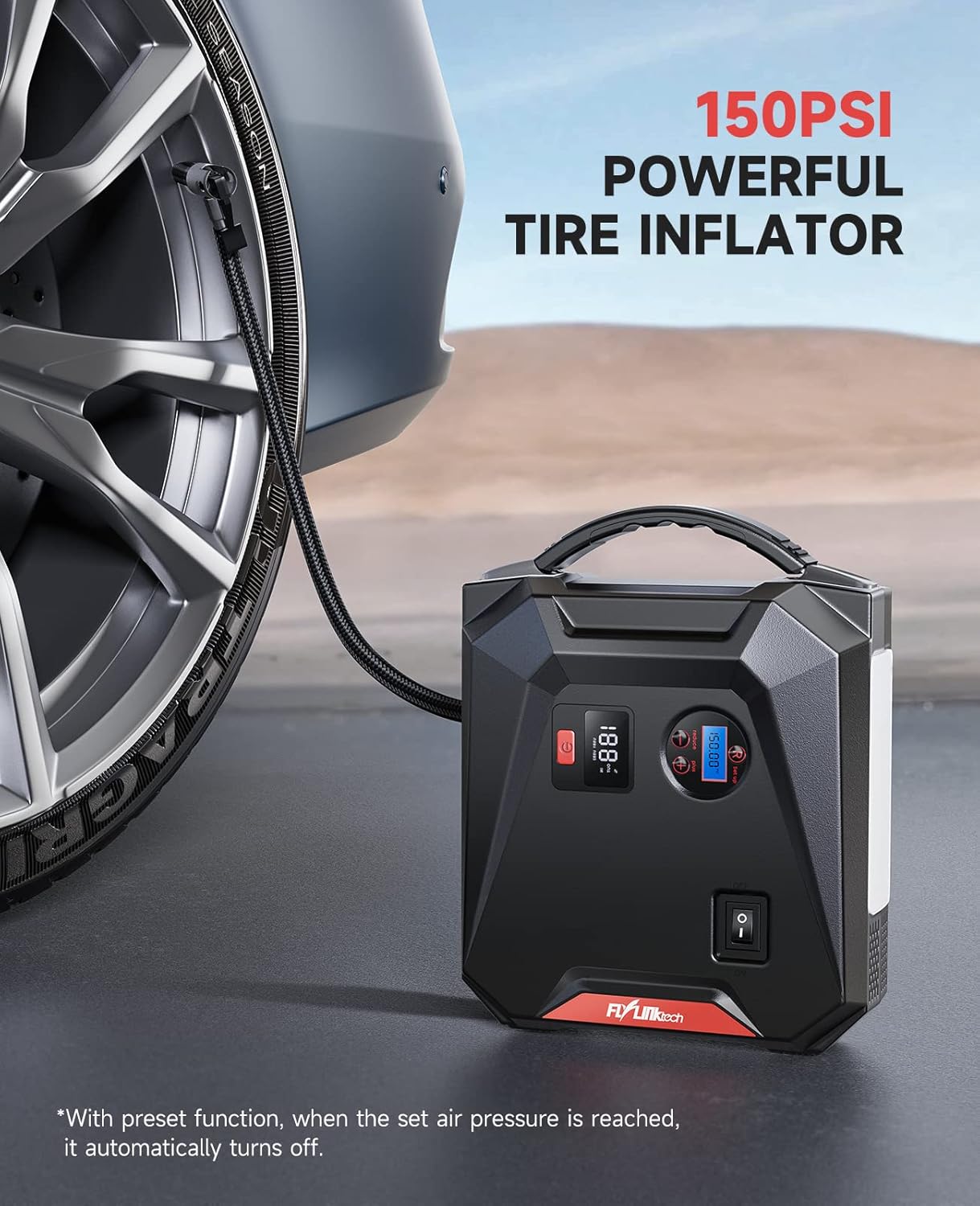
- Connect the air hose to the tire valve stem. Ensure it is securely tightened to prevent air leakage.
- Press the power button on the CF700 to turn on the unit. The LCD air pressure display will show the current tire pressure.
- Use the '+' and '-' buttons to set the desired target pressure. The unit supports PSI, BAR, KPA, and KG/CM².
- Press the ON/OFF button for the air compressor to start inflation.
- Il compressore si arresterà automaticamente una volta raggiunta la pressione preimpostata.
- Scollegare il tubo dell'aria dalla valvola del pneumatico.
Use the included valve adapters for inflating bicycles, balls, and other inflatables.
Utilizzo come Power Bank
La capacità di 24000 mAh consente di caricare vari dispositivi elettronici.

- Ricarica USB: Connect your device's USB charging cable to either of the USB output ports (USB 1 QC3.0 or USB 2 2.4A) on the CF700. The device will begin charging automatically.
- Uscita CC: For 12V car accessories, connect the accessory to the DC 12V-16V/10A output port. Ensure the accessory's power requirements do not exceed 10A.
Utilizzo della luce di emergenza a LED
The 5W LED light provides illumination for various situations.

- Press and hold the power button for approximately 3 seconds to turn on the LED light in Stable mode.
- Press the power button again to cycle through the light modes: Stable → SOS → Strobe → Off.
- To turn off the light directly from any mode, press and hold the power button for 3 seconds.
Risoluzione dei problemi
| Problema | Possibile causa | Soluzione |
|---|---|---|
| Il dispositivo non si accende. | La batteria è completamente scarica. | Carica completamente il dispositivo. |
| Il veicolo non si avvia con i cavi. | clamp connessione; Batteria del dispositivo troppo scarica; Batteria del veicolo gravemente danneggiata. | Controllare clamp connections (solid green light on smart clamp); Recharge CF700; Consult a mechanic. |
| cl . intelligenteamp l'indicatore lampeggia in rosso. | Collegamento con polarità invertita; Cortocircuito; Sovratemperatura. | Disconnetti clamps and reconnect correctly; Check for short circuits; Allow device to cool down. |
| Tire inflator does not start or stops prematurely. | Air hose not securely connected; Target pressure already reached; Device battery too low. | Ensure hose is tight; Check current pressure; Recharge CF700. |
| I dispositivi USB non si caricano. | Device battery too low; Cable issue; Device not compatible. | Recharge CF700; Try a different USB cable; Check device compatibility. |
Manutenzione e stoccaggio
- Pulisci il dispositivo con un panno asciutto e morbido. Non utilizzare prodotti chimici aggressivi o materiali abrasivi.
- Store the CF700 in its storage bag in a cool, dry place between -20°C and 60°C (-4°F and 140°F).
- Avoid storing the device in direct sunlight or near heat sources.
- Per una durata ottimale della batteria, ricaricare l'unità ogni 3-6 mesi, anche se non utilizzata.
Garanzia e supporto
FLYLINKTECH products are designed and manufactured to the highest quality standards. For warranty information or technical support, please refer to the contact details provided on the product packaging or the official FLYLINKTECH website. Please have your model number (CF700) and purchase date available when contacting support.