
1. Introduzione
The Lepro PR902103-US Smart Table Lamp offers versatile lighting solutions for your home. This LED touch lamp features RGB color changing capabilities, tunable warm to cool white light, and dimmable brightness. It is designed for seamless integration with smart home ecosystems, supporting both Amazon Alexa and Google Assistant for voice control, as well as control via a dedicated mobile application. This manual provides comprehensive instructions for setup, operation, and maintenance.

Figure 1: Lepro Smart Table Lamp mostrareasing its app control interface.
2. Cosa c'è nella scatola
Si prega di verificare che tutti i componenti siano presenti nella confezione:
- 1 x Lepro Smart Table Lamp (Model: PR902103-US)
- 1 x 4.9 ft USB Cable
- 1 x adattatore di alimentazione
- 1 x Manuale utente (questo documento)
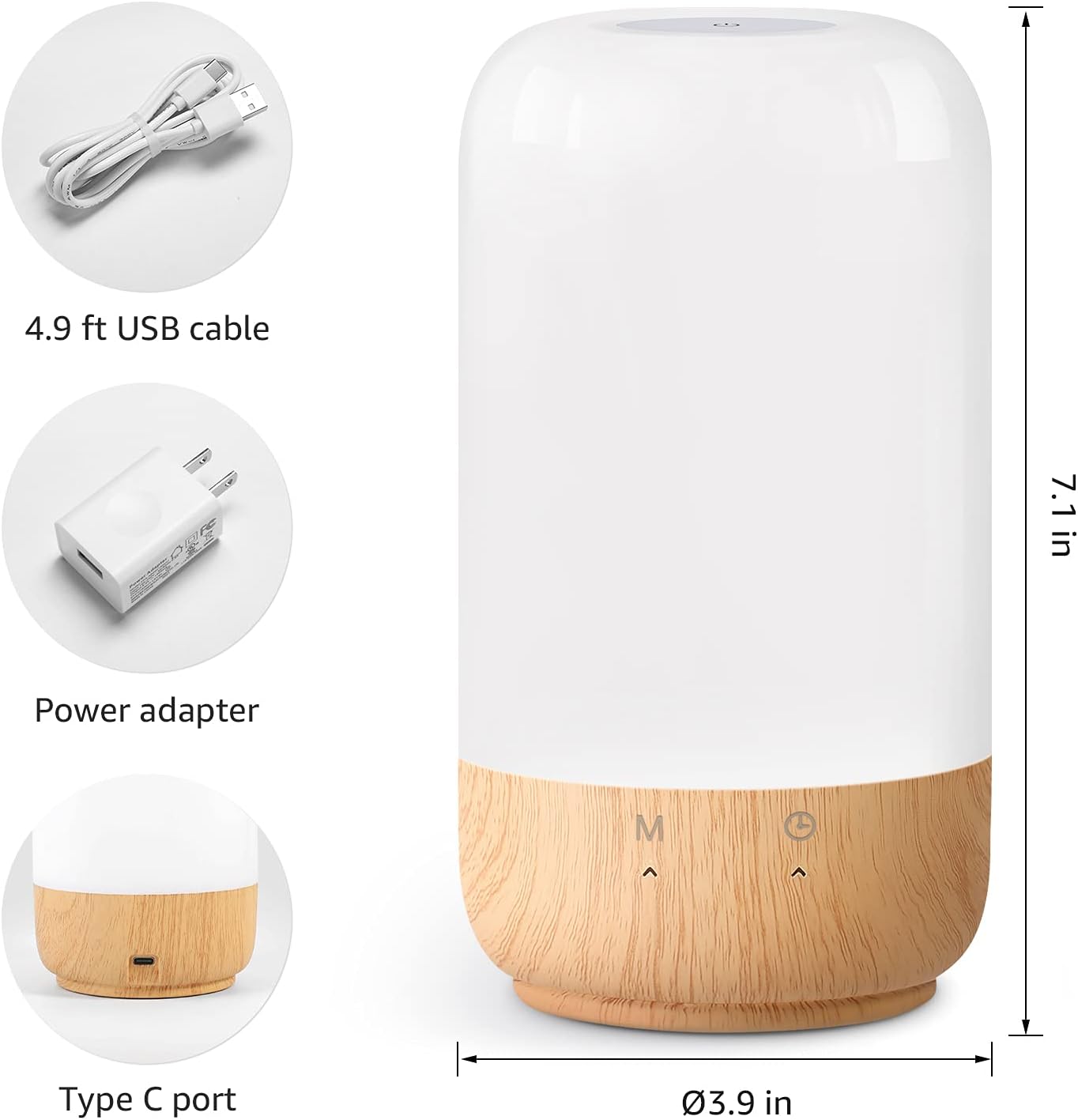
Figura 2: Componenti inclusi e dimensioni del prodotto.
3. Impostazione
Follow these steps to set up your Lepro Smart Table Lamp:
- Collegamento elettrico: Collegare il cavo USB in dotazione al lamp's Type-C port and the power adapter. Plug the power adapter into a standard wall outlet. The lamp si illuminerà.
- Download dell'app: Download the 'Lepro LampUX' app from your mobile device's App Store (iOS) or Google Play Store (Android).
- Registrazione dell'account: Open the 'Lepro LampUX' app and register a new account or log in if you already have one.
- Associazione del dispositivo:
- Nell'app, tocca "Aggiungi dispositivo" o l'icona "+".
- Select 'Table Lamp' from the lighting category.
- Assicurare lamp is powered on. Long press the timer button on the lamp's base for at least 5 seconds until the indicator light blinks rapidly.
- Verificare che la spia luminosa lampeggi rapidamente nell'app e procedere.
- Select your 2.4 GHz Wi-Fi network and enter the password. (Note: The lamp only supports 2.4 GHz Wi-Fi networks. If your router is 5 GHz, please set it to 2.4 GHz during setup.)
- The app will begin adding the device. Once successfully added, you can rename your lamp per una più facile identificazione.
Video 1: Detailed steps on how to set up your Lepro Smart Lamp utilizzando l'applicazione mobile.
4. Istruzioni per l'uso
The Lepro Smart Table Lamp can be controlled via touch, the mobile app, or voice commands.
4.1. Toccare Controlli
- Accensione/spegnimento: Short press the power button (marked 'M') on the lampla base.
- Regolazione della luminosità: Slide your finger along the left side of the lamp's base to adjust brightness.
- Color Change (RGB): Slide your finger along the right side of the lamp's base to cycle through RGB colors.
- Interruttore di modalità: Short press the timer button (clock icon) to switch between white light modes (warm white, cool white) and RGB color mode.
4.2. Mobile App Controls
The 'Lepro LampUX' app provides comprehensive control over your lamp:
- Brightness & Color Temperature: Adjust the brightness level and select color temperatures from 2700K (warm white) to 5700K (cool white).
- Selezione del colore RGB: Scegli tra 16 milioni di colori utilizzando la ruota dei colori nell'app.
- Scene: Select from pre-set scenes like 'Night', 'Read', 'Meeting', 'Leisure', or customize your own scenes with specific colors and effects.
- Timer & Wake-up: Imposta gli orari per lamp to turn on/off automatically. Utilize the 'Sunrise Simulation' feature to gradually increase light for a gentle wake-up.

Figure 3: Mobile application interface for controlling lamp impostazioni.

Figura 4: La lamp's timer and wake-up functions in use.
4.3. Comandi vocali
The Lepro Smart Table Lamp is compatible with Amazon Alexa and Google Assistant. To enable voice control:
- Garantisci la tua lamp is successfully paired with the 'Lepro LampUX' app.
- Apri l'app Amazon Alexa o Google Home.
- Vai alla sezione "Abilità e giochi" (Alexa) o "Compatibile con Google" (Google Home).
- Cercare and enable the 'Lepro LampUX' skill/service.
- Link your 'Lepro LampUX' account with your Alexa/Google account.
- Una volta effettuato il collegamento, è possibile utilizzare comandi vocali come:
- "Alexa, accendi [Lamp Nome]."
- "Ehi Google, imposta [Lamp Nome] al bianco caldo."
- "Alexa, cambia [Lamp Nome] in blu."
- "Ehi Google, oscura [Lamp Nome] al 50%.

Figure 5: Voice control integration with Amazon Alexa.
Video 2: Demonstration of the Lepro Smart Table Lamp working with Alexa and Google Home.
5. Manutenzione
To ensure the longevity and optimal performance of your Lepro Smart Table Lamp, si prega di seguire queste linee guida di manutenzione:
- Pulizia: Scollegare l'alimentazione prima della pulizia. Utilizzare un panno morbido e asciutto per pulire l'apparecchio.amp's surface. Avoid using abrasive cleaners, solvents, or harsh chemicals, as these may damage the finish or electronic components.
- Magazzinaggio: Se si conserva il lamp per un periodo prolungato, assicurarsi che sia pulito e asciutto. Conservarlo in un luogo fresco e asciutto, lontano dalla luce solare diretta e da temperature estreme.
- Gestione: Gestisci il lamp con cura. Evitare di farlo cadere o di sottoporlo a forti urti.
6. Risoluzione Dei Problemi
If you encounter issues with your Lepro Smart Table Lamp, fare riferimento ai seguenti problemi comuni e alle relative soluzioni:
| Problema | Possibile causa | Soluzione |
|---|---|---|
| Lamp non si accende. | Nessuna alimentazione elettrica. | Controllare che l'adattatore di alimentazione sia collegato saldamente alla presa lamp e la presa a muro. Assicurarsi che la presa sia funzionante. |
| Impossibile connettersi al Wi-Fi. | Incorrect Wi-Fi band (5 GHz). Password errata. Segnale Wi-Fi debole. | Ensure your Wi-Fi network is 2.4 GHz. Verify the Wi-Fi password. Move the lamp closer to your router. |
| Il controllo vocale non funziona. | Skill not enabled/linked. Nome del dispositivo errato. | Ensure the 'Lepro LampUX' skill is enabled and linked in your Alexa/Google Home app. Use the exact device name configured in the app. |
| Lamp non risponde. | Problema temporaneo del software. | Scollegare lamp from the power outlet for 10 seconds, then plug it back in to perform a soft reset. |
7. Specifiche
| Caratteristica | Dettaglio |
|---|---|
| Marca | Lebbroso |
| Numero di modello | PR902103-USA |
| Dimensioni del prodotto | 3.9"P x 3.9"L x 7.1"A |
| Peso dell'articolo | 1.19 libbre |
| Materiale | Plastica, legno |
| Tipo di sorgente luminosa | GUIDATO |
| Cosatage | 7 watt |
| Luminosità | 350 lumen |
| Colore chiaro | RGB + CCT (Tunable White 2700-5700K) |
| Metodo di controllo | App, tocco, voce (Alexa, Assistente Google) |
| Connettività | Solo Wi-Fi a 2.4 GHz |
| Uso interno/esterno | Al chiuso |
8. Garanzia e supporto
Lepro products are designed and manufactured to the highest quality standards. For warranty information and technical support, please refer to the contact details provided on the product packaging or visit the official Lepro websito. Conservare la ricevuta d'acquisto come prova d'acquisto per eventuali reclami in garanzia.