
Jensen RBTTX10
Manuale utente del trasmettitore e ricevitore audio wireless portatile Jensen
Model: RBTTX10
1. Introduzione
The Jensen RBTTX10 is a versatile portable wireless audio transmitter and receiver designed to add Bluetooth connectivity to a wide range of audio devices. This device allows you to either transmit audio wirelessly from non-Bluetooth sources to Bluetooth-enabled headphones or speakers, or receive audio wirelessly from Bluetooth-enabled devices to non-Bluetooth audio systems.
With a range of up to 32 feet and a built-in rechargeable battery providing up to 13 hours of playback, the RBTTX10 offers flexible audio solutions for your home, car, or portable entertainment needs.

Image: The Jensen RBTTX10 unit, a compact black rectangular device with a power button on top and an audio jack and TX/RX switch on one end.
2. Caratteristiche principali
- Doppia funzionalità: Operates as both a Bluetooth audio transmitter (TX) and receiver (RX).
- Ampia compatibilità: Connects to TVs, sound systems, car audio, Nintendo Switch, and other devices via AUX input/output.
- Connettività Bluetooth: Enables wireless audio streaming with a range of up to 32 feet.
- Riproduzione estesa: Fino a 13 ore di riproduzione audio continua con una singola carica.
- Batteria ricaricabile: Built-in battery allows for portable use and continuous streaming while charging.
- Bassa latenza: Designed for real-time, high-quality audio streaming with minimal lag.

Image: The Jensen RBTTX10 unit shown alongside icons indicating its 13-hour playtime, compatibility with TV/sound systems, and 32-foot Bluetooth range.

Image: The Jensen RBTTX10 connected to a home audio receiver, demonstrating its use for real-time audio with low latency, with a television displaying a basketball game in the background.
3. Contenuto della confezione
Si prega di controllare la confezione per verificare la presenza dei seguenti elementi:
- Jensen RBTTX10 Wireless Audio Transmitter & Receiver Unit
- Cavo di ricarica micro-USB
- Cavo AUX (cavo audio da 3.5 mm)
- Manuale dell'utente (questo documento)
4. Disposizione del dispositivo

Immagine: Un primo piano laterale view of the Jensen RBTTX10, highlighting the 3.5mm audio jack and the TX/RX mode switch.

Immagine: Un primo piano laterale view of the Jensen RBTTX10, showing the micro-USB charging port and three small indicator lights.
Familiarizza con le porte e i comandi del dispositivo:
- Pulsante di accensione: Located on the top surface, used to turn the device on/off and for pairing.
- Interruttore TX/RX: Located on one end, used to select Transmitter (TX) or Receiver (RX) mode.
- Jack audio da 3.5 mm: For connecting to audio sources or output devices via the AUX cable.
- Porta micro USB: For charging the device using the provided micro-USB cable.
- Indicatori LED: Small lights indicating power, charging status, and Bluetooth pairing status.
5. Carica del dispositivo
Before first use, fully charge the RBTTX10. The device can also stream audio while charging.
- Connect the supplied micro-USB charging cable to the micro-USB port on the RBTTX10.
- Collegare l'altra estremità del cavo USB a un adattatore di alimentazione USB (non incluso) o alla porta USB di un computer.
- The LED indicator will show charging status (e.g., red for charging, off or blue for fully charged, refer to specific LED behavior in the full manual if available).
- A full charge typically takes approximately 2-3 hours and provides up to 13 hours of playback.
6. Modalità operative
6.1. Modalità trasmettitore (TX)
In Transmitter (TX) mode, the RBTTX10 sends audio from a non-Bluetooth device (e.g., TV, MP3 player, computer) to Bluetooth-enabled headphones or speakers.
- Set the TX/RX switch on the RBTTX10 to the TX posizione.
- Connect one end of the 3.5mm AUX cable to the RBTTX10's audio jack.
- Connect the other end of the AUX cable to the audio output (e.g., headphone jack, AUX out) of your non-Bluetooth device (e.g., TV, computer, MP3/MP4 player).
- Turn on the RBTTX10 by pressing and holding the power button until the LED indicator flashes, indicating pairing mode.
- Place your Bluetooth headphones or speakers in pairing mode.
- The RBTTX10 will automatically search for and connect to nearby Bluetooth audio devices. Once connected, the LED indicator will change (e.g., solid blue).
- Play audio on your non-Bluetooth device, and it will be transmitted wirelessly to your Bluetooth headphones or speakers.
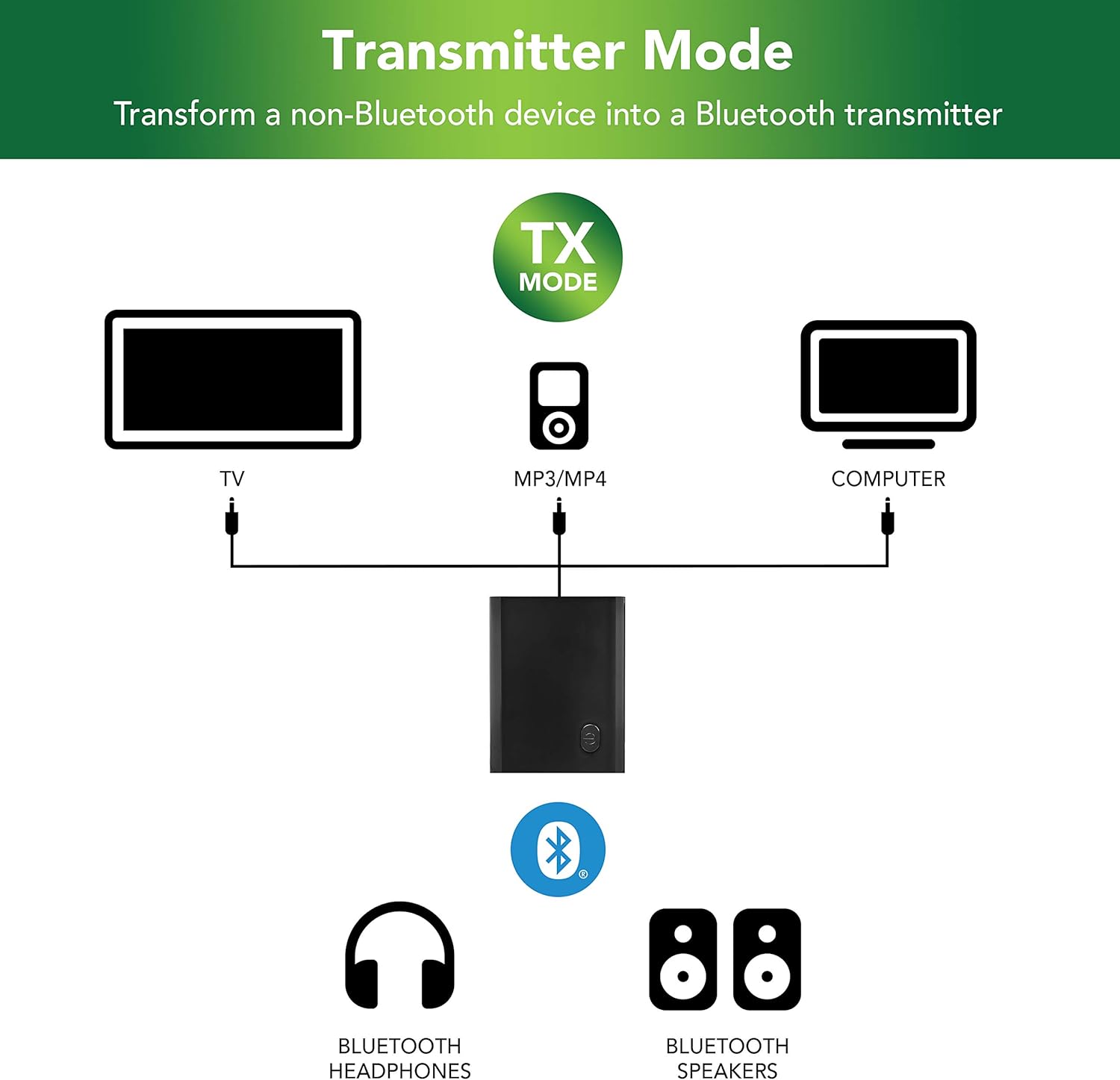
Image: A diagram illustrating the Transmitter Mode (TX) setup, showing the Jensen RBTTX10 connected via AUX cable to a TV, MP3/MP4 player, or computer, and wirelessly transmitting audio to Bluetooth headphones or speakers.
6.2. Modalità ricevitore (RX)
In Receiver (RX) mode, the RBTTX10 receives audio wirelessly from a Bluetooth-enabled device (e.g., smartphone, tablet, gaming console) and outputs it to a non-Bluetooth audio system (e.g., wired headphones, wired speakers, car AUX input).
- Set the TX/RX switch on the RBTTX10 to the RX posizione.
- Connect one end of the 3.5mm AUX cable to the RBTTX10's audio jack.
- Connect the other end of the AUX cable to the audio input (e.g., AUX in) of your non-Bluetooth audio system (e.g., wired headphones, wired speakers, car stereo).
- Turn on the RBTTX10 by pressing and holding the power button until the LED indicator flashes, indicating pairing mode.
- On your Bluetooth-enabled device (e.g., smartphone), go to Bluetooth settings and search for "RBTTX10" (or similar device name). Select it to pair.
- Once paired, the LED indicator on the RBTTX10 will change (e.g., solid blue).
- Play audio on your Bluetooth-enabled device, and it will be received by the RBTTX10 and outputted to your connected audio system.

Image: A diagram illustrating the Receiver Mode (RX) setup, showing a phone, gaming console, or tablet wirelessly transmitting audio to the Jensen RBTTX10, which is then connected via AUX cable to wired earphones or wired speakers.
7. Specifiche
| Caratteristica | Specificazione |
|---|---|
| Numero di modello | RBTTX10 |
| Dimensioni del prodotto | 4 x 6.1 x 1.1 pollici |
| Peso dell'articolo | 0.704 once (0.02 chilogrammi) |
| Tecnologia di connettività | Ausiliario, Bluetooth, USB |
| Portata Bluetooth | Fino a 32 piedi |
| Durata della batteria | Fino a 13 ore di riproduzione |
| Tipo di batteria | 1 batteria agli ioni di litio (necessaria) |
| Modalità di uscita audio | Stereo |
| Colore | Nero |
| Produttore | Voxx Accessori Corp. |
8. Risoluzione Dei Problemi
If you encounter issues with your Jensen RBTTX10, please refer to the following common solutions:
| Problema | Possibile soluzione |
|---|---|
| Il dispositivo non si accende. | Assicurati che il dispositivo sia completamente carico. Collegalo a una fonte di alimentazione tramite il cavo micro-USB. |
| Impossibile effettuare l'associazione con un dispositivo Bluetooth. |
|
| Nessuna uscita/ingresso audio. |
|
| La qualità audio è scarsa o intermittente. |
|
9. Informazioni sulla sicurezza
Per garantire un funzionamento sicuro del dispositivo, leggere e seguire le seguenti linee guida di sicurezza:
- Non esporre il dispositivo a temperature estreme, alla luce solare diretta o a elevata umidità.
- Non smontare, riparare o modificare il dispositivo autonomamente. Per qualsiasi intervento di assistenza, rivolgersi a personale qualificato.
- Tenere il dispositivo lontano dall'acqua e da altri liquidi.
- Utilizzare solo il cavo di ricarica fornito.
- Smaltire il dispositivo e la batteria in modo responsabile, nel rispetto delle normative locali.
10. Garanzia e supporto
For warranty information and technical support, please refer to the official Jensen weboppure contatta direttamente il servizio clienti. Conserva la ricevuta d'acquisto come prova d'acquisto.
You can visit the Jensen Store on Amazon for more information: Jensen Store
Ask a question about this manual
Ask about setup, troubleshooting, compatibility, parts, safety, or missing instructions. Manuals+ will review the question and use this page’s manual context to help answer it.