
1. Introduzione
Grazie per l'acquistoasing the Kimiso KM-2003 Bluetooth Speaker. This manual provides essential information for the safe and efficient use of your device. Please read these instructions carefully before operating the speaker and retain them for future reference.
2. Informazioni sulla sicurezza
- Non esporre l'altoparlante a temperature estreme, alla luce solare diretta o a elevata umidità.
- Keep the speaker away from water and liquids. This product is non impermeabile.
- Non tentare di smontare, riparare o modificare autonomamente l'altoparlante. Contattare personale di assistenza qualificato per assistenza.
- Utilizzare solo il volume di carica specificatotage (5V USB) to prevent damage.
- Tenere fuori dalla portata dei bambini.
- Evitare l'ascolto prolungato ad alto volume per prevenire danni all'udito.
3. Contenuto della confezione
Si prega di controllare la confezione per verificare la presenza dei seguenti elementi:
- Kimiso KM-2003 Bluetooth Speaker
- Cavo di ricarica USB
- Manuale dell'utente (questo documento)
4. Prodotto finitoview
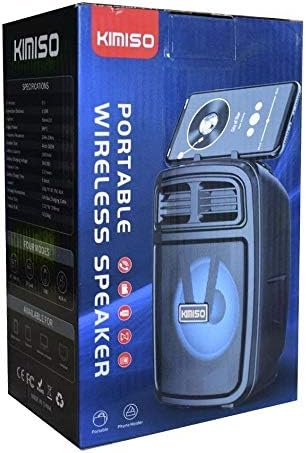
Immagine 1: The Kimiso KM-2003 Bluetooth Speaker shown in its retail packaging. The speaker features a dark casing with a visible speaker cone and LED lighting, along with a slot for holding a mobile phone on top.
The Kimiso KM-2003 is a portable wireless speaker designed for versatile audio playback. It features Bluetooth connectivity, support for USB and TF card playback, an AUX input, and integrated LED lights. The speaker is equipped with a handle for easy portability and includes a karaoke function.
5. Impostazione
5.1 Ricarica dell'altoparlante
- Collegare il cavo di ricarica USB in dotazione alla porta di ricarica dell'altoparlante.
- Connect the other end of the USB cable to a 5V USB power source (e.g., a wall adapter, computer USB port).
- La spia di carica si illuminerà, in genere di colore rosso, per indicare che l'altoparlante è in carica.
- Once fully charged, the indicator light may change color or turn off. A full charge provides approximately 4 hours of playback time.
5.2 Accensione/spegnimento
- To power on the speaker, press and hold the Power button (location varies, typically on the control panel) for a few seconds until you hear an audible prompt or see the LED lights activate.
- To power off the speaker, press and hold the Power button again until the speaker powers down.
5.3 Associazione Bluetooth
- Ensure the speaker is powered on and in Bluetooth pairing mode. The LED indicator will usually flash, indicating it's ready to pair.
- Sul tuo dispositivo mobile (smartphone, tablet, laptop), attiva il Bluetooth e cerca i dispositivi disponibili.
- Select "KM-2003" from the list of found devices.
- Once successfully paired, the speaker will emit a confirmation sound, and the Bluetooth indicator light will typically stop flashing and remain solid.
- The effective Bluetooth connection range is approximately 10 meters (33 feet).
5.4 Other Connection Modes
The KM-2003 speaker supports multiple playback options:
- Riproduzione USB: Inserire una chiavetta USB contenente audio MP3 files nella porta USB. L'altoparlante passerà automaticamente alla modalità USB e inizierà la riproduzione.
- Riproduzione della scheda TF: Inserire una scheda TF (MicroSD) contenente audio MP3 filenello slot per schede TF. L'altoparlante passerà automaticamente alla modalità scheda TF e inizierà la riproduzione.
- Ingresso AUX: Connect an external audio device (e.g., MP3 player, computer) to the speaker's AUX port using a 3.5mm audio cable. The speaker will switch to AUX mode, and audio will be played from the connected device.
6. Istruzioni per l'uso
6.1 Controlli di base
The speaker features integrated control buttons, typically located on the top or front panel:
- Pulsante di accensione: Press and hold to turn on/off. Short press to switch modes (Bluetooth, USB, TF, AUX).
- Pulsante Play/Pausa: Premere brevemente per riprodurre o mettere in pausa l'audio.
- Volume su (+): Premere brevemente per aumentare il volume. Tenere premuto per la traccia successiva.
- Volume basso (-): Premere brevemente per diminuire il volume. Tenere premuto per tornare alla traccia precedente.
- Pulsante luce LED: Premere brevemente per scorrere le modalità di illuminazione LED o spegnerle.
6.2 Riproduzione di musica
After connecting via Bluetooth, USB, TF card, or AUX, use the speaker's control buttons or your connected device to manage music playback (play, pause, skip tracks, adjust volume).
6.3 Funzione Karaoke
The KM-2003 speaker includes a karaoke function. If a microphone input is available (not explicitly listed as included, but function is present), connect a compatible microphone to the designated port. Adjust microphone volume separately if controls are provided.
6.4 luci LED
The speaker features integrated LED lights that enhance the listening experience. Use the dedicated LED light button to change light patterns or turn the lights on/off according to your preference.
7. Manutenzione
- Pulizia: Utilizzare un panno morbido e asciutto per pulire l'esterno dell'altoparlante. Non utilizzare detergenti abrasivi, solventi o prodotti chimici aggressivi.
- Magazzinaggio: Quando non viene utilizzato per lunghi periodi, conservare l'altoparlante in un luogo fresco e asciutto, lontano dalla luce solare diretta e da temperature estreme.
- Cura della batteria: Per prolungare la durata della batteria, evitare di scaricarla completamente frequentemente. Caricare regolarmente l'altoparlante, anche se non in uso.
8. Risoluzione Dei Problemi
| Problema | Possibile soluzione |
|---|---|
| L'altoparlante non si accende. | Assicurati che la batteria sia carica. Collega l'altoparlante a una fonte di alimentazione e riprova. |
| Impossibile effettuare l'associazione tramite Bluetooth. | Ensure the speaker is in Bluetooth pairing mode. Turn off and on Bluetooth on your device. Move closer to the speaker (within 10m). Forget the device on your phone and try pairing again. |
| Nessun suono. | Check the volume level on both the speaker and your connected device. Ensure the correct input mode (Bluetooth, USB, TF, AUX) is selected. |
| Suono distorto. | Reduce the volume. Ensure the audio source is not distorted. Move your device closer to the speaker to improve Bluetooth signal. |
9. Specifiche
| Caratteristica | Specificazione |
|---|---|
| Modello | KM-2003 |
| Versione Bluetooth | Not specified (Wireless) |
| Portata Bluetooth | Fino a 10 metri (33 piedi) |
| Canale audio | Stereo 2.0 |
| Potenza di uscita | 20 Watt |
| Risposta in frequenza | Da 20 Hz a 20 kHz |
| Dimensioni dell'altoparlante | 4 pollici |
| Capacità della batteria | 1200mAh |
| Ingresso di ricarica | 5V (USB) |
| Durata media della batteria | Fino a 4 ore |
| Modalità supportate | USB, TF Card, AUX, Bluetooth |
| Modalità vivavoce | SÌ |
| Wifi | NO |
| Uso esterno | Yes (Portable) |
| Batteria ricaricabile | SÌ |
| Funzione radio | NO |
| Luci LED | SÌ |
| Funzione karaoke | SÌ |
| Maniglia inclusa | SÌ |
| Telecomando | NO |
| Impermeabile | NO |
| Dimensioni del prodotto | Dimensioni: 40 x 25 x 35 cm |
| Peso del prodotto | 1 chilogrammo |
| Dispositivi compatibili | Notebook, Smartphone, Tablet |
10. Garanzia e supporto
Kimiso products are designed for reliability and performance. For warranty information or technical support, please refer to the contact details provided at your point of purchase or visit the official Kimiso websito. Conservare la prova d'acquisto per eventuali reclami in garanzia.