
Varmilo VBS108
Varmilo VBS108 Lure Bot Mechanical Keyboard
Manuale di istruzioni
Introduzione
Thank you for choosing the Varmilo VBS108 Lure Bot Mechanical Keyboard. This keyboard is designed for versatility and durability, featuring triple mode connectivity (Bluetooth 5.0, 2.4GHz Wireless, and USB-C), high-quality PBT dye-sub keycaps, and Cherry MX Brown switches for a tactile typing experience. This manual provides detailed instructions for setup, operation, maintenance, and troubleshooting to ensure optimal performance and longevity of your keyboard.
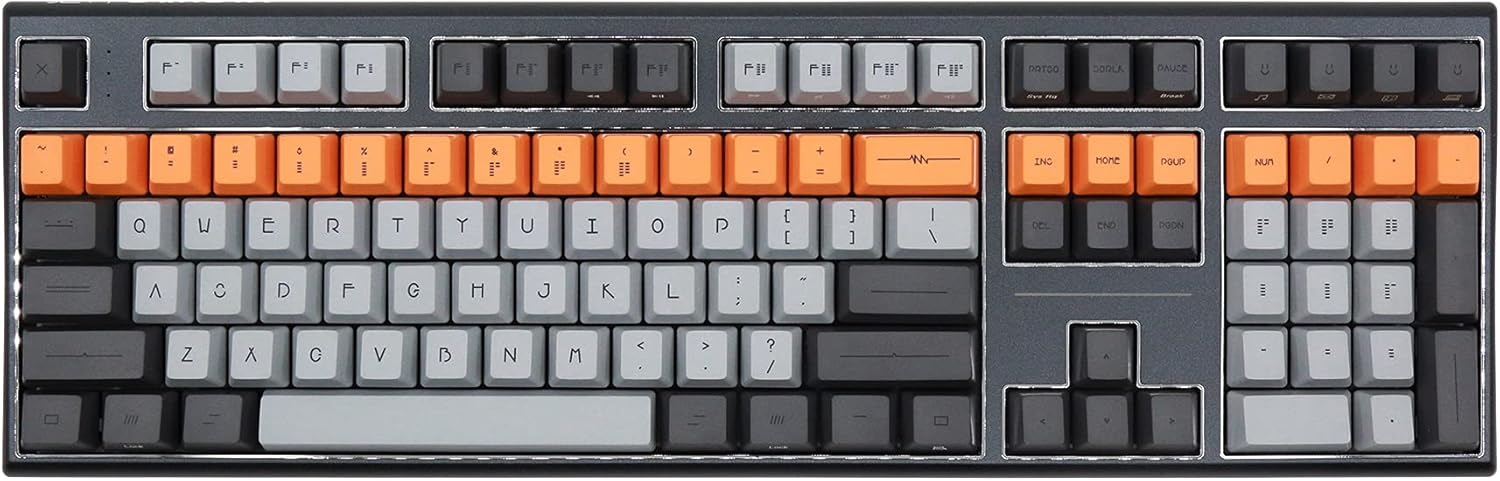
Figure 1: Varmilo VBS108 Lure Bot Mechanical Keyboard
Contenuto della confezione
Si prega di assicurarsi che tutti gli articoli siano presenti nel pacco:
- Varmilo VBS108 Lure Bot Mechanical Keyboard
- Cavo da USB-C a USB-A
- Dongle wireless da 2.4 GHz (in genere conservato nel vano batteria della tastiera o in uno slot dedicato)
- Estrattore per tasti (potrebbe essere incluso)
- Manuale dell'utente (questo documento)
Impostare
The Varmilo VBS108 offers three connectivity modes: USB-C wired, 2.4GHz wireless, and Bluetooth 5.0.
1. Connessione cablata USB-C
- Locate the USB-C port on the keyboard (usually on the top edge).
- Collegare un'estremità del cavo USB-C in dotazione alla tastiera.
- Collegare l'altra estremità (USB-A) a una porta USB disponibile sul computer.
- La tastiera verrà riconosciuta automaticamente e sarà pronta all'uso.
2. Connessione wireless a 2.4 GHz
- Individuare il dongle wireless da 2.4 GHz.
- Collega il dongle a una porta USB disponibile sul tuo computer.
- Ensure the keyboard is in 2.4GHz mode (refer to the keyboard's function key combinations or a physical switch if available).
- La tastiera dovrebbe connettersi automaticamente.
3. Connessione Bluetooth 5.0
- Ensure the keyboard is in Bluetooth pairing mode. This typically involves holding down a specific Fn key combination (e.g., Fn + 1, Fn + 2, or Fn + 3 for different profiles) until an indicator light flashes. Consult your keyboard's specific key legend for Bluetooth pairing.
- Sul tuo computer o dispositivo, apri le impostazioni Bluetooth.
- Cercare new devices and select "Varmilo VBS108" or a similar name from the list.
- Seguire le istruzioni visualizzate sullo schermo per completare il processo di associazione.
Operativo
The Varmilo VBS108 keyboard includes various function key combinations for enhanced control.
Combinazioni di tasti funzione (Fn + tasto)
- Fn + F1-F12: Multimedia controls (play/pause, volume up/down, mute, etc.). Refer to the keycap legends for specific functions.
- Fn + Win: Tasto Blocca/Sblocca Windows.
- Fn + Alt sinistro: Switch between macOS and Windows layouts (if supported).
- Fn + Q/W/E: Passa da Bluetooth profiles (se applicabile).
- Fn + R: Passare alla modalità wireless a 2.4 GHz.
- Fn+T: Passa alla modalità cablata USB-C.
- Fn + Backlight Keys: Adjust backlight brightness or effects (if applicable).
Adjustable Flip-out Feet
La tastiera è dotata di 3 tastitage adjustable flip-out feet on the underside, allowing you to customize the typing angle for ergonomic comfort.

Figure 2: Adjustable Flip-out Feet
Manutenzione
Proper maintenance ensures the longevity and performance of your Varmilo keyboard.
Pulizia della tastiera
- Tasti: Use a keycap puller to carefully remove keycaps. Clean them with a mild soap solution and a soft cloth, then rinse thoroughly and air dry completely before reattaching.
- Caso: Pulisci la custodia della tastiera con un panno morbido e leggermenteamppanno privo di lanugine. Evitare l'uso di prodotti chimici aggressivi o materiali abrasivi.
- Tra i tasti: Use compressed air to remove dust and debris from between the key switches. A small brush can also be used for stubborn particles.

Figure 3: PBT Dye-Sub Keycaps
Risoluzione dei problemi
If you encounter issues with your Varmilo VBS108 keyboard, try the following solutions:
- La tastiera non risponde (cablata): Assicurati che il cavo USB-C sia collegato saldamente sia alla tastiera che al computer. Prova una porta USB o un cavo diverso.
- Keyboard not responding (Wireless/Bluetooth):
- Controllare il livello della batteria.
- Ensure the keyboard is in the correct mode (2.4GHz or Bluetooth).
- For 2.4GHz, ensure the dongle is properly inserted and try a different USB port.
- For Bluetooth, unpair and re-pair the keyboard with your device. Ensure your device's Bluetooth is enabled.
- Le chiavi non si registrano: Remove the keycap and check for any obstructions around the switch. Clean the area with compressed air.
- Connessione intermittente: Ensure there are no major sources of interference (e.g., other wireless devices) near the keyboard or dongle.
- Aggiornamento del firmware: Check the official Varmilo website for any available firmware updates for your model, which can resolve known issues.
Specifiche
| Caratteristica | Dettaglio |
|---|---|
| Marca | Varmilo |
| Modello | VBS108 Lure Bot |
| Tecnologia di connettività | Bluetooth 5.0, 2.4GHz Wireless, USB-C |
| Tipo di interruttore | Ciliegia MX Marrone |
| Materiale del copritastiera | PBT Dye-Sub |
| Numero di chiavi | 104 |
| Dispositivi compatibili | PC |
| Colore | Cherry MX Brown (keyboard color scheme) |
| Caratteristica speciale | 3-Stage Adjustable Flip-out Feet |
Garanzia e supporto
Varmilo products are designed for quality and reliability. For information regarding warranty coverage, technical support, or service, please refer to the warranty card included with your product or visit the official Varmilo websito. Puoi anche contattare il rivenditore presso il quale hai acquistato il prodotto per ricevere assistenza.
Ask a question about this manual
Ask about setup, troubleshooting, compatibility, parts, safety, or missing instructions. Manuals+ will review the question and use this page’s manual context to help answer it.