
1. Introduzione
This manual provides essential information for the proper setup, operation, maintenance, and troubleshooting of your Datalogic PowerScan M8500 Wireless Barcode Scanner. Please read this manual thoroughly before using the device to ensure optimal performance and longevity.
2. Prodotto finitoview
The Datalogic PowerScan M8500 is a robust wireless barcode scanner designed for industrial applications. It features USB connectivity for its cradle and wireless communication for the scanner unit, allowing for flexible operation.

Figura 2.1: Davanti view of the Datalogic PowerScan M8500 wireless barcode scanner, highlighting the scanning window and trigger button.
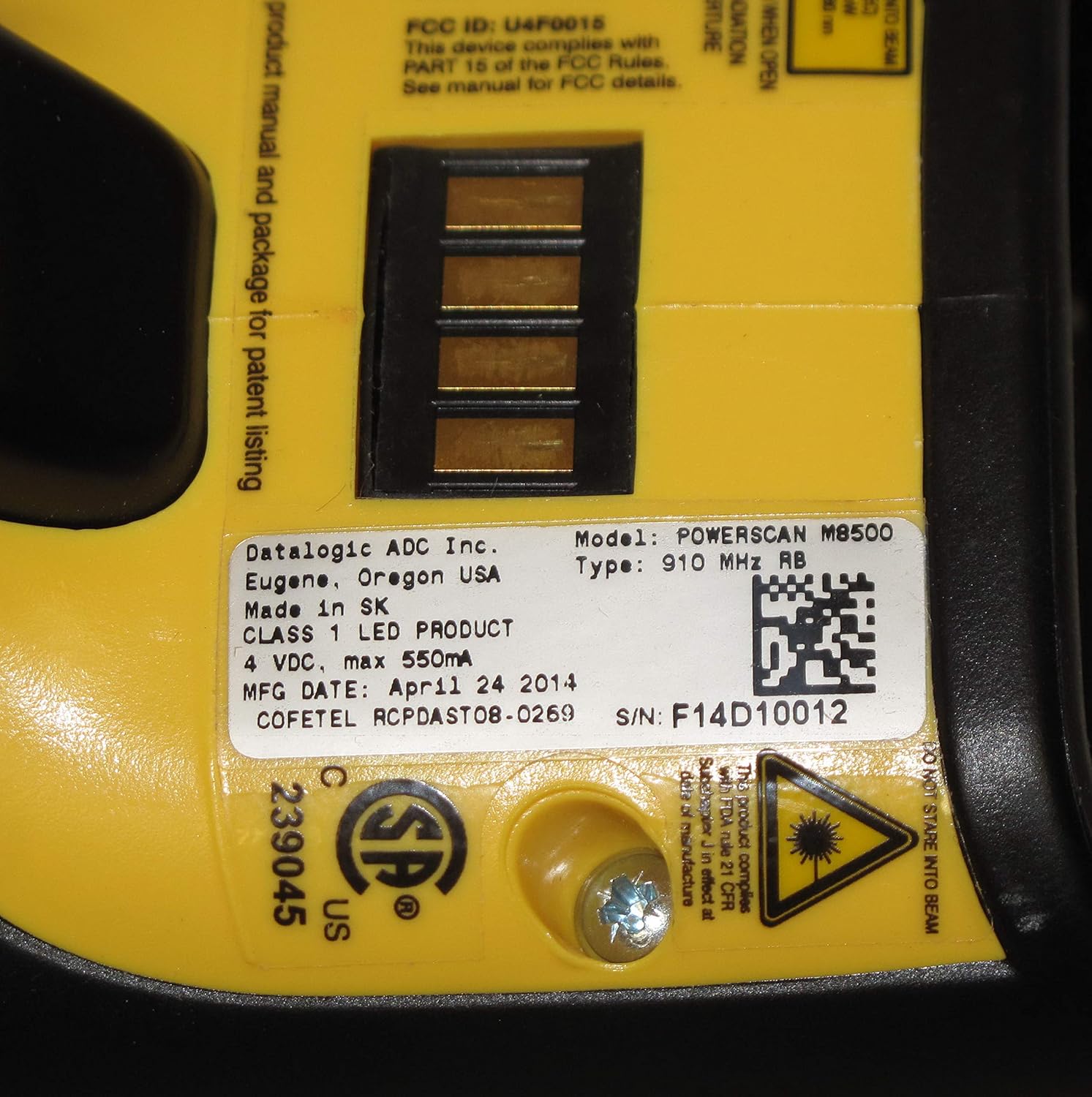
Figura 2.2: Posteriore view of the Datalogic PowerScan M8500 barcode scanner, displaying the product label with essential information such as model number, FCC ID, and electrical specifications.
3. Impostazione
3.1 Disimballaggio
Carefully remove all components from the packaging. Verify that all items are present: the PowerScan M8500 scanner, its charging/communication cradle, and a USB cable.
3.2 Cradle Connection
- Connect one end of the provided USB cable to the USB port on the cradle.
- Connect the other end of the USB cable to an available USB port on your desktop or laptop computer.
- Ensure the cradle receives power. An indicator light on the cradle should illuminate.
3.3 Initial Scanner Charging and Pairing
- Place the PowerScan M8500 scanner into the cradle. Ensure it is seated correctly.
- The scanner will begin charging. Allow sufficient time for a full charge before initial use.
- The scanner and cradle are typically pre-paired. If pairing is required, refer to the full Datalogic PowerScan M8500 programming manual for specific barcode sequences.
4. Istruzioni per l'uso
4.1 Scansione dei codici a barre
- Tenere lo scanner con la finestra di scansione rivolta verso il codice a barre.
- Press and hold the trigger button. A red aiming pattern will project from the scanner.
- Align the aiming pattern over the barcode you wish to scan.
- Una volta letto correttamente il codice a barre, lo scanner emetterà un segnale acustico e/o un indicatore visivo (ad esempio, una luce verde).
- Rilasciare il pulsante di attivazione.

Figura 4.1: The Datalogic PowerScan M8500 scanner in operation, showing the red aiming pattern used for precise barcode targeting.
4.2 Funzionamento wireless
The PowerScan M8500 communicates wirelessly with its cradle, allowing for freedom of movement within the specified range. Ensure the scanner remains within range of the cradle for uninterrupted data transmission.
5. Manutenzione
5.1 Pulizia dello scanner
Per mantenere prestazioni di scansione ottimali, mantenere pulita la finestra di scansione. Utilizzare un panno morbido e privo di lanugine leggermenteampPulire con acqua o con una soluzione detergente delicata e non abrasiva. Non utilizzare prodotti chimici aggressivi o materiali abrasivi, poiché potrebbero danneggiare la finestra di scansione.
5.2 Cura della batteria
For models with removable batteries, ensure proper insertion and removal. If the scanner is not used for an extended period, it is recommended to fully charge the battery before storage and periodically recharge it to prevent deep discharge.
5.3 Gestione generale
The PowerScan M8500 is designed for durability, but avoid dropping the device or exposing it to extreme temperatures, excessive moisture, or direct sunlight for prolonged periods.
6. Risoluzione Dei Problemi
6.1 Lo scanner non legge i codici a barre
- Check aiming: Ensure the aiming pattern is correctly centered over the barcode.
- Barcode quality: Verify the barcode is not damaged, smudged, or poorly printed.
- Distanza: Regolare la distanza tra lo scanner e il codice a barre.
- Livello della batteria: Assicurarsi che la batteria dello scanner sia sufficientemente carica.
- Symbology enabled: Confirm that the barcode symbology (e.g., Code 128, QR Code) is enabled in the scanner's configuration. Refer to the full programming manual.
6.2 Nessuna trasmissione di dati al computer
- Cradle connection: Assicurarsi che il cavo USB sia collegato saldamente sia alla base che al computer.
- Cradle power: Verify the cradle is powered on.
- Scanner-cradle link: Confirm the scanner is properly linked (paired) with its cradle. Re-pairing may be necessary.
- Installazione del driver: Ensure the necessary USB drivers for the cradle are installed on your computer.
6.3 Lo scanner non si accende
- Carica batterie: Place the scanner in the cradle to charge for at least 30 minutes.
- Condizione della batteria: If the battery is old or damaged, it may need replacement.
7. Specifiche
| Caratteristica | Specificazione |
|---|---|
| Modello | PowerScan M8500 |
| Produttore | Dati logici |
| Tecnologia di connettività | USB Cable (for cradle), Wireless (for scanner) |
| Fonte di alimentazione | Corded Electric (for cradle) |
| Dispositivi compatibili | Desktop, portatile |
| UPC / GTIN | 649661723868 |
8. Informazioni sulla garanzia
This Datalogic PowerScan M8500 unit is a renewed product. It comes with a Garanzia limitata di 90 giorni from the seller. Additionally, renewed products purchased through Amazon are typically eligible for replacement or refund under the Amazon Renewed Guarantee if you are not satisfied with the purchase. Please refer to your purchase documentation for specific terms and conditions.
9. Supporto
For further assistance, technical support, or warranty claims, please contact the seller from whom you purchased this renewed product. You may also visit the official Datalogic website for product documentation and general support resources for the PowerScan M8500 series.