
ZIPRO 6299212
ZIPRO Dash Foldable Rowing Machine User Manual
Modello: 6299212
Introduzione
The ZIPRO Dash Rowing Machine is designed to provide an effective and smooth full-body workout in the comfort of your home. Featuring a magnetic braking system, it offers quiet operation and adjustable resistance levels to suit individual training needs. The integrated training computer is compatible with the iConsole+ mobile application, allowing for wireless control via Bluetooth from your smartphone or tablet. Additionally, it supports the Kinomap application for enhanced training experiences. The computer tracks essential workout data such as time, stroke count, calorie consumption, and heart rate (with the included Polar telemetry band), displaying them on its LCD screen. Its foldable design ensures convenient storage.

Image: The ZIPRO Dash Foldable Rowing Machine, showcasing its sleek black design with green accents, magnetic resistance unit, and comfortable seat on a sturdy rail.
Informazioni importanti sulla sicurezza
Please read all instructions carefully before assembling and using the ZIPRO Dash Rowing Machine. Keep this manual for future reference.
- Consultare il proprio medico prima di iniziare qualsiasi programma di esercizi.
- Tenere i bambini e gli animali domestici lontani dalla macchina durante l'uso.
- Posizionare il vogatore su una superficie piana e stabile, con spazio sufficiente attorno.
- Prima di ogni utilizzo, ispezionare la macchina per verificare la presenza di parti allentate o usurate. Non utilizzarla se danneggiata.
- Durante l'attività fisica, indossare calzature e abbigliamento sportivo adeguati.
- Non superare il peso massimo dell'utente di 135 kg (297 libbre).
- Utilizzare la macchina solo per lo scopo per cui è stata progettata, come descritto nel presente manuale.
- Interrompere immediatamente l'esercizio se ci si sente deboli, storditi o si avverte dolore.
Contenuto della confezione
Carefully unpack all components and ensure you have received the following parts:
- Main Frame Assembly (with magnetic resistance unit and console mount)
- Guida del sedile
- Sedile scorrevole
- Stabilizzatore anteriore
- Stabilizzatore posteriore
- Footrests (2)
- Manubrio
- Training Computer (LCD display)
- Polar T34 Telemetry Heart Rate Band
- Kit hardware (bulloni, rondelle, dadi, utensili)
- Manuale d'uso
Se qualche parte risulta mancante o danneggiata, contattare immediatamente l'assistenza clienti.
Assemblaggio e configurazione
Assembly typically takes 30-60 minutes. It is recommended to have two people for assembly. Ensure all parts are present before beginning.
- Fissare gli stabilizzatori: Securely attach the front and rear stabilizers to the main frame using the provided bolts and tools. Ensure the stabilizing pads are properly aligned.
- Installare la guida del sedile: Connect the seat rail to the main frame. Make sure it is firmly attached and aligned.
- Sede del monte: Slide the seat onto the seat rail. Verify that the ball bearings allow for smooth movement.
- Fissare i poggiapiedi: Secure the two footrests to the main frame. Ensure they are stable and the straps are adjustable.
- Connetti il manubrio: Attach the handlebar to the pulling strap/chain mechanism.
- Installa Console: Mount the training computer onto its designated holder. Insert the included batteries (AA Mignon cells). Connect any necessary cables from the main unit to the console.
- Controllo finale: Before first use, double-check all bolts and connections to ensure they are tight and secure. Test the rowing motion and resistance adjustment.
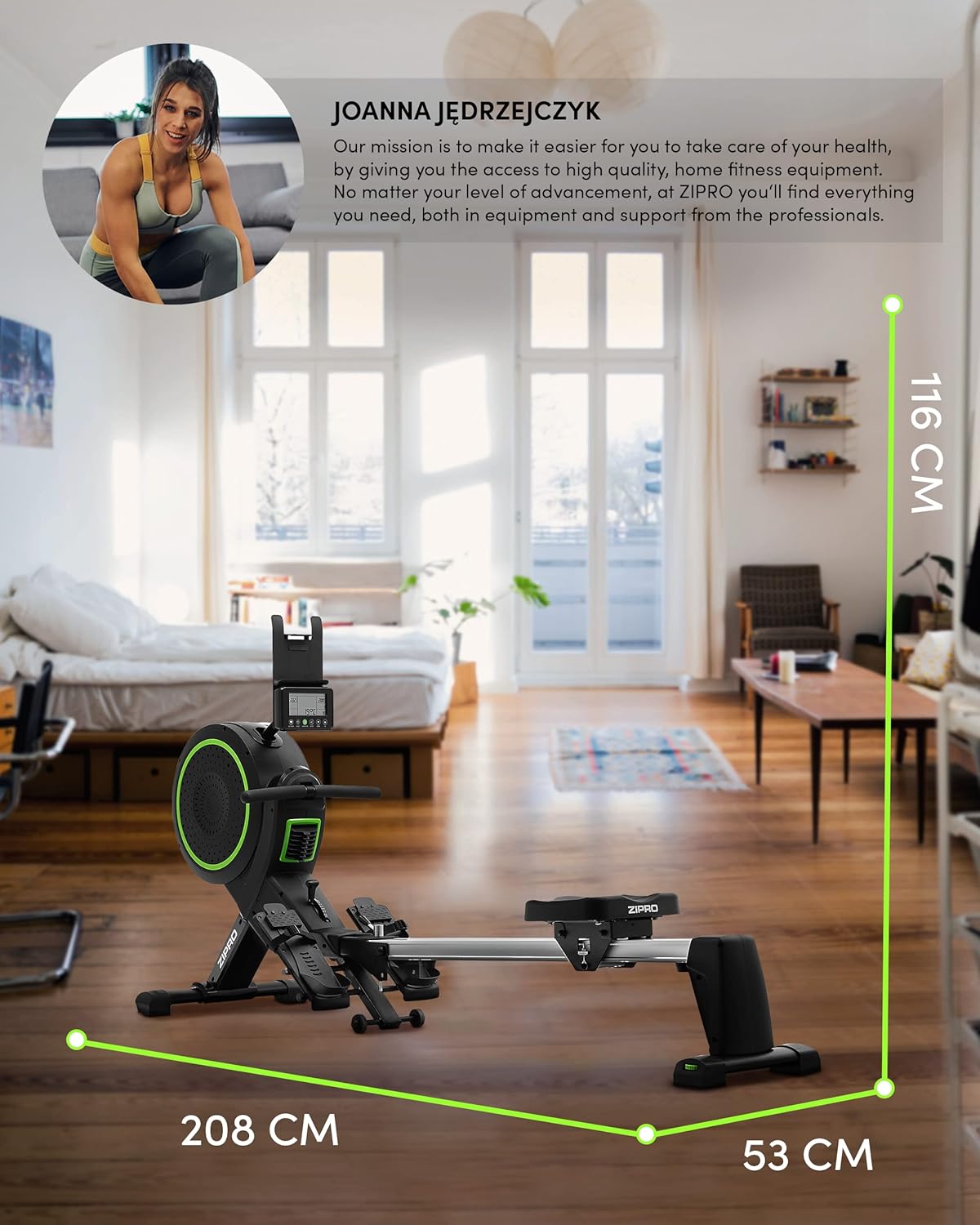
Image: Diagram showing the dimensions of the ZIPRO Dash Rowing Machine (208 cm length, 53 cm width, 116 cm height), useful for planning placement.
Istruzioni per l'uso
Accensione della console
The LCD training computer powers on automatically when you begin rowing or press any button. It is powered by AA batteries (included).

Immagine: Primo piano view of the ZIPRO Dash Rowing Machine's LCD console, showing various workout metrics and control buttons.
Regolazione della resistenza
The ZIPRO Dash features an 8-step magnetic resistance system. To adjust the resistance, locate the resistance knob or lever on the main unit (often near the fan/flywheel housing). Turn the knob clockwise to increase resistance and counter-clockwise to decrease it. Choose a level that challenges you appropriately for your fitness level.
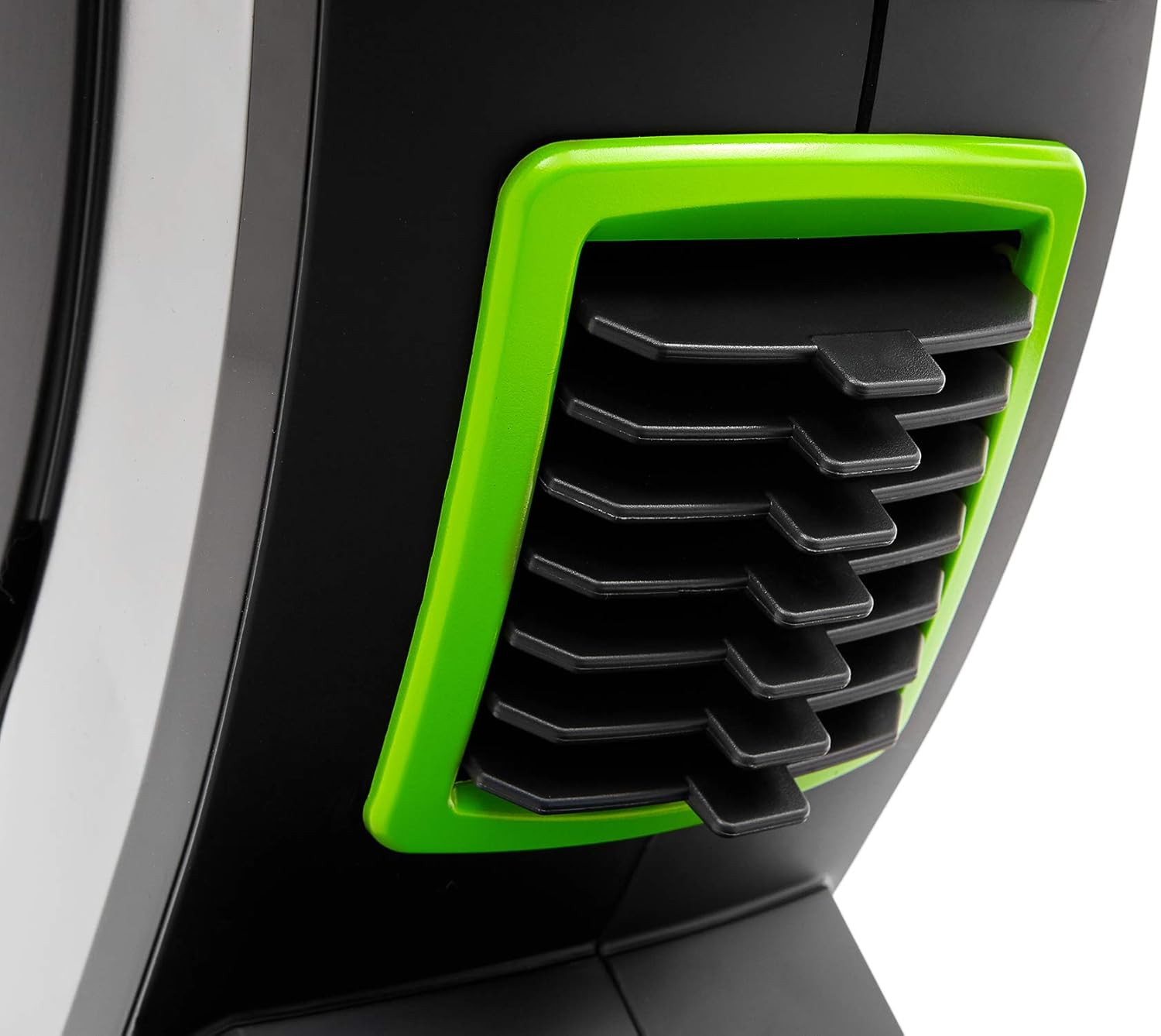
Image: Detail of the resistance adjustment mechanism on the ZIPRO Dash Rowing Machine, showing the numbered settings.
Utilizzo del computer di allenamento
The LCD display shows various workout metrics:
- TEMPO: Durata del tuo allenamento.
- COLPI: Numero totale di colpi eseguiti.
- CALORIE: Calorie bruciate stimate.
- FREQUENZA CARDIACA: Your heart rate, measured via the Polar T34 telemetry band (if worn and connected).
- Other metrics may include distance, strokes per minute, etc.
Use the buttons on the console (e.g., MODE, SET, RESET) to navigate through display modes, set target values, or reset your workout data. Refer to the console's specific instructions for detailed button functions.
Connecting to Mobile Applications (iConsole+ & Kinomap)
The ZIPRO Dash computer is Bluetooth-enabled for connectivity with mobile apps.
- Scarica le app: Download the "iConsole+" and/or "Kinomap" applications from your device's app store.
- Abilita Bluetooth: Assicurati che il Bluetooth sia abilitato sul tuo smartphone o tablet.
- Collegare: Open the chosen app and follow the in-app instructions to search for and connect to your ZIPRO Dash rowing machine. The app will typically detect the machine automatically.
- Caratteristiche:
- iConsole+: Allows wireless control of the rowing computer, access to workout programs, and virtual routes.
- Kinomap: Tracks your progress and offers virtual routes with real-world video, allowing you to compete with other users.

Image: A user rowing on the ZIPRO Dash, with logos for Kinomap and iConsole+ apps, highlighting the machine's smart connectivity features.
Piegatura e conservazione
The ZIPRO Dash is designed to be foldable for convenient storage.
- Meccanismo di rilascio: Locate the folding release pin or knob, usually near the connection point of the seat rail to the main frame.
- Piegare: Carefully lift the seat rail upwards until it locks into the vertical storage position. Ensure it is securely latched.
- Mossa: Use the integrated transport wheels (located on the front stabilizer) to easily move the folded machine for storage.

Image: The ZIPRO Dash Rowing Machine shown in its folded, upright storage position, demonstrating its space-saving design.
Manutenzione
Regular maintenance will prolong the life of your rowing machine.
- Pulizia: Pulisci la macchina con adamp Dopo ogni utilizzo, rimuovere il sudore e la polvere con un panno. Non utilizzare detergenti abrasivi.
- Lubrificazione: Periodically check the seat rail for smooth operation. If needed, apply a small amount of silicone-based lubricant to the rail.
- Ispezioni: Regularly check all bolts, nuts, and moving parts for tightness and wear. Tighten any loose fasteners. Inspect the pulling strap/chain for fraying or damage.
- Sostituzione della batteria: If the console display becomes dim or unresponsive, replace the AA batteries. Note that the battery compartment might require unscrewing the console from its mount.
Risoluzione dei problemi
| Problema | Possibile causa | Soluzione |
|---|---|---|
| La console non visualizza i dati. | Le batterie sono scariche o installate in modo errato. Collegamento allentato. | Sostituire le batterie. Controllare tutti i collegamenti dei cavi alla console. |
| La resistenza sembra incoerente o troppo debole/forte. | Resistance setting is incorrect. Internal mechanism issue. | Adjust the resistance knob. If problem persists, contact support. |
| Il sedile non scorre fluidamente. | Dirt or debris on the rail. Rail needs lubrication. | Clean the seat rail. Apply silicone lubricant. |
| La macchina emette rumori insoliti. | Loose bolts or components. Worn parts. | Check and tighten all bolts. Inspect for worn parts and contact support if necessary. |
| App (iConsole+/Kinomap) not connecting via Bluetooth. | Bluetooth off on device. App permissions. Console not active. | Ensure Bluetooth is on. Grant app permissions. Start rowing to activate console. Restart app/device. |
Specifiche
| Nome del modello | ZIPRO Dash |
| Numero di modello | 6299212 |
| Colore | Nero |
| Meccanismo di resistenza | Magnetico (8 livelli) |
| Tipo di visualizzazione | LCD |
| Tracked Metrics | Time, Strokes, Calories, Heart Rate (with Polar T34 band) |
| Connettività | Bluetooth (iConsole+, Kinomap compatible) |
| Peso massimo dell'utente | 135 kg (297 libbre) |
| Maximum Recommended User Height | 200 cm (6 piedi e 7 pollici) |
| Dimensioni del prodotto (L x P x A) | 207 x 53 x 115 cm (81.5 x 20.9 x 45.3 pollici) |
| Dimensioni da piegato (circa) | (Vertical storage, specific dimensions not provided but implied by foldable feature) |
| Peso dell'articolo | 40 kg (88 libbre) |
| Materiale del telaio | Metal / Alloy Steel |
| Fonte di alimentazione | Manual (hand-operated), Console: Batteries (AA) |
| Caratteristiche speciali | Foldable design, Anti-slip footrests, Portable device holder, Stabilizing pads, Transport wheels |
Garanzia e supporto
Per informazioni sulla garanzia, fare riferimento alla scheda di garanzia inclusa con il prodotto o visitare il sito ufficiale ZIPRO websito. Conservare la prova d'acquisto per eventuali reclami in garanzia.
If you encounter any issues not covered in the troubleshooting section or require further assistance, please contact ZIPRO customer support. Contact details can typically be found on the manufacturer's websito o sulla confezione del prodotto.
Produttore: Morele.net sp. zoo
Ask a question about this manual
Ask about setup, troubleshooting, compatibility, parts, safety, or missing instructions. Manuals+ will review the question and use this page’s manual context to help answer it.