
Pyle PT888BTWM
Manuale utente del ricevitore home theater a 5.2 canali Pyle PT888BTWM
Model: PT888BTWM
Marca: Pyle
1. Prodotto finitoview
The Pyle PT888BTWM is a 5.2 Channel AV Receiver System designed to deliver an immersive Hi-Fi home theater surround sound experience. This versatile amplifier features built-in Bluetooth for wireless audio streaming, next-gen audio DSP technology for superior sound quality, and supports 4K Ultra HD and 3D video with Blu-ray pass-through. It includes two 2-channel UHF wireless microphones for added convenience, an AM/FM radio tuner, and multiple connectivity options for various external devices.
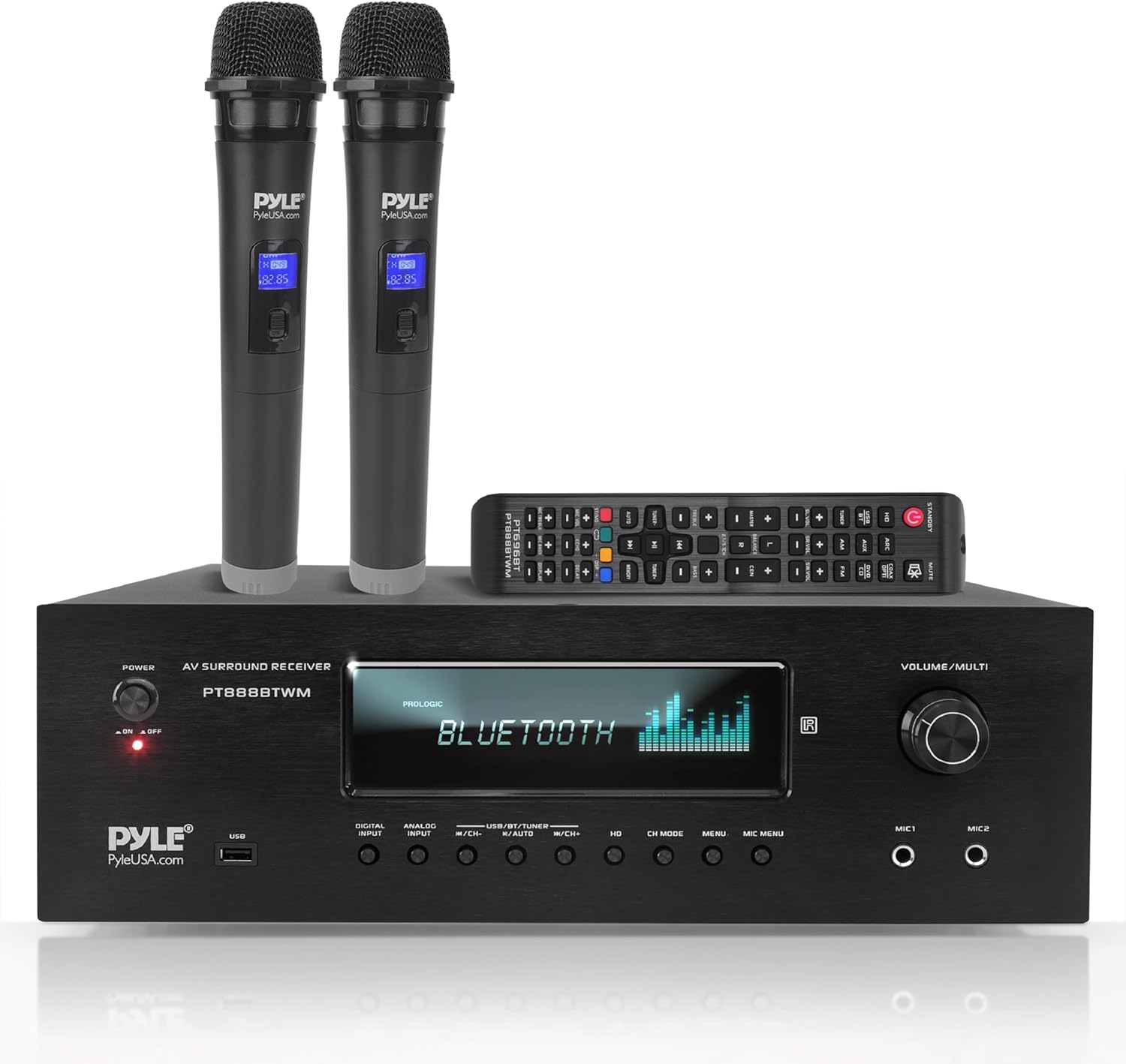
Figure 1: Pyle PT888BTWM Home Theater Receiver with included accessories.
2. Cosa c'è nella scatola
Disimballare con cura tutti i componenti e assicurarsi che siano inclusi i seguenti articoli:
- Pyle PT888BTWM Home Theater Receiver
- Telecomando
- 2 microfoni wireless UHF
- Antenna AM/FM
- Antenna ad anello
- Audio Jack Cable (RCA)
- Cavo di alimentazione

Figura 2: Tutti gli articoli inclusi nella confezione del prodotto.
3. Impostazione
3.1 Connessioni
Before powering on the unit, ensure all necessary connections are made securely.

Figure 3: Front and Rear Panel Layout with connection points.
Collegamenti degli altoparlanti
- Collega i tuoi altoparlanti a Terminale altoparlante binding posts on the rear panel. Ensure correct polarity (+ to + and - to -) for each speaker. The receiver supports 4-16 Ohm speaker impedance.
- For a 5.2 channel setup, connect Front Left (FL), Front Right (FR), Center (CEN), Surround Left (SL), and Surround Right (SR) speakers.
- Connect your subwoofer(s) to the dedicated Uscita subwoofer RCA.
Audio/Video Source Connections
- Ingressi HDMI: Connect HDMI-enabled devices (e.g., Blu-ray player, game console, streaming device) to the HDMI INPUT 1, 2, or 3 porti.
- Uscita HDMI: Collegare il USCITA HDMI to your TV or projector for video pass-through.
- Audio digitale ottico/coassiale: For digital audio sources, connect to the OTTICO or COASSIALE porte di ingresso.
- RCA (L/R) Audio: Connect analog audio devices (e.g., CD player, DVD player) to the AUX/DVD/CD INPUT Porte RCA.
- Ingresso USB: Inserisci un'unità flash USB nel USB port on the front panel for MP3 digital file riproduzione.
Collegamenti dell'antenna
- Collegare l'in dotazione Antenna AM/FM to the respective terminals on the rear panel for radio reception.
- Allega il Antenna Bluetooth to the BT ANT port for optimal wireless streaming performance.
3.2 Accensione iniziale
Once all connections are secure, plug the power cord into a wall outlet. Turn the ENERGIA switch on the front panel to the 'ON' position. The VFD display will illuminate, indicating the unit is ready for operation.
4. Istruzioni per l'uso
4.1 Accensione/spegnimento
- To power on the receiver, turn the ENERGIA knob on the front panel clockwise to the 'ON' position.
- Per spegnere, girare la ENERGIA knob counter-clockwise to the 'OFF' position.
4.2 Selezione dell'ingresso
Utilizzare il INPUT DIGITALE, INGRESSO ANALOGICO, O USB/BT/TUNER buttons on the front panel or the remote control to select your desired audio/video source (e.g., HDMI 1, Optical, Bluetooth, AM/FM).
4.3 Connettività Bluetooth
The receiver features Bluetooth 5.0 for wireless audio streaming from compatible devices.

Figure 4: Seamless Bluetooth wireless music streaming.
- Select 'Bluetooth' as the input source using the USB/BT/TUNER button. The VFD display will show 'BLUETOOTH'.
- Sul tuo dispositivo mobile (smartphone, tablet, ecc.), attiva il Bluetooth e cerca i dispositivi disponibili.
- Select 'Pyle PT888BTWM' from the list to pair.
- Once paired, you can stream audio wirelessly from your device to the receiver.
4.4 Riproduzione USB
The front USB port allows playback of MP3 digital audio files.
- Inserire un'unità flash USB contenente MP3 files nel USB porta.
- Select 'USB' as the input source. The receiver will automatically begin playing compatible files.
- Use the playback controls (e.g., Play/Pause, Next/Previous Track) on the front panel or remote.
Funzionamento radio AM/FM 4.5
To listen to AM/FM radio:
- Select 'TUNER' as the input source.
- Use the tuning buttons (e.g., CH+/CH-) to scan for radio stations.
- The VFD display will show the current frequency.
4.6 Microphone Use and Controls
The receiver includes two 1/4-inch microphone inputs and two UHF wireless microphones for karaoke or public address.

Figure 5: Using the UHF wireless microphones with the receiver.
- Connect wired microphones to the MICROFONO 1 or MICROFONO 2 ingressi sul pannello frontale.
- Ensure the UHF wireless microphones are powered on and paired.
- Regolare il volume del microfono utilizzando VOL MICROFONO controllare.
- Utilizzare il ECO DEL MICROFONO, MICROFONO BASSO, E ALTI DEL MICROFONO controls to fine-tune microphone audio.
4.7 Regolazioni audio
The receiver features DSP sound processing technology and various controls for audio customization.

Figure 6: Enjoying high-quality audio and video with the receiver.
- Volume principale: Adjust the overall system volume using the large VOLUME/MULT manopola.
- DSP EQ: The receiver includes digital sound processing for enhanced audio. Refer to the on-screen menu (if applicable) or remote control for specific EQ settings.
- Modalità canale: Utilizzare il MODALITÀ CH button to cycle through different audio channel modes (e.g., Stereo, Surround).
5. Manutenzione
To ensure the longevity and optimal performance of your Pyle PT888BTWM receiver, follow these maintenance guidelines:
- Pulizia: Utilizzare un panno morbido e asciutto per pulire l'esterno dell'unità. Non utilizzare detergenti liquidi o spray, poiché potrebbero danneggiare la finitura o i componenti interni.
- Ventilazione: Ensure adequate ventilation around the receiver. Do not block the ventilation openings on the top or sides of the unit. Avoid placing the receiver in an enclosed cabinet without proper airflow.
- Cavo di alimentazione: Regularly inspect the power cord for any signs of damage. If damaged, discontinue use and contact Pyle support.
- Magazzinaggio: Se si conserva l'unità per un periodo prolungato, scollegarla dalla presa di corrente e conservarla in un luogo fresco e asciutto, lontano dalla luce solare diretta e da temperature estreme.
6. Risoluzione Dei Problemi
This section addresses common issues you might encounter with your receiver. If the problem persists after attempting these solutions, please contact Pyle customer support.
| Problema | Possibile causa | Soluzione |
|---|---|---|
| Nessun potere | Power cord not securely connected; Power switch off; Power outage. | Ensure power cord is firmly plugged into the unit and wall outlet. Turn the power switch to 'ON'. Check household circuit breaker. |
| Nessuna uscita audio | Incorrect input source selected; Speaker wires loose or incorrectly connected; Volume too low; Mute function active. | Select the correct input source. Check all speaker wire connections for proper polarity. Increase volume. Deactivate mute. |
| Errore di accoppiamento Bluetooth | Receiver not in Bluetooth mode; Device too far; Bluetooth not enabled on source device. | Ensure receiver input is set to 'Bluetooth'. Move device closer to receiver. Enable Bluetooth on your source device and retry pairing. |
| Scarsa ricezione radio | Antenna non collegata o posizionata male. | Connect the AM/FM antenna securely. Adjust antenna position for better signal. |
| Unit displays 'Protect' | Over-current, short circuit, or over-voltage protezione attivata. | Immediately power off the unit and disconnect from power. Check speaker wiring for any short circuits. Allow unit to cool down. Reconnect and power on. If issue persists, contact support. |
7. Specifiche
Detailed technical specifications for the Pyle PT888BTWM Home Theater Receiver:
- Uscita Wattage: 1000 Watt (potenza di picco)
- Numero di canali: 5.2 canali
- Impedenza dell'altoparlante: 4-16 Ohm
- Tecnologia di connettività: RCA, Bluetooth, USB, HDMI
- Versione Bluetooth: 5.0
- Ingressi HDMI: 3
- Uscite HDMI: 1
- Ingressi microfono: 2 x 1/4 di pollice
- Ingressi audio digitali: Ottico, Coassiale
- Supporto USB: MP3 Digital Files
- Sintonizzatore radio: AM/FM
- Dimensioni del prodotto (L x P x A): 16.9 x 13.8 x 5.5 pollici
- Peso dell'articolo: 23.8 libbre
- Numero modello: PT888BTWM
- Codice UPC: 842893132792
- Produttore: Pilo
- Paese di origine: Cina
8. Garanzia e supporto
Pyle products are designed and manufactured to the highest quality standards. For detailed warranty information, please refer to the warranty card included with your product or visit the official Pyle USA websito.
For technical support, troubleshooting assistance, or service inquiries, please contact Pyle customer support. You can also refer to the comprehensive User Manual PDF for additional information and diagrams: Scarica il manuale utente (PDF)