
1. Introduzione
Grazie per l'acquistoasing the QFX E-B3 Bluetooth Professional High-Power Speaker. This manual provides essential information for the safe and efficient operation of your speaker. Please read it thoroughly before use and retain it for future reference.
The QFX E-B3 is designed to deliver powerful audio with features including Bluetooth connectivity, FM radio, USB/SD card playback, LED party lights, and a 250W power amplifier. It also supports True Wireless System (TWS) for stereo pairing with another compatible speaker.
2. Informazioni sulla sicurezza
- Fonte di energia: Collegare l'altoparlante solo all'alimentatore specificato, come indicato sull'unità.
- Ventilazione: Assicurare un'adeguata ventilazione attorno all'altoparlante. Non ostruire le aperture di ventilazione.
- Acqua e umidità: This speaker is not waterproof. Do not expose it to rain, moisture, or any liquids to prevent electric shock or fire.
- Calore: Tenere l'altoparlante lontano da fonti di calore quali termosifoni, bocchette di ventilazione, stufe o altri apparecchi che producono calore.
- Pulizia: Unplug the speaker from the power outlet before cleaning. Use a dry cloth for cleaning. Do not use liquid cleaners or aerosol cleaners.
- Manutenzione: Non tentare di riparare questo prodotto da soli. Affidare tutte le operazioni di manutenzione a personale di assistenza qualificato.
- Posizionamento: Posizionare l'altoparlante su una superficie stabile e piana per evitare che cada.
3. Contenuto della confezione
Verificare che tutti gli articoli siano presenti nel pacco:
- QFX E-B3 High-Power Speaker
- Microfono
- Telecomando
- Cavo di alimentazione CA.
- Manuale dell'utente (questo documento)
4. Prodotto finitoview
The QFX E-B3 speaker features dual 15-inch woofers and a 1-inch tweeter, protected by a metal grill. It includes integrated handles and wheels for portability.

Figura 4.1: Fronte view of the QFX E-B3 Speaker.
Controlli e porte del pannello posteriore
The rear panel houses all input/output connections and control knobs.
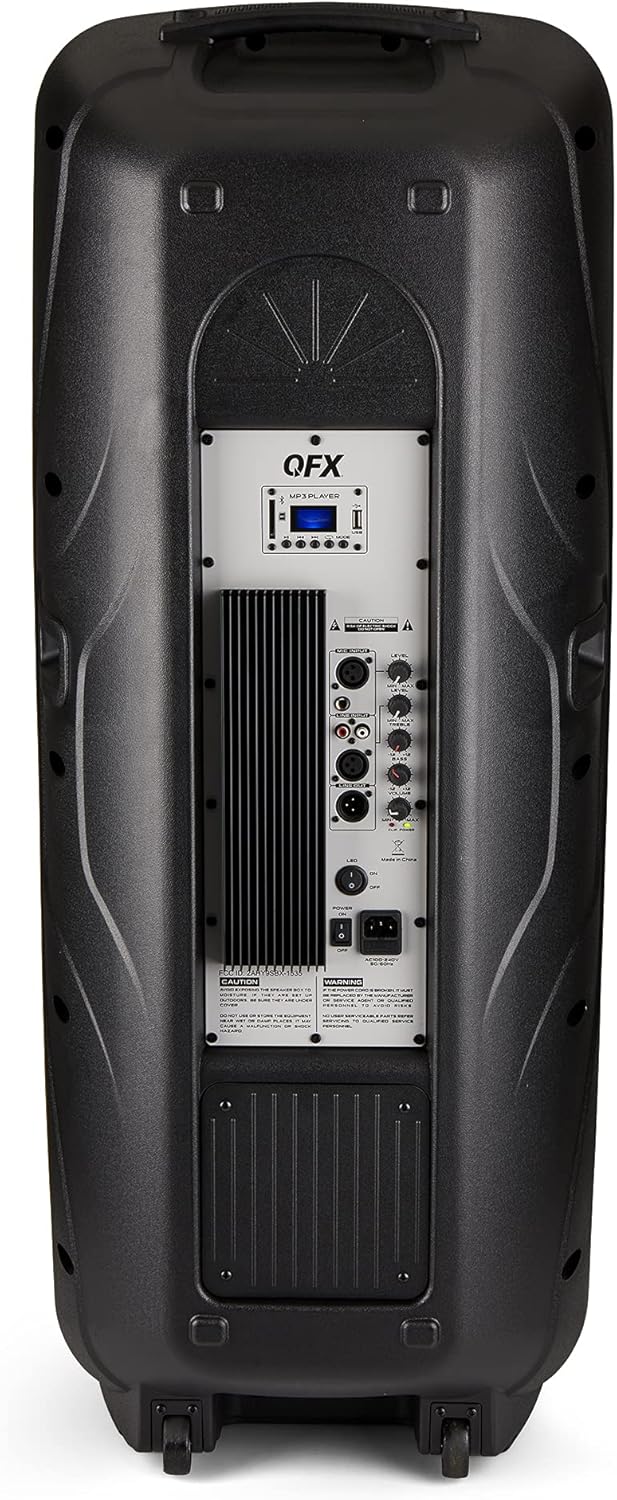
Figure 4.2: Rear panel with controls and ports.
- Interruttore di alimentazione: Accende/spegne l'altoparlante.
- Ingresso CA: Collega il cavo di alimentazione CA.
- USB/SD Card Ports: Per riprodurre l'audio fileda unità USB o schede SD.
- Schermo di visualizzazione: Mostra la modalità corrente e le informazioni sulla traccia.
- Pulsante Modalità: Switches between input modes (Bluetooth, FM, USB, SD, RCA).
- Pulsante Play/Pausa: Controlla la riproduzione per USB/SD/Bluetooth.
- Pulsanti traccia precedente/successiva: Naviga tra le tracce o le stazioni FM.
- Manopola del volume principale: Regola il volume generale.
- Bass/Treble Control Knobs: Adjusts low and high frequencies.
- Ingresso microfono XLR: Connects a wired microphone.
- Microphone Volume/Echo Knobs: Adjusts microphone volume and echo effect.
- Ingresso RCA (S/D): Connects external audio devices via RCA cables.
- XLR Line Input/Output: For connecting to other audio equipment.
5. Impostazione
Posizionamento iniziale
Place the speaker on a stable, flat surface. For optimal sound, position it in a central location within the listening area. The integrated wheels and handle allow for easy transport.

Figure 5.1: Speaker being moved with handle and wheels.
Collegamento di potenza
- Assicurarsi che l'interruttore di alimentazione dell'altoparlante sia in posizione OFF.
- Connect the AC power cable to the AC input on the rear panel of the speaker.
- Collegare l'altra estremità del cavo di alimentazione CA a una presa a muro standard.
- Flip the power switch to the ON position. The display screen will illuminate.
6. Istruzioni per l'uso
Accoppiamento Bluetooth
- Turn on the QFX E-B3 speaker.
- Premere il tasto MODALITÀ button on the speaker or remote control until "BLUE" appears on the display screen, indicating Bluetooth mode.
- Abilita il Bluetooth sul tuo dispositivo mobile (smartphone, tablet, ecc.).
- Cercare available Bluetooth devices and select "QFX E-B3" from the list.
- Once paired, the speaker will emit a confirmation sound. You can now play audio from your device through the speaker.
Accoppiamento True Wireless System (TWS)
TWS allows two QFX E-B3 speakers to connect wirelessly for a stereo sound experience. This feature works only in Bluetooth mode.
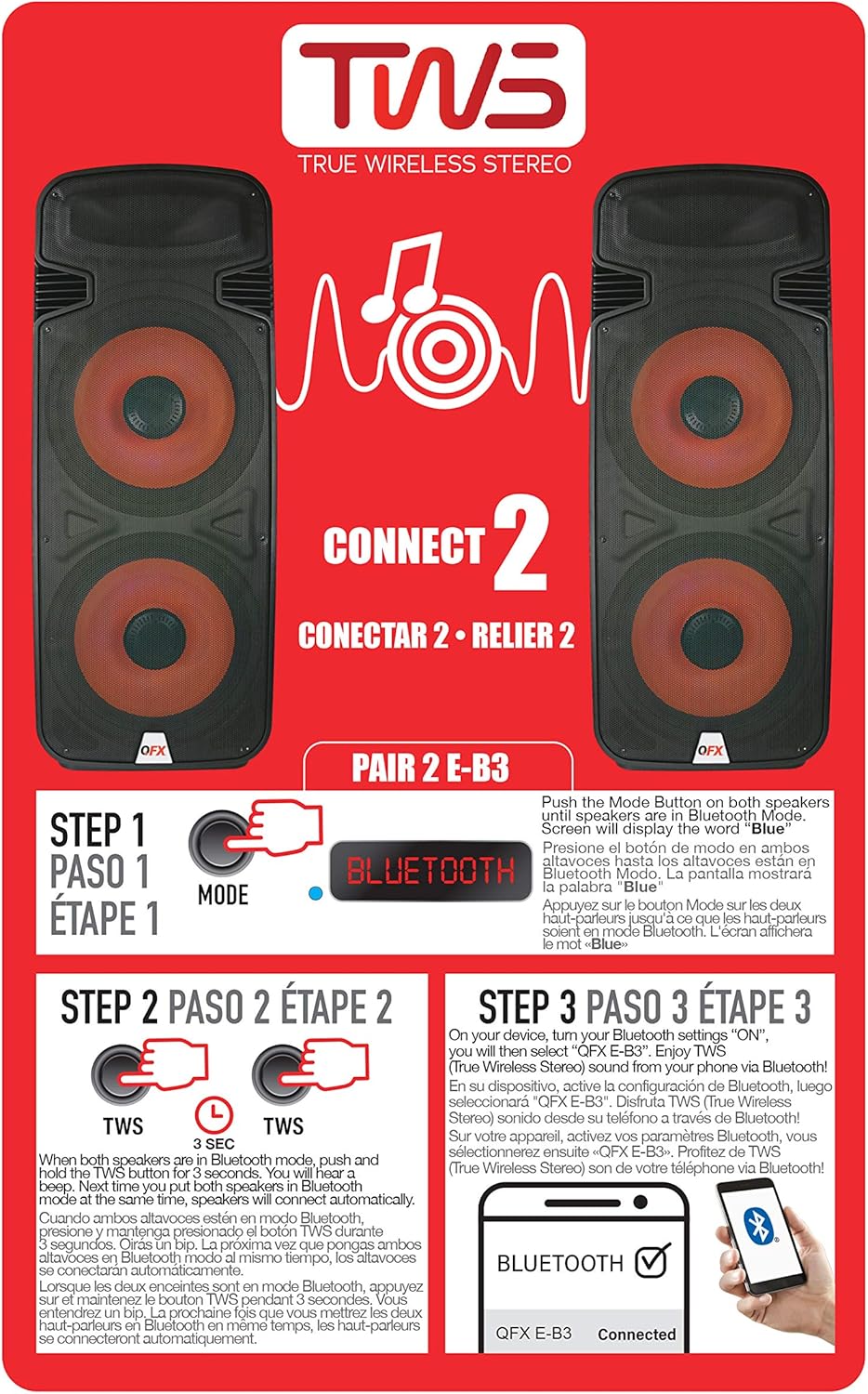
Figure 6.1: TWS Pairing Instructions.
- Ensure both QFX E-B3 speakers are powered on and in Bluetooth mode. The display on both speakers should show "BLUE".
- Su uno degli altoparlanti (questo sarà l'altoparlante principale), tieni premuto il tasto TWS button for approximately 3 seconds. The speakers will attempt to connect to each other.
- Once successfully paired, you will hear a confirmation sound, and the display on the primary speaker will show "BLUE" while the secondary speaker will show "BLUE" as well.
- On your Bluetooth-enabled device, search for and select "QFX E-B3". The two speakers will now play audio in stereo.
Funzionamento della radio FM
- Premere il tasto MODALITÀ button to switch to FM radio mode. The display will show the FM frequency.
- Premere e tenere premuto il tasto Riproduci/Pausa pulsante per avviare una scansione automatica delle stazioni FM. L'altoparlante salverà tutte le stazioni trovate.
- Utilizzare il Traccia precedente/successiva pulsanti per navigare tra le stazioni FM salvate.
Riproduzione USB/scheda SD
- Inserire una chiavetta USB o una scheda SD (con audio compatibile) files) nella rispettiva porta sul pannello posteriore.
- L'altoparlante passerà automaticamente alla modalità USB/SD e inizierà a riprodurre l'audio files. In caso contrario, premere il tasto MODALITÀ pulsante per selezionare la modalità USB o SD.
- Utilizzare il Riproduci/Pausa E Traccia precedente/successiva pulsanti per controllare la riproduzione.
Ingresso microfono
- Connect a microphone to the XLR Microphone Input on the rear panel.
- Adjust the Microphone Volume and Echo knobs to achieve the desired sound.
Ingresso RCA
- Connect an external audio source (e.g., CD player, mixer) to the RCA Input (L/R) ports using appropriate RCA cables.
- Premere il tasto MODALITÀ button to select RCA input mode.
- Adjust the master volume on the speaker and the volume on your external audio source.
Luci LED per feste
The speaker features integrated LED party lights that activate automatically when the speaker is powered on. There are no specific controls for the LED lights mentioned; they are designed to enhance the audio experience.
7. Manutenzione
Pulizia
- Scollegare sempre l'altoparlante prima di pulirlo.
- Utilizzare un panno morbido e asciutto per pulire le superfici esterne dell'altoparlante.
- Non utilizzare detergenti abrasivi, cere o solventi poiché potrebbero danneggiare la finitura.
- Mantenere le aperture di ventilazione libere da polvere e detriti.
Magazzinaggio
When not in use for extended periods, store the speaker in a cool, dry place, away from direct sunlight and extreme temperatures. Cover the speaker to protect it from dust.
8. Risoluzione Dei Problemi
If you encounter issues with your QFX E-B3 speaker, refer to the following common problems and solutions:
| Problema | Possibile causa | Soluzione |
|---|---|---|
| Nessun potere | Cavo di alimentazione non collegato; Presa di corrente non attiva; Interruttore di alimentazione dell'altoparlante spento. | Ensure AC cable is securely connected to speaker and outlet. Check if outlet is working. Turn speaker power switch ON. |
| Nessun suono | Volume troppo basso; Modalità di input selezionata non corretta; Sorgente audio non riprodotta. | Increase master volume. Press MODE button to select correct input. Ensure audio source is playing and its volume is up. |
| Il Bluetooth non si connette | Speaker not in Bluetooth mode; Device Bluetooth off; Speaker already paired to another device; Device too far. | Ensure speaker is in Bluetooth mode ("BLUE" on display). Turn on device Bluetooth. Disconnect from other devices. Move device closer to speaker (within 30 feet). |
| Accoppiamento TWS non riuscito | Altoparlanti non in modalità Bluetooth; il pulsante TWS non è stato tenuto premuto abbastanza a lungo. | Ensure both speakers are in Bluetooth mode. Press and hold the TWS button on one speaker for 3 seconds. |
| La riproduzione USB/SD non funziona | Modalità errata; Incompatibile file formato; Scheda USB/SD danneggiata. | Press MODE to select USB/SD. Ensure audio files are in a compatible format (e.g., MP3). Try a different USB/SD card. |
9. Specifiche
| Caratteristica | Specificazione |
|---|---|
| Marca | QFX |
| Numero di modello | MI-SI3 |
| Potenza massima in uscita dell'altoparlante | 250 Watt |
| Tecnologia di connettività | USB, Bluetooth |
| Modalità di uscita audio | Stereo |
| Tipo di montaggio | Plug Mount, Wheel Mount |
| Tipo di altoparlante | Woofer (Dual 15 Inches) |
| Tipo di controllore | Telecomando |
| Colore | Party LED |
| È impermeabile | Falso |
| Metodo di controllo | Remoto |
| Diametro del woofer | 15 pollici |
| Numero di canali audio | 2.0 |
| Tecnologia senza fili | Bluetooth |
| Protocollo di connettività | Bluetooth |
| Fonte di alimentazione | Elettrico con cavo |
| Tipo di driver audio | Driver dinamico |
| Dimensioni del driver audio | 15 pollici |
| Dimensioni dell'articolo (P x L x A) | 16.77"P x 13.98"L x 23.74"A |
| Peso dell'articolo | 13.2 libbre |
| Dispositivi compatibili | Computer portatile, lettore MP3, smartphone, tablet, televisione |
| Codice UPC | 606540039618 |
10. Informazioni sulla garanzia
This product is covered by a limited warranty. For specific details regarding warranty coverage and terms, please refer to the warranty information provided at the point of purchase or contact QFX customer support directly. The warranty is typically per contract with the retailer.
11. Supporto
For technical assistance, troubleshooting beyond this manual, or inquiries about your QFX E-B3 speaker, please contact QFX customer support or your retailer. Contact information can usually be found on the manufacturer's websito o sulla ricevuta d'acquisto.


