
1. Introduzione
Welcome to the user manual for your new Q Link Wireless Serrano 3 Smartphone. This guide provides essential information on setting up, operating, maintaining, and troubleshooting your device. Please read this manual thoroughly to ensure optimal performance and longevity of your smartphone.

Figura 1: Fronte e retro view of the Serrano 3 Smartphone.
2. Cosa c'è nella scatola
Upon unboxing your Serrano 3 Smartphone, please verify that all the following items are included:
- Serrano 3 Smartphone
- Pellicola protettiva per lo schermo
- Cavo di ricarica (USB)
- Adattatore di alimentazione
- Guida rapida

Figure 2: Serrano 3 Smartphone and accessories within its packaging.
3. Impostazione
3.1. Carica del dispositivo
Before first use, fully charge your Serrano 3 Smartphone. Connect the charging cable to the phone's charging port and the power adapter to a wall outlet. The battery indicator on the screen will show charging progress.
3.2. Inserimento della scheda SIM e della scheda SD
To insert your SIM card (for cellular service) and an optional microSD card (for expanded storage):
- Individuare il vassoio della scheda SIM/SD sul lato del telefono.
- Utilizzare lo strumento di espulsione SIM in dotazione per aprire il vassoio.
- Place your SIM card(s) and microSD card into their respective slots, ensuring correct orientation.
- Spingere delicatamente il vassoio nel telefono finché non scatta in posizione.
3.3. Accensione/Spegnimento
- Per accendere: Press and hold the Power button (usually on the right side) until the Q Link Wireless logo appears.
- Per spegnere: Tenere premuto il pulsante di accensione finché non viene visualizzato il menu delle opzioni di risparmio energetico. Selezionare "Spegni" e confermare.
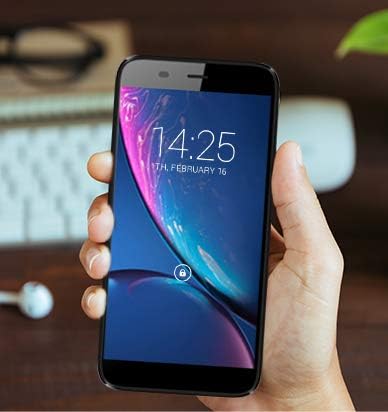
Figure 3: The Serrano 3 Smartphone being held, demonstrating its size and display.
4. Utilizzo del dispositivo
4.1. Navigazione
The Serrano 3 features a responsive touchscreen for all interactions. Use gestures such as tapping, swiping, pinching, and spreading to navigate menus, open applications, and control content.
4.2. Effettuare chiamate e inviare messaggi
Access the Phone app to make calls by dialing numbers or selecting contacts. Use the Messages app to send and receive SMS/MMS messages. Ensure your SIM card is properly inserted and activated for cellular services.
4.3. Connessione al Wi-Fi
Per connettersi a una rete Wi-Fi:
- Vai a Impostazioni > Rete e Internet > Wifi.
- Attiva il Wi-Fi.
- Seleziona la rete desiderata dall'elenco e inserisci la password se richiesta.
4.4. Utilizzo della fotocamera
The Serrano 3 is equipped with a 2MP front camera and a 5MP rear camera. Open the Camera app to capture photos and videos. Tap the screen to focus and press the shutter button to take a picture.
5. Manutenzione
Proper care will extend the life of your Serrano 3 Smartphone:
- Pulizia: Utilizzare un panno morbido e privo di lanugine per pulire lo schermo e il corpo. Evitare materiali abrasivi o prodotti chimici aggressivi.
- Resistenza all'acqua: Questo dispositivo non è resistente all'acqua. Evitare l'esposizione ai liquidi.
- Temperatura: Non esporre il dispositivo a temperature estreme (caldo o freddo).
- Cura della batteria: Evitare di scaricare completamente la batteria frequentemente. Caricare il dispositivo regolarmente.
- Aggiornamenti software: Mantieni aggiornato il software del tuo dispositivo per garantire prestazioni e sicurezza ottimali.
6. Risoluzione Dei Problemi
If you encounter issues with your Serrano 3 Smartphone, refer to the table below for common problems and their solutions.
| Problema | Possibile soluzione |
|---|---|
| Il dispositivo non si accende. | Assicurarsi che la batteria sia carica. Collegare il dispositivo a un caricabatterie e attendere qualche minuto prima di riprovare ad accenderlo. |
| Lo schermo non risponde. | Restart the device by holding the Power button. If unresponsive, force restart by holding Power button for 10-15 seconds. |
| Impossibile connettersi al Wi-Fi. | Check Wi-Fi settings, ensure Wi-Fi is enabled, and re-enter the password. Restart your Wi-Fi router. |
| Scarsa qualità delle chiamate o assenza di segnale. | Controlla l'inserimento della scheda SIM. Spostati in un'area con una migliore copertura di rete. Contatta il tuo operatore telefonico. |
| Device is stuck in a boot loop or shows "corrupt" message. | This indicates a potential software or hardware issue. Try a factory reset (consult online resources for your specific model's reset procedure, as it may vary). If the issue persists, contact customer support for further assistance. |
7. Specifiche
Key technical specifications for the Q Link Wireless Serrano 3 Smartphone:
| Caratteristica | Dettaglio |
|---|---|
| Nome del modello | Q Link Wireless Connecting America Serrano 3 |
| Numero modello articolo | Serrano H6 |
| Sistema operativo | Android Vai |
| Dimensioni dello schermo | 5.5 pollici |
| Risoluzione | 566x319 |
| Memoria RAM | 2 GB |
| Capacità di archiviazione della memoria | 16 GB |
| Telecamera posteriore | 5 MP |
| Fotocamera frontale | 2 MP |
| Capacità della batteria | 2200 milioneampprima ora (mAh) |
| Tempo di ricarica | 2 ore |
| Dimensioni del prodotto | 6 x 2.48 x 0.42 pollici |
| Peso dell'articolo | 3.53 once (100 grammi) |
| Colore | Nero |
| Tecnologie di comunicazione wireless | Cellulare (4G LTE) |
| Tecnologie di connettività | Wi-Fi, GPS |
| Presa audio | 3.5 millimetri |
8. Garanzia e supporto
Q Link Wireless provides support for its products. For specific warranty details, please refer to the documentation included with your purchase or visit the official Q Link Wireless websito.
Politica di ritorno: This product typically has a 30-day return policy for refund or replacement, subject to the retailer's terms and conditions.
For technical assistance or further inquiries, please contact Q Link Wireless customer support through their official channels.