
Bytech BY-AU-BS-152-BK
Bytech True Wireless Bluetooth Boost Link True Speaker User Manual
Model: BY-AU-BS-152-BK
Introduzione
Grazie per l'acquistoasing the Bytech True Wireless Bluetooth Boost Link True Speaker. This manual provides essential information for setting up, operating, and maintaining your new speakers. Please read this manual thoroughly before use to ensure proper operation and to maximize your listening experience. These speakers feature True Wireless Stereo (TWS) functionality, Bluetooth connectivity, FM Radio, and Bass Boost for rich audio.
Informazioni sulla sicurezza
- Do not expose the speakers to extreme temperatures, humidity, or direct sunlight.
- Evitare di far cadere o di sottoporre gli altoparlanti a forti urti.
- Do not disassemble, repair, or modify the speakers yourself. Refer all servicing to qualified personnel.
- Tenere gli altoparlanti lontani dall'acqua e da altri liquidi.
- Utilizzare solo il cavo di ricarica e l'adattatore di alimentazione specificati.
- Pulire gli altoparlanti con un panno morbido e asciutto. Non utilizzare detergenti abrasivi o solventi.
- Ascoltare a volume moderato per evitare danni all'udito.
Contenuto della confezione

Image: The Bytech Boost Link True Wireless Speakers shown in their retail packaging, highlighting the two speakers and the Bluetooth connectivity feature.
Si prega di verificare che tutti gli articoli siano presenti e in buone condizioni:
- 2 x Bytech Boost Link True Wireless Speakers
- 1 cavo di ricarica (USB)
- 1 x Manuale utente (questo documento)
Prodotto finitoview

Immagine: Primo piano frontale view of the two Bytech Boost Link True Wireless Speakers, showing the speaker grilles and control buttons at the bottom.
Familiarizzare con i componenti e i controlli dell'altoparlante:
- Griglia dell'altoparlante: Protects the speaker driver.
- Pulsanti di controllo:
- Pulsante di accensione: Power On/Off, Play/Pause.
- Pulsante Modalità: Switch between Bluetooth, FM Radio, etc.
- Pulsante Traccia precedente/Volume giù: Pressione breve per la traccia precedente, pressione prolungata per abbassare il volume.
- Pulsante Traccia successiva/Volume su: Premere brevemente per la traccia successiva, premere a lungo per aumentare il volume.
- Porta di ricarica: Per collegare il cavo di ricarica USB.
- Indicatore LED: Mostra lo stato di alimentazione, lo stato di carica e lo stato di associazione.
Impostare
Ricarica degli altoparlanti
Before first use, fully charge both speakers. Connect the supplied USB charging cable to the charging port on each speaker and plug the other end into a USB power adapter (not included) or a computer's USB port. The LED indicator will show charging status and turn off or change color when fully charged.
Accensione/spegnimento
- Per accendere: Press and hold the Power button on each speaker until the LED indicator lights up and you hear a power-on prompt.
- Per spegnere: Press and hold the Power button on each speaker until the LED indicator turns off and you hear a power-off prompt.
Istruzioni per l'uso
Accoppiamento Bluetooth (modalità altoparlante singolo)
- Assicurarsi che l'altoparlante sia acceso e in modalità di associazione Bluetooth (l'indicatore LED lampeggerà).
- Sul tuo dispositivo (smartphone, tablet, laptop), attiva il Bluetooth e cerca i dispositivi disponibili.
- Select "BYTECH BOOST LINK" (or similar name) from the list.
- Una volta effettuato l'accoppiamento, l'indicatore LED smetterà di lampeggiare e rimarrà fisso, e verrà emesso un suono di conferma.
True Wireless Stereo (TWS) Pairing (Two Speakers)
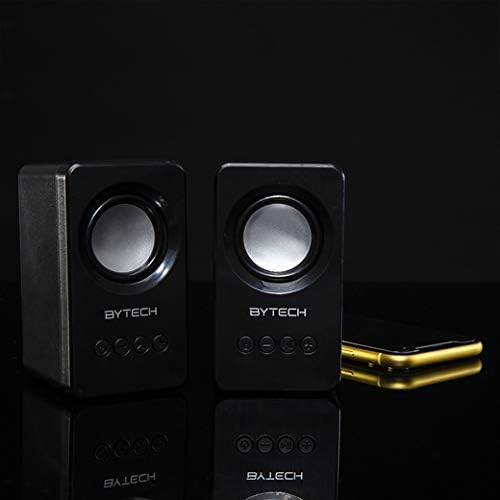
Image: The two Bytech Boost Link True Wireless Speakers positioned next to a smartphone, symbolizing their ability to connect wirelessly to each other and a device for stereo sound.
For a true stereo sound experience, you can pair both speakers together:
- Power on both Bytech Boost Link speakers. Do not connect them to your Bluetooth device yet.
- The speakers will automatically attempt to pair with each other. You will hear a confirmation sound when they are successfully linked for TWS. One speaker will become the master (left channel) and the other the slave (right channel).
- Once TWS paired, the master speaker will enter Bluetooth pairing mode (LED flashing).
- On your device, enable Bluetooth and search for "BYTECH BOOST LINK". Connect to this single entry.
- Entrambi gli altoparlanti ora riprodurranno l'audio in stereo.
- Nota: If the speakers do not automatically pair, try double-pressing the Mode button on one of the speakers to initiate TWS pairing.
Funzionamento della radio FM
- Power on the speaker(s).
- Premere il tasto Modalità ripetutamente il pulsante finché non si sente il segnale radio FM.
- Per eseguire la scansione automatica e salvare le stazioni, tenere premuto il tasto Riproduci/Pausa button. The speaker will scan and store available FM stations.
- Utilizzare il Traccia precedente E Traccia successiva pulsanti per navigare tra le stazioni salvate.
Riproduzione audio e controllo del volume
- Riproduci/Pausa: Premi brevemente il pulsante di accensione.
- Traccia successiva: Short press the Next Track/Volume Up button.
- Traccia precedente: Short press the Previous Track/Volume Down button.
- Aumenta volume: Long press the Next Track/Volume Up button.
- Volume basso: Long press the Previous Track/Volume Down button.
Manutenzione
- Pulizia: Use a soft, dry, lint-free cloth to clean the surface of the speakers. Do not use liquid cleaners, aerosols, or solvents.
- Magazzinaggio: Quando non vengono utilizzati per lunghi periodi, conservare gli altoparlanti in un luogo fresco e asciutto, lontano dalla luce solare diretta e da temperature estreme.
- Cura della batteria: To prolong battery life, avoid fully discharging the battery frequently. Charge the speakers regularly, even if not in use.
Risoluzione dei problemi
| Problema | Possibile causa | Soluzione |
|---|---|---|
| L'altoparlante non si accende. | Batteria scarica. | Caricare completamente l'altoparlante. |
| Impossibile effettuare l'associazione tramite Bluetooth. | Altoparlante non in modalità di associazione; Bluetooth del dispositivo disattivato; Troppo lontano dal dispositivo. | Ensure speaker LED is flashing; Turn on Bluetooth on your device; Move speaker closer to device (within 10 meters). |
| Nessun suono. | Volume too low; Speaker not connected; Incorrect mode. | Increase volume on speaker and device; Re-pair Bluetooth; Ensure correct mode (Bluetooth/FM). |
| L'associazione TWS non riesce. | Altoparlanti già collegati a un dispositivo; Altoparlanti troppo distanti. | Disconnect speakers from any device; Power off and on both speakers, then try TWS pairing again; Ensure speakers are close to each other. |
| Scarsa ricezione radio FM. | Segnale debole; interferenza. | Relocate the speaker to an area with better reception; Extend the charging cable (can act as an antenna). |
Specifiche
- Modello: DA-AU-BS-152-BK
- Marca: Tecnologia Bytech
- Tecnologia di connettività: Wireless (Bluetooth)
- Modalità di uscita audio: Circondare
- Tipo di altoparlante: Suono Surround
- Caratteristiche speciali: Wireless Bluetooth, Bass Boost, FM Radio, True Wireless Stereo (TWS)
- Utilizzi consigliati: Per i lettori musicali
- Dispositivi compatibili: Computer portatile, tablet, smartphone
- Tipo di controller: Pulsanti sul dispositivo
- Dimensioni della confezione: Dimensioni: 20.7 x 16 x 9 cm
- Peso: 560 grammi
Garanzia e supporto
Bytech products are designed and manufactured to the highest quality standards. For information regarding warranty coverage, technical support, or service inquiries, please refer to the warranty card included with your purchase or visit the official Bytech websito. Conservare la prova d'acquisto per eventuali reclami in garanzia.
For further assistance, please contact Bytech customer support.
Ask a question about this manual
Ask about setup, troubleshooting, compatibility, parts, safety, or missing instructions. Manuals+ will review the question and use this page’s manual context to help answer it.