
1. Introduzione
This manual provides detailed instructions for the installation, operation, and maintenance of your EONON GA2185J 10.1-inch Android Car Navigation System. Please read this manual thoroughly before using the product to ensure proper and safe operation. Keep this manual for future reference.
2. Informazioni sulla sicurezza
- Installazione professionale consigliata: Data la complessità degli impianti elettrici delle automobili, si consiglia vivamente l'installazione da parte di un professionista per evitare danni all'unità o al veicolo.
- Sicurezza di guida: Non utilizzare il sistema in modo da distrarti dalla guida. Dai sempre priorità alla sicurezza stradale.
- Alimentazione elettrica: Assicurarsi che l'unità sia collegata a un alimentatore da 12 V CC con messa a terra negativa. Vol. erratotagpuò causare danni.
- Temperatura: Evitare di esporre l'unità a temperature estreme o alla luce solare diretta per periodi prolungati.
- Umidità: Tenere l'unità lontana dall'acqua e dall'umidità eccessiva.
- Ventilazione: Assicurare un'adeguata ventilazione attorno all'unità per evitare il surriscaldamento.
3. Contenuto della confezione
Verifica che tutti gli articoli elencati di seguito siano inclusi nel tuo pacchetto:

Immagine: Included Accessories. This image displays all components that come with the EONON GA2185J unit, neatly arranged and numbered for easy identification.
- GPS Antenna (3m) x1
- Cavo di alimentazione x1
- Cavo AV x2
- Microphone (3m) x1
- USB Cable (1m) x2
- Wi-Fi Antenna (1.5m) x1
- Fusibile da 15 Ax1
- Strumento di smontaggio x1
- Viti di montaggio x4
- Manuale di istruzioni x1
4. Prodotto finitoview
The EONON GA2185J is a 10.1-inch Android 10 car navigation system designed to provide a comprehensive multimedia and navigation experience in your vehicle.

Immagine: EONON GA2185J Main Unit. This image shows the front of the car navigation system, highlighting its memory specifications.
Caratteristiche principali:
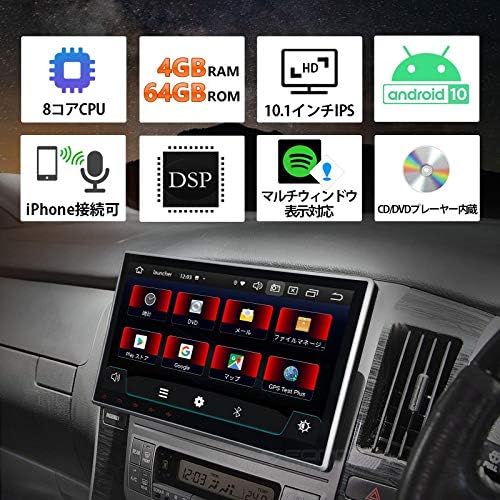
Immagine: Caratteristica finitaview. This infographic summarizes the main technical specifications and functionalities of the device.
- Sistema operativo: Androide 10
- Processore: CPU a 8 core
- Memoria: 4 GB di RAM + 64 GB di ROM
- Display: Touchscreen IPS da 10.1 pollici
- Connettività: Built-in Wi-Fi, Built-in Bluetooth, USB
- Caratteristiche audio: DSP (Digital Sound Processor), Equalizer, Subwoofer output, RCA outputs
- Radio: FM Tuner, AM Tuner, RDS
- Integrazione smartphone: iPhone connectivity (Mirroring)
- Multitasking: Multi-window display support
- Riproduzione multimediale: CD/DVD Player built-in

Immagine: Processor Details. This image highlights the powerful 8-core processor and memory configuration of the system.
Prestazione:

Immagine: Fast Boot Time. This image demonstrates the system's quick startup, powering on in approximately 1 second.
The system is designed for a fast and smooth user experience, supporting numerous applications and improving data transfer speeds for efficient multitasking.
5. Configurazione e installazione
Controllo pre-installazione:
- Before installation, carefully check the size and shape of your vehicle's console panel to ensure compatibility.
- If the product size does not match your console, please contact the service center directly for assistance.
Installazione fisica:
The unit features an adjustable screen, allowing for a gap of up to approximately 35mm between the LCD panel and the main unit for optimal viewangoli di inclinazione.

Immagine: Adjustable Screen Angle. This diagram illustrates how the screen can be tilted to achieve the best viewposizione di avanzamento.
- Carefully remove your existing car stereo or panel.
- Connect the necessary wiring harnesses (power, speakers, accessories) to the GA2185J unit.
- Mount the unit securely into the dashboard using the provided mounting screws.
- Adjust the screen angle as needed for optimal visibility.
- Reinstall any removed panels or trim.
Collegamenti elettrici:
Per i collegamenti specifici, fare riferimento allo schema elettrico fornito con l'unità. I collegamenti principali includono:
- Cavo di alimentazione: Connect to vehicle's 12V DC power supply (constant, accessory, ground).
- Cavi dell'altoparlante: Collegalo agli altoparlanti del tuo veicolo.
- Antenna GPS: Collegare l'antenna GPS e posizionarla in un luogo con una vista libera view del cielo.
- Antenna WiFi: Connect the Wi-Fi antenna for optimal wireless signal reception.
- Cavi USB: Collega dispositivi USB per la riproduzione multimediale o la ricarica dello smartphone.
- AV Cables: Use for connecting external audio/video sources or outputting video to external displays.
- Microfono: Collega il microfono esterno per chiamate in vivavoce e comandi vocali.
6. Istruzioni per l'uso
Funzionamento di base:
- Accensione/spegnimento: Tieni premuto il pulsante di accensione (se disponibile) oppure accendi l'accensione del veicolo.
- Schermo tattile: È possibile navigare nell'interfaccia toccando, scorrendo e pizzicando sul touchscreen IPS da 10.1 pollici.
- Controllo del volume: Regolare il volume utilizzando i comandi sullo schermo o i comandi al volante (se collegati).
Sistema Android 10:
Your device runs on Android 10, offering a familiar and intuitive user interface. It supports a wide range of applications and provides a smooth, responsive experience.

Immagine: Android 10 Interface. This image demonstrates the Android 10 operating system running on the device, showcasing its multimedia capabilities.
Connettività Bluetooth:
Pair your smartphone or other Bluetooth devices to the unit for hands-free calling and audio streaming.
- Accedere alle impostazioni Bluetooth dell'unità.
- Abilita il Bluetooth sul tuo smartphone e cerca i dispositivi disponibili.
- Select 'EONON GA2185J' (or similar name) from the list and confirm pairing.
Connessione Wi-Fi:
Connect to a Wi-Fi network to access online features, download apps, and browse the internet.
- Navigate to the Wi-Fi settings menu.
- Seleziona la rete Wi-Fi desiderata e inserisci la password, se richiesta.
Navigazione GPS:
Utilize pre-installed or downloaded navigation applications for turn-by-turn directions and real-time traffic information.
- Assicurarsi che l'antenna GPS sia installata correttamente e che il segnale sia chiaro.
- Apri la tua app di navigazione preferita e inserisci la destinazione.
Visualizzazione multi-finestra:
The multi-window feature allows you to split the screen and use two applications simultaneously, enhancing multitasking capabilities.

Immagine: Multi-Window Display. This image illustrates the ability to run two applications side-by-side on the screen, such as navigation and music.
Smartphone Mirroring (iPhone Connectivity):
Connect your iPhone to the unit to mirror its display and access apps, navigation, calls, and music through the car stereo's interface. This feature is designed with driving safety in mind.

Immagine: iPhone Connectivity. This image shows an iPhone connected to the car stereo, demonstrating the mirroring functionality for seamless integration.
Impostazioni audio:
Utilize the built-in DSP, equalizer, and subwoofer output to customize your audio experience.
- Access the audio settings menu to adjust sound profiles, bass, treble, and balance.
- The DSP allows for fine-tuning of sound characteristics.
- Connect an external subwoofer to the dedicated output for enhanced bass.
7. Manutenzione
- Pulizia dello schermo: Utilizzare un panno morbido e privo di lanugine per pulire delicatamente il touchscreen. Evitare detergenti abrasivi o solventi.
- Aggiornamenti software: Controllare periodicamente la disponibilità di aggiornamenti software per garantire prestazioni ottimali e l'accesso a nuove funzionalità. Gli aggiornamenti sono solitamente disponibili sul sito web del produttore. websito o tramite le impostazioni del sistema.
- Cura generale: Mantenere l'unità libera da polvere e detriti. Evitare di posizionare oggetti pesanti sull'unità.
8. Risoluzione Dei Problemi
If you encounter issues with your EONON GA2185J, refer to the following common problems and solutions:
| Problema | Possibile causa | Soluzione |
|---|---|---|
| L'unità non si accende. | Cablaggio errato, fusibile bruciato, problema di alimentazione del veicolo. | Check power cable connections. Inspect the 15A fuse. Verify vehicle's power supply. |
| Nessun suono. | Cavi degli altoparlanti scollegati, volume troppo basso, impostazioni audio errate. | Check speaker connections. Increase volume. Verify audio output settings. |
| Il segnale GPS è debole o impreciso. | Antenna GPS posizionata in modo errato o difettosa. | Assicurarsi che l'antenna GPS abbia una visuale libera view del cielo. Controllare il collegamento dell'antenna. |
| Problemi di connessione Bluetooth. | Dispositivo non in modalità di associazione, interferenza, processo di associazione non corretto. | Assicurati che entrambi i dispositivi siano in modalità di associazione. Elimina le associazioni precedenti e riprova. Avvicinati all'unità. |
| System freezes or becomes unresponsive. | Software glitch, too many apps running, overheating. | Perform a soft reset (refer to manual for reset button location, usually a small pinhole). Close unnecessary applications. Ensure proper ventilation. |
Se il problema persiste dopo aver provato queste soluzioni, contattare l'assistenza clienti.
9. Specifiche
| Caratteristica | Specificazione |
|---|---|
| Dimensioni dello schermo | 10.1 pollici |
| Sistema operativo | Androide 10 |
| Processore | 8 core |
| Memoria RAM | 4 GB |
| ROM | 64 GB |
| Connettività | Bluetooth, USB, Wi-Fi |
| Altre funzioni | AM Tuner, Bluetooth Built-in, DSP, FM Tuner, RCA, RDS, Wi-Fi Built-in, Equalizer, Subwoofer, Touchscreen |
| Dispositivi compatibili | Smartphone, PC |
| Tipo di connettore | Jack da 3.5 mm, RCA |
| Modalità di uscita audio | Surround, stereo |
| Metodo di controllo | App, Touch, Remote |
| Peso del prodotto | 2.3 kg |
| Dimensioni del pacco | Dimensioni: 34.8 x 32 x 23.88 cm |
10. Garanzia e supporto
Per informazioni sulla garanzia, supporto tecnico o richieste di assistenza, consultare la scheda di garanzia inclusa con il prodotto o contattare direttamente il venditore/produttore. Conservare la ricevuta d'acquisto come prova d'acquisto.


