
Jensen CAR710
Jensen CAR710 Multimedia Receiver User Manual
Modello: CAR710
1. Introduzione
This manual provides detailed instructions for the installation, operation, and maintenance of your Jensen CAR710 7-inch Mechless Multimedia Receiver. The CAR710 features a 7-inch extra-large touchscreen LCD (1024x600), compatibility with Apple CarPlay and Android Auto, built-in Bluetooth for hands-free calling and music streaming, and a powerful 240 Watts MOSFET amplifier (60W x 4).
Le caratteristiche principali includono:
- 7" Extra-large touchscreen LCD (1024x600)
- Funziona con Apple CarPlay
- Works with Android Auto
- Bluetooth with hands-free calling, music streaming, phonebook support (HFP, A2DP, AVRCP, PBAP)
- Rear USB input (1.5A fast charging)
- Rear RCA A/V input
2. Configurazione e installazione
Professional installation is highly recommended for this multimedia receiver to ensure proper wiring and functionality. Incorrect installation can lead to damage to the unit or vehicle's electrical system.
2.1 Cablaggio e collegamenti
The CAR710 requires careful wiring. You may need to purchase a vehicle-specific wiring harness. Some installations may require wire splicing. Ensure all connections are secure and insulated.
For USB media playback, ensure your USB drive is formatted to FAT32. ExFAT format may not be recognized and will require reformatting on a computer.
2.2 Accensione iniziale
After installation, turn on your vehicle's ignition. The unit should power on. Follow any on-screen prompts for initial setup, such as language selection or time setting.
3. Istruzioni per l'uso
3.1 Interfaccia touchscreen
The CAR710 features a responsive touchscreen for all operations. Navigate through menus and select functions by tapping the corresponding icons.

Figure 3.1: Main Source Selection Screen
This image displays the Jensen CAR710's main screen, showing options for Radio, USB, Bluetooth Phone, Bluetooth Audio, Android Auto, and Apple CarPlay. The current time and date are visible at the top right.
3.2 Apple CarPlay e Android Auto
Connect your compatible iPhone or Android smartphone via the USB port to activate Apple CarPlay or Android Auto. This allows you to access navigation, music, messages, and other apps directly from the receiver's screen.

Figure 3.2: Apple CarPlay Navigation Interface
This image shows the Apple CarPlay interface on the Jensen CAR710, displaying a map with navigation directions and media playback controls.
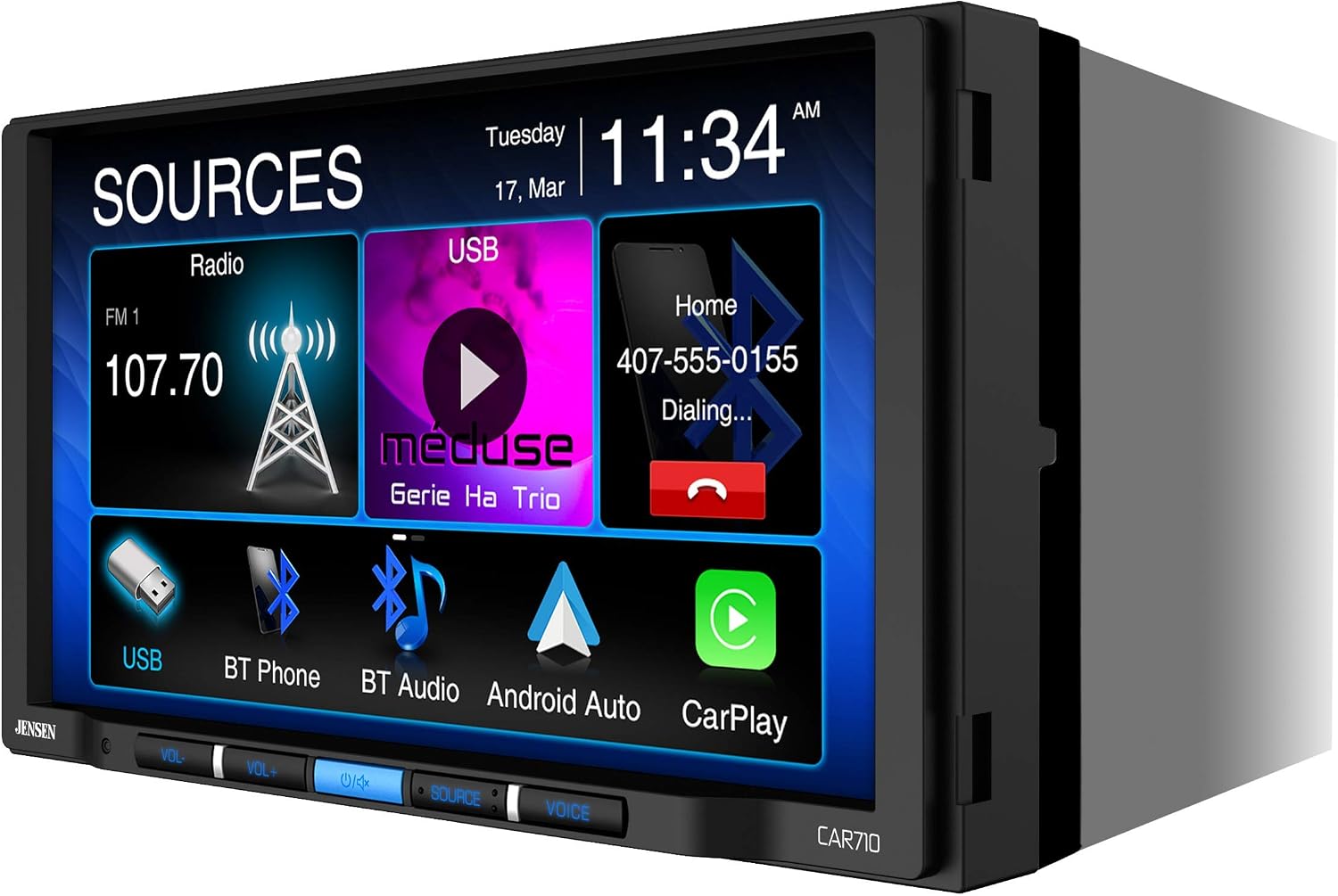
Figure 3.3: Apple CarPlay Application Menu
This image illustrates the main application menu within Apple CarPlay on the Jensen CAR710, showing icons for Phone, Music, Maps, Messages, and other compatible apps.

Figure 3.4: Android Auto Navigation Interface
This image displays the Android Auto interface on the Jensen CAR710, featuring a map with navigation and controls at the bottom.
While generally responsive, some users may experience slight sluggishness on the main screen. CarPlay and Android Auto performance is typically smooth.
3.3 Connettività Bluetooth
Pair your Bluetooth-enabled device to the CAR710 for hands-free calling and wireless audio streaming. Refer to the on-screen Bluetooth menu for pairing instructions.
3.4 Controlli audio
Adjust volume using the physical VOL+/- buttons or the on-screen controls. The unit features individual volume settings for different functions (CarPlay, Radio, Phone Calls). These settings may reset to a default level (e.g., level 11) after the vehicle is turned off and restarted. This is normal behavior and not indicative of a wiring issue if station presets and time are retained.
Access the Equalizer (EQ) settings to customize sound output. If sound quality is not optimal, adjust the time alignment settings within the audio menu.
3.5 Radio and USB Playback
Select the Radio source to access FM radio. Use the on-screen controls to tune stations and save presets. Insert a USB drive into the rear USB port for media playback. The unit supports various audio and video formats.
3.6 Ingresso telecamera di retromarcia
The CAR710 supports a rear camera input. Connect a compatible backup camera to the designated RCA input. The display will automatically switch to the camera view when the vehicle is in reverse. Note that some cameras may produce a dark or low-quality image on the screen, even with full screen brightness.
4. Manutenzione
To ensure longevity and optimal performance of your Jensen CAR710, follow these maintenance guidelines:
- Pulizia: Utilizzare un panno morbido e asciutto per pulire il touchscreen e l'esterno dell'unità. Evitare detergenti abrasivi o solventi.
- Aggiornamenti software: Periodically check the Jensen website for available firmware updates. Keeping the software current can improve performance and resolve minor issues.
- Condizioni ambientali: Evitare di esporre l'unità a temperature estreme, alla luce solare diretta per periodi prolungati o a umidità eccessiva.
5. Risoluzione Dei Problemi
If you encounter issues with your CAR710, refer to the following common problems and solutions:
| Problema | Possibile causa/soluzione |
|---|---|
| Apple CarPlay / Android Auto crashes frequently. | Try unplugging and replugging your phone. Ensure your phone's operating system and the unit's firmware are up to date. If the issue persists, contact Jensen support. |
| Buttons do not light up at night. | Check the display settings within the unit's menu. There may be an option to control button backlighting. |
| Volume resets to a low level after restarting the vehicle. | This is often normal behavior as different audio sources (CarPlay, Radio, Phone) have independent volume settings that may default to a specific level upon restart. Ensure your wiring for constant power (12V always on) is correct if station presets or time are not saved. |
| Backup camera image is dark or unclear. | Ensure the camera is properly connected and functioning. Some cameras may not be fully compatible or may have low light sensitivity. Adjust screen brightness on the unit. |
| Qualità del suono scadente. | Access the audio settings and adjust the Equalizer (EQ) and Time Alignment settings to optimize sound for your vehicle's acoustics. |
6. Specifiche
| Caratteristica | Dettaglio |
|---|---|
| Dimensioni del prodotto | 9 x 9 x 7 pollici |
| Peso dell'articolo | 3.39 libbre |
| Numero di modello | CAR710 |
| Display | 7" Extra-large touchscreen LCD (1024x600) |
| Potenza in uscita | 240 Watts MOSFET Power (60W x 4) |
| Tecnologie di connettività | Bluetooth, RCA, USB |
| Comunicazione senza fili | Bluetooth |
| Caratteristiche speciali | Pandora, Spotify, Touchscreen |
| Dispositivi compatibili | Smartphone, Altoparlante |
| Modalità di uscita audio | Stereo |
| Canale audio surround | 2.0 |
| Codifica video | H.264, H.265/HEVC |
7. Garanzia e supporto
Jensen products are designed and manufactured to the highest quality standards. This product is covered by a limited warranty. For specific warranty terms and conditions, please refer to the warranty card included with your product or visit the official Jensen websito.
For technical support, troubleshooting assistance, or service inquiries, please contact Jensen customer support. Contact information can typically be found on the Jensen websito o nella confezione del prodotto.
Websito: jensenmobile.com
Ask a question about this manual
Ask about setup, troubleshooting, compatibility, parts, safety, or missing instructions. Manuals+ will review the question and use this page’s manual context to help answer it.