
1. Introduzione
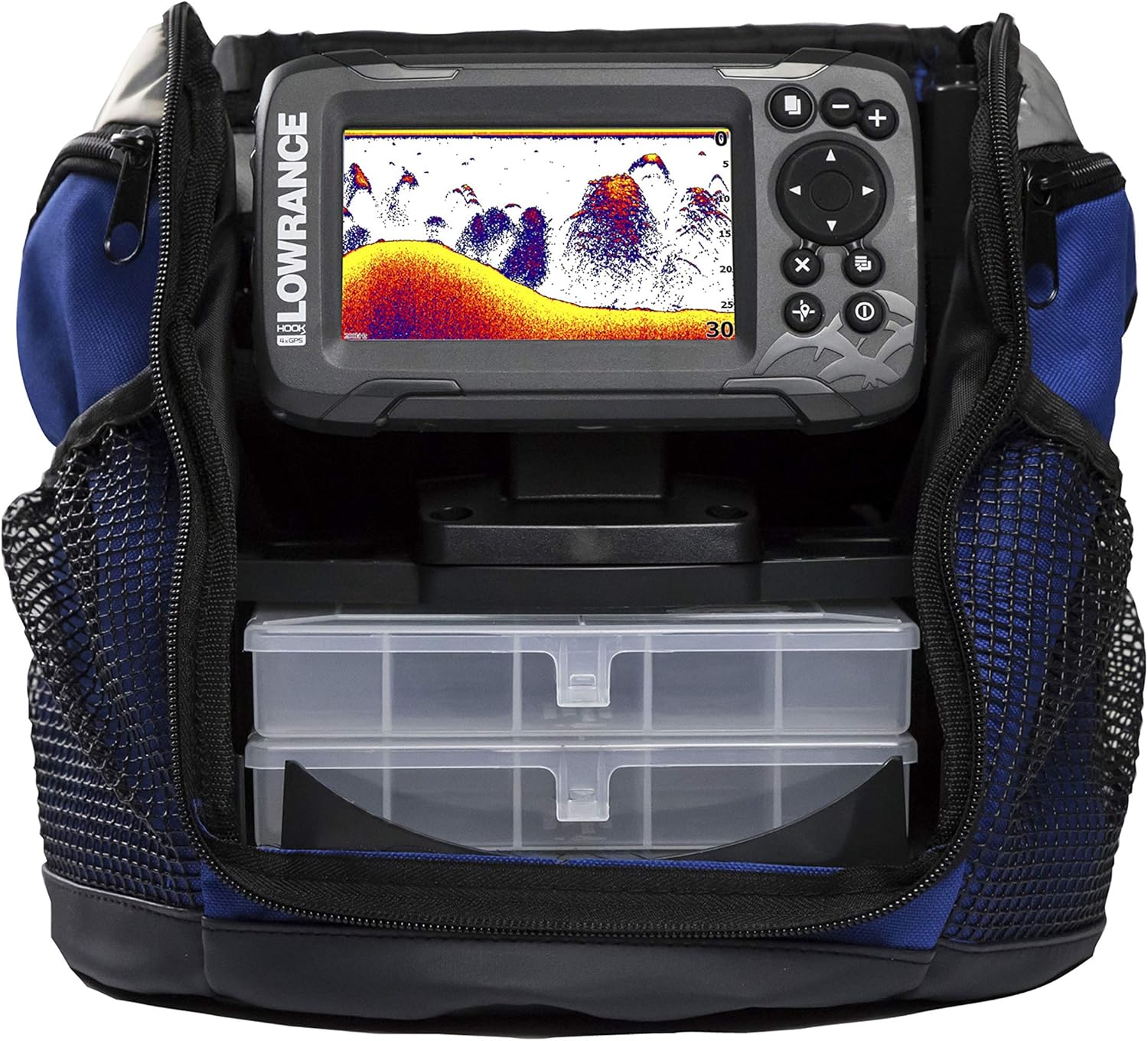
This manual provides comprehensive instructions for the setup, operation, and maintenance of your Lowrance HOOK2 Fish Finder All-Season Pack. Designed for simplicity and effectiveness, the HOOK2 series offers intuitive controls and advanced sonar technology to enhance your fishing experience in various environments, from open water to ice fishing.
Per garantire il corretto funzionamento e la sicurezza del dispositivo, leggere attentamente il presente manuale prima di utilizzarlo.
2. Cosa c'è nella scatola
Verify that all the following components are included in your Lowrance HOOK2 Fish Finder All-Season Pack:
- Lowrance HOOK2 Fish Finder Unit (4-inch SolarMAX Display)
- Staffa di montaggio regolabile
- Bullet Skimmer Transducer
- Transducer Mounting Hardware (screws, bolts, brackets)
- Cavo di alimentazione
- All-Season Pack Carry Bag
- 12V Sealed Lead-Acid Battery
- Caricabatterie
- Quick Guide and Welcome Aboard Documentation

3. Impostazione
3.1 Mounting the Fish Finder Unit
Attach the adjustable mounting bracket to a stable, flat surface on your boat or ice fishing sled using the provided hardware. Ensure the mount is secure and allows for easy adjustment of the display angle. The unit can then be clicked into place on the bracket.
3.2 Collegamento del trasduttore
For boat use, mount the Bullet Skimmer Transducer to the transom or a suitable location ensuring it is submerged and has a clear view of the water below. For ice fishing, the transducer can be suspended directly into the ice hole. Connect the transducer cable to the corresponding port on the back of the HOOK2 unit.
3.3 Accensione
Connect the power cable to the HOOK2 unit and then to the 12V battery. Ensure the battery is fully charged using the provided charger before first use. Press and hold the power button on the unit to turn it on. The unit will typically boot directly into sonar mode.

4. Istruzioni per l'uso
4.1 Navigazione e visualizzazione di base
The HOOK2 features a simple keypad for navigation. Use the arrow keys to move through menus and adjust settings. The 'Pages' button cycles through different display views (Sonar, GPS, etc.). The 'Enter' button confirms selections, and the 'X' button cancels or goes back.
4.2 Sonar Display Interpretation
The sonar display shows the bottom contour, fish arches, and structure. Fish typically appear as arches or inverted V-shapes. The depth is indicated on the left side of the screen. The autotuning sonar automatically adjusts settings for the clearest image, but manual adjustments can be made via the menu.
4.3 Navigazione GPS
The GPS model allows you to track your movement and generate basic maps on the fly. You can view your current coordinates and track your path. This feature is particularly useful for navigating in areas without pre-loaded charts or for marking productive fishing spots.
4.4 Waypoint Management
Mark waypoints at locations of interest, such as productive fishing holes or underwater structures. To mark a waypoint, press the 'Waypoint' button. You can then edit the waypoint's symbol to categorize it (e.g., a fish symbol for a productive spot). This allows for easy identification and navigation back to these locations.
5. Manutenzione
To ensure the longevity and optimal performance of your HOOK2 Fish Finder, follow these maintenance guidelines:
- Pulizia: After each use, wipe down the unit and transducer with a damp panno. Evitare detergenti abrasivi o solventi.
- Magazzinaggio: Store the unit in a dry, cool place away from direct sunlight. Ensure the battery is fully charged before long-term storage and recharge periodically.
- Cura del cavo: Inspect cables for any signs of wear or damage. Avoid sharp bends or kinks that could damage internal wires.
- Cura della batteria: Always use the provided charger. Do not overcharge or deep discharge the battery.
6. Risoluzione Dei Problemi
If you encounter issues with your Lowrance HOOK2 Fish Finder, refer to the following common troubleshooting tips:
- Nessun potere: Check battery connections and ensure the battery is charged. Verify the power cable is securely plugged into the unit.
- Nessuna lettura del sonar: Ensure the transducer is fully submerged in water and free from obstructions. Check that the transducer cable is securely connected to the unit.
- Immagine sonar scadente: Adjust sensitivity settings. Ensure the transducer is properly aligned and not experiencing air bubbles or turbulence.
- GPS non tracciante: Assicurarsi che l'unità abbia una chiara view del cielo per acquisire i segnali satellitari.
For more detailed troubleshooting or persistent issues, please consult the full user manual or contact Lowrance customer support.
7. Specifiche
| Caratteristica | Dettaglio |
|---|---|
| Marca | Bassarenza |
| Nome del modello | Ice Fishing Electronics |
| Numero di modello | Numero di telefono: 000-14178-001 |
| Dimensioni dello schermo | 4 pollici |
| Tipo di visualizzazione | LCD |
| Fonte di alimentazione | Alimentato a batteria |
| Peso dell'articolo | 4.5 libbre |
| Tipo di montaggio | Montaggio in superficie |
| Colore | Grigio |
| Materiale | Plastica |
8. Garanzia e supporto
Your Lowrance HOOK2 Fish Finder All-Season Pack is covered by a 1-Year Limited Warranty from the date of purchase. This warranty covers defects in materials and workmanship under normal use.
For warranty claims, technical support, or additional product information, please contact Lowrance Customer Service or visit their official websito:
- Garanzia: 1 anno
- Supporto online: Visita il sito ufficiale Lowrance website for FAQs, software updates, and detailed product manuals.
- Contatta l'assistenza: Refer to your product packaging or the Lowrance website for current contact information (phone, email).


