
Introduzione
The Seagate Expansion Portable Hard Drive provides an easy-to-use solution for instantly adding storage to your computer. This portable hard drive is designed for simple drag-and-drop file saving and offers automatic recognition with both Windows and Mac computers. It features a sleek, compact design, making it ideal for carrying your photos, movies, music, and other important files on the go. The device connects via USB 3.0, ensuring fast data transfer speeds and power directly from the USB port.
Cosa è incluso
Verificare che tutti gli articoli siano presenti nel pacco:
- Seagate Expansion portable hard drive
- Cavo USB 18 da 45.72 pollici (3.0 cm)
- Guida rapida
- Limited Warranty: APAC - 3 years
- Rescue Data Recovery Services information
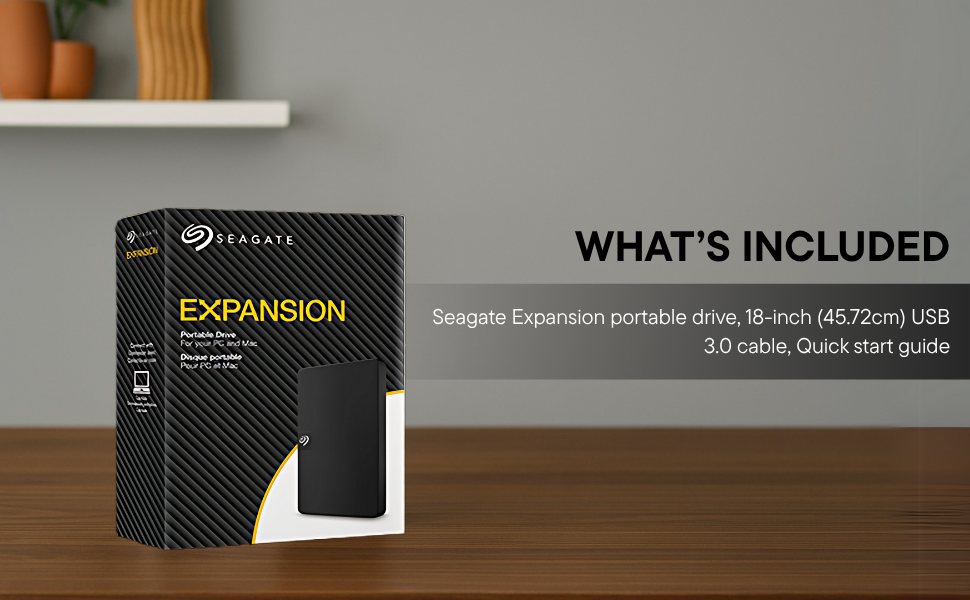
Image: Contents of the Seagate Expansion portable hard drive package, including the drive, USB cable, and documentation.
Impostare
- Collegare il cavo USB: Plug the small end of the included USB 3.0 cable into the Seagate Expansion portable hard drive.
- Connessione al computer: Plug the larger end of the USB 3.0 cable into an available USB port on your computer. The drive is USB 3.0 powered, so no external power adapter is needed.
- Riconoscimento automatico: The drive will be automatically recognized by your Windows or Mac operating system. No software installation is typically required for basic functionality.
- For Mac Users (Time Machine): If you intend to use the drive with Apple Time Machine for backups, reformatting the drive is required. Refer to your Mac's documentation for instructions on how to reformat and set up Time Machine.

Image: A Seagate Expansion portable hard drive connected to a laptop via a USB cable, demonstrating the plug-and-play setup.

Image: A hand holding the Seagate Expansion drive, with Windows and Mac compatibility logos displayed next to it.
Istruzioni per l'uso
Once connected, the Seagate Expansion drive functions like any other external storage device on your computer.
- Accesso all'unità: On Windows, the drive will appear under 'This PC' or 'My Computer'. On Mac, it will appear on the desktop or in Finder under 'Locations'.
- Risparmio Files: Per salvare files, simply drag and drop them from your computer's internal storage to the Seagate Expansion drive's icon or open folder. You can also use the 'Copy' and 'Paste' functions.
- Organizzazione Files: Create folders on the drive to organize your data efficiently.
- Espulsione sicura: Always safely eject the drive before disconnecting it to prevent data corruption. On Windows, right-click the drive icon in the system tray and select 'Eject'. On Mac, drag the drive icon to the Trash or click the Eject button next to the drive in Finder.

Image: A hand demonstrating the drag-and-drop method to transfer files from a laptop to the Seagate Expansion portable hard drive.
Manutenzione
Una corretta manutenzione garantisce la longevità e le prestazioni ottimali dell'unità Seagate Expansion.
- Cura fisica: Maneggiare l'unità con cura. Evitare di farla cadere o di esporla a temperature estreme, umidità o forti campi magnetici.
- Pulizia: Per pulire l'esterno dell'unità, utilizzare un panno morbido, asciutto e privo di lanugine. Non utilizzare detergenti liquidi o solventi.
- Backup dei dati: While the drive is designed for storage, it is always recommended to maintain backups of critical data on multiple devices or cloud services.
- Aggiornamenti del firmware: Controllare periodicamente il supporto Seagate websito per eventuali aggiornamenti firmware disponibili per il tuo modello, per garantire prestazioni e compatibilità ottimali.
Risoluzione dei problemi
If you encounter issues with your Seagate Expansion drive, consider the following steps:
- Unità non rilevata:
- Assicurarsi che il cavo USB sia collegato saldamente sia all'unità che al computer.
- Prova a collegare l'unità a una porta USB diversa del computer.
- Se disponibile, testare l'unità con un cavo USB diverso.
- Riavvia il computer.
- Prestazioni lente:
- Ensure you are using a USB 3.0 port for optimal speeds. USB 2.0 ports will result in slower transfers.
- Chiudere tutte le applicazioni non necessarie in esecuzione in background.
- Check your computer's disk management or disk utility to ensure the drive is healthy.
- Accesso Files: Se non riesci ad accedere files, ensure the drive is properly mounted and not in use by another application.
Per una risoluzione dei problemi più dettagliata, fare riferimento al sito ufficiale Seagate Troubleshooting Guide (PDF).
Specifiche
| Numero di modello | STKM1000400 |
| Capacità di archiviazione digitale | 1 TB |
| Interfaccia del disco rigido | Presa USB 2.0/3.0 |
| Tecnologia di connettività | USB |
| Marca | Portale di mare |
| Caratteristica speciale | Data Recovery Service, Portable |
| Fattore di forma del disco rigido | 2.5 pollici |
| Descrizione del disco rigido | Disco rigido meccanico |
| Dispositivi compatibili | Desktop, portatile |
| Tipo di installazione | Disco rigido esterno |
| Colore | Nero |
| Velocità di rotazione del disco rigido | 5400 giri al minuto |
| Velocità di lettura | 120 Megabyte al secondo |
| Item Dimensions L x W x Thickness | 11.7L x 8W x 1.5Th Centimeters |
| Peso dell'articolo | 0.4 libbre |
| Materiale di recinzione | Plastica |
Garanzia e supporto
Your Seagate Expansion portable hard drive comes with comprehensive support and warranty coverage.
- Garanzia limitata: The product includes a 3-year limited warranty. This covers device replacement or repair for manufacturing defects.
- Servizi di recupero dati di salvataggio: For added peace of mind, your purchase includes 3 years of Rescue Data Recovery Services. This service covers data loss due to accidents, mechanical errors, or natural disasters, providing a chance to recover your valuable data.

Image: The 'Rescue Services' logo, indicating the inclusion of 3 years of data recovery services.
Informazioni sui contatti
For warranty claims, technical support, or inquiries regarding Rescue Data Recovery Services, please contact Seagate Customer Care:
- Seagate Technology (Thailand) Limited. India Customer Care No: 18003092525
Please have your product model number (STKM1000400) and proof of purchase ready when contacting support.