
LIGE BW1290
Manuale di istruzioni per lo smartwatch LIGE
Modello: BW1290
1. Impostazione
1.1. Disimballaggio e ispezione iniziale
Upon opening the package, verify that all components are present and in good condition. The package should contain the LIGE Smart Watch, a magnetic charging cable, and a strap adjustment tool. A warranty card and user manual are also included.

Image: LIGE Smart Watch and its included accessories.
Video: Unboxing the LIGE Smart Watch and reviewil suo contenuto.
1.2. Ricarica dello Smart Watch
Connect the magnetic charging cable to the charging points on the back of the watch. Plug the USB end into a compatible power source. The watch display will indicate charging status. Ensure the watch is fully charged before first use.
1.3. Download e associazione dell'app
To unlock the full functionality of your LIGE Smart Watch, download the 'Da Fit' application on your smartphone. The app is compatible with iOS 8.0 or Android OS 4.4 and above, and Bluetooth 4.0 or above.
- Long press the side button of the watch for 3-5 seconds to turn it on.
- Open the QR code on the watch's setting page.
- Scan the QR code using your phone to download the 'Da Fit' APP.
- Attiva il Bluetooth e i servizi di localizzazione del tuo telefono.
- Ensure the smart watch is not currently bound to other phones.
- Open the 'Da Fit' APP on your phone, set up your personal information.
- Navigate to the "Device" interface within the app and click "Bind Device".
- On the watch's main dial interface, swipe right to view the Bluetooth MAC address.
- Select the searched device name and corresponding MAC address in the app, then click 'Pair'. The bracelet is successfully connected once paired.
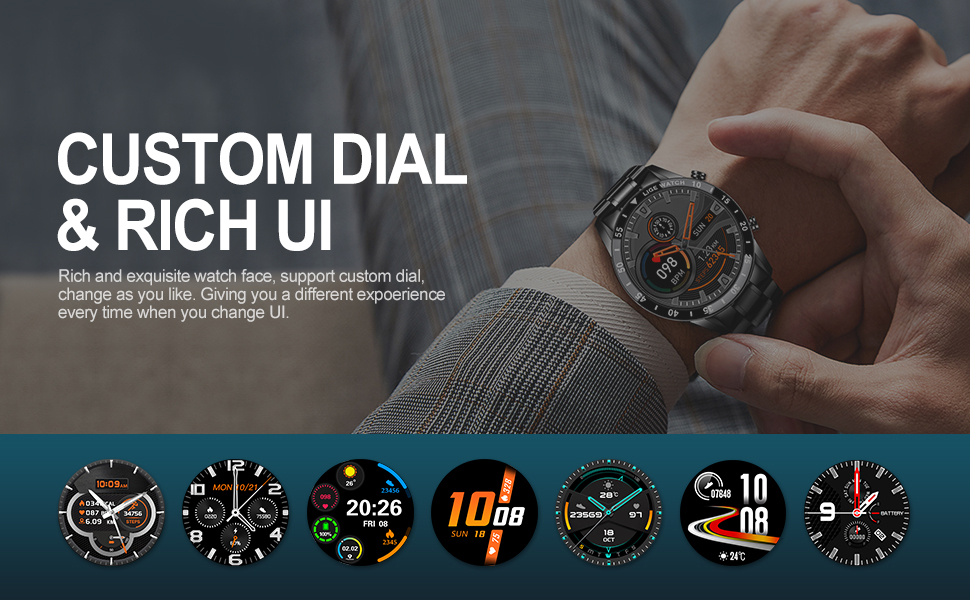
Image: The 'Da Fit' app interface for customizing watch dials.
1.4. Adjusting the Strap Size
The LIGE Smart Watch comes with a metal strap and a dedicated adjustment tool. Use this tool to remove or add links to achieve a comfortable fit on your wrist.
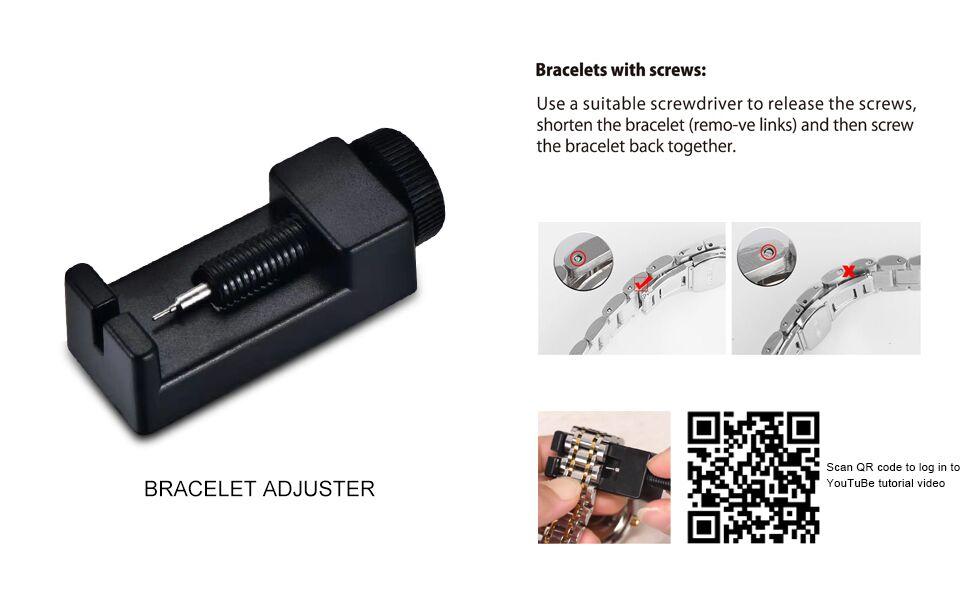
Image: Instructions for adjusting the watch strap using the provided tool.
2. Utilizzo dello Smart Watch
2.1. Navigazione di base
The LIGE Smart Watch features a 1.3-inch full touch screen. Swipe left/right or up/down to navigate through different menus and functions. Use the side buttons for power on/off and quick access to certain features.
2.2. Chiamate e notifiche Bluetooth
Once paired with your phone, the watch allows you to make and receive calls directly. It also vibrates to alert you of incoming calls, SMS texts, and SNS messages from platforms like Facebook, WeChat, WhatsApp, Skype, Line, InstagRam e Twitter.

Image: The smart watch displaying an incoming call, allowing direct answering or hanging up.
2.3. Monitoraggio della salute
The watch provides 24-hour health monitoring capabilities:
- Cardiofrequenzimetro: Tiene traccia costantemente della tua frequenza cardiaca.
- Misuratore della pressione sanguigna: Provides periodic blood pressure readings.
- Monitoraggio del sonno: Automatically measures your sleep patterns, including awake, light, and deep sleep data.
Note: The measurement data from the smart watch's health functions are for reference only and should not be used as medical data.

Image: Health monitoring features, including heart rate and blood pressure tracking.
2.4. Monitoraggio delle attività
Track your daily activities and exercise performance:
- Modalità sportive: Built-in 10 sport modes including walking, running, cycling, rock climbing, swimming, diving, table tennis, badminton, football, and basketball.
- Monitoraggio giornaliero: All-day tracking of steps, distance, and calories burned.
- Cronometro: Use the stopwatch function to time your workouts.

Immagine: Oltreview of daily sports tracking features and supported activities.
2.5. Funzionalità aggiuntive
The LIGE Smart Watch includes several convenient features:
- Sveglia: Imposta le sveglie direttamente dal tuo orologio.
- Promemoria sedentario: Ricevi avvisi per incoraggiare il movimento dopo periodi di inattività.
- Controllo della musica: Control music playback on your phone (play, pause, next, previous).
- Controllo remoto della telecamera: Remotely trigger your phone's camera for photos.
- Previsioni del tempo: Synchronize with your phone to display real-time weather conditions.

Image: A compilation of additional smart features available on the watch.
3. Manutenzione
3.1. Prolungare la durata della batteria
To maximize your watch's battery life:
- Reduce screen brightness and frequency of screen activation. Disable the
Ask a question about this manual
Ask about setup, troubleshooting, compatibility, parts, safety, or missing instructions. Manuals+ will review the question and use this page’s manual context to help answer it.