
FOCHEW HX160Q2
FOCHEW Wireless Portable Charger User Manual
Modello: HX160Q2
Introduzione
Thank you for choosing the FOCHEW Wireless Portable Charger. This high-capacity 30,800mAh power bank is designed to provide convenient and fast charging for your mobile devices, featuring 15W wireless charging, 25W PD, and QC4.0 fast charging capabilities. Its smart LCD display keeps you informed about the remaining battery level. Please read this manual carefully to ensure safe and optimal use of your device.
Informazioni sulla sicurezza
ATTENZIONE: Questo prodotto potrebbe contenere sostanze chimiche che lo Stato della California ritiene possano causare cancro, malformazioni congenite o altri danni riproduttivi. Per ulteriori informazioni, visitare il sito www.P65Warnings.ca.gov.
- Non esporre il power bank a temperature estreme (caldo o freddo), alla luce solare diretta o a elevata umidità.
- Non smontare, aprire o tentare di riparare autonomamente il power bank.
- Tenere lontano da acqua e altri liquidi.
- Evitare di far cadere o sottoporre il power bank a forti impatti.
- Non utilizzare il power bank se è danneggiato o gonfio.
- Tenere fuori dalla portata dei bambini.
- Assicurare una ventilazione adeguata durante la carica e la scarica.
- Remove your phone case if it is thicker than 5mm when using wireless charging.
Contenuto della confezione
- FOCHEW 30,800mAh USB-C Power Bank (25W PD+QC 4.0) x1
- Cavo micro USB x1
- Manuale utente x1
Specifiche
| Caratteristica | Dettaglio |
|---|---|
| Capacità | 30,800mAh |
| Ingresso USB | 25W PD 3.0 (5V/3A), Micro USB (5V/2.1A) |
| Uscita USB | PD 3.0 (5V/3A), Dual QC 4.0 (5V/3A) |
| Uscita senza fili | 5 W, 7.5 W, 10 W, 15 W max |
| Potenza totale | 25W |
| Dimensioni | 5.9 x 2.9 x 0.6 pollici (circa) |
| Peso | 12.7 once (367 g) |
| Tipo di batteria | Polimero di litio |
| Caratteristiche di sicurezza | Overcharge, Over-discharge, Excessive Currents, Short Circuits, Overheating Protection |
Impostare
Ricarica iniziale del Power Bank
Before first use, fully charge your FOCHEW Wireless Portable Charger. It is recommended to use a USB-C fast charging cable and a PD wall charger for optimal charging speed. A full charge can be achieved within approximately 3.5 hours using a 25W PD charger.
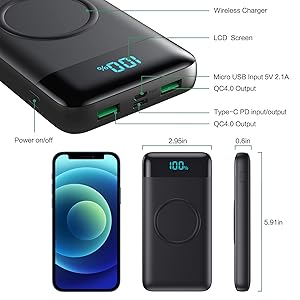
Figura 1: Recharging the power bank. Using a 25W PD charger, the power bank can be fully recharged in about 3.5 hours. A standard 2A Micro USB charger will take approximately 9 hours.
Accensione/spegnimento
To turn on the power bank and activate the LCD display, briefly press the power button located on the side of the device. The display will show the current battery percentage. Il power bank si spegnerà automaticamente dopo un periodo di inattività per risparmiare energia.

Figura 2: Power button and port identification. The power button is on the side, and the LCD screen displays the battery percentage. The top surface features a wireless charging pad.
Istruzioni per l'uso
Wireless Charging (15W Max)
The power bank supports 5W, 7.5W, 10W, and 15W Max wireless fast charging. To use, simply place your wireless charging-compatible device on the designated wireless charging pad on the power bank's surface. Ensure the device is centered on the pad for optimal charging. The power bank is not magnetic.
- Nota: For effective wireless charging, remove phone cases thicker than 5mm.
- Compatibilità: Compatible with devices supporting wireless charging, including iPhone 16/16 Plus/16 Pro/16 Pro Max, iPhone 15/15 Plus/15 Pro/15 Pro Max, iPhone 14/14 Plus/14 Pro/14 Pro Max, iPhone 13/13 Mini/13 Pro/13 Pro Max, iPhone 12/12 Mini/12 Pro/12 Pro Max, iPhone XR/X/XS/XS MAX/8 Plus, Samsung S24/S24 Plus/S24 Ultra/Galaxy Z Flip5, and other Qi-enabled devices.
- Importante: This portable charger is not suitable for wireless charging of Bluetooth headphones.

Figura 3: Wireless charging in action. Place your compatible device on the charging pad for convenient cable-free power delivery.
Wired Charging (25W PD & QC 4.0)
Utilize the 25W Power Delivery 3.0 output (USB-C port) and Quick Charge 4.0 outputs (USB-A ports) for optimized fast charging. Connect your device using a compatible USB cable to one of the available output ports. Fast charging can bring a cellphone to 100% within 1.5 hours.
- Compatibilità: You can use charging cables to charge all smartphones, including iPhone 8/7 Plus/7/6s Plus/6 Plus/6/SE/5S; Samsung Galaxy S23/S22/S21/S20/S10/S9/S8/Note20, Note10, Note9, Galaxy Z Flip4, Galaxy Z Flip3, Galaxy Z Fold3, Galaxy A73, A13, A33, A53; LG G8, LG G7, LG X4, LG Q60, LG K40; Google Pixel and other electronic devices.

Figura 4: Wired fast charging. The USB-C port supports 25W Power Delivery for rapid device charging.
Ricarica simultanea
Charge up to four devices simultaneously. You can wirelessly charge one device (up to 15W) while also charging up to three other devices via the Micro USB output port and the two USB-C PD ports.

Figura 5: Multiple device charging. The power bank offers various charging methods, including two QC ports, one PD port, and one wireless charging pad, allowing for simultaneous charging of up to four devices.
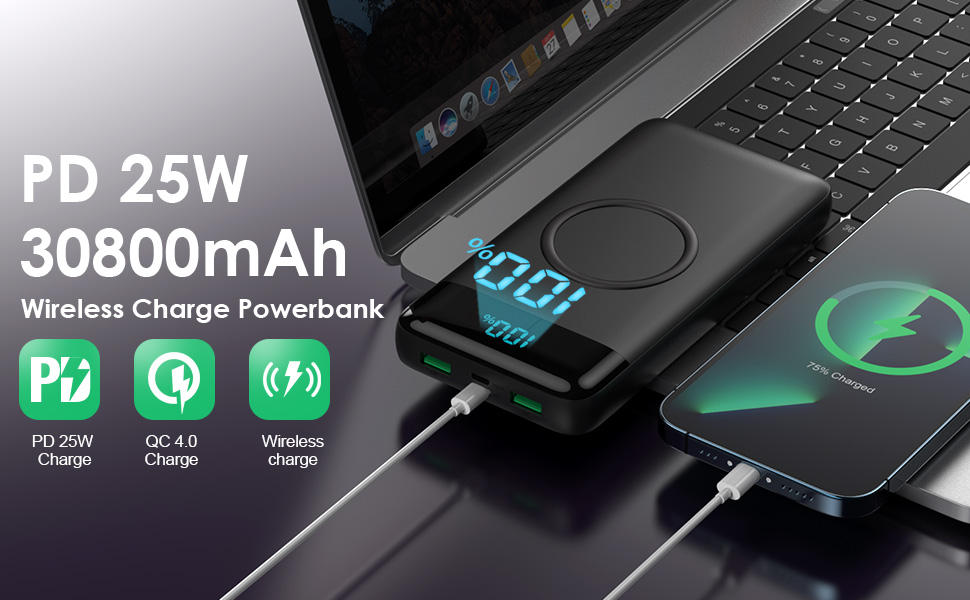
Figura 6: Charging four devices simultaneously. This image illustrates the convenience of charging multiple devices at once, ideal for shared use or when many gadgets need power.
Smart LCD Indicators
The integrated LCD display shows the remaining battery level as a percentage, allowing you to easily monitor the power bank's charge status and know when it needs to be recharged.

Figura 7: Smart LCD display. The clear digital display provides an accurate percentage della carica residua della batteria.
Manutenzione
- Pulisci il power bank con un panno morbido e asciutto. Non utilizzare prodotti chimici aggressivi o materiali abrasivi.
- Conservare il power bank in un luogo fresco e asciutto quando non viene utilizzato.
- For long-term storage, charge the power bank to about 50-70% to preserve battery health.
Risoluzione dei problemi
Il power bank non si ricarica
- Assicurarsi che il cavo di ricarica sia collegato saldamente sia alla porta di ingresso del power bank sia alla fonte di alimentazione.
- Verify that the wall adapter or USB port you are using is functional.
- Prova un cavo di ricarica o un adattatore da parete diverso.
Dispositivo non in carica tramite power bank
- Premere il pulsante di accensione sul power bank per assicurarsi che sia attivo.
- Check if the charging cable is securely connected to both the power bank's output port and your device.
- Prova un cavo di ricarica o una porta di uscita diversi sul power bank.
- For wireless charging, ensure your device is centered on the wireless pad and that its case is not too thick (>5mm).
- Confirm your device is compatible with the power bank's charging specifications (wired or wireless).
Carica lenta
- Ensure you are using a fast-charging compatible cable and wall adapter (for recharging the power bank) or device cable (for charging your device).
- Check if your device supports fast charging (PD or QC 4.0).
- Avoid using the power bank in extremely hot or cold environments.
Garanzia e supporto
Your FOCHEW Wireless Portable Charger comes with a 24-month warranty policy. For any issues or support, please contact FOCHEW customer service. They offer 24-hour customer service to assist you.
Ask a question about this manual
Ask about setup, troubleshooting, compatibility, parts, safety, or missing instructions. Manuals+ will review the question and use this page’s manual context to help answer it.