
Introduzione
Welcome to the user manual for your AWOW Funtab 701 Kids Tablet. This guide provides essential information on setting up, operating, maintaining, and troubleshooting your device to ensure a safe and enjoyable experience for your child. Please read this manual thoroughly before using the tablet.
Contenuto della confezione
Si prega di verificare che tutti gli articoli elencati di seguito siano inclusi nel pacchetto:
- AWOW Funtab 701 Kids Tablet (7 inch)
- Exclusive Kid-Proof Case
- Penna attiva
- Manuale dell'utente (questo documento)
- Adattatore di alimentazione
Prodotto finitoview
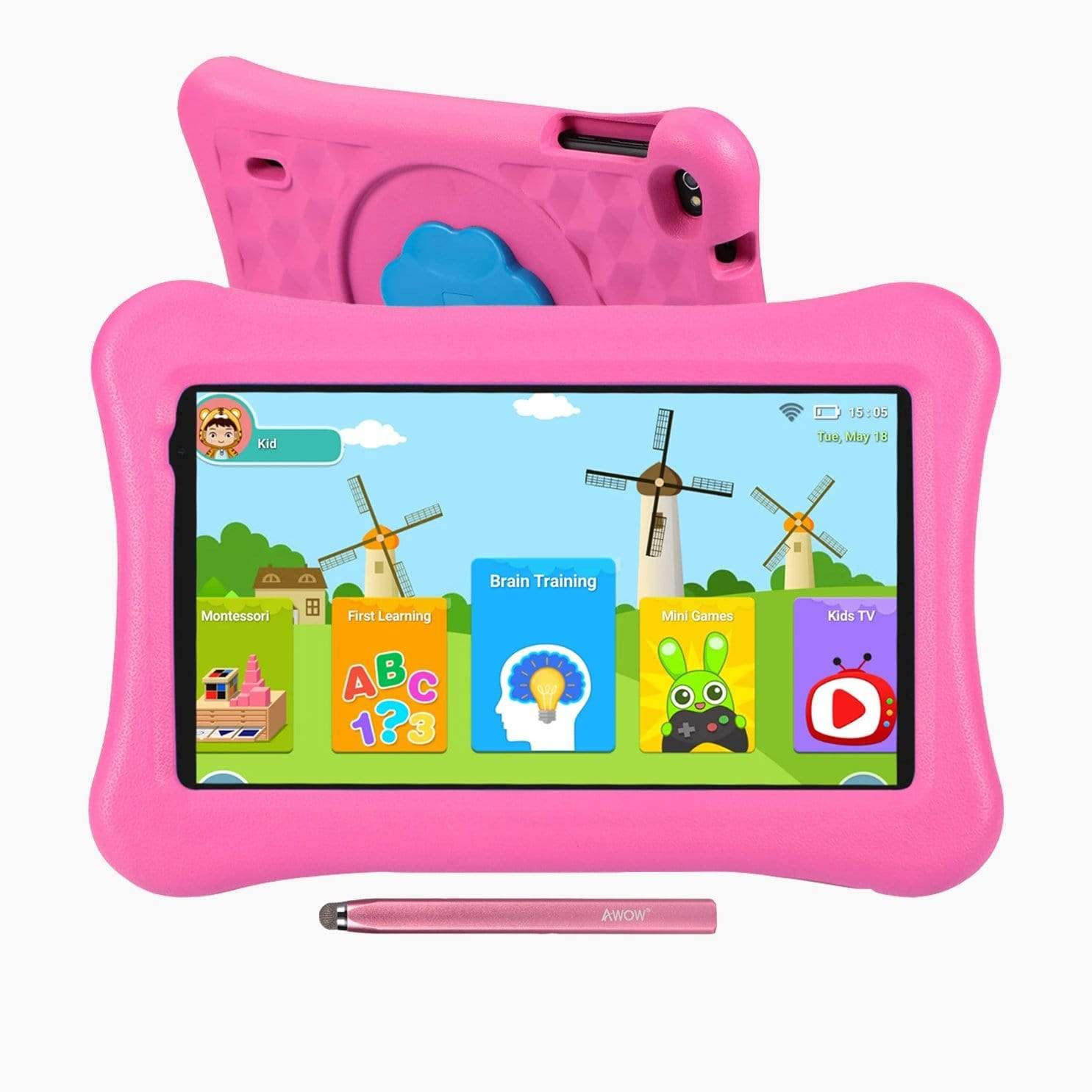
Image: The AWOW Funtab 701 Kids Tablet, shown with its protective pink kid-proof case and the accompanying active pen. The tablet features a 7-inch display.
The AWOW Funtab 701 is a 7-inch kids tablet designed for educational and entertainment purposes. It runs on Android 10 Go, powered by a 1.5GHz Quad-core processor, with 2GB RAM and 16GB ROM. It features a 1024x600 IPS HD display and supports 2.4G Wi-Fi connectivity. The tablet comes with a durable kid-proof case and an active pen for interactive learning and creativity.
Impostare
1. Ricarica del tablet
Before first use, fully charge the tablet. Connect the provided power adapter to the tablet's charging port and plug it into a wall outlet. The charging indicator will typically light up. A full charge may take several hours.
2. Accensione/Spegnimento
- Per accendere: Tieni premuto il pulsante di accensione (solitamente situato sul lato o sul bordo superiore) finché lo schermo non si illumina.
- Per spegnere: Tieni premuto il pulsante di accensione finché non appare sullo schermo un menu di spegnimento. Seleziona "Spegni" e conferma.
3. Configurazione iniziale
Alla prima accensione, il tablet ti guiderà attraverso la procedura di configurazione iniziale:
- Selezione della lingua: Scegli la tua lingua preferita.
- Connessione Wi-Fi: Select your 2.4G Wi-Fi network from the list and enter the password.
- Account Google: Sign in with an existing Google account or create a new one. This is necessary for accessing the Google Play Store and other Google services.
- Data e ora: Imposta la data e l'ora corrette oppure lascia che la rete le imposti automaticamente.
4. iWawa App and Parental Controls
The AWOW Funtab 701 comes with the iWawa app pre-installed, offering a safe environment for children and robust parental controls.
- Creazione Profiles: Open the iWawa app to create individual profileper ogni bambino.
- Gestione dei contenuti: Within the parental control mode, you can hand-pick specific apps, games, videos, and websites that your child can access.
- Screen Time Control: Set daily time limits for tablet usage and specific play periods.
- Navigazione sicura: Ensure children browse only safe and approved websiti.
- Regolazione delle impostazioni: Parental control settings can be adjusted as your child grows to tailor content to their age and development.
Utilizzo del tablet
1. Navigazione di base
Il tablet utilizza un'interfaccia touchscreen. I gesti più comuni includono:
- Rubinetto: Per selezionare un elemento o aprire un'app.
- Scorri: Per scorrere le pagine o i menu.
- Pizzico: Per ingrandire o rimpicciolire le immagini e web pagine.
- Premere a lungo: Per accedere ai menu contestuali o spostare le icone delle app.
2. Using the Active Pen
The included active pen allows for more precise interaction, drawing, and writing. Simply touch the pen to the screen as you would with your finger. No pairing is typically required for basic functionality.
3. Gestione delle applicazioni
- Scaricare app: Access the Google Play Store to download new applications. Ensure parental controls are set to manage app downloads for children.
- Disinstallazione delle app: Long-press an app icon on the home screen or in the app drawer, then drag it to the 'Uninstall' option that appears. Alternatively, go to Settings > Apps & notifications > See all apps, select the app, and tap 'Uninstall'.
4. Connessione al Wi-Fi
To connect or reconnect to a Wi-Fi network:
- Vai a Impostazioni > Rete e Internet > Wifi.
- Assicurati che il Wi-Fi sia attivato On.
- Select your desired 2.4G network from the list of available networks.
- Se richiesto, immettere la password di rete, quindi toccare Collegare.
Manutenzione
1. Pulizia
Per pulire lo schermo del tablet, utilizzare un panno morbido e privo di lanugine. Per le macchie ostinate, utilizzare un panno leggermenteampen the cloth with water or a screen-specific cleaning solution. Avoid harsh chemicals or abrasive materials. The kid-proof case can be cleaned with mild soap and water.
2. Cura della batteria
Per prolungare la durata della batteria:
- Evitare di esporre la compressa a temperature estreme (calde o fredde).
- Non lasciare che la batteria si scarichi completamente frequentemente.
- Per la ricarica utilizzare solo l'adattatore di alimentazione fornito.
- Reduce screen brightness and close unused apps to conserve power.
3. Conservazione
When not in use for extended periods, store the tablet in a cool, dry place away from direct sunlight. Ensure the battery has at least a 50% charge before storing.
Risoluzione dei problemi
If you encounter issues with your AWOW Funtab 701, refer to the solutions below:
- Il tablet non si accende: Ensure the tablet is fully charged. Connect it to the power adapter and wait a few minutes before attempting to power it on again. If it still doesn't turn on, try holding the power button for 10-15 seconds.
- Problemi di connessione Wi-Fi: Check if your Wi-Fi router is working correctly. Restart both the tablet and the router. Ensure you are connecting to a 2.4G network and have entered the correct password.
- Le app sono lente o si bloccano: Close unused applications. Clear the cache of problematic apps (Settings > Apps & notifications > App info > Storage & cache > Clear cache). If the issue persists, consider uninstalling and reinstalling the app.
- La batteria si scarica rapidamente: The average battery life is approximately 4 hours. To optimize, reduce screen brightness, disable Wi-Fi when not needed, and close background apps. Avoid running multiple demanding applications simultaneously.
- Lo schermo non risponde: Try restarting the tablet. If the issue persists, ensure the screen is clean and free of debris.
Specifiche
| Caratteristica | Dettaglio |
|---|---|
| Marca | AWOW |
| Nome del modello | Funtab 701 |
| Sistema operativo | Android 10 Vai |
| Dimensioni dello schermo | 7 pollici |
| Risoluzione dello schermo | 1024 x 600 pixel |
| Processore | 1.5 GHz Quad-core (Qualcomm) |
| Memoria RAM | 2 GB |
| Memoria interna | 16 GB |
| Archiviazione espandibile | Micro SD slot (up to 512GB) |
| Telecamera posteriore | 2.0 MP |
| Fotocamera frontale | 2.0 MP |
| Connettività wireless | 2.4G Wi-Fi (802.11b) |
| Durata media della batteria | 4 ore |
| Dimensioni del prodotto | Dimensioni: 18.5 x 10.5 x 1 cm |
| Peso dell'articolo | 453.59 grammi |
Garanzia e supporto
For warranty information, please refer to the documentation provided at the time of purchase. This typically includes details on coverage duration and terms. For technical assistance or further inquiries, please contact AWOW customer service through their official support channels.