
SPRT POS58 IVU
SPRT POS58 IVU Receipt Thermal Printer User Manual
Model: POS58 IVU
Introduzione
This manual provides essential information for the proper setup, operation, and maintenance of your SPRT POS58 IVU Receipt Thermal Printer. Please read this manual thoroughly before using the printer to ensure optimal performance and longevity.
The SPRT POS58 IVU is a compact and efficient thermal receipt printer designed for various point-of-sale applications. It features USB connectivity and is compatible with 5.7 cm wide thermal paper.
Impostare
1. Disimballaggio e ispezione
- Estrarre con cautela la stampante e tutti gli accessori dalla confezione.
- Verify that all components are present: printer unit, power adapter, USB cable.
- Inspect the printer for any visible damage. If damaged, contact your supplier immediately.
2. Collegamento della stampante
- Connetti alimentazione: Insert the power adapter cable into the printer's power port and plug the other end into a suitable power outlet.
- Connetti USB: Collegare un'estremità del cavo USB alla porta USB della stampante e l'altra estremità a una porta USB disponibile sul computer o sul sistema POS.
- Accensione: Locate the power switch on the printer (typically on the side or front) and turn it to the 'ON' position.
3. Caricamento della carta termica
The SPRT POS58 IVU printer uses standard 5.7 cm wide thermal paper rolls.
- Open the paper cover by pressing the release button or lifting the latch (location may vary slightly).
- Insert the thermal paper roll with the printing surface facing the thermal head. Ensure the roll is seated correctly in the paper compartment.
- Estrarre una piccola quantità di carta dalla taglierina.
- Chiudere saldamente il coperchio della carta finché non scatta in posizione.
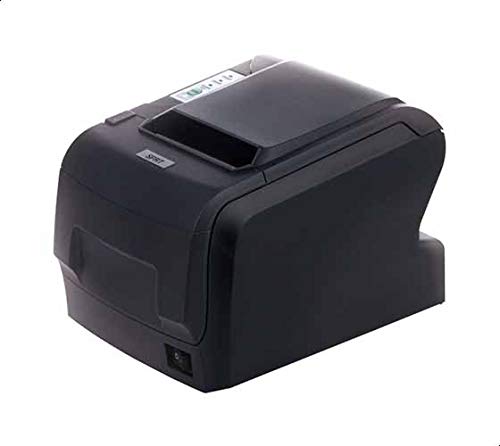
Figure 1: SPRT POS58 IVU Receipt Thermal Printer. This image displays the compact black thermal printer from an angled view, highlighting its paper output slot and the power switch located on the side.
Istruzioni per l'uso
Stampa di base
- Ensure the printer is powered on and connected to your computer/POS system.
- Install the necessary printer drivers on your operating system if not already installed. Refer to the driver installation guide provided separately or available from the manufacturer's websito.
- From your application (e.g., POS software, word processor), select the SPRT POS58 IVU as your printer.
- Initiate the print command. The printer will automatically feed and print the receipt.
- Tear off the receipt against the serrated edge of the paper output slot.
Luci di segnalazione
The printer typically has indicator lights to show its status:
- Luce di alimentazione: Indica che la stampante è accesa.
- Spia di errore: Illuminates or blinks to indicate an error condition (e.g., paper out, print head overheat).
- Spia di carta esaurita: Indicates that the paper roll is empty or incorrectly loaded.
Manutenzione
Pulizia della testina termica
Regular cleaning of the thermal head ensures clear print quality and extends printer life. Clean the thermal head after every 50-100 km of printing or if print quality degrades.
- Spegnere la stampante e scollegare il cavo di alimentazione.
- Aprire il coperchio di carta.
- Wait a few minutes for the thermal head to cool down if the printer has been recently used.
- Gently wipe the thermal head surface with a cotton swab lightly moistened with absolute alcohol (ethanol).
- Allow the alcohol to evaporate completely before closing the cover and reconnecting power.
Pulizia dell'esterno
Pulire l'esterno della stampante con un panno morbido eamp panno. Non utilizzare solventi aggressivi o detergenti abrasivi.
Gestione della carta
- Use only high-quality thermal paper to prevent damage to the thermal head and ensure optimal print quality.
- Store thermal paper in a cool, dry place away from direct sunlight and heat.
Risoluzione dei problemi
| Problema | Possibile causa | Soluzione |
|---|---|---|
| La stampante non si accende. | Power cable not connected; power outlet faulty; printer switch off. | Controllare il collegamento del cavo di alimentazione; provare una presa diversa; assicurarsi che l'interruttore di alimentazione sia su ON. |
| No printing / Blank output. | Paper loaded incorrectly (upside down); paper out; driver not installed/configured; printer not selected. | Reload paper correctly (printing side facing thermal head); replace paper roll; install/reinstall drivers; select printer in application. |
| Qualità di stampa scadente. | Thermal head dirty; low-quality paper; paper stored improperly. | Clean thermal head; use recommended thermal paper; store paper correctly. |
| Inceppamento della carta. | Paper not loaded straight; foreign object in paper path. | Open cover, remove jammed paper carefully, reload paper straight; inspect for obstructions. |
Specifiche
| Caratteristica | Dettaglio |
|---|---|
| Marca | SPRT |
| Numero di modello | POS58 IVU |
| Tipo di stampante | Stampante termica per ricevute |
| Tecnologia di connettività | USB |
| Stampa Media | Labels (commonly used for receipts) |
| Larghezza della carta | 5.7 centimetri |
| Colore | Nero |
| Peso dell'articolo | 1.82 chilogrammi |
| Dimensioni del pacco | Dimensioni: 28 x 21.4 x 17.8 cm |
Garanzia e supporto
Specific warranty terms and detailed support contact information are not provided within the available product data. For warranty claims, technical support, or service inquiries, please refer to the documentation included with your purchase or contact your point of sale or the manufacturer directly.
You may find additional resources and contact details on the official SPRT websito.
Ask a question about this manual
Ask about setup, troubleshooting, compatibility, parts, safety, or missing instructions. Manuals+ will review the question and use this page’s manual context to help answer it.