
1. Introduzione
Thank you for choosing the A4Tech Fstyler FG30S Silent Wireless Mouse. This optical mouse is designed for comfortable and quiet operation, featuring advanced 2.4 GHz wireless technology for a stable connection. This manual provides essential information for setting up, operating, maintaining, and troubleshooting your device.
2. Contenuto della confezione
Si prega di controllare la confezione per verificare la presenza dei seguenti elementi:
- A4Tech Fstyler FG30S Silent Wireless Mouse
- Ricevitore Nano USB
- Manuale dell'utente (questo documento)
Nota: An AA alkaline battery is required for operation and is not included in the package.
3. Impostazione
Follow these steps to set up your A4Tech Fstyler FG30S mouse:
- Inserire la batteria: Locate the battery compartment on the underside of the mouse. Open the cover and insert one AA alkaline battery, ensuring correct polarity. Close the battery cover securely.
- Collegare il ricevitore USB: Plug the Nano USB receiver into an available USB port on your computer (desktop PC or laptop).
- Accensione del mouse: Slide the On/Off switch, located on the underside of the mouse, to the 'ON' position. The mouse should now be detected by your computer.
- Installazione del driver: Your computer's operating system (e.g., Windows XP, Linux, or newer versions) should automatically detect and install the necessary drivers. No manual driver installation is typically required.
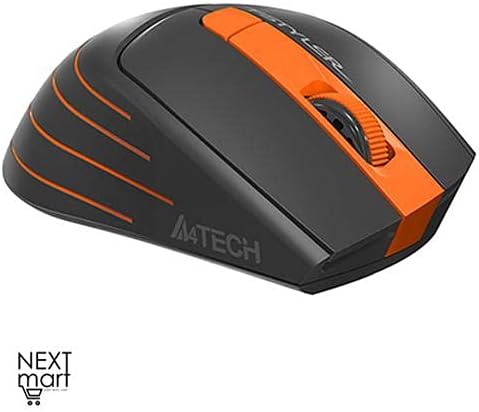
Figura 3.1: Dall'alto verso il basso view of the A4Tech Fstyler FG30S Silent Wireless Mouse, highlighting its ergonomic shape and orange design elements.
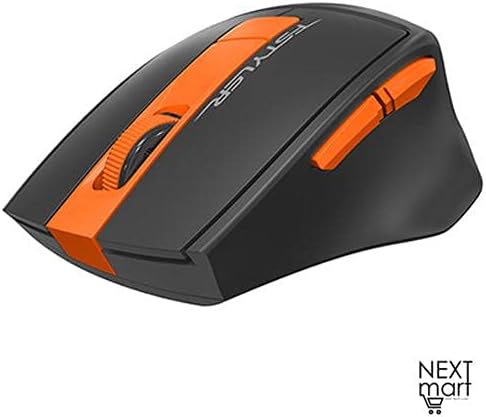
Figura 3.2: Angolato view of the A4Tech Fstyler FG30S Silent Wireless Mouse, illustrating the placement of its side buttons and the textured scroll wheel.
4. Istruzioni per l'uso
Your A4Tech Fstyler FG30S mouse offers several features for enhanced productivity:
- Clic silenziosi: The mouse features silent click technology, reducing noise during use and minimizing disturbance to others.
- Regolazione DPI: The mouse has 3 adjustable DPI levels (1000/1600/2000 DPI). Press the DPI button (usually located near the scroll wheel) to cycle through the sensitivity settings.
- 6 Pulsanti: In addition to the standard left, right, and scroll wheel buttons, the mouse includes additional buttons for various functions. These can often be customized through software (if available from the manufacturer).
- 16-in-One Shortcut Commands: This feature allows you to assign up to 16 customizable shortcut commands or gestures to specific mouse actions, enhancing workflow efficiency. Refer to the manufacturer's website for any specific software required for customization.
- Interruttore On/Off: Use the On/Off switch on the underside of the mouse to conserve battery power when the mouse is not in use or during transport.
- Risparmio energetico: The mouse incorporates 4-level adjustable power-saving modes. It will enter sleep mode after 0.2 seconds of inactivity to extend battery life.

Figura 4.1: Caratteristica sopraview of the A4Tech Fstyler FG30S mouse, detailing DPI settings, button lifespan, programmable gestures, silent operation, power management, and the power switch.
5. Manutenzione
Per garantire prestazioni ottimali e longevità del mouse:
- Pulizia: Use a soft, dry cloth to clean the mouse surface. For the optical sensor, use a cotton swab lightly dampened with rubbing alcohol, ensuring no liquid enters the mouse.
- Sostituzione della batteria: When the mouse performance degrades or it stops responding, replace the AA battery. Always use a fresh, high-quality alkaline battery.
- Magazzinaggio: When not in use for extended periods, turn off the mouse using the On/Off switch and consider removing the battery to prevent leakage. Store in a cool, dry place.
6. Risoluzione Dei Problemi
If you encounter issues with your mouse, try the following solutions:
| Problema | Soluzione |
|---|---|
| Il mouse non risponde |
|
| Movimento irregolare del cursore |
|
| Portata wireless corta |
|
7. Specifiche
| Caratteristica | Dettaglio |
|---|---|
| Marca | A4Tech |
| Numero di modello | FG30S |
| Colore | Arancia |
| Tipo di topo | Mouse ottico |
| Tipo di connessione | Senza fili (2.4 GHz) |
| wireless Range | 10-15 metri |
| Livelli DPI | 1000 / 1600 / 2000 DPI (regolabile) |
| Numero di pulsanti | 6 |
| Tipo di ricevitore | Ricevitore Nano USB |
| Fonte di alimentazione | 1 batteria alcalina AA (non inclusa) |
| Durata della batteria | Fino a 12 mesi |
| Caratteristiche speciali | Silent Clicks, 4-Level Adjustable Power Saving, Anti-slip Side, On/Off Switch, 16-in-One Shortcut Commands |
| Durata della vita del pulsante | Fino a 5 milioni di clic |
| Dispositivi compatibili | PC desktop, portatile |
| Sistemi operativi | Linux, Windows XP (e versioni più recenti) |
| Orientamento della mano | Ambidestro |
| Peso dell'articolo | 160 grammi |
| Dimensioni (confezione) | Dimensioni: 19.6 x 13 x 6.2 cm |
8. Garanzia e supporto
The A4Tech Fstyler FG30S mouse is designed for durability, with a button lifespan of up to 5 million clicks. For warranty claims or technical support, please refer to the retailer where you purchased the product or visit the official A4Tech websito per informazioni di contatto e ulteriore assistenza.