
Yunteng yt-1288
Manuale utente del monopiede estensibile per selfie Yunteng YT-1288
Model: YT-1288 | Brand: Yunteng
Prodotto finitoview
The Yunteng YT-1288 is an extendable handheld monopod designed for capturing photos and videos with smartphones and cameras. It features a detachable Bluetooth remote control for convenient operation and an adjustable ball head for versatile shooting angles.

Figure 1: Yunteng YT-1288 Extendable Selfie Stick Monopod with its detachable Bluetooth remote control.
This monopod is constructed from durable aluminum alloy and ABS plastic, ensuring both lightweight portability and robust performance. It extends up to 125 cm (49.2 inches) and collapses to a compact 42.5 cm (16.7 inches) for easy transport.
Guida all'installazione
1. Collegamento del dispositivo
- Prepare the Phone Adapter: The monopod comes with an adjustable phone adapter. Ensure it is securely attached to the 1/4 inch screw on the monopod's ball head.
- Monta il tuo smartphone: Gently expand the phone adapter clamp and insert your smartphone. Ensure the phone is held firmly and centrally to maintain balance.
- Mount a Camera (Optional): If using a camera, ensure it has a 1/4 inch screw mount. Securely attach the camera directly to the monopod's 1/4 inch screw.

Figura 2: primo piano views illustrating the adjustable phone holder, ball head, extension locking mechanisms, and the slot for the remote control.
2. Associazione del telecomando Bluetooth
- Accendere il telecomando: Locate the power switch on the side of the detachable Bluetooth remote control and slide it to the "ON" position. The indicator light will begin to flash, indicating it is in pairing mode.
- Attiva il Bluetooth sul tuo dispositivo: On your smartphone or camera, go to the Bluetooth settings menu.
- Connect to "Yunteng": Cercare available devices. You should see "Yunteng" or a similar name appear in the list. Select it to pair. The indicator light on the remote will stop flashing and remain solid once successfully paired.
- Prova di connessione: Open your device's camera application and press the shutter button on the remote to confirm the connection.
Nota: The remote control can be stored in the designated slot on the monopod handle when not in use, or detached for remote operation.
Istruzioni per l'uso
1. Extending and Retracting the Monopod
- Per estendere: Unlock the segment clamps by flipping them open. Gently pull each section outwards to extend the monopod to your desired length. Once extended, firmly close the clamps to lock each segment in place.
- Per ritirare: Open the segment clamps and push each section inwards until the monopod is fully collapsed. Close the clampÈ per proteggerlo.
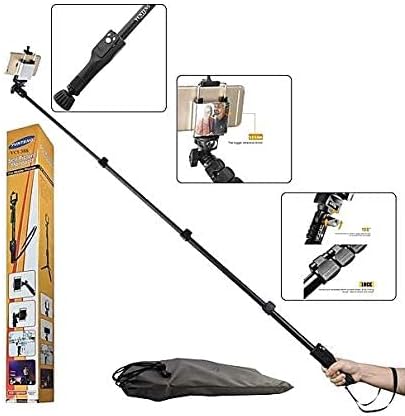
Figure 3: The Yunteng YT-1288 monopod shown in its fully extended state, alongside its packaging.
2. Regolazione degli angoli di ripresa
- Regolazione della testa a sfera: Loosen the thumb screw on the ball head located near the phone adapter. Adjust the angle of your device as needed (up to 180 degrees). Tighten the thumb screw to secure the desired position.
- Specchio incorporato: Utilize the small mirror located on the phone adapter for better framing when using your device's rear camera for selfies.
3. Using the Shutter Remote
- Once paired, simply press the appropriate button on the Bluetooth remote control to capture photos or start/stop video recording.
- The remote allows for convenient hands-free operation, especially when the monopod is fully extended or used from a distance.
Video 1: A demonstration of the Yunteng YT-1288 selfie stick's extendable feature, 180-degree adjustable head, and detachable remote control functionality. The video also highlights its maximum extension length of 125 cm.
Manutenzione
- Pulizia: Wipe the monopod with a soft, dry cloth after each use to remove dust and dirt. For stubborn marks, a slightly damp È possibile utilizzare un panno e asciugare immediatamente. Evitare l'uso di prodotti chimici aggressivi o detergenti abrasivi.
- Magazzinaggio: Store the monopod in a cool, dry place away from direct sunlight and extreme temperatures. Ensure it is fully retracted before storage to protect the extending segments.
- Batteria remota: If the Bluetooth remote control stops responding, the battery may need replacement. Refer to the remote's specific instructions for battery type and replacement procedure.
Risoluzione dei problemi
| Problema | Possibile causa | Soluzione |
|---|---|---|
| Il telecomando Bluetooth non si associa. | Remote is off, battery is low, or device Bluetooth is off. | Ensure remote is on and charged. Turn device Bluetooth off and on. Forget device and re-pair. |
| Remote not triggering shutter. | Not paired, camera app settings, or incompatible device. | Verify pairing. Check camera app settings (e.g., volume button for shutter). Some older devices may not be fully compatible. |
| Il telefono non è tenuto saldamente. | Phone adapter not tightened or phone too large/small. | Ensure phone adapter is securely tightened. Verify phone dimensions are within the adapter's range. |
| Monopod segments not locking. | Clamps not fully closed or debris in mechanism. | Garantire tutti clamps are firmly closed. Check for any obstructions and clean if necessary. |
Specifiche
- Modello: Codice YT-1288
- Materiale: Aluminum Alloy and ABS
- Colore: Nero
- Interfaccia della fotocamera: Universal 1/4 Screw
- Segmenti: 3
- Lunghezza estesa: 125 cm (49.2 pollici)
- Lunghezza chiusa: 42.5 cm (16.7 pollici)
- Peso dell'articolo: 0.35 chilogrammi
- Consiglio di peso massimo: 10 chilogrammi
- Dispositivi compatibili: Cellphone, Camera
Garanzia e supporto
Per informazioni sulla garanzia o assistenza tecnica, fare riferimento alla confezione del prodotto o contattare direttamente il produttore. Conservare la ricevuta d'acquisto per eventuali reclami in garanzia.
For further assistance, you may also visit the official Yunteng websito o contattare il loro servizio clienti.
Ask a question about this manual
Ask about setup, troubleshooting, compatibility, parts, safety, or missing instructions. Manuals+ will review the question and use this page’s manual context to help answer it.