
1. Introduzione
Thank you for choosing the Caliber HPG318DAB Portable DAB+/FM Radio. This device offers high-quality digital and analog radio reception, a compact design for portability, and convenient alarm functions. This manual provides essential information for the safe and efficient use of your radio.
2. Informazioni sulla sicurezza
- Leggere attentamente tutte le istruzioni prima dell'uso e conservarle per riferimento futuro.
- Non esporre il dispositivo a pioggia, umidità o temperature estreme.
- Evitare di posizionare il dispositivo vicino a fonti di calore o alla luce diretta del sole.
- Non smontare o tentare di riparare il dispositivo autonomamente. Per qualsiasi intervento di assistenza, rivolgersi a personale qualificato.
- Utilizzare solo il cavo di ricarica e l'adattatore forniti.
- Tenere fuori dalla portata dei bambini.
3. Contenuto della confezione
Assicurarsi che tutti gli articoli siano presenti nel pacco:
- Caliber HPG318DAB Portable DAB+/FM Radio Unit
- Manuale d'uso
- Cavo di ricarica USB
- Adattatore di alimentazione
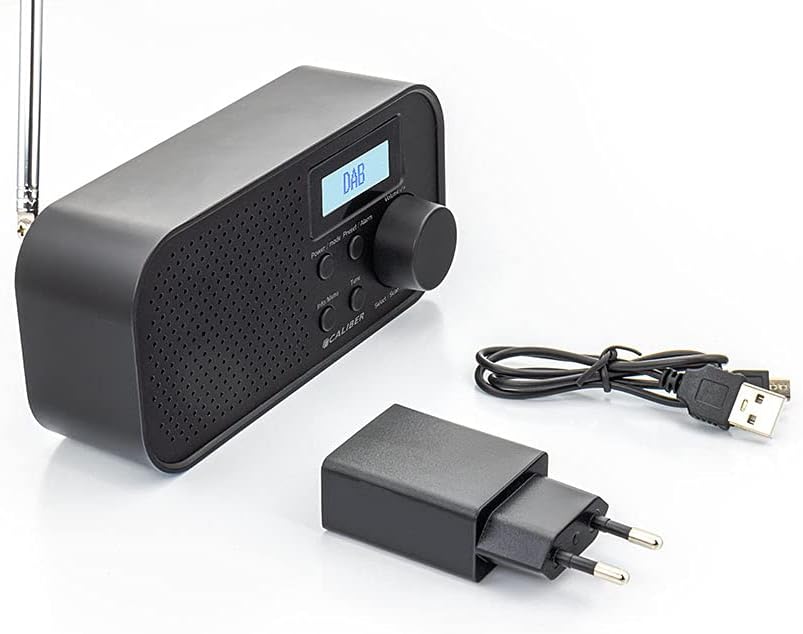
Image: Caliber HPG318DAB radio unit, USB charging cable, and power adapter.
4. Prodotto finitoview
4.1 Controlli del pannello frontale
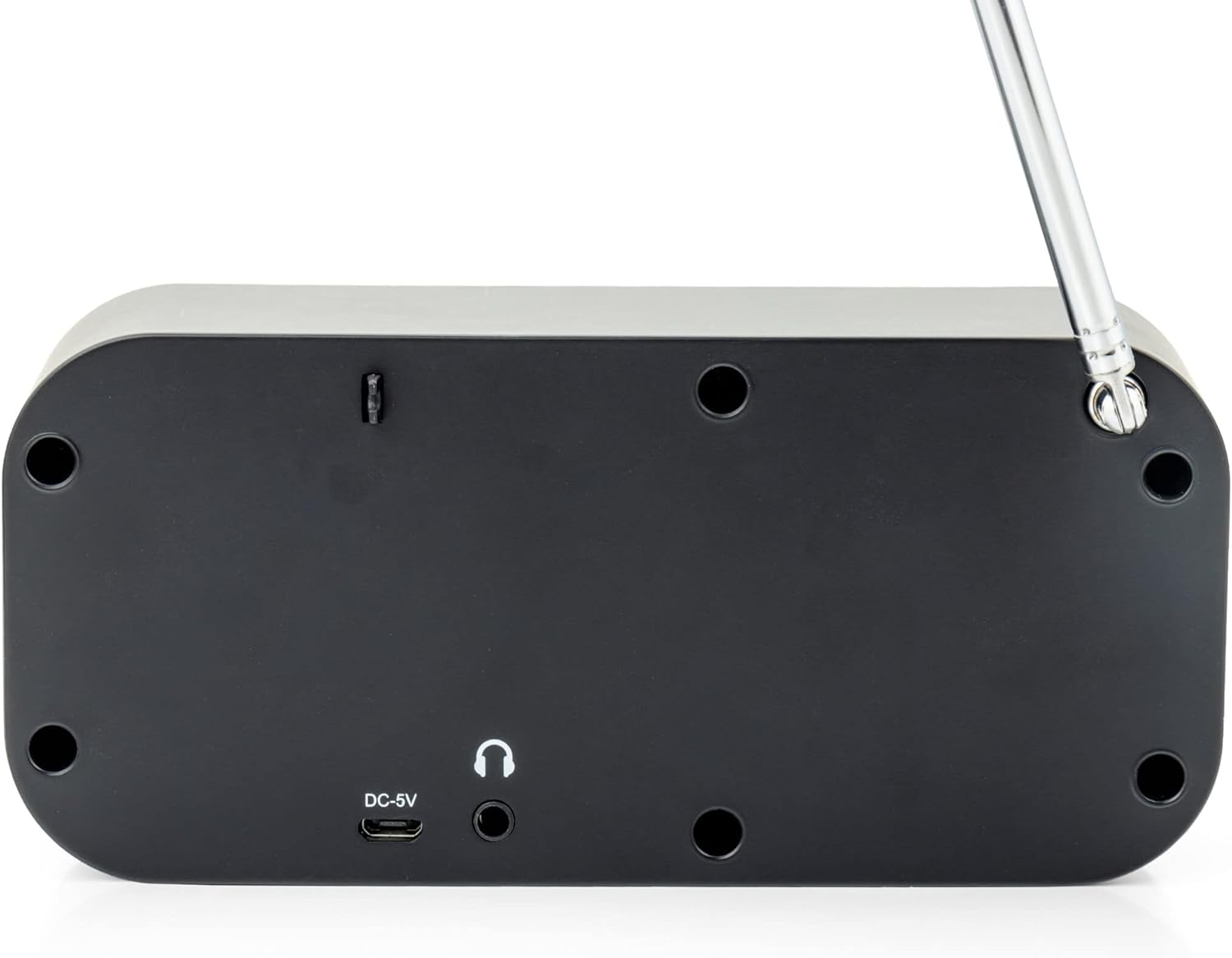
Immagine: Frontale view of the Caliber HPG318DAB radio, highlighting the LCD screen, speaker grille, and control buttons.
- Schermo LCD: Visualizza informazioni sulla stazione, l'ora e le opzioni del menu.
- Pulsante di accensione / modalità: Turns the radio on/off and switches between DAB+ and FM modes.
- Pulsante Menu/Informazioni: Accesses menu settings and displays additional information.
- Pulsante Preimpostato/Allarme: Saves/recalls preset stations and sets alarm functions.
- Select/Scan Button: Confirms selections and initiates station scans.
- Pulsante Ripeti: Disattiva temporaneamente l'allarme.
- Manopola del volume: Regola il volume dell'audio.
- Griglia dell'altoparlante: Uscita audio.
4.2 Collegamenti del pannello posteriore

Immagine: Posteriore view of the Caliber HPG318DAB radio, showing the DC-5V charging port, 3.5mm headphone jack, and telescopic antenna.
- Ingresso CC-5V: Collegare qui il cavo di ricarica USB.
- Jack per cuffie da 3.5 mm: For connecting headphones or earphones.
- Antenna telescopica: Estendi per una ricezione radio ottimale.
5. Impostazione
5.1 Caricamento della batteria
The Caliber HPG318DAB features a built-in rechargeable battery, providing up to 8 hours of playback on a full charge.
- Connect the small end of the provided USB charging cable to the Ingresso DC-5V porta sul retro della radio.
- Connect the larger end of the USB cable to the provided power adapter.
- Collegare l'alimentatore a una presa a muro standard.
- The charging indicator on the LCD screen will show the charging status. Once fully charged, the indicator will change.
Note: It is recommended to fully charge the battery before first use.
5.2 Regolazione dell'antenna
For optimal radio reception, fully extend the telescopic antenna located on the rear of the device. Adjust its position to improve signal strength if reception is poor.
6. Istruzioni per l'uso
6.1 Accensione/spegnimento e selezione della modalità
- Per accendere la radio ON, premere e tenere premuto il tasto Potenza/Modalità pulsante.
- Per accendere la radio SPENTO, premere e tenere premuto il tasto Potenza/Modalità di nuovo il pulsante.
- Per passare da DAB+ E FM modes, short press the Potenza/Modalità button while the radio is on. The current mode will be displayed on the LCD screen.
6.2 Funzionamento della radio DAB+
- Passare alla modalità DAB+ utilizzando il Potenza/Modalità pulsante.
- The radio will automatically perform a full scan for available DAB+ stations upon first use or if no stations are found. To initiate a manual scan, press the Menu/Informazioni button, navigate to 'Full Scan', and press Select/Scan.
- Utilizzare il Manopola del volume per scorrere l'elenco delle stazioni disponibili. Premere Select/Scan per selezionare una stazione.
- To save a station as a preset (up to 10 presets): While listening to a station, press and hold the Preimpostazione/Allarme pulsante. Utilizzare il Manopola del volume per selezionare un numero preimpostato (1-10), quindi premere Select/Scan per confermare.
- To recall a preset station: Short press the Preimpostazione/Allarme pulsante, utilizzare il Manopola del volume per selezionare il numero preimpostato desiderato, quindi premere Select/Scan.
- Premere il tasto Menu/Informazioni pulsante per view additional information (e.g., program type, signal strength, time) provided by Radio Data System (RDS).
6.3 Funzionamento della radio FM
- Passare alla modalità FM utilizzando il Potenza/Modalità pulsante.
- To automatically scan for stations: Press and hold the Select/Scan pulsante. La radio eseguirà la scansione e si fermerà sulla successiva stazione con segnale forte.
- Per sintonizzare manualmente: ruotare la Manopola del volume to adjust the frequency in small increments.
- To save a station as a preset (up to 10 presets): While listening to a station, press and hold the Preimpostazione/Allarme pulsante. Utilizzare il Manopola del volume per selezionare un numero preimpostato (1-10), quindi premere Select/Scan per confermare.
- To recall a preset station: Short press the Preimpostazione/Allarme pulsante, utilizzare il Manopola del volume per selezionare il numero preimpostato desiderato, quindi premere Select/Scan.
- Premere il tasto Menu/Informazioni pulsante per view additional information (e.g., station name, program type) provided by Radio Data System (RDS).
6.4 Controllo del volume
Ruota il grande Manopola del volume in senso orario per aumentare il volume e in senso antiorario per diminuirlo.
6.5 Uso delle cuffie
Connect any standard 3.5mm headphones or earphones to the Jack per cuffie da 3.5 mm on the rear of the radio for private listening. The internal speaker will automatically mute when headphones are connected.
6.6 funzioni di allarme
The radio includes alarm clock and sleep timer functions.
Impostazione della sveglia:
- Premere e tenere premuto il tasto Preimpostazione/Allarme button until the alarm setup menu appears.
- Utilizzare il Manopola del volume to navigate through options like Alarm 1, Alarm 2, Time, Source (Buzzer/DAB/FM), and Volume. Press Select/Scan per confermare ogni impostazione.
- Set the desired alarm time, choose your preferred alarm source (buzzer, DAB+ station, or FM station), and set the alarm volume.
- Ensure the alarm is set to 'On' in the menu.
Utilizzando la funzione snooze:
Quando suona la sveglia, premere il tasto Posticipare button to temporarily pause the alarm for a short period (e.g., 9 minutes). The alarm will sound again after the snooze period.
Impostazione del timer di spegnimento:
- Premere il tasto Menu/Informazioni pulsante.
- Navigate to the 'Sleep' option using the Manopola del volume e premere Select/Scan.
- Select the desired sleep timer duration (e.g., 15, 30, 45, 60, 90 minutes, or Off). The radio will automatically turn off after the selected time.
7. Manutenzione
7.1 Pulizia
To clean the radio, use a soft, dry cloth. Do not use abrasive cleaners, waxes, or solvents as they may damage the finish.
7.2 Conservazione
When not in use for extended periods, store the radio in a cool, dry place away from direct sunlight and extreme temperatures. Ensure the battery is partially charged before storage to maintain its lifespan.
7.3 Cura della batteria
To prolong the life of the built-in Lithium-ion battery, avoid fully discharging it frequently. Charge the radio regularly, even if not in constant use.
8. Risoluzione Dei Problemi
| Problema | Possibile causa | Soluzione |
|---|---|---|
| La radio non si accende. | La batteria è scarica. | Connect the radio to power using the USB cable and adapter to charge the battery. |
| Scarsa ricezione radio (DAB+/FM). | Antenna non estesa o area con segnale debole. | Estendere completamente l'antenna telescopica e regolarne la posizione. Provare a spostare la radio in un'altra posizione. |
| Nessun suono. | Volume is too low or headphones are connected. | Aumentare il volume utilizzando il Manopola del volume. Disconnect headphones if you want sound from the speaker. |
| L'allarme non suona. | Allarme non impostato correttamente o disattivato. | Check alarm settings (time, source, volume, 'On' status) in the menu. |
9. Specifiche
| Caratteristica | Specificazione |
|---|---|
| Numero di modello | HPG318DAB |
| Dimensioni (L x P x A) | Dimensioni: 15 x 4 x 6.5 cm |
| Peso | 255 grammi |
| Fonte di alimentazione | Battery-Powered (1 Lithium-ion battery required) |
| Durata della batteria | Fino a 8 ore |
| Bande radio supportate | DAB+, FM |
| Tecnologia di connettività | AUX (for headphones), USB (for charging) |
| Maximum Speaker Output | 25 Watt |
| Materiale | Plastica |
| Colore | Nero |
| Caratteristiche speciali | Portable, Alarm Function, RDS, LCD Screen |
10. Garanzia e supporto
For warranty information and customer support, please refer to the documentation provided with your purchase or visit the official Caliber websito. Conservare la prova d'acquisto per eventuali reclami in garanzia.