
1. Introduzione
The thinkcar ThinkEASY is a 12V car battery tester designed to analyze the health of various lead-acid batteries, including those found in cars, trucks, motorcycles, ATVs, SUVs, boats, and golf carts. This device connects via Bluetooth 5.0 to a mobile application, providing detailed reports on battery health, cranking system performance, and charging system efficiency. It supports a wide range of battery types and CCA values, making it a versatile tool for both professionals and DIY enthusiasts.

Image: The ThinkEASY tester is compatible with various 12V vehicles including ATVs, trucks, motorcycles, boats, and cars.
2. Informazioni sulla sicurezza
Please read and understand all safety instructions before using the thinkcar ThinkEASY battery tester. Failure to follow these instructions may result in electric shock, fire, or serious injury.
- Quando si lavora in prossimità delle batterie, indossare sempre protezioni per gli occhi e indumenti protettivi.
- Assicurarsi che il veicolo si trovi in un'area ben ventilata.
- Avoid sparks and open flames near the battery. Batteries can produce explosive gases.
- Non toccare i terminali della batteria o il clampa mani nude mentre è collegato a una fonte di alimentazione.
- Tenere il tester lontano dalla portata dei bambini.
- Se l'acido della batteria entra in contatto con la pelle o gli occhi, sciacquare immediatamente con abbondante acqua e consultare un medico.
- Garantire il clamps are connected correctly: red to positive (+), black to negative (-).
3. Contenuto della confezione
Verifica che tutti gli articoli siano presenti nel tuo pacco:
- thinkcar ThinkEASY 12V Car Battery Tester unit with integrated clamps.
- Manuale d'uso (questo documento).
4. Prodotto finitoview
The thinkcar ThinkEASY battery tester consists of a compact main unit with integrated red (positive) and black (negative) clamps. The device communicates wirelessly via Bluetooth to a dedicated mobile application, displaying test results and analysis on your smartphone or tablet.

Image: The thinkcar ThinkEASY battery tester features robust red and black clamps for secure connection to a 12V battery.
5. Impostazione
5.1 Download e installazione dell'app
- Per dispositivi Android: Cercare and download the "Thinkdiag+" App from the Google Play Store.
- Per dispositivi iOS: Cercare and download the "Thinkdiag" App from the Apple App Store.
- Installa l'applicazione sul tuo smartphone o tablet.
5.2 Connessione Bluetooth
- Assicurati che il Bluetooth sia abilitato sul tuo dispositivo mobile.
- Connect the ThinkEASY tester to your vehicle's 12V battery (red clamp al terminale positivo, nero clamp to negative terminal). The device will power on automatically.
- Open the Thinkdiag/Thinkdiag+ app. Navigate to the 'Gadget' menu within the app.
- The app should automatically detect the ThinkEASY device. Select it to establish a Bluetooth connection.

Image: The ThinkEASY app interface on a smartphone, demonstrating Bluetooth connectivity to the battery tester.
6. Istruzioni per l'uso
The ThinkEASY tester performs various tests to assess your battery and vehicle's electrical system. Ensure the tester is properly connected to the battery and the app is connected via Bluetooth before proceeding.

Image: The ThinkEASY app displays results for Battery Health, Start System, and Charging Health tests.
6.1 Battery Health Test
This test evaluates the overall condition of your battery, including its capacity and internal resistance. Select "Battery Health Test" in the app. The app will guide you through the process and display results such as State of Health (SOH) and State of Charge (SOC).
6.2 Start System Test (Cranking Test)
This test assesses the vehicle's starting system, including the starter motor and battery's ability to deliver sufficient current during engine cranking. Follow the app's instructions to start the engine. The app will display cranking voltage and duration, indicating if the starting system is performing normally.
6.3 Test del sistema di ricarica (test dell'alternatore)
This test checks the vehicle's charging system, primarily the alternator, to ensure it is properly charging the battery. The app will measure on-load and no-load voltages, as well as ripple voltage, to determine the charging system's efficiency.
6.4 Additional Tests and Features
The ThinkEASY app also provides access to other diagnostic functions:
- Voltage Prova: Visualizza la batteria corrente voltage.
- Ripple Analysis: Measures the AC ripple voltage from the alternator, indicating potential issues with the rectifier diodes.
- Prova di resistenza: Misura la resistenza interna della batteria.
- Test di carico: Simulates a load on the battery to assess its performance under demand.
- Monitoraggio della temperatura: With a built-in temperature sensor, the device can monitor the engine bay temperature in real-time via the app.

Image: The ThinkEASY app offers multiple test options including State of Health (SOH), State of Charge (SOC), Charging Test, Cranking Test, Voltage Test, Ripple Analysis, Resistance Test, and Load Test.

Image: The ThinkEASY tester includes a temperature sensor to monitor engine bay temperature, operating within a range of -20°C to 50°C.
6.5 Supported Battery Types and CCA Range
The ThinkEASY supports various 12V lead-acid battery types and a CCA (Cold Cranking Amps) range of 100-2000.
- batterie al GEL
- Batterie allagate normali
- Batterie AGM a piastra piatta
- Batterie a spirale AGM

Image: The ThinkEASY tester supports various 12V battery types including GEL, Regular-flooded, AGM Flat Plate, and AGM Spiral, with a CCA range of 100-2000.
7. Manutenzione
- Clean the tester's clamps after each use to prevent corrosion and ensure good electrical contact. Use a dry cloth.
- Conservare il dispositivo in un luogo asciutto e fresco, lontano dalla luce solare diretta e da temperature estreme.
- Do not attempt to disassemble or modify the tester. This will void the warranty and may cause damage.
8. Risoluzione Dei Problemi
- App Not Found: Ensure you are searching for "Thinkdiag+" for Android or "Thinkdiag" for iOS. If issues persist, contact thinkcar support for alternative app recommendations.
- Errore di connessione Bluetooth:
- Verifica che il Bluetooth sia abilitato sul tuo dispositivo mobile.
- Ensure the ThinkEASY tester is properly connected to a 12V battery and powered on.
- Riavvia l'app e prova a connetterti di nuovo.
- Check if the battery has enough charge to power the Bluetooth module. If the battery is completely dead, the tester may not be able to establish a connection.
- Letture imprecise:
- Verificare che i terminali della batteria siano puliti e che il clamphanno una connessione solida.
- Verify the battery type and CCA input in the app match your battery's specifications.
9. Specifiche
| Caratteristica | Specificazione |
|---|---|
| Marca | pensaauto |
| Modello | ThinkEasy |
| Fonte di alimentazione | Alimentato a batteria (dalla batteria del veicolo) |
| Modalità di connessione | Bluetooth + APP |
| Measuring CCA Range | 100-2000 CC |
| Measuring Capacity Range | 30-80Ah |
| Misurazione del volumetage Gamma | 11-16 V |
| Temperatura di lavoro | -20°C a 50°C (-4°F a 122°F) |
| Dimensioni del prodotto (L x P x A) | 6.3 x 3.94 x 1.18 pollici |
| Peso dell'articolo | 11.3 once |
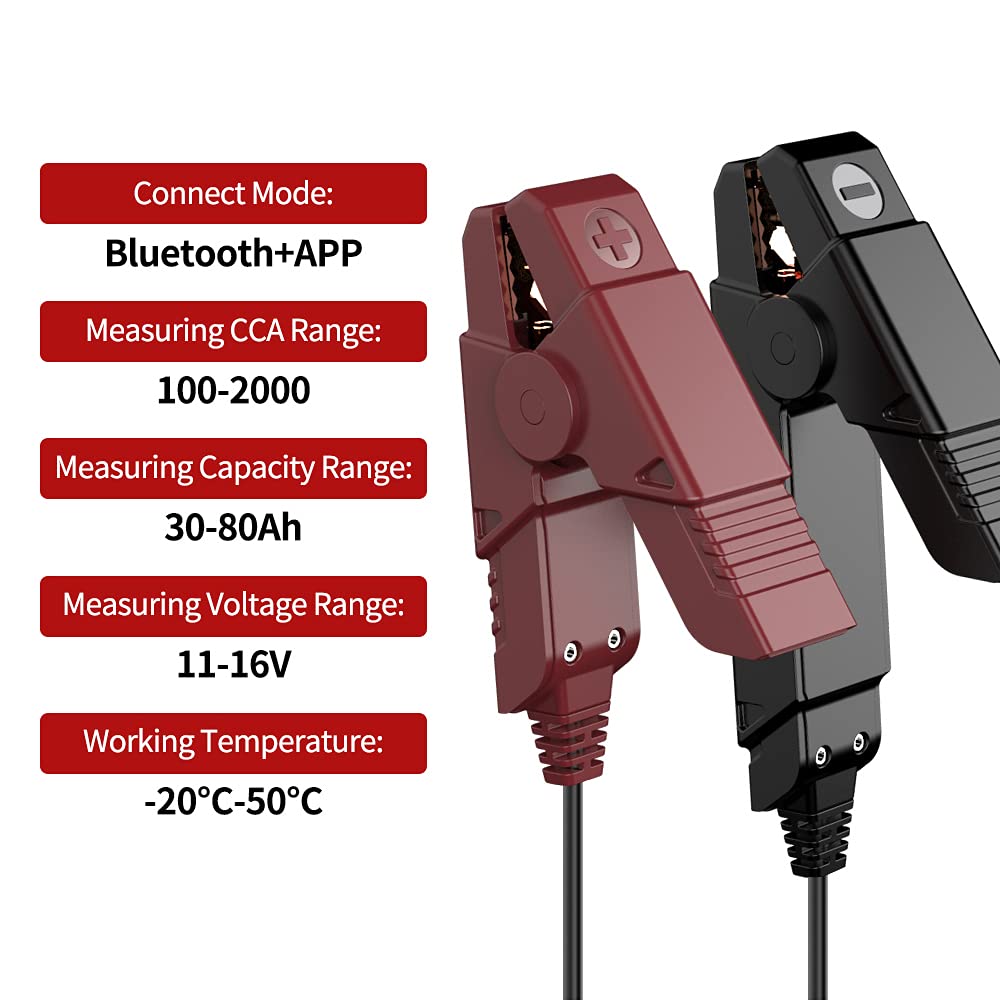
Image: Key specifications of the thinkcar ThinkEASY battery tester, including connection mode, measurement ranges, and operating temperature.
10. Garanzia e supporto
thinkcar products are designed for reliability and performance. For warranty information, technical support, or service inquiries, please refer to the official thinkcar webo contattare direttamente il servizio clienti. Conservare la ricevuta d'acquisto come prova d'acquisto per eventuali reclami in garanzia.
Ufficiale Websito: www.thinkcar.com