
1. Introduzione
The Logitech Ergo M575 Wireless Trackball Mouse is designed for ergonomic comfort and precise control. This manual provides essential information for setting up, operating, maintaining, and troubleshooting your device.

Figure 1: Logitech Ergo M575 Wireless Trackball Mouse (Graphite)
2. Caratteristiche principali
- Design ergonomico e confortevole: The sculpted shape naturally fits your hand, promoting a relaxed hand and arm posture.
- Smooth Thumb Control: Achieve precise cursor control on any surface using the integrated trackball. Cursor speed can be adjusted via Logitech Options software.
- Design salvaspazio: Ideal for tight workspaces and busy desks as the trackball does not require movement of the mouse itself.
- Doppia connettività: Connect effortlessly using either Bluetooth or the included USB receiver. Enjoy a stable connection with a range of up to 33 feet (10m).
- Materiali sostenibili: Plastic parts in the ERGO M575 include post-consumer recycled plastic (Graphite/Black: 50%, Off-White: 21%). Packaging uses FSC-certified paper.
- Durata prolungata della batteria: Up to 24 months of use from a single AA battery when using the USB receiver.
- Comodi controlli: Features large, easy-to-reach Back/Forward buttons and a precision scroll wheel for efficient navigation.

Figure 2: Labeled components of the Ergo M575 mouse, including Back/Forward buttons, Precision scroll wheel, and Removable trackball.
3. Impostazione
3.1. Cosa c'è nella scatola
Verificare che tutti i componenti siano presenti nella confezione:
- Logitech Ergo M575 Wireless Trackball Mouse
- Batteria AA
- Ricevitore USB unificante
- Documentazione utente

Figure 3: Packaging and contents of the Logitech Ergo M575.
3.2. Installazione della batteria
- Individuare il vano batteria sul lato inferiore del mouse.
- Aprire il coperchio del vano batterie.
- Inserire la batteria AA fornita, assicurandosi della corretta polarità (+/-).
- Chiudere saldamente il coperchio del vano batterie.
3.3. Collegamento del mouse
The Ergo M575 offers two connection methods: USB Unifying Receiver or Bluetooth.
3.3.1. Utilizzo del ricevitore USB Unifying
- Remove the USB Unifying Receiver from its storage slot inside the battery compartment.
- Collega il ricevitore USB a una porta USB disponibile sul tuo computer.
- Accendere il mouse utilizzando l'interruttore On/Off situato nella parte inferiore.
- Il computer dovrebbe rilevare automaticamente il mouse e connettersi ad esso.
3.3.2. Utilizzo del Bluetooth
- Accendere il mouse utilizzando l'interruttore On/Off situato nella parte inferiore.
- Press and hold the Bluetooth pairing button on the underside of the mouse until the LED indicator starts blinking rapidly.
- Sul computer, apri le impostazioni Bluetooth.
- Select "Logitech Ergo M575" from the list of available devices and follow the on-screen prompts to complete pairing.
4. Utilizzo del mouse
4.1. Funzioni di base
- Clic sinistro: Pulsante principale per selezionare gli elementi e interagire con il software.
- Clic destro: Pulsante secondario per menu contestuali e opzioni aggiuntive.
- Rotella di scorrimento: Scorrere verso l'alto o verso il basso i documenti e web pages. Pressing the scroll wheel acts as a middle click.
- Pulsanti Indietro/Avanti: Located near the trackball, these buttons allow for quick navigation in web browser e file esploratori.
4.2. Using the Trackball
Control the cursor by rolling the trackball with your thumb. The trackball provides precise movement without needing to move the entire mouse, making it ideal for limited desk space.

Figure 4: The compact design of the Ergo M575 allows for efficient use in tight spaces.
4.3. Logitech Options Software
For advanced customization, download and install the Logitech Options software from the official Logitech websito. Questo software ti consente di:
- Adjust cursor speed and acceleration.
- Reassign button functions to suit your workflow.
- Set application-specific settings.
5. Manutenzione
5.1. Pulizia del trackball
Over time, dust and debris may accumulate around the trackball, affecting its smoothness. To clean:
- Spingere delicatamente il trackball dalla parte inferiore del mouse per estrarlo.
- Per pulire il trackball, utilizzare un panno morbido e privo di lanugine.
- Clean the inside of the trackball cavity, paying attention to the small sensor points.
- Reinserire il trackball nel suo alloggiamento finché non scatta in posizione.
5.2. Sostituzione della batteria
When the battery indicator light on the mouse turns red, it's time to replace the AA battery. Follow the steps in Section 3.2.
6. Risoluzione Dei Problemi
| Problema | Possibile causa | Soluzione |
|---|---|---|
| Il mouse non risponde | Battery is low or dead. Mouse is off. Connection issue. | Replace the AA battery. Ensure the On/Off switch is in the 'On' position. Re-pair via Bluetooth or re-insert USB receiver. |
| Cursor movement is erratic or sticky | Trackball or sensor is dirty. | Clean the trackball and its cavity as described in Section 5.1. |
| La connessione Bluetooth si interrompe frequentemente | Interference from other devices. Distance from computer. | Move closer to your computer. Ensure no other strong wireless signals are interfering. Try connecting via USB receiver. |
| I pulsanti non funzionano come previsto | Software settings are incorrect. | Check Logitech Options software settings and reassign button functions if necessary. |
7. Specifiche
- Dimensioni del prodotto: 5.28 x 3.94 x 0.01 pollici
- Peso dell'articolo: 7 once
- Batterie: 1 Lithium Ion battery required (AA battery included)
- Tecnologia di connettività: Bluetooth, USB (ricevitore unificante)
- Tecnologia di rilevamento del movimento: Tracciatore
- Colore: Grafite
- Produttore: Logitech
- Primo disponibile: 5 maggio 2021
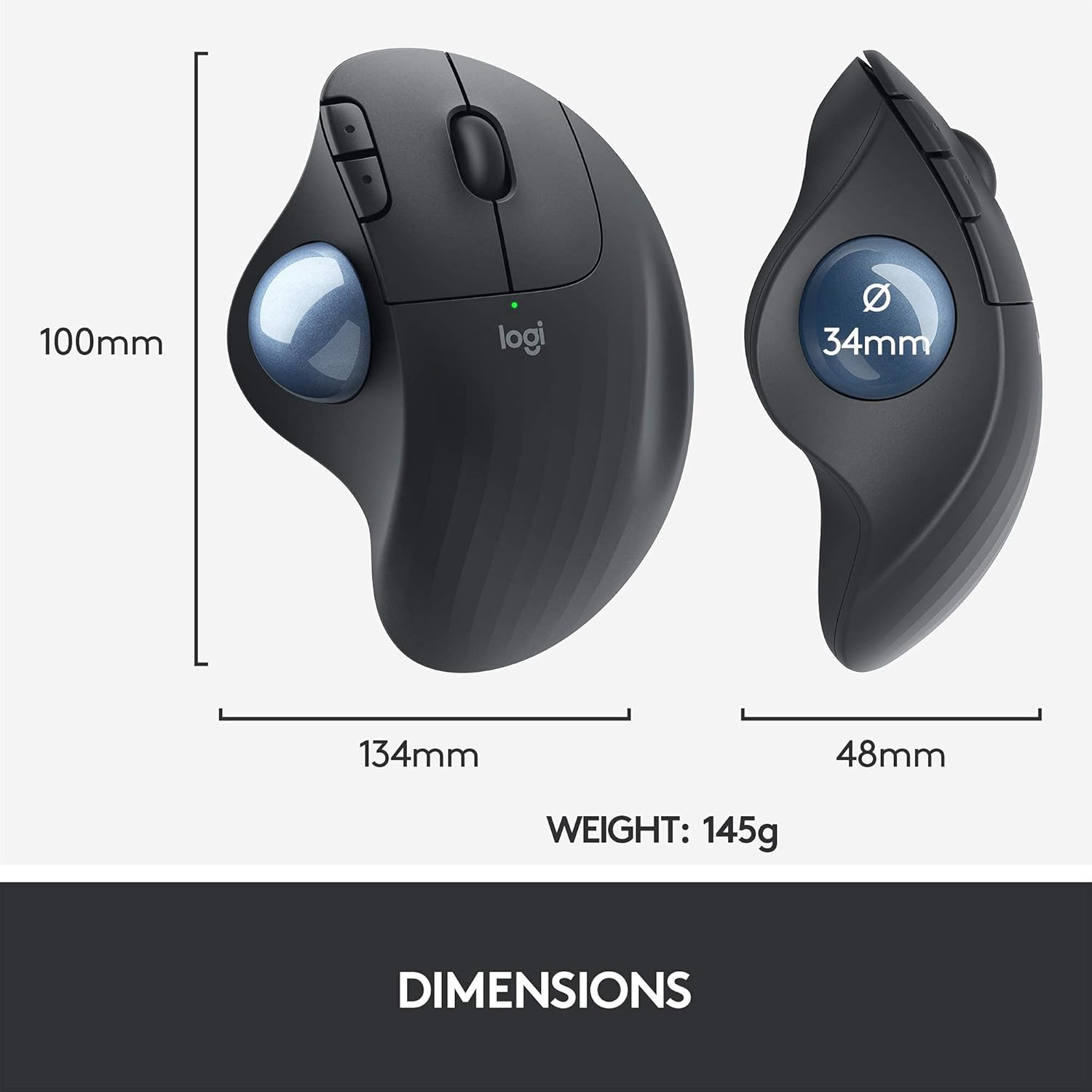
Figure 5: Physical dimensions and weight of the Ergo M575 mouse.
8. Garanzia e supporto
Per informazioni sulla garanzia e supporto tecnico, fare riferimento al sito ufficiale Logitech website or contact Logitech customer service. This product is a renewed item and is covered by the Amazon Renewed Guarantee, which ensures it has been professionally inspected and tested to work and look like new. Renewed products are eligible for replacement or refund if not satisfied with the purchase.
Visita Supporto Logitech for the latest drivers, software, and support resources.