
Easytry123 N2QAYB000752
Easytry123 Replacement Remote Control User Manual
Modello: N2QAYB000752
For Panasonic Viera LCD HDTV TVs
1. Introduzione
This manual provides instructions for the Easytry123 Replacement Remote Control, model N2QAYB000752. This remote is designed to function as a replacement for various Panasonic Viera LCD HDTV models, including TX-L42E5E, TX-L42E5Y, TX-L42EW5, TX-L47E5B, TX-L47E5E, TX-L47E5Y, TX-L47EW5, TX-LR32E5, TX-LR42E5, TX-L42ETW5, TX-L47ET5, and TX-P42UT50. Please note that as a replacement unit, some advanced or specific functions of your original remote may not be fully supported.
For optimal performance, ensure your TV model is listed as compatible. This remote does not require programming and is ready for use once batteries are installed.
2. Impostazione
2.1 Installazione della batteria
- Individuare il vano batterie sul retro del telecomando.
- Per aprire il coperchio del vano batteria, farlo scorrere verso il basso o nella direzione indicata dalla freccia.
- Inserire due (2) batterie di tipo AA, assicurandosi che i terminali positivo (+) e negativo (-) siano allineati correttamente con i segni all'interno del vano.
- Richiudere il coperchio del vano batteria facendolo scorrere in posizione finché non scatta in posizione.

Figure 1: Back of the remote control with the battery compartment open, illustrating the correct orientation for inserting two AA batteries.

Figure 2: Back of the remote control with the battery compartment securely closed after battery installation.
2.2 Uso iniziale
Once batteries are installed, the remote control is ready for immediate use with compatible Panasonic Viera TVs. Point the remote directly at the TV's infrared receiver.
3. Utilizzo del telecomando
This section details the primary functions of the buttons on your replacement remote control. Refer to the image below for button layout.
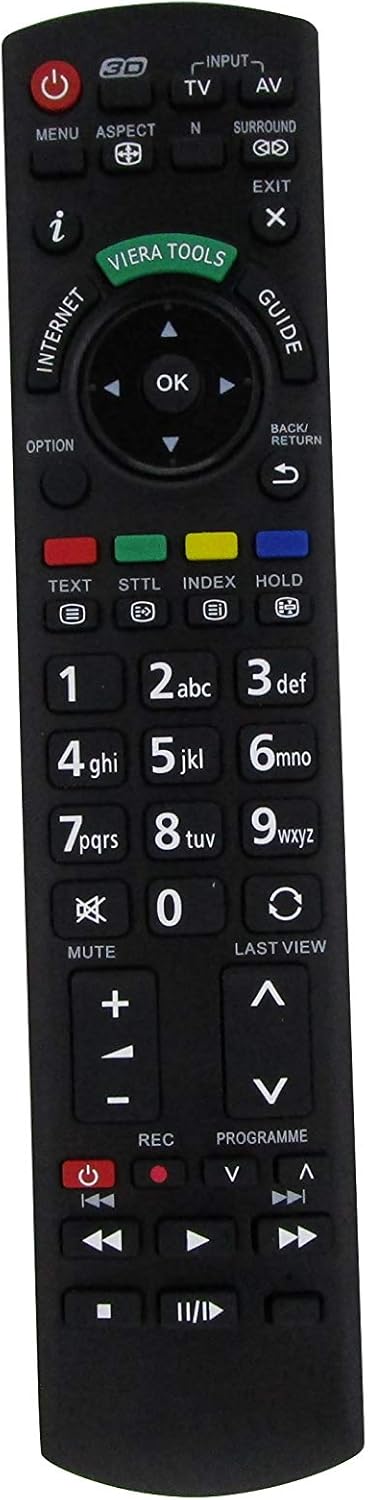
Figura 3: Fronte view of the Easytry123 Replacement Remote Control, highlighting the various function buttons.
3.1 Funzioni chiave
- Energia (●): Accende o spegne la TV.
- Input/AV: Seleziona la sorgente di ingresso video (ad esempio, HDMI 1, AV, Componente).
- TV: Switches to TV broadcast mode.
- Menu: Apre il menu principale del televisore per impostazioni e regolazioni.
- Aspetto: Changes the screen aspect ratio (e.g., 16:9, 4:3).
- N: (Function may vary) Often used for picture modes or specific TV features.
- Circondare: Activates or deactivates surround sound modes.
- Uscita: Closes menus or returns to the previous screen.
- io (Informazioni): Displays program information or current status.
- Strumenti Viera: Accesses Panasonic's Viera Tools menu for smart features.
- Internet: Direct access to internet features (if supported by TV).
- Guida: Apre la guida elettronica ai programmi (EPG).
- Tasti di navigazione (su, giù, sinistra, destra, OK): Utilizzato per navigare nei menu e confermare le selezioni.
- Opzione: Accesses context-sensitive options within menus.
- Indietro/Ritorna: Ritorna al menu o al canale precedente.
- Testo: Activates teletext (if available).
- STTL (Sottotitoli): Attiva/disattiva i sottotitoli.
- Indice: Accesses index pages in teletext or other features.
- Presa: Contiene la pagina del televideo.
- Numeric Pad (0-9): Enters channel numbers or numerical data.
- Muto: Disattiva l'audio della TV.
- Scorso View: Ritorna al precedente viewcanale o ingresso modificato.
- Volume (+/-): Regola il volume della TV.
- Canale (▲/▼): Cambia i canali TV in su o in giù.
- REC (Registra): Initiates recording (if TV supports PVR function).
- Programme (▲/▼): Similar to Channel Up/Down, for program selection.
- Controlli di riproduzione (Riproduci, Pausa, Stop, Riavvolgi, Avanzamento rapido, Salta): Controls media playback for connected devices or TV's internal media player.
Note: The functionality of certain buttons may depend on your specific Panasonic TV model and its features.
4. Manutenzione
4.1 Sostituzione della batteria
Replace batteries when the remote's response becomes sluggish or it stops functioning. Always replace both batteries simultaneously with new AA-size batteries. Do not mix old and new batteries, or different types of batteries.
4.2 Pulizia
Per pulire il telecomando, utilizzare un panno morbido e asciutto. Per lo sporco ostinato, utilizzare un panno leggermente dampImmergere il panno in acqua. Evitare l'uso di prodotti chimici aggressivi, detergenti abrasivi o solventi, poiché potrebbero danneggiare la superficie del telecomando o i componenti interni.
4.3 Conservazione
Quando si conserva il telecomando per lunghi periodi, rimuovere le batterie per evitare perdite che potrebbero danneggiarlo. Conservare in un luogo fresco e asciutto, lontano dalla luce solare diretta e da temperature estreme.
5. Risoluzione Dei Problemi
- Il telecomando non risponde:
- Controllare che le batterie siano inserite correttamente, rispettando la polarità corretta.
- Sostituire le vecchie batterie con quelle nuove.
- Assicurarsi che non vi siano ostacoli tra il telecomando e il sensore a infrarossi del televisore.
- Verificare che il telecomando sia puntato direttamente verso la TV.
- Alcuni pulsanti non funzionano:
- As a replacement remote, some specific functions might not be supported by this unit or your TV model.
- Ensure the TV is in the correct mode (e.g., TV mode for channel buttons, AV mode for playback controls).
- Funzionamento intermittente:
- Le batterie scariche possono causare un funzionamento intermittente. Sostituirle.
- Assicurarsi che nessuna fonte di luce intensa (come la luce solare diretta o luci fluorescenti intense) interferisca con il segnale IR.
6. Specifiche
| Numero di modello | N2QAYB000752 |
| Marca | Easytry123 |
| Compatibilità | Panasonic Viera LCD HDTVs (e.g., TX-L42E5E, TX-L47E5B, TX-P42UT50) |
| Fonte di alimentazione | 2 batterie AA |
| Connettività | Infrarossi (IR) |
7. Garanzia e supporto
For information regarding warranty coverage or technical support, please refer to the purchase documentation or contact the seller, Easytry123, directly. As this is a replacement product, warranty terms may vary from original manufacturer warranties.
For further assistance, please visit the seller's support page or contact their customer service.