
1. Introduzione
Thank you for choosing the IROAD X5 Dash Cam. This device is designed to record your driving journey in Full HD, providing crucial evidence in case of an incident. It features front and rear cameras, Wi-Fi connectivity for smartphone access, a G-Sensor for impact detection, and advanced driver assistance systems (ADAS). Please read this manual carefully before installation and operation to ensure proper use and optimal performance.

Figure 1: IROAD X5 Dash Cam (Front and Rear Units)
2. Prodotto finitoview
2.1 Contenuto della confezione
- Main Unit (Front Camera)
- Telecamera posteriore
- Dongle Wi-Fi
- IROAD Genuine 16GB MicroSD Card
- Staffa di fissaggio
- Constant Power Cable (3m)
- Rear Camera Connection Cable (6m)
- Manuale di istruzioni (questo documento)
- Spare Double-sided Tape
2.2 Caratteristiche principali
- Dual Full HD Recording: Front and rear cameras record in 1920x1080P at 30fps.
- Largo Viewangolo di ing: Campo di 140° view sia per la fotocamera anteriore che per quella posteriore.
- Sensore G: 3-axis acceleration sensor for automatic impact detection and event recording.
- Connettività Wi-Fi: Connect to your smartphone via Wi-Fi for live view, riproduzione e regolazione delle impostazioni.
- ADAS (Sistema avanzato di assistenza alla guida): Includes Lane Departure Warning, Front Vehicle Departure Warning, and Forward Collision Warning.
- Varie modalità di registrazione: Continuous, Impact, Parking, and Motion Detection recording.
- Visione notturna: Enhanced recording quality in low-light conditions.
- Registrazione audio: On/Off selectable.
3. Impostazione
3.1 Inserimento della scheda MicroSD
- Assicurarsi che la dash cam sia spenta.
- Locate the MicroSD card slot on the main unit.
- Inserire la scheda MicroSD da 16 GB fornita nello slot fino a sentire un clic. Assicurarsi che l'orientamento sia corretto.
3.2 Installazione della fotocamera frontale
- Pulisci la zona del parabrezza dove intendi montare la telecamera.
- Attach the mounting bracket to the front camera.
- Peel off the protective film from the double-sided tape on the bracket.
- Mount the front camera on the windshield, ideally behind the rearview specchio, garantendo una visione chiara view of the road. Press firmly for secure adhesion.

Figure 2: IROAD X5 Front Camera
3.3 Installazione della telecamera posteriore
- Clean the rear window area.
- Attach the rear camera to the rear window using the double-sided tape, ensuring a clear view.
- Connect the rear camera to the main unit using the provided 6m rear camera connection cable. Route the cable neatly along the vehicle's interior trim.
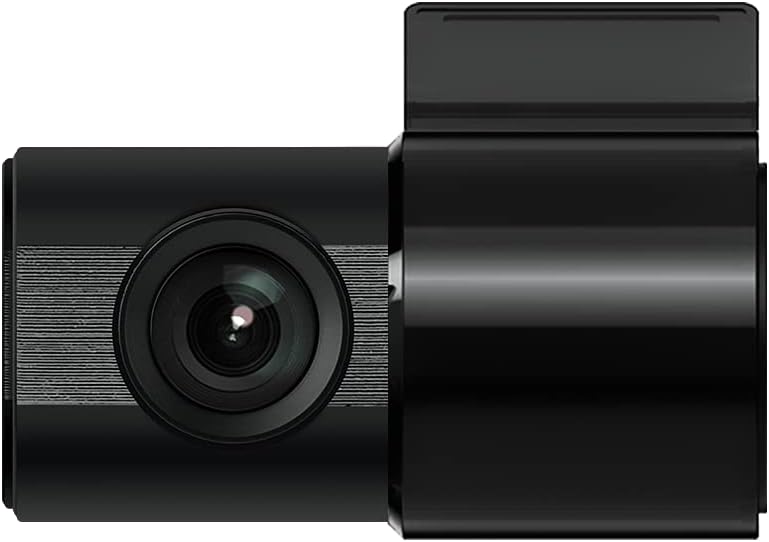
Figure 3: IROAD X5 Rear Camera
3.4 Collegamento di alimentazione
- Connect the constant power cable to the main unit's power input port.
- Connect the other end of the power cable to your vehicle's power source (e.g., OBDII port for general and hybrid vehicles, if using the optional OBDII power cable, or fuse box for constant power). Consult a professional for hardwiring if unsure.
3.5 Wi-Fi Dongle Connection (Optional)
If your model requires an external Wi-Fi dongle, insert it into the designated USB port on the main unit. This enables Wi-Fi connectivity for smartphone app control.
4. Istruzioni per l'uso
4.1 Accensione/spegnimento automatico
The IROAD X5 Dash Cam will automatically power on and begin recording when your vehicle's ignition is turned on. It will power off automatically when the ignition is turned off.
4.2 Modalità di registrazione
- Registrazione continua: The dash cam continuously records while driving. Older files are overwritten by new ones when the MicroSD card is full.
- Impact Recording: When the G-Sensor detects a sudden impact or collision, the dash cam automatically saves the current recording segment as an event file, impedendone la sovrascrittura.
- Registrazione parcheggio: When the vehicle is parked and the ignition is off, the dash cam enters parking mode. It records events triggered by motion detection or impacts.
- Registrazione di rilevamento del movimento: In parking mode, the camera records when motion is detected in its field of view.
4.3 Funzioni ADAS
The IROAD X5 includes Advanced Driver Assistance Systems to enhance driving safety:
- Avviso di deviazione dalla corsia (LDWS): Ti avvisa se il tuo veicolo esce dalla corsia.
- Avviso di allontanamento del veicolo anteriore (FVDW): Ti avvisa quando il veicolo che ti precede inizia a muoversi da fermo.
- Forward Collision Warning (FCWS): Ti avvisa di una potenziale collisione con un veicolo che precede.
These features can be configured via the IROAD smartphone application.
4.4 Registrazione audio
Audio recording is enabled by default. You can toggle this feature on or off through the IROAD smartphone application settings.
4.5 Using the IROAD App (Wi-Fi)
- Download the "IROAD" app from your smartphone's app store.
- Accendi la dash cam.
- On your smartphone, go to Wi-Fi settings and connect to the IROAD dash cam's Wi-Fi network (SSID and password can be found in the app or on the device label).
- Open the IROAD app to access live view, recorded videos, and adjust settings.
5. Manutenzione
5.1 Gestione della scheda MicroSD
It is recommended to format the MicroSD card regularly (e.g., once a month) to maintain optimal recording performance and prevent data corruption. This can be done through the IROAD smartphone app or by removing the card and formatting it on a computer.
5.2 Pulizia delle lenti
Periodically clean the front and rear camera lenses with a soft, dry cloth to ensure clear video quality. Avoid using abrasive cleaners.
5.3 Aggiornamenti firmware
Check the official IROAD website or the IROAD app for available firmware updates. Keeping your dash cam's firmware up-to-date ensures the latest features and bug fixes.
6. Risoluzione Dei Problemi
| Problema | Possibile causa/soluzione |
|---|---|
| La dash cam non si accende. | Check power cable connection. Ensure vehicle ignition is on. Verify fuse in power cable or vehicle's fuse box. |
| Nessuna registrazione o interruzione della registrazione. | MicroSD card may be full or corrupted. Format the MicroSD card. Ensure the card is inserted correctly. |
| Problemi di connessione Wi-Fi. | Ensure Wi-Fi dongle is properly connected (if applicable). Restart the dash cam and your smartphone. Check Wi-Fi settings on your phone. |
| Scarsa qualità video. | Clean camera lenses. Ensure protective film is removed from lenses. Check recording resolution settings in the app. |
| Gli avvisi ADAS sono imprecisi. | Ensure the camera is properly calibrated and mounted centrally. Environmental factors (heavy rain, fog) can affect performance. |
7. Specifiche
| Caratteristica | Specificazione |
|---|---|
| Campo di View (Anteriore posteriore) | 140° |
| Resolution (Front/Rear) | Full HD 1920x1080P |
| Frame Rate (Front/Rear) | 30 fps |
| Modalità di registrazione | Continuous, Impact, Parking, Motion Detection |
| Caratteristiche ADAS | Lane Departure Warning, Front Vehicle Departure Warning, Forward Collision Warning |
| Sensore G | Sensore di accelerazione a 3 assi |
| Registrazione audio | On/Off selectable |
| Consumo energetico | 2.6W |
| Temperatura di esercizio | -30°C a 75°C |
| Supporto di registrazione | Scheda MicroSD (inclusa da 16 GB) |
| Dimensioni dell'unità principale | 90 x 40 x 30 mm |
| Peso unità principale | 60g |
| Connettività | Wifi |
| Tipo di visualizzazione | LCD (4 inch, if applicable, though product description implies no screen on main unit) |
| Metodo di montaggio | Adesivo |
8. Garanzia e supporto
For warranty information, technical support, or service inquiries, please refer to the warranty card included with your product or visit the official IROAD websito. Conservare la ricevuta d'acquisto come prova d'acquisto per eventuali reclami in garanzia.