
Introduzione
This manual provides comprehensive instructions for the assembly, operation, and maintenance of your CaDA Race Car (Dual Control). This product is a detailed replication of a supercar, designed for an engaging building experience and versatile control gameplay.
The model features a low complexity for easy building, consisting of 289 pieces. It supports dual control modes: a 2.4G remote control and APP Bluetooth connectivity, allowing for various functionalities including forward, backward, left, right movement, scratch graphical programming, gyroscope control, and path planning.

Image: The CaDA Race Car (Dual Control) model C51074W, a yellow building block car, displayed alongside its product packaging box. The box highlights the dual control feature and the number of pieces.
Impostare
Before operating your CaDA Race Car, proper assembly and battery installation are required.
Assemblea
The product consists of 289 plastic pieces. Follow the included step-by-step building instructions carefully to assemble the race car. Ensure all connections are secure to prevent parts from detaching during operation.
Installazione della batteria
The race car requires 2 AAA batteries for operation. These batteries are not included with the product. Locate the battery compartment, typically on the underside or rear of the model, and insert the batteries according to the polarity indicators (+/-).

Image: Two distinct views of the fully assembled CaDA Race Car. The top view shows the car from a slightly elevated angle, while the bottom view presents a side profile, demonstrating the completed build.
Istruzioni per l'uso
Your CaDA Race Car offers dual control modes for versatile gameplay.
Telecomando 2.4G
Power on the remote control and the race car. The devices should automatically pair. Use the joystick and buttons on the remote control to maneuver the car:
- Avanti indietro: Use the main joystick to move the car in straight lines.
- Sinistra/Destra: Use the secondary controls or joystick movements to steer the car.
APP Controllo Bluetooth
Download the official CaDA app on your smartphone or tablet. Enable Bluetooth on your device and open the app. Select the CaDA Race Car model to connect. The app provides multiple control interfaces:
- Interfaccia di controllo remoto: Joystick e pulsanti virtuali per i movimenti di base.
- Gyroscope Control Interface: Tilt your device to steer the car.
- Path Planning Interface: Draw a path on your screen for the car to follow.
- Scratch Graphical Programming: Utilize the graphical programming feature within the app to create custom movement sequences and actions for the car.
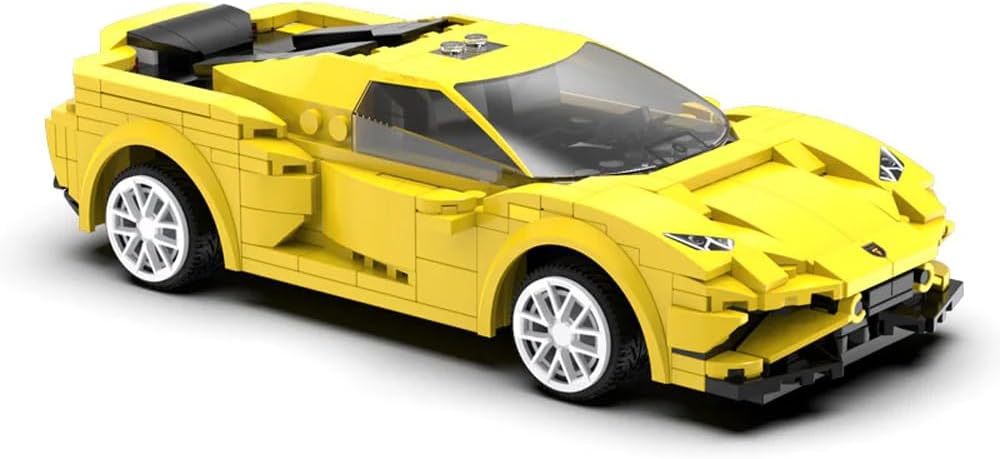
Image: A detailed close-up of the assembled CaDA Race Car, showcasing its sleek yellow body, white wheels, and intricate block construction, ready for operation.
Manutenzione
To ensure the longevity and optimal performance of your CaDA Race Car, follow these maintenance guidelines:
- Pulizia: Use a soft, dry cloth to wipe down the car and remote control. Avoid using water or harsh cleaning agents, as these can damage electronic components and plastic parts.
- Magazzinaggio: Conservare l'auto e i suoi componenti in un luogo fresco e asciutto, lontano dalla luce solare diretta e da temperature estreme.
- Cura della batteria: Remove batteries from the car and remote control if they will not be used for an extended period to prevent leakage.
- Integrità delle parti: Periodically check for any loose or damaged parts. Reattach or replace as necessary to maintain structural integrity.
Risoluzione dei problemi
If you encounter issues with your CaDA Race Car, refer to the following common problems and solutions:
L'auto non risponde
- Controllare le batterie: Ensure both the car and remote control have fresh batteries installed correctly with proper polarity.
- Accensione: Verify that both the car and remote control are switched ON.
- Abbinamento: If using the remote control, ensure it is properly paired with the car. For APP control, confirm Bluetooth is enabled and the app is connected to the model.
- Distanza: Ensure you are within the effective operating range of the remote control or Bluetooth connection.
Parts Detaching During Play
- Connessioni sicure: Re-examine the assembly instructions and ensure all pieces are firmly pressed together. Some connections may require more force during initial assembly.
- Impatto: While the structure is sturdy, repeated collisions can cause parts to loosen. Reattach any detached pieces securely.
Problemi di connettività dell'app
- Bluetooth: Confirm Bluetooth is active on your device.
- Aggiornamento dell'app: Ensure the CaDA app is updated to the latest version.
- Ricomincia: Try restarting both the car and your smart device.
Specifiche
| Numero modello articolo | C51074W |
| Dimensioni del prodotto | Dimensioni: 9.6 x 20 x 5.5 cm |
| Peso | 620 grammi |
| Numero di pezzi | 289 |
| Scala | 1:20 |
| Tipo di materiale | Plastica |
| Velocità massima | 3.8 chilometri all'ora |
| Batterie richieste | 2 batterie AAA (non incluse) |
| Assemblaggio richiesto | SÌ |
| Telecomando incluso | No (refers to a separate physical remote, control is via app or optional accessory) |
Garanzia e supporto
For warranty information or technical support regarding your CaDA Race Car (Dual Control), please refer to the documentation included with your purchase or visit the official CaDA websito. Puoi anche contattare il rivenditore presso il quale hai acquistato il prodotto per ricevere assistenza.