
Introduzione
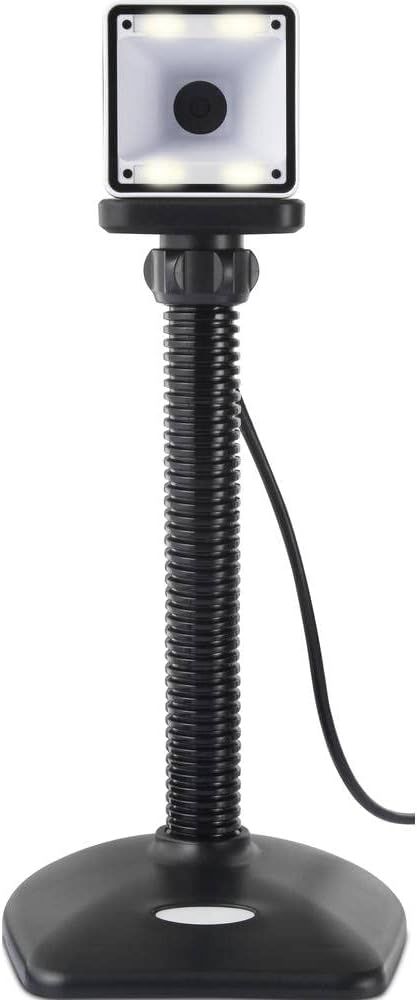
Thank you for choosing the Renkforce RF-SBS-500 2D Wired Barcode Scanner. This device is designed for efficient and reliable scanning of both 1D and 2D barcodes from various surfaces, including paper and smartphone screens. Its omnidirectional scanning capability and hands-free operation make it suitable for a wide range of applications. This manual provides essential information for the proper setup, operation, and maintenance of your scanner.
Istruzioni di sicurezza
- Non esporre lo scanner a temperature estreme, umidità o luce solare diretta.
- Evitare di far cadere lo scanner o di sottoporlo a forti urti.
- Non tentare di smontare o modificare lo scanner. Ciò invaliderà la garanzia.
- Keep the scanning window clean to ensure optimal performance. Use a soft, dry cloth.
- Ensure the USB cable is connected securely to prevent accidental disconnection.
Contenuto della confezione
- Renkforce RF-SBS-500 2D Wired Barcode Scanner
- Cavo USB-A integrato
- Manuale dell'utente (questo documento)
Impostare
Follow these steps to set up your Renkforce RF-SBS-500 barcode scanner:
- Disimballare lo scanner: Estrarre con cautela lo scanner dalla confezione.
- Connettersi a un computer: Plug the integrated USB-A cable from the scanner into an available USB port on your desktop or laptop computer.
- Installazione del driver: The scanner is typically plug-and-play. Your operating system (Windows, macOS, Linux) should automatically detect and install the necessary drivers. Wait for the installation to complete.
- Posizionamento: Place the scanner on a stable, flat surface. The flexible neck allows for adjustment of the scanning head angle for optimal positioning.

Utilizzo dello scanner
The Renkforce RF-SBS-500 is designed for ease of use with its omnidirectional and hands-free capabilities.
- Accensione: Once connected via USB, the scanner will power on automatically. The LED indicators on the scanner head may illuminate briefly.
- Scansione di un codice a barre: Position the barcode within the scanning area of the scanner head. The scanner will automatically detect and read the barcode.
- Feedback visivo e sonoro: Upon successful scanning, the integrated buzzer will emit a short beep, and the LED display on the scanner will flash or change color, indicating a successful read.
- Lettura omnidirezionale: The scanner can read barcodes regardless of their orientation, eliminating the need to align the barcode precisely.
- Hands-Free Mode (Presentation Mode): The scanner operates continuously in a presentation mode, allowing you to simply pass items with barcodes in front of the scanning window without pressing any buttons. This saves time and improves workflow efficiency.
- Codici a barre supportati: The scanner supports both 1D (e.g., EAN, UPC, Code 39) and 2D (e.g., QR Code, Data Matrix, PDF417) barcode types.
Manutenzione
Una corretta manutenzione garantisce la longevità e le prestazioni ottimali dello scanner.
- Pulizia della finestra di scansione: Pulire regolarmente la finestra di scansione con un panno morbido e privo di lanugine. Per lo sporco ostinato, pulire leggermenteampPulire il panno con acqua o con un detergente delicato e non abrasivo. Non spruzzare il detergente direttamente sullo scanner.
- Pulizia generale: Pulire l'esterno dello scanner con un panno asciutto o leggermente umido.amp stoffa. Evitare l'uso di prodotti chimici aggressivi o materiali abrasivi.
- Magazzinaggio: Quando non lo si utilizza, conservare lo scanner in un ambiente pulito e asciutto, lontano dalla luce solare diretta e da temperature estreme.
Risoluzione dei problemi
Se riscontri problemi con lo scanner, fai riferimento ai seguenti problemi comuni e alle relative soluzioni:
| Problema | Possibile causa | Soluzione |
|---|---|---|
| Lo scanner non si accende. | USB cable not connected properly or faulty USB port. | Ensure the USB cable is firmly connected to both the scanner and the computer. Try a different USB port. |
| Lo scanner non legge i codici a barre. | Barcode damaged, scanning window dirty, or incorrect barcode type. | Check the barcode for damage. Clean the scanning window. Ensure the barcode type is supported (1D/2D). Adjust the distance and angle of the barcode to the scanner. |
| Nessun segnale acustico o feedback LED dopo la scansione. | Barcode not read successfully. | Refer to the "Scanner does not read barcodes" solution. If the issue persists, contact support. |
| I dati scansionati vengono visualizzati in modo errato. | Keyboard layout mismatch or software issue. | Ensure your computer's keyboard layout matches the expected output. Test with a simple text editor. |
If the problem persists after trying these solutions, please contact Renkforce customer support.
Specifiche
| Caratteristica | Specificazione |
|---|---|
| Numero di modello | Numero di modello: RF-4679568 |
| Capacità di scansione | Codici a barre 1D e 2D |
| Tecnologia di connettività | USB-A (cablato) |
| Frequenza di scansione | 60 immagini al secondo |
| Modalità di scansione | Omnidirectional, Hands-free (Presentation Mode) |
| Feedback | Integrated Buzzer, LED Display |
| Dispositivi compatibili | Desktop Computer, Laptop, Smartphone (via appropriate adapter if needed) |
| Dimensioni (L x P x A) | Dimensioni: 150 x 5.2 x 5.2 cm |
| Peso dell'articolo | 102 grammi |
| Fonte di alimentazione | USB alimentato |
| Paese di origine | Germania |
Garanzia e supporto
Renkforce products are manufactured to high-quality standards and come with a standard warranty. Please refer to your purchase documentation or the Renkforce official websito per i termini e le condizioni di garanzia specifici applicabili alla tua regione.
For technical support, troubleshooting assistance, or warranty claims, please contact Renkforce customer service. Contact details can typically be found on the Renkforce websul sito o sulla confezione del prodotto.