
1. Introduzione
Thank you for choosing the MEDION X64060 Party Speaker. This manual provides essential information for the safe and efficient use of your device. Please read it thoroughly before operating the speaker and keep it for future reference.
The MEDION X64060 is a versatile party speaker designed for various entertainment needs, featuring powerful audio output, integrated DJ and karaoke functions, and dynamic light effects.
2. Istruzioni di sicurezza
- Leggere attentamente tutte le istruzioni prima dell'uso.
- Tenere l'altoparlante lontano da acqua, umidità e temperature estreme.
- Non ostruire le aperture di ventilazione.
- Utilizzare esclusivamente il cavo di alimentazione fornito con il dispositivo.
- Non tentare di riparare il dispositivo da soli. Per qualsiasi intervento di assistenza, rivolgersi a personale qualificato.
- Ensure the speaker is placed on a stable, level surface to prevent tipping.
- Evitare l'esposizione prolungata a livelli di volume elevati per prevenire danni all'udito.
3. Contenuto della confezione
Si prega di controllare la confezione per verificare la presenza dei seguenti elementi:
- MEDION X64060 Party Speaker
- 1 x Microfono
- Cavo di alimentazione
- Manuale dell'utente (questo documento)
4. Prodotto finitoview
Familiarize yourself with the main components and controls of your MEDION X64060 Party Speaker.

Immagine: Pannello di controllo sopraview
This image displays a close-up of the speaker's top control panel, showing various knobs and buttons for audio adjustments, DJ functions, and input selections.

Image: Speaker Dimensions and Connections
This image illustrates the overall dimensions of the speaker (980mm height, 350mm width, 340mm depth) and highlights the available connection ports: 1x USB, 2x Microphone (6.3 mm), 1x Guitar (6.3 mm), 1x Audio Input (3.5 mm), and 1x Audio Input (RCA).
4.1 Pannello frontale
- Relatori: Two main speakers with integrated LED lighting.
- Effetti di luce: Dynamic LED lights that synchronize with music.
4.2 Pannello di controllo superiore
- Pulsante di accensione: To turn the speaker on/off.
- Controlli del volume: Main volume, microphone volume (MIC1 VOL, MIC2 VOL), guitar volume (GUITAR VOL), and echo volume (ECHO VOL).
- Equalizzatore (EQ): 5-band equalizer for sound adjustment.
- Selettori di ingresso: Buttons for Bluetooth, USB, AUX.
- DJ Functions: Cross-fader, scratch wheel, drum pads (HI-HAT, SNARE, BASS DRUM, CYMBAL, TOM1, TOM2), and record function.
- Porta USB: Per la riproduzione USB.
- Ingressi microfono: Two 6.3 mm jack inputs.
- Ingresso per chitarra: One 6.3 mm jack input.
- Ingresso AUX: 3.5 mm jack input.
4.3 Pannello posteriore
- Potenza in ingresso: Per collegare il cavo di alimentazione.
- Ingresso audio RCA: Additional audio input.
4.4 Funzionalità di mobilità
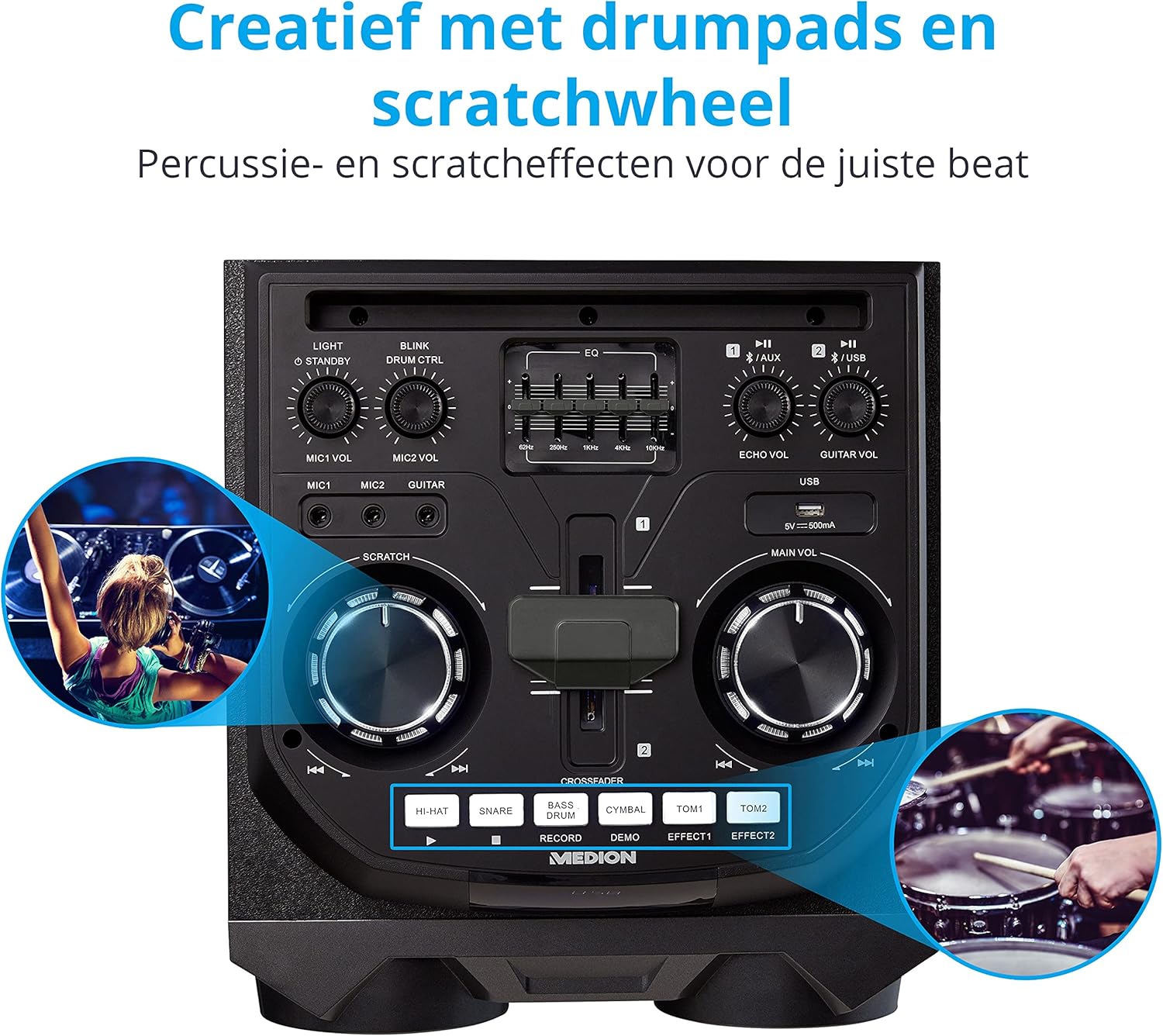
Image: Integrated Wheels for Portability
This image shows the back of the speaker, highlighting the integrated wheels at the bottom, designed for easy transport.
- Ruote integrate: For easy transportation of the speaker.
- Maniglie: Ergonomic handles for lifting and moving.
5. Impostazione
5.1 Posizionamento iniziale
Posizionare l'altoparlante su una superficie stabile e piana. Assicurarsi che ci sia un'adeguata ventilazione attorno all'unità. Evitare di posizionarlo vicino a fonti di calore o alla luce diretta del sole.
5.2 Collegamento di alimentazione
- Collegare il cavo di alimentazione in dotazione all'ingresso di alimentazione sul retro dell'altoparlante.
- Collegare l'altra estremità del cavo di alimentazione a una presa a muro adatta.
- Press the power button on the top control panel to turn on the speaker. The LED lights will illuminate.
5.3 Connecting a Microphone or Guitar
For karaoke or live instrument performance:
- Plug your microphone(s) into the MIC1 or MIC2 6.3 mm jack inputs on the top panel.
- Plug your guitar into the GUITAR 6.3 mm jack input on the top panel.
- Adjust the respective volume knobs (MIC1 VOL, MIC2 VOL, GUITAR VOL) and ECHO VOL to your preference.
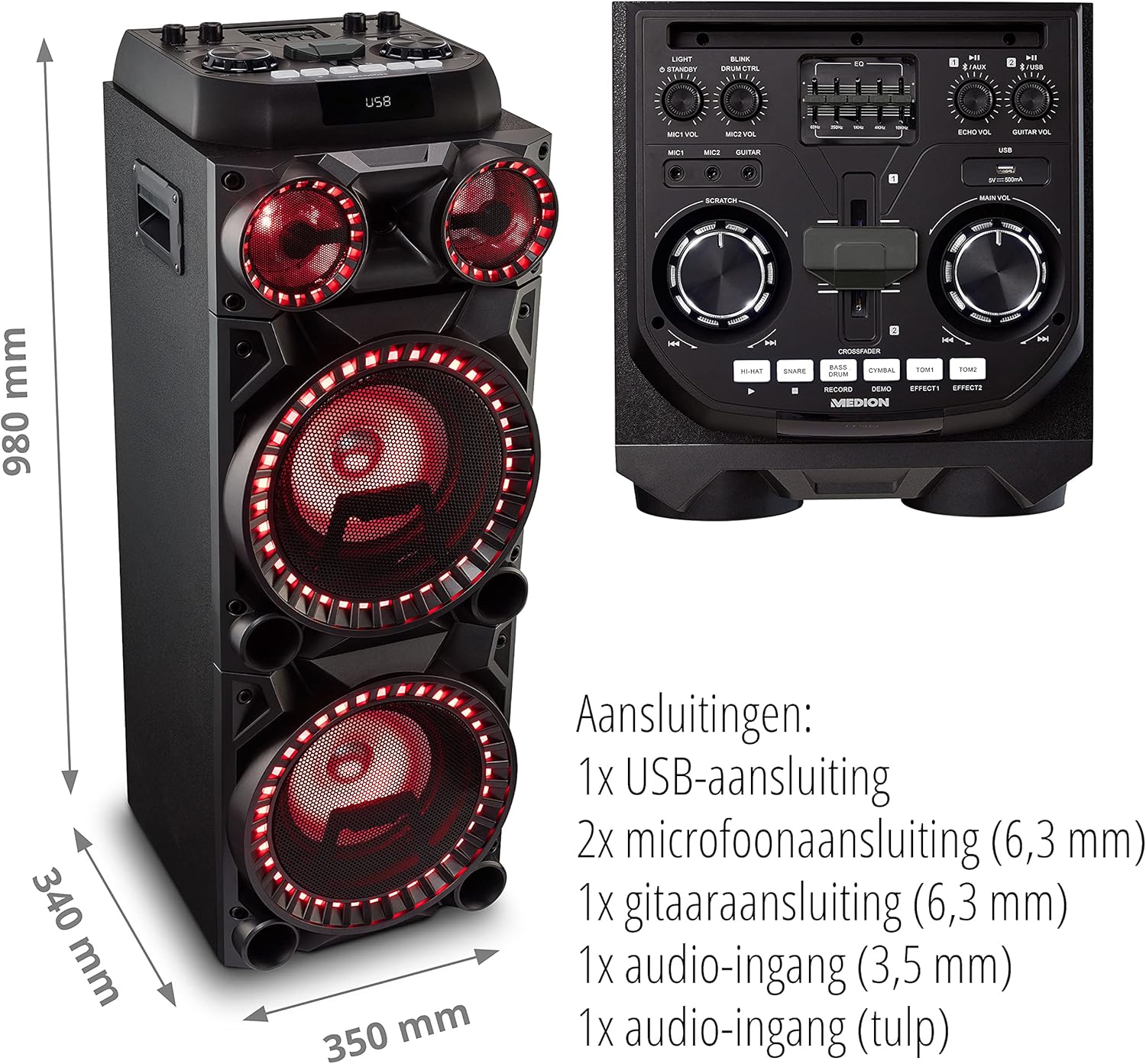
Image: Microphone and Guitar Connection for Karaoke
This image shows individuals enjoying karaoke, demonstrating the use of a microphone connected to the speaker for singing.
6. Istruzioni per l'uso
6.1 Connessione Bluetooth
- Premere il tasto Bluetooth button on the control panel. The Bluetooth indicator will blink.
- Abilita il Bluetooth sul tuo smartphone, tablet o altro dispositivo audio.
- Cercare "MEDION X64060" in your device's Bluetooth settings and select it to pair.
- Once connected, the Bluetooth indicator will stop blinking and remain solid. You can now play music wirelessly.

Image: Bluetooth Music Playback
This image shows a smartphone displaying a music application, indicating a wireless Bluetooth connection to the speaker for audio streaming.
6.2 Riproduzione USB
- Inserisci un'unità flash USB contenente audio files into the USB port on the top panel.
- Premere il tasto USB per selezionare la modalità USB.
- The speaker will automatically detect and begin playing audio files from the USB drive. Use the playback controls (play/pause, skip track) on the control panel.
6.3 Ingresso AUX
- Connect an external audio device (e.g., MP3 player, laptop) to the 3.5 mm AUX input or the RCA audio input on the rear panel using an appropriate audio cable (not included).
- Premere il tasto AUSILIARIO pulsante per selezionare la modalità AUX.
- Play audio from your connected device. The speaker will output the sound.
6.4 Funzioni DJ
The MEDION X64060 includes various DJ features for creative sound mixing.

Image: DJ Function Controls
Questa immagine fornisce una descrizione dettagliata view of the DJ control section, including the cross-fader, scratch wheel, and various drum pads.
- Cross-fader: Use the cross-fader to smoothly transition between different audio sources or effects.
- Scratch Wheel: Manipulate the scratch wheel for classic DJ scratch effects.
- Pad per batteria: Premere il tasto HAT, TRAPPOLA, TAMBURO, PIATTO, TOM1, E TOM2 pads to add drum sound effects to your music.
- Funzione di registrazione: Utilizzare il DOCUMENTAZIONE button to record your drum pad sequences.
6.5 Funzione Karaoke
Connect a microphone as described in section 5.3. Play your chosen karaoke track via Bluetooth, USB, or AUX. Adjust the microphone and echo volumes for the desired effect.
6.6 Effetti di luce
The speaker features dynamic LED light effects that respond to the music. These lights automatically activate when the speaker is on. There may be a dedicated button (e.g., "LIGHT" or "BLINK") to control or cycle through different light modes, refer to the control panel for specific options.

Image: Dynamic Blue Light Effects
This image showcases the speaker with its blue LED lights illuminated, demonstrating the atmospheric light effects.

Image: Dynamic Red Light Effects
This image shows the speaker with its red LED lights illuminated, highlighting another color option for the atmospheric light effects.
7. Manutenzione
7.1 Pulizia
- Prima di pulire l'altoparlante, scollegarlo sempre dalla presa di corrente.
- Utilizzare un panno morbido e asciutto per pulire le superfici esterne.
- Do not use liquid cleaners, aerosols, or abrasive materials, as these can damage the finish or internal components.
7.2 Conservazione
When not in use for extended periods, store the speaker in a cool, dry place, away from direct sunlight and extreme temperatures. Cover the unit to protect it from dust.
8. Risoluzione Dei Problemi
| Problema | Possibile causa | Soluzione |
|---|---|---|
| Nessun potere | Power cord not connected properly; Power outlet not working. | Ensure the power cord is securely plugged into both the speaker and a working wall outlet. Test the outlet with another device. |
| Nessun suono | Volume too low; Incorrect input selected; Device not paired (Bluetooth); Cable not connected (AUX/Guitar/Mic). | Increase the main volume and individual input volumes. Select the correct input source (Bluetooth, USB, AUX). Re-pair Bluetooth device. Check all cable connections. |
| La connessione Bluetooth non riesce | Altoparlante non in modalità di associazione; Dispositivo troppo lontano; Interferenza. | Ensure the speaker is in Bluetooth pairing mode (blinking indicator). Move your device closer to the speaker. Avoid obstacles and other wireless devices. |
| Microfono/chitarra non funzionanti | Volume too low; Cable faulty; Incorrect input. | Increase MIC/GUITAR VOL. Check microphone/guitar cable. Ensure the instrument is properly connected. |
9. Specifiche
| Marca | MEDION |
| Numero di modello | X64060 | MD44060 |
| Potenza di uscita | 2 x 100 W RMS (2 x 1000 W di potenza di uscita musicale massima) |
| Tecnologia di connettività | Bluetooth 5.0, USB, AUX (3.5mm, RCA) |
| Ingressi audio | 2 x Microphone (6.3 mm), 1 x Guitar (6.3 mm), 1 x AUX (3.5 mm), 1 x RCA |
| Equalizzatore | 5 bande |
| Colore | Nero |
| Materiale | Plastica |
| Dimensioni del prodotto (L x P x A) | Dimensioni: 38.8 x 35 x 101 cm |
| Peso dell'articolo | 15 kg |
| Tipo di montaggio | Da terra |
| Fonte di alimentazione | Elettrico con cavo |
| Dispositivi compatibili | Computer portatile, Smartphone |
10. Garanzia e supporto
For warranty information and technical support, please refer to the warranty card included with your product or visit the official MEDION websito. Conservare la prova d'acquisto per eventuali reclami in garanzia.
Servizio clienti MEDION: For assistance, please contact MEDION customer support through their official channels. Contact details can typically be found on the MEDION websito o nella confezione del prodotto.