
Introduzione e chiusuraview
The SYNCO Wireless Lavalier Microphone G2(A2) Pro is a 2.4G dual lapel microphone system designed for high-quality audio capture. It offers robust features for various applications including online classes, vlogging, live streaming, YouTube content creation, and recording with cameras, smartphones, and tablets.
- Powerful Charging Case: Provides up to 24 hours of continuous working time, ideal for extended use. Each TX and RX unit also features a Type-C port for direct charging during operation.
- Digital 2.4GHz & Auto-Pairing: Utilizes the 2.4GHz frequency spectrum and Syncoder technology for a secure, stable, and hassle-free audio system. Supports automatic connection upon power-on.
- 200 M Transmission & One-Touch Noise Cancellation: Achieves stable and anti-interference signals up to 656 ft/200 m (Line of Sight) with low 20 ms latency. Integrated DSP technology optimizes audio instantly and offers one-touch noise cancellation.
- Mute Function & Three Usage Modes: Features a power/mute button on the transmitter to pause audio recording. Offers stereo, monaural, and safety channel modes for versatile shooting scenarios.
- Real-Time Audio Monitoring & Volume Control: Includes a 3.5 mm TRS earphone jack on the receiver for real-time audio monitoring. Volume levels can be adjusted on each transmitter.
- Ampia compatibilità: Suitable for iPhone/iPad/Android smartphones, DSLR cameras, camcorders, laptops, audio recorders, and computers.
Cosa c'è nella scatola
The SYNCO G2(A2) Pro package includes all necessary components for immediate use:
- 1x RX Receiver
- 2x TX Transmitters
- 1x Carrying & Charging Box
- 1x Type C - Type C Cable
- 1x Type C - USB A Adapter
- 2x External Lav Mics (with Wind Muffs)
- 2x Mic Windshields
- 1x 3.5mm TRRS Smartphone Cable
- 1x 3.5mm TRS Camera Cable
- 1x Type-C to Lightning Adapter
- 2x magneti
- 1x Manuale utente

For a visual unboxing experience, please refer to the official seller videos below:
Video 1: "Let's see what's we get in the G2A2 PRO box" - An unboxing video showcasing the contents of the package.
Video 2: "SYNCO G2A2PRO wireless lavalier microphone unboxing" - Another detailed unboxing video of the microphone system.
Impostare
Before first use, ensure all units (transmitters and receiver) are fully charged using the provided charging case or Type-C cables. Remove any protective films from charging contacts if present.

Connessione ai dispositivi
The G2(A2) Pro system supports various devices. Ensure you use the correct cable for your specific device:
- Smartphones/Tablets (Android): Use the Type C - Type C Cable.
- Smartphones/Tablets (iPhone/iPad): Use the 3.5mm TRRS Smartphone Cable with a Lightning to 3.5mm adapter (not included).
- Fotocamere/videocamere DSLR: Use the 3.5mm TRS Camera Cable.
- Computer/Laptop: Use the Type C - Type C Cable or Type C - USB A Adapter if needed.
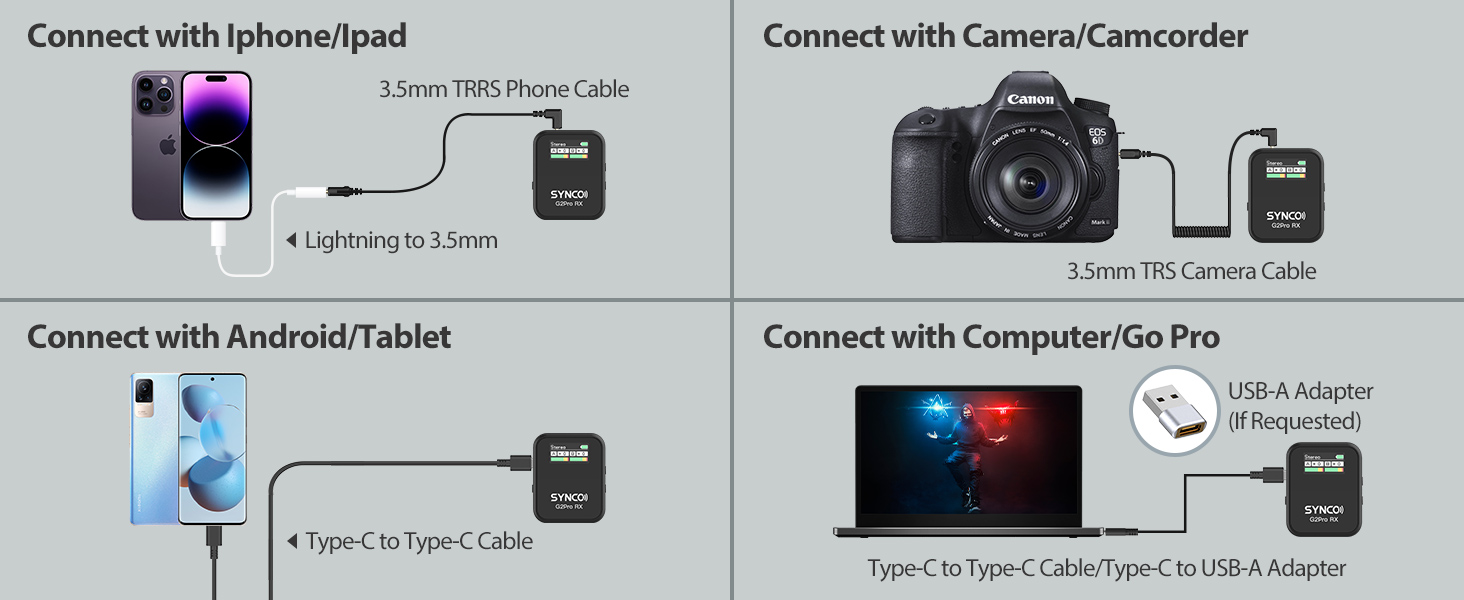
The system supports automatic connection between TX & RX after power on. Manual pairing is also possible if needed.
Istruzioni per l'uso
Accensione/spegnimento e associazione
- To power on/off, press and hold the power button on each TX and RX unit.
- Units should auto-pair upon power-on. If not, refer to the user manual for manual pairing instructions.
Funzione silenziosa
- Simply press the transmitter's power/mute button to pause audio recording during filming.
Noise Cancellation & Gain Control

- Activate one-touch noise cancellation for clearer audio, especially in noisy environments.
- Adjust the volume/gain levels on each transmitter to optimize signal levels. The system offers 6 levels of gain control.
Monitoraggio audio
- Plug in 3.5 mm TRS earphones into the receiver's earphone jack to monitor audio in real-time.
Modalità di utilizzo
- Switch between Stereo, Monaural, and Safety Channel modes on the receiver depending on your recording needs. The safety channel mode helps prevent sound blasting and howling.

Video 3: "SYNCO G2A2PRO Wireless Lavalier Microphone test" - A comprehensive test of the microphone's features and audio quality.
Manutenzione
To ensure the longevity and optimal performance of your SYNCO G2(A2) Pro microphone system, follow these maintenance guidelines:
- Pulizia: Utilizzare un panno morbido e asciutto per pulire le unità e la custodia di ricarica. Evitare l'uso di prodotti chimici aggressivi o materiali abrasivi.
- Magazzinaggio: Store the microphone system in its charging case when not in use to protect it from dust, moisture, and physical damage.
- Cura della batteria: Per la conservazione a lungo termine, assicurarsi che le batterie siano parzialmente cariche (circa il 50%) per preservarne la salute. Evitare di scaricarle completamente o sovraccaricarle per periodi prolungati.
- Wind Muffs: Regularly clean or replace the wind muffs to ensure effective noise reduction and clear audio.
Risoluzione dei problemi
If you encounter issues with your SYNCO G2(A2) Pro, try the following troubleshooting steps:
- Nessuna uscita audio:
- Ensure all units are powered on and properly paired.
- Check cable connections between the receiver and your recording device.
- Verify that the recording device's input settings are correctly configured to recognize an external microphone.
- Adjust the gain levels on the transmitters and the volume on your recording device.
- Scarsa qualità audio/rumore:
- Activate the one-touch noise cancellation feature.
- Ensure wind muffs are properly installed on external lav mics.
- Check for obstructions between the transmitter and receiver that might interfere with the signal.
- Reduce the distance between the transmitter and receiver if experiencing signal drops.
- Problemi di ricarica:
- Ensure the charging case is charged. Check the battery indicator lights on the case.
- Verify that the units are correctly seated in the charging contacts within the case.
- Try charging units directly using a Type-C cable.
Specifiche
| Caratteristica | Dettaglio |
|---|---|
| Marca | SINCO |
| Nome del modello | G2 Pro (G2A2PRO) |
| Tecnologia di connettività | 2.4 GHz |
| Tipo di connettore | USB tipo C, jack da 3.5 mm |
| Caratteristiche speciali | Clip, Battery Indicator Light, Mute Function, Noise Reduction, Dual-Channel System |
| Dispositivi compatibili | Laptop, Camcorder, Audio Mixer, Camera, Smartphone |
| Modello polare | Omnidirezionale |
| Sensibilità Audio | 85 dB |
| Signal-to-Noise Ratio | 86 dB |
| Peso dell'articolo | 1.04 libbre |
| Dimensioni del prodotto | 8.03 x 3.9 x 2.52 pollici |
| Fonte di alimentazione | Alimentato a batteria (1 batteria agli ioni di litio inclusa) |
Garanzia e supporto
For warranty information, technical support, or any inquiries regarding your SYNCO G2(A2) Pro Wireless Lavalier Microphone, please visit the official SYNCO website or contact their customer service directly. Refer to the user manual for specific contact details.