Introduzione
The Cellularline Clip Pro is a mono Bluetooth® earbud designed for convenience and portability. It features a unique charging base with an integrated clip, allowing you to easily attach it to clothing. The earbud itself is wireless and its capsule can be rotated for comfortable use in either the right or left ear. This manual provides detailed instructions for setting up, operating, and maintaining your Clip Pro earbud.

Image: The Cellularline Clip Pro earbud detached from its charging base, showcasing its compact design and the charging contacts.
Contenuto della confezione
Si prega di controllare la confezione per verificare la presenza dei seguenti elementi:
- Cellularline Clip Pro Mono Headset
- Cavo di ricarica
- Punte auricolari sostitutive
- Manuale di istruzioni (questo documento)
Prodotto finitoview
Familiarize yourself with the components of your Cellularline Clip Pro:

Immagine: in alto view of the Clip Pro charging base with the earbud securely docked. A blue indicator light is visible on the earbud.
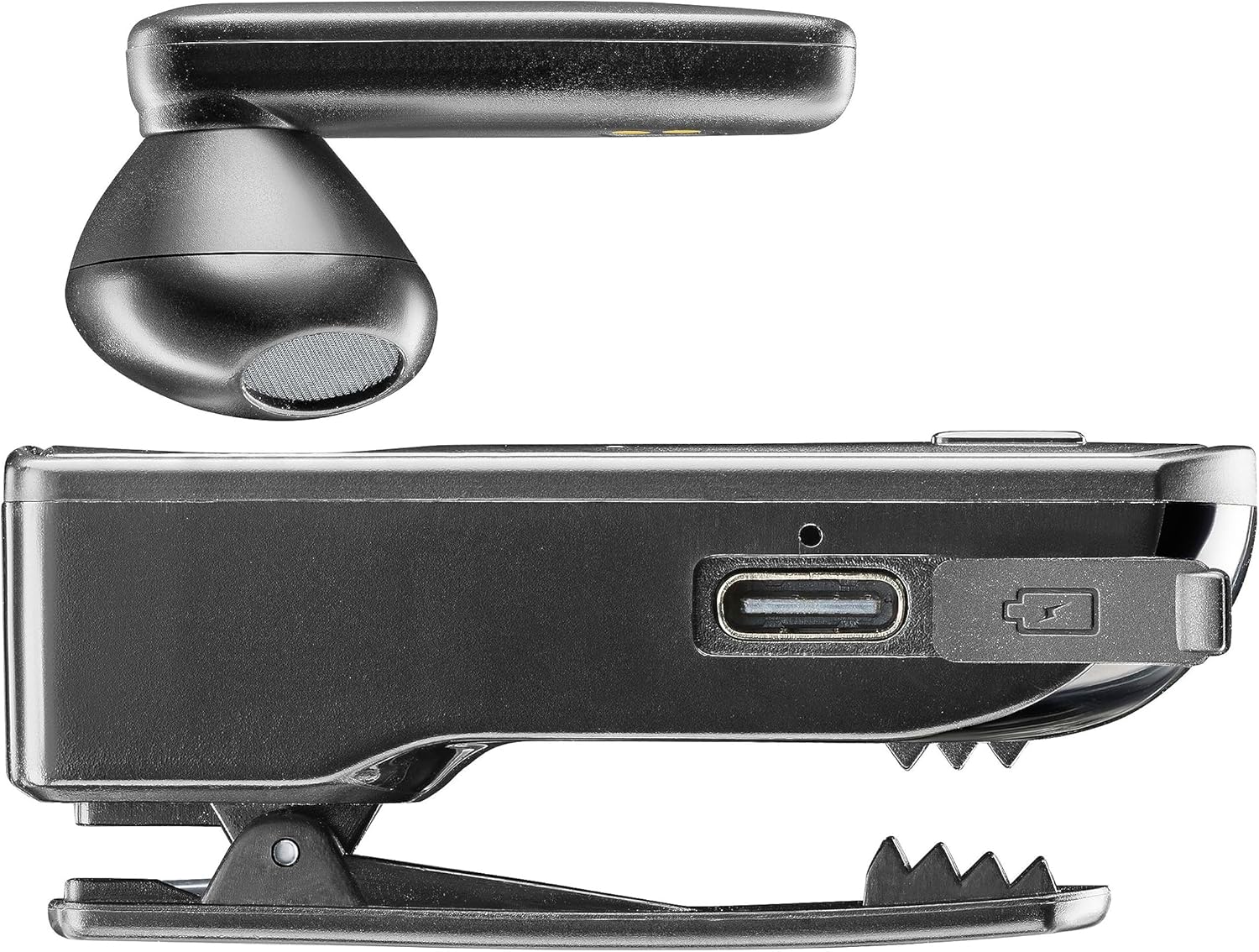
Immagine: Lato view of the Clip Pro charging base, highlighting the USB-C charging port and the integrated clip mechanism.

Immagine: dettagliata view of the earbud's inner surface, showing the two gold charging contacts and the speaker mesh.
Impostare
1. Carica del dispositivo
Before first use, fully charge your Cellularline Clip Pro. The charging base provides additional power for the earbud.
- Connect the provided charging cable to the USB-C port on the charging base.
- Collegare l'altra estremità del cavo a una fonte di alimentazione USB compatibile (ad esempio, un adattatore da parete, una porta USB del computer).
- Place the earbud into the charging base. Ensure the charging contacts align.
- The charging indicator light on the earbud will show charging status. A full charge takes approximately 1.5 hours.
2. Associazione con un dispositivo Bluetooth
To use the earbud, you must first pair it with your smartphone or other Bluetooth-enabled device.
- Ensure the earbud is charged and powered off.
- Remove the earbud from the charging base. It will automatically enter pairing mode (indicator light will flash).
- On your device (e.g., smartphone), go to the Bluetooth settings and enable Bluetooth.
- Cercare available devices. Select "Cellularline Clip Pro" from the list.
- Once connected, the earbud's indicator light will stop flashing and remain solid or turn off, depending on the model.
- The earbud is now ready for use. It will automatically reconnect to the last paired device when powered on and within range.
Istruzioni per l'uso
Accensione/spegnimento
- Accensione: Remove the earbud from the charging base. It will automatically power on. Alternatively, press and hold the multifunction button on the earbud for a few seconds.
- Spegni: Place the earbud back into the charging base. It will automatically power off. Alternatively, press and hold the multifunction button on the earbud for a few seconds until the indicator light turns off.
Gestione delle chiamate
- Rispondi/Termina chiamata: Premere una volta il pulsante multifunzione.
- Rifiuta chiamata: Tenere premuto il pulsante multifunzione per circa 2 secondi.
- Ricomponi l'ultimo numero: Premere due volte il pulsante multifunzione.
- Vibrator Feature: The charging base will vibrate when you receive an incoming call, even if the earbud is docked.
Controllo del volume
The charging base features dedicated volume adjustment buttons.
- Aumenta volume: Press the '+' button on the charging base.
- Diminuisci volume: Press the '-' button on the charging base.
Wearing the Earbud
The earbud capsule is rotatable, allowing for comfortable use in either the right or left ear.
- Gently rotate the earbud capsule to align with your preferred ear.
- Insert the earbud into your ear canal. Adjust for a secure and comfortable fit.

Image: A man wearing the Cellularline Clip Pro earbud, with the charging base clipped to his shirt collar, demonstrating its hands-free use.
Manutenzione
To ensure the longevity and optimal performance of your Cellularline Clip Pro, follow these maintenance guidelines:
- Pulizia: Use a soft, dry cloth to clean the earbud and charging base. Do not use abrasive cleaners or solvents.
- Auricolari: Regularly check and clean the eartips. Replace them if they become worn or damaged.
- Magazzinaggio: When not in use, store the earbud in its charging base to protect it and keep it charged. Store in a cool, dry place away from direct sunlight and extreme temperatures.
- Resistenza all'acqua: This device is not waterproof. Avoid exposure to water, moisture, or excessive humidity.
Risoluzione dei problemi
If you encounter issues with your Cellularline Clip Pro, try the following solutions:
| Problema | Possibile soluzione |
|---|---|
| L'auricolare non si accende. | Ensure the earbud is charged. Place it in the charging base for at least 15 minutes. |
| Impossibile associare il dispositivo. | Make sure Bluetooth is enabled on your device. Ensure the earbud is in pairing mode (flashing indicator light). Try forgetting the device in your phone's Bluetooth settings and re-pairing. |
| Nessun suono o volume basso. | Check the volume levels on both the earbud (using the charging base buttons) and your connected device. Ensure the earbud is properly seated in your ear. |
| Charging base not vibrating for calls. | Ensure the earbud is correctly docked in the charging base and the base itself has sufficient power. |
| Earbud disconnects frequently. | Ensure your device is within the Bluetooth range (typically 10 meters/33 feet) and there are no significant obstructions. Fully charge both the earbud and the charging base. |
Specifiche
- Nome modello: BTCLIPPROK
- Marca: Cellularline
- Tecnologia di connettività: Bluetooth senza fili
- Fattore di forma: Earbud (Capsule)
- Posizionamento dell'orecchio: In-ear
- Colore: Nero
- Materiale: Plastica PC + ABS
- Peso dell'articolo: 94 grammi
- Tempo di ricarica: 1.5 ore
- Composizione della batteria: Ioni di litio (1 incluso)
- Batteria ricaricabile: SÌ
- Caratteristiche speciali: Multifunction answer button, Volume adjustment buttons, Vibrating charging base
- Dispositivi compatibili: iPhone, Samsung, Huawei, Xiaomi, and all Bluetooth-enabled devices
- Tipo di controllo: Media control, Volume control, Touch
Informazioni sulla sicurezza
Si prega di leggere e seguire queste precauzioni di sicurezza per evitare danni al dispositivo o lesioni personali:
- Non esporre il dispositivo a temperature estreme, alla luce solare diretta o a elevata umidità.
- Evitare di far cadere o sottoporre il dispositivo a forti impatti.
- Do not attempt to disassemble, repair, or modify the device yourself. Contact authorized service personnel for assistance.
- Tenere il dispositivo lontano dalla portata dei bambini e degli animali domestici.
- Smaltire il dispositivo e la batteria in modo responsabile, nel rispetto delle normative locali.
- Do not use the earbud at excessively high volumes for prolonged periods, as this may cause hearing damage.
Garanzia e supporto
Per informazioni sulla garanzia e sull'assistenza clienti, fare riferimento al sito ufficiale Cellularline webo contattare il rivenditore. Conservare la prova d'acquisto per eventuali reclami in garanzia.