
CDIYTOOL 4yhujuyj
CDIYTOOL 100A MPPT Solar Charge Controller User Manual
Model: 4yhujuyj
Introduzione
This manual provides essential information for the safe and efficient operation of your CDIYTOOL 100A MPPT Solar Charge Controller. This controller is designed for 36V, 48V, and 60V battery systems and features an LCD display, multiple load control modes, and dual USB outputs. Please read this manual thoroughly before installation and use.
The controller automatically adapts to 36V/48V/60V systems and is not suitable for 12V/24V systems. It utilizes innovative MPPT technology for high tracking efficiency, detecting the maximum charging current.
Istruzioni di sicurezza
Always adhere to the following safety guidelines to prevent injury and damage to the controller or other components.
- Assicurarsi che la batteria abbia una carica sufficientetage for the controller to recognize the correct battery type upon first use.
- Connect the battery to the controller first, then connect the solar panels. Reversing this order can damage the controller.
- L'ingresso massimo voltage is 50V. Ensure your solar panel configuration does not exceed this limit. For example, a 19V photovoltaic panel matches a 12V battery, and a 38V photovoltaic panel matches a 24V battery. When a 38V panel is connected, the maximum voltage may reach 42V.
- The controller is suitable for various battery types (including open, lead-acid, gel, and lithium batteries). Refer to the controller's settings for specific battery types.
- The controller provides protection against overvoltage, short circuit, overload, overcharge, and over-discharge.
- Non tentare di smontare o riparare il controller da soli. Contattare personale qualificato per l'assistenza.

Image: Excerpt from the user manual detailing safety instructions and a connection diagram.
Caratteristiche del prodotto
- Display LCD multifunzione: Provides real-time display of charging current, discharge current, and power generation.
- Tecnologia MPPT: Innovative Maximum Power Point Tracking with high efficiency (up to 99%) for optimal solar energy harvesting.
- Protezione affidabile: Include sovravoltage, short circuit, overload, overcharge, and over-discharge protection.
- Automatic Focusing MPPT Tracking: Ensures high charging efficiency and bidirectional focusing tracking.
- Compensazione della temperatura: Regola automaticamente il volume di caricatage in base alle variazioni della temperatura ambiente.
- Doppia uscita USB: Provides 5V/2A output for charging mobile devices.

Immagine: Frontale view of the CDIYTOOL 100A MPPT Solar Charge Controller, highlighting the LCD display and dual USB ports.
Configurazione e installazione
Per una corretta installazione del regolatore di carica solare, seguire questi passaggi:
- Preparare il cablaggio: Ensure all wires are correctly sized for the expected current and are properly insulated.
- Collegare la batteria: Connect the battery to the charge controller first. Ensure correct polarity (+ to + and - to -). The controller requires sufficient battery voltage to recognize the system type.
- Collegare il pannello solare: Connect the solar panel(s) to the charge controller. Ensure correct polarity. Do not exceed the maximum input voltage di 50V.
- Collegamento del carico (facoltativo): Connect your DC load to the load terminals of the controller. The controller can manage load output based on settings.
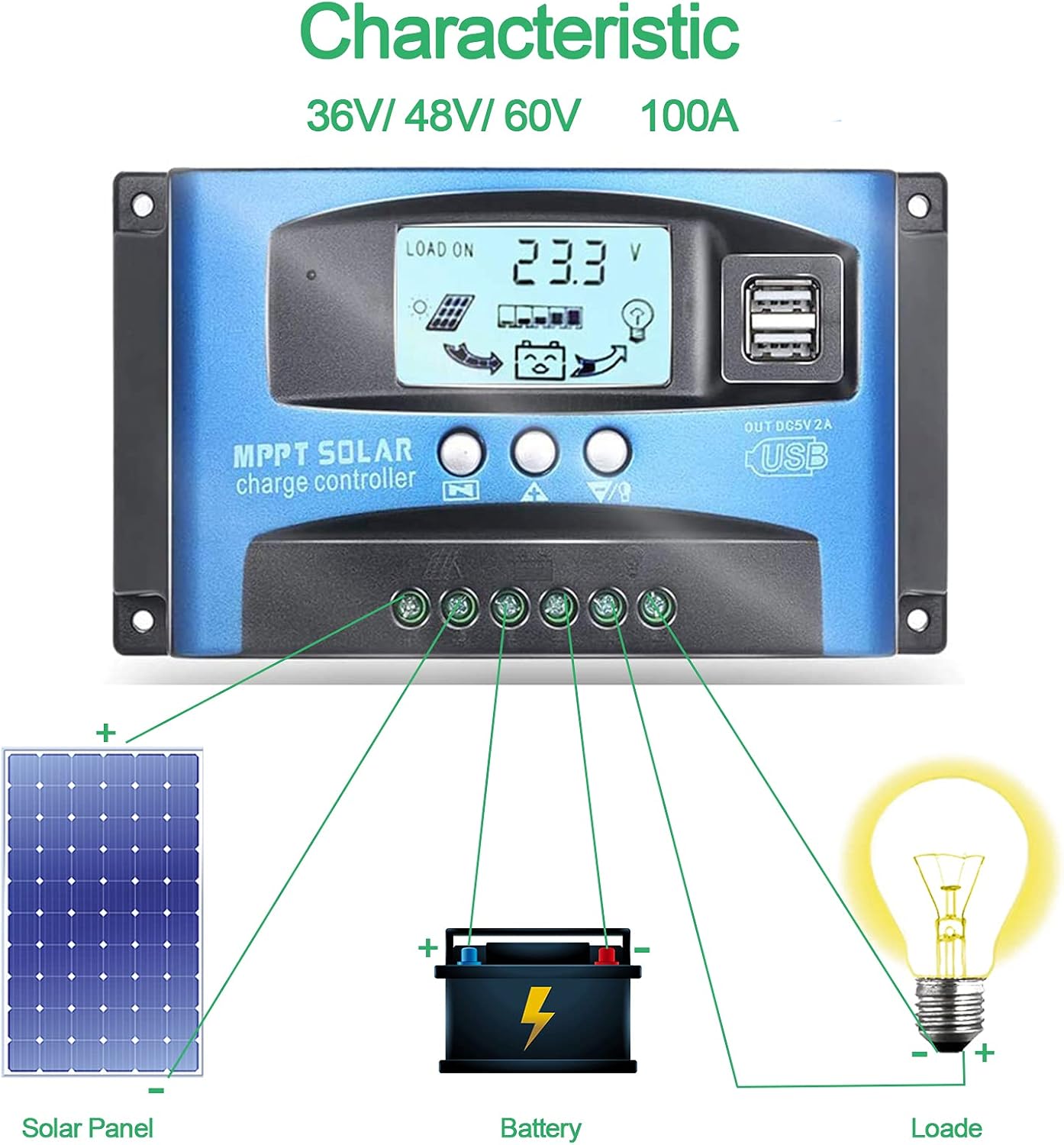
Image: Connection diagram illustrating how to connect solar panels, battery, and load to the charge controller.

Immagine: dettagliata view of the controller with labels for its components, including buttons, LCD, USB ports, and connection points.
Istruzioni per l'uso
Il controller è dotato di un display LCD e di tre pulsanti per il funzionamento: Menu, Pagina su e Pagina giù/Manuale.
Schermo LCD
Il display LCD visualizza vari parametri, tra cui il volume della batteriatage, charging current, discharge current, and system status. The icons on the display indicate solar panel activity, battery charge level, and load status.
Funzioni dei pulsanti
- Pulsante Menu: Press to enter the menu interface and cycle through different settings. Long press to modify parameters.
- Pulsante Pagina su: Utilizzato per aumentare i valori o per spostarsi verso l'alto nei menu.
- Pulsante Pagina giù/Manuale: Used to decrease values or navigate downwards in menus. Also functions as a manual load control switch (on/off) when on the main interface.
Ricarica USB
The controller is equipped with dual USB ports providing 5V/2A output for charging compatible devices such as mobile phones and tablets.

Image: Demonstration of the controller's dual USB ports being used to charge a mobile phone.
Manutenzione
Una manutenzione regolare garantisce la longevità e le prestazioni ottimali del regolatore di carica solare.
- Ispezionare le connessioni: Controllare periodicamente tutti i collegamenti elettrici per verificarne la tenuta e la corrosione. Collegamenti allentati possono causare perdite di potenza o surriscaldamento.
- Controller pulito: Mantenere il controller pulito e privo di polvere e detriti. Utilizzare un panno asciutto per pulire la superficie. Non utilizzare detergenti liquidi.
- Prestazioni del monitor: Regularly check the LCD display for normal operation and expected voltagletture e/correnti.
- Stato della batteria: Ensure your battery is well-maintained and within its recommended operating parameters.
Risoluzione dei problemi
Questa sezione fornisce soluzioni ai problemi più comuni che potresti riscontrare.
| Situazione | Probabile causa | Soluzione |
|---|---|---|
| Nessuna visualizzazione sullo schermo | Batteria non collegata o bassa tensionetage | Connect battery, check battery voltage |
| No charge when sunny | Solar panel reversed or open circuit | Reconnect solar panel, check wiring |
| Il carico non funziona | Load short circuit, overload, or over-discharge protection | Check load wiring, reduce load, or charge battery |
| Controller non in carica | Pannello solare voltage too low or battery full | Ensure sufficient solar input, check battery status |
The controller includes built-in protections for reverse polarity, overvoltage, short circuit, overload, overcharge, and over-discharge. If an issue persists after troubleshooting, contact customer support.
Specifiche
| Parametro | Valore |
|---|---|
| Modello | 4yhujuyj |
| Marca | CDIYTOOL |
| Corrente nominale | 100A |
| Volume di sistematage | 36V/48V/60V Auto Adapt (Not for 12V/24V) |
| Max ingresso solare Voltage | 50V |
| Uscita USB | Doppio 5V/2A |
| Tipo di visualizzazione | LCD |
| Peso dell'articolo | 14.4 once |
| Dimensioni del pacco | 6.81 x 3.98 x 2.01 pollici |

Image: Diagram showing the physical dimensions of the solar charge controller.
Risorse e supporto aggiuntivi
For further assistance or to access the mobile application for monitoring, please refer to the following:
Applicazione mobile
The BL-912V APP can be installed on your Android phone to monitor and control the solar charge controller. Scan the QR code below or visit the provided link to download and install the application.
Link per il download: http://fir.sdhzwl.cn/5w4b
The mobile phone app allows for remote monitoring of charging and discharging data, daily power generation, and other functions.
Image: Section of the user manual detailing the BL-912V APP installation process, including a QR code.
Garanzia e servizio clienti
For warranty information or technical support, please contact CDIYTOOL customer service through the platform where you purchased the product. Keep your purchase receipt for warranty claims.
Applicazioni tipiche
The CDIYTOOL MPPT Solar Charge Controller is suitable for a variety of off-grid solar power applications, including:
- Residential solar power systems
- RV and marine solar setups
- Illuminazione stradale solare
- Stazioni di monitoraggio remoto
- Agricultural irrigation systems

Immagine: Examples of typical applications for the solar charge controller in various settings.
Ask a question about this manual
Ask about setup, troubleshooting, compatibility, parts, safety, or missing instructions. Manuals+ will review the question and use this page’s manual context to help answer it.