
1. Introduzione
Thank you for choosing the AIYIMA A05 TPA3221 Power Amplifier. This compact 2.0 channel stereo amplifier is designed to deliver high-fidelity audio to passive speakers, featuring both Bluetooth and RCA input options. This manual provides detailed instructions for setup, operation, and maintenance to ensure optimal performance and longevity of your device.
2. Istruzioni di sicurezza
- Alimentazione elettrica: Use only the specified power adapter (DC 12-32V) to prevent damage. Ensure the power outlet voltage è compatibile.
- Ventilazione: Posizionare il amplifier in a well-ventilated area. Do not block ventilation openings. Avoid placing it on soft surfaces that may obstruct airflow.
- Umidità: Keep the device away from water, humidity, and liquids. Do not operate with wet hands.
- Calore: Avoid direct sunlight, heat sources, or extreme temperatures.
- Pulizia: Scollegare l'alimentazione prima della pulizia. Utilizzare un panno morbido e asciutto. Non utilizzare detergenti liquidi o spray.
- Manutenzione: Non tentare di riparare o smontare l'unità da soli. Per qualsiasi intervento di assistenza, rivolgersi a personale qualificato.
- Bambini: Tenere fuori dalla portata dei bambini.
3. Contenuto della confezione
Si prega di controllare la confezione per verificare la presenza dei seguenti elementi:
- AIYIMA A05 Bluetooth 5.0 Amplificatore x 1
- Antenna Bluetooth x 1
- Manuale utente x 1
- Scheda di garanzia x 1
- Adattatore di alimentazione CC 32V x 1

Immagine 3.1: Contents of the AIYIMA A05 amppacchetto lifier, incluso il amplifier unit, Bluetooth antenna, user manual, warranty card, and power adapter.
4. Prodotto finitoview
4.1 Controlli del pannello frontale
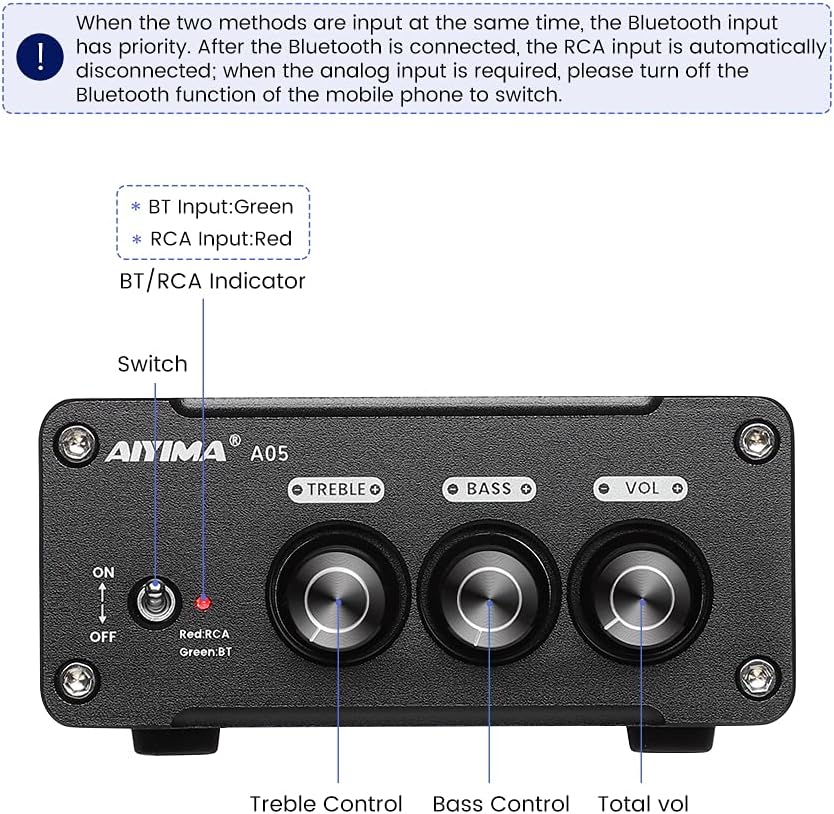
Immagine 4.1: Front panel of the AIYIMA A05 amplifier, showing the power switch, input indicator, treble, bass, and volume controls.
- Interruttore di alimentazione (ON/OFF): Attiva o disattiva il amppotere lificatore.
- BT/RCA Indicator: Displays the active input source. Green indicates Bluetooth (BT) input, Red indicates RCA input.
- Controllo degli acuti: Regola l'uscita audio ad alta frequenza.
- Controllo dei bassi: Regola l'uscita audio a bassa frequenza.
- Controllo del volume: Regola il livello di uscita audio complessivo.

Immagine 4.2: Avvicinamento view of the power switch and the BT/RCA input indicator on the front panel.

Immagine 4.3: Avvicinamento view of the Treble, Bass, and Volume control knobs.
4.2 Collegamenti del pannello posteriore

Immagine 4.4: Rear panel of the AIYIMA A05 amplifier, showing the Bluetooth antenna port, RCA audio input, speaker outputs, and DC power input.
- ANT (Bluetooth Antenna Port): Connect the included Bluetooth antenna here for wireless audio reception.
- AUDIO IN (RCA Input): Connect audio sources (e.g., CD player, TV, DAC) using RCA cables.
- SPEAKER (Audio Output): Connect passive speakers using speaker wires. Ensure correct polarity (+ to + and - to -).
- DC 24-32V (Power Input): Connect the provided DC power adapter.
5. Istruzioni per l'installazione
Segui questi passaggi per configurare il tuo AIYIMA A05 amplificatore:
- Collegare l'antenna Bluetooth: Screw the included Bluetooth antenna into the ANT port on the rear panel.
- Collegare gli altoparlanti: Connect your passive speakers to the SPEAKER output terminals on the rear panel. Ensure the positive (+) terminal of the amplifier connects to the positive (+) terminal of the speaker, and the negative (-) terminal connects to the negative (-).
- Collegare la sorgente audio (RCA): If using a wired audio source, connect it to the AUDIO IN (RCA) ports on the rear panel using appropriate RCA cables.
- Connetti alimentazione: Connect the DC power adapter to the DC 24-32V input port on the rear panel, then plug the adapter into a wall outlet.
- Accensione: Flip the power switch on the front panel to the "ON" position. The input indicator will light up.

Immagine 5.1: Pannello posteriore del amplifier with Bluetooth antenna, RCA cables, speaker wires, and power adapter connected.
6. Istruzioni per l'uso
6.1 Accensione/Spegnimento
Per accendere il amplifier, flip the front panel switch to the "ON" position. To power off, flip the switch to the "OFF" position.
6.2 Connessione Bluetooth
- Assicurare il amplifier is powered on and the BT/RCA indicator is green, indicating Bluetooth mode. If it's red, ensure no RCA cable is connected or disconnect it.
- Sul tuo dispositivo mobile (telefono, tablet, ecc.), attiva il Bluetooth e cerca i dispositivi disponibili.
- Select "AIYIMA A05" from the list of devices to pair.
- Once paired, the indicator light will remain green, and you can play audio from your device through the amppiù vivace.
6.3 RCA Input Usage
- Connect your audio source to the RCA input ports on the rear panel.
- Assicurare il amplifier is powered on. The BT/RCA indicator should be red, indicating RCA input mode.
- If the indicator is green (Bluetooth mode), ensure Bluetooth is disconnected on any paired device, or turn off Bluetooth on your mobile device to switch to RCA input.
6.4 Regolazione dell'audio
- Volume: Rotate the "VOL" knob clockwise to increase volume and counter-clockwise to decrease.
- Alti: Rotate the "TREBLE" knob to adjust high-frequency sounds to your preference.
- Basso: Rotate the "BASS" knob to adjust low-frequency sounds to your preference.
7. Manutenzione
- Pulizia: Disconnect the power adapter before cleaning. Use a soft, dry, lint-free cloth to wipe the surface of the amplifier. Do not use harsh chemicals or abrasive materials.
- Magazzinaggio: If not in use for an extended period, store the amplifier in un luogo fresco e asciutto, lontano dalla luce solare diretta e da temperature estreme.
- Connessioni: Controllare periodicamente tutti i collegamenti dei cavi per assicurarsi che siano saldi e privi di corrosione.
8. Risoluzione Dei Problemi
If you encounter issues with your AIYIMA A05 amplifier, fare riferimento ai seguenti problemi comuni e alle relative soluzioni:
| Problema | Possibile causa | Soluzione |
|---|---|---|
| Nessuna uscita audio |
|
|
| Distorted or buzzing sound |
|
|
| Il Bluetooth non si connette |
|
|
| Loud noise/ticking on startup |
|
|
If the problem persists after trying these solutions, please contact AIYIMA customer support for further assistance.
9. Specifiche

Immagine 9.1: Dimensions of the AIYIMA A05 amplifier: 107mm (4.2in) width, 87mm (3.4in) depth, 36mm (1.4in) height.
| Caratteristica | Specificazione |
|---|---|
| Modello | A05 |
| Potenza di uscita | 105 Watts (at 4 Ω) |
| Numero di canali | 2.0 (Stereo) |
| Versione Bluetooth | QCC3034 APTX Bluetooth 5.0 |
| Chipset | TPA3221 |
| Volume minimo di fornituratage | 12 Volt (CC) |
| Volume massimo di fornituratage | 32 Volt (CC) |
| Peso dell'articolo | 500 grammi |
| Dimensioni (circa) | 107mm (W) x 87mm (D) x 36mm (H) |
10. Garanzia e supporto
L'AIYIMA A05 amplifier comes with a warranty. Please refer to the included Warranty Card for specific terms and conditions. For technical support, troubleshooting assistance, or warranty claims, please contact AIYIMA customer service through the retailer where the product was purchased or visit the official AIYIMA websito.
Risorse online: For additional information and support, you may visit the AIYIMA store page: AIYIMA Official Store